Page 79 of 333
Steering Wheel Controls
When you push the CANCEL button, or tap the brake pedal, the CRUISE
CONTROL light on the instrument
panel will go out and the car will
begin to slow down. You can use the accelerator pedal in the normal way.
The system remembers the previously-set cruising speed. Toreturn to that speed, accelerate to
above 25 mph (40 km/h), then press
and release the RESUME/accel
button. The CRUISE CONTROL
light comes on, and the car will accelerate to the same cruisingspeed as before. Pressing the Cruise Control Master
Switch turns the system completelyoff and erases the previous cruising
speed from memory. To use the
system again, refer to Using the
Cruise Control.
Remote Audio Controls
These buttons let you control some functions of the audio system with-out removing your hands from the
wheel. Refer to page 163 for a com- plete explanation.
Instruments and Controls
AUDIO/CH
BUTTON
Page 105 of 333
Driving Position Memory System
Doing any of the following after
pressing the MEMO button will cancel the storing procedure. Not pressing a memory button
within 5 seconds. Readjusting the seat or steering
position. Readjusting the outside mirror
position.
Each memory button stores only one driving position. Storing a new
position erases the previous setting stored in that button's memory. If
you want to add a new position while retaining the current one, use the
other memory button.
All stored driving positions will be lost if your car's battery goes dead or
is disconnected.
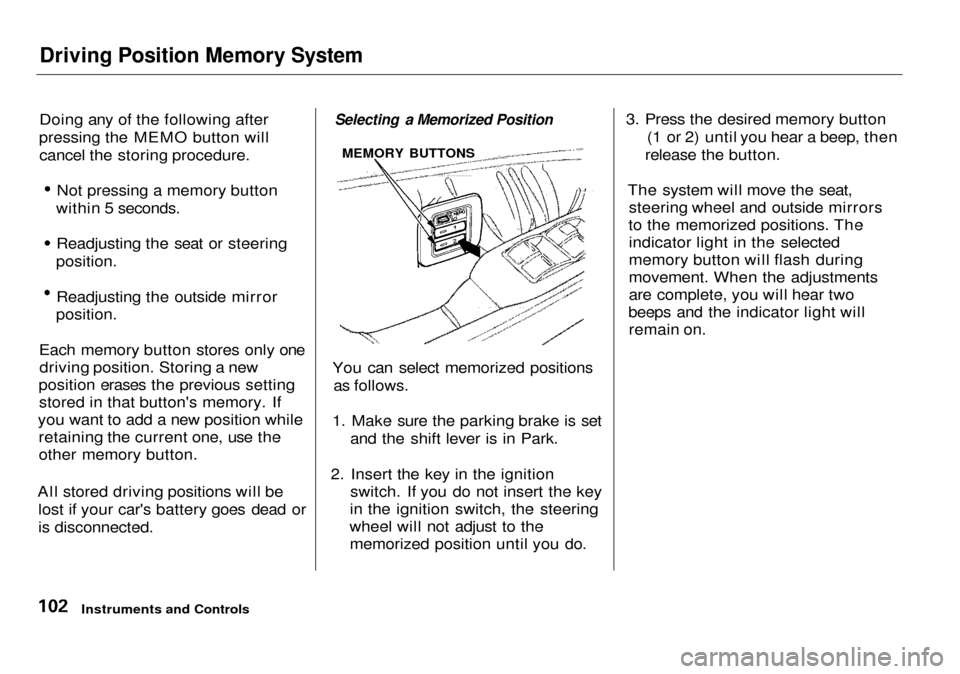
Selecting a Memorized Position
You can select memorized positions as follows.
1. Make sure the parking brake is set and the shift lever is in Park.
2. Insert the key in the ignition switch. If you do not insert the key
in the ignition switch, the steering
wheel will not adjust to the memorized position until you do. 3. Press the desired memory button
(1 or 2) until you hear a beep, then
release the button.
The system will move the seat, steering wheel and outside mirrors
to the memorized positions. The indicator light in the selected
memory button will flash during
movement. When the adjustments
are complete, you will hear two
beeps and the indicator light will remain on.
Instruments and Controls
MEMORY BUTTONS
Page 112 of 333
Parking Brake, Digital Clock
Parking Brake
To apply the parking brake, depress the pedal fully. To release it, pull the
release lever. The parking brake
light on the instrument panel should
go out when the parking brake is
fully released with the engine
running (see page 54). If you try to drive the car without releasing the
parking brake, the ABS indicator
may come on, and the ABS may not
work properly. The VSA system
indicator will also come on along
with the ABS indicator (see page
189).
Driving the car with the parking brake
applied can damage the rear brakes
and axles.
Digital Clock
3.5 RL without Navigation System
The digital clock displays the time with the ignition switch ON (II). To see the time with the ignition off,
press and hold the wide button to the right of the clock.
CONTINUED
Instruments and Controls
NOTICE
RELEASE LEVER
PARKING
BRAKE PEDAL
Page 168 of 333

Security System
The security system helps to protect your car and valuables from theft.
The horn sounds and a combination of headlights, parking lights, side
marker lights and taillights flashes if someone attempts to break into your
car or remove the radio. This alarm
continues for two minutes, then the system resets. To reset an alarming
system before the two minutes have
elapsed, unlock either front door
with the key or the remote
transmitter.
The security system sets auto- matically fifteen seconds after you
lock the doors, hood, and trunk. For
the system to activate, you must lock
the doors from the outside with the
key, lock tab, door lock switch, or
remote transmitter. The security system light next to the driver's door
lock starts blinking immediately to show you the system is setting itself. Once the security system is set,
opening any door (without using the
key or the remote transmitter), or
the hood, will cause it to alarm. It also alarms if the radio is removed
from the dashboard or the wiring is
cut.
With the system set, you can still
open the trunk with the master key
or the remote transmitter without
triggering the alarm. The alarm will sound if the trunk lock is forced, or
the trunk is opened with the trunk
release button on the driver's door.
The security system will not set if the hood, trunk, or any door is not
fully closed. If the system will not set,check the Door and Brake Lamp
Monitor on the instrument panel (see page 57), to see if the doors
and trunk are fully closed. Since it is not part of the monitor display,
manually check the hood.
Do not attempt to alter this system
or add other devices to it.
Comfort and Convenience Features
SECURITY SYSTEM LIGHT
Page 171 of 333

Break-in Period, Gasoline
Break-in Period
Help assure your car's future
reliability and performance by paying
extra attention to how you drive
during the first 600 miles (1,000 km).
During this period: Avoid full-throttle starts and rapid
acceleration.
Avoid hard braking. New brakes
need to be broken-in by moderate
use for the first 200 miles (300
km).
Do not change the oil until the
recommended time or mileage
interval shown in the maintenance
schedule.
You should follow these same re- commendations with an overhauled
or exchanged engine, or when the
brakes are relined.
Gasoline
Your Acura is designed to operate on premium unleaded gasoline with a
pump octane number of 91 or higher.
If you are unable to find premium unleaded gasoline, you may substi-
tute an unleaded regular gasoline.
The engine will compensate for the lower octane, but you may notice aslight decrease in power as a result.
We recommend gasolines containing detergent additives that help prevent
fuel system and engine deposits.
Using gasoline containing lead will
damage your car's emissions
controls. This contributes to air
pollution. In Canada, some gasolines contain
an octane-enhancing additive called
MMT. If you use such gasolines,
your emissions control system performance may deteriorate and
the Malfunction Indicator Lamp on
your instrument panel may turn on. If this happens, contact your
authorized Acura dealer for service.
Before Driving
Page 173 of 333
Service Station Procedures
5. Screw the fuel fill cap back on,
tighten it until it clicks several
times. If you do not properly tighten the cap, the MalfunctionIndicator Lamp may come on (see
page 287).
6. Push the fuel fill door closed until
it latches.
Opening the Hood
1. Shift to Park or Neutral and set
the parking brake. Pull the hood
release handle located under the
lower left corner of the dashboard.
The hood will pop up slightly.
2. Standing in front of the car, reach
in between the hood and the front
bumper with your finger. Slide the
latch handle.
Before Driving
HOOD RELEASE HANDLE
LATCH HANDLE
Page 177 of 333

Accessories and Modifications
Modifying your car, or installing
some non-Acura accessories, can
make your car unsafe. Before you
make any modifications or add any
accessories, be sure to read the
following information.
Accessories
Your dealer has Genuine Acura accessories that allow you to
personalize your car. These accessories have been designed and
approved for your car, and are
covered by warranty.
Non-Acura accessories are usuallydesigned for universal applications.
Although aftermarket accessories may fit on your car, they may not
meet factory specifications, andcould adversely affect your car's
handling and stability. (See "Modifications" on the page 175 for
additional information.) When properly installed, cellular
phones, alarms, two-way radios, and
low-powered audio systems should not interfere with your car's
computer-controlled systems, such
as the SRS and anti-lock brake
system.
However, if electronic accessories
are improperly installed, or exceed
your car's electrical system capacity, they can interfere with the operationof your car, or even cause the
airbags to deploy.
Before installing any accessory:
Make sure the accessory does not
obscure any lights, or interfere
with proper car operation or
performance.
Be sure electronic accessories do
not overload electrical circuits
(see page 292 ). Have the installer contact your
Acura dealer for assistance before
installing any electronic accessory.
If possible, have your dealer inspect
the final installation.
Before Driving
Improper accessories or
modifications can affect your
car's handling, stability and performance, and cause a
crash in which you can be hurt
or killed.
Follow all instructions in this
owner's manual regarding
accessories and modifications.
Page 178 of 333

Accessories and Modifications
Modifications Do not remove any original
equipment or modify your car in any
way that would alter its design or operation. This could make your car
unsafe and illegal to drive.
For example, do not make any
modifications that would change the
ride height of your car, or install
wheels and tires with a different overall diameter.
Such modifications can adversely
affect handling, and interfere with
the operation of the car's anti-lock
brakes and other systems.
In addition, any modifications that
decrease ground clearance increase
the chance of undercarriage parts striking a curb, speed bump, or other
raised object, which could cause
your airbags to deploy. Do not modify your steering wheel
or any other part of your
Supplemental Restraint System.
Modifications could make the
system ineffective.
Additional Safety Precautions
Do not attach or place objects on
the front airbag covers. Any object
attached to or placed on the covers
marked "SRS AIRBAG," in the
center of the steering wheel and
on top of the dashboard, could
interfere with the proper operation of the airbags. Or, if the airbags
inflate, the objects could be
propelled inside the car and hurt
someone.
Do not attach hard objects on or
near a front door. If a side airbag
inflates, a cup holder or other hard
object attached on or near the door could be propelled inside the
car and hurt someone.
Do not place any objects over theoutside edge of a front seat-back.
Covering the outside edge of a
front seat-back, with a non-Acura seat cover for example, could
prevent the airbag from inflating
properly.
Before Driving


