Page 75 of 376
2-7 Lockout Prevention
The lockout deterrent feature makes it difficult for you
to lock your keys in your vehicle. If the driver's door is
open while the keys are in the ignition, you will not be
able to use your power door lock switch.
This feature cannot guarantee that you'll never be
locked out of your vehicle. If you don't leave the keys in
the ignition, or if you use the manual door lock, you
could still lock your keys inside your vehicle.
Always remember to take your keys with you.
To turn this feature on or off, see ªLocks and Lighting
Choicesº in the Index.
Leaving Your Vehicle
If you are leaving the vehicle, take your keys, open your
door and set the locks from inside. Then get out and
close the door.
Keyless Entry System (If Equipped)
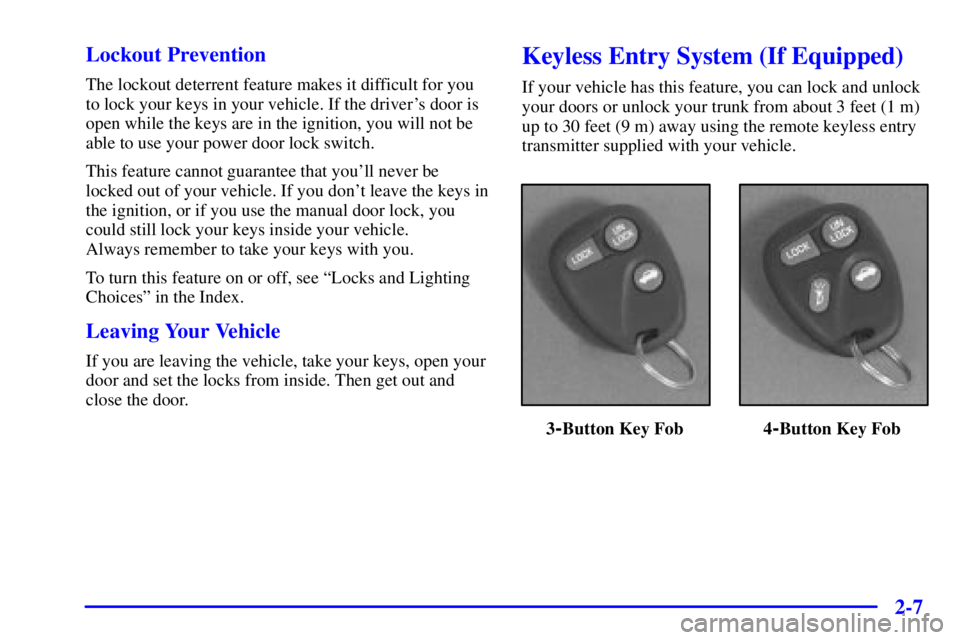
If your vehicle has this feature, you can lock and unlock
your doors or unlock your trunk from about 3 feet (1 m)
up to 30 feet (9 m) away using the remote keyless entry
transmitter supplied with your vehicle.
3-Button Key Fob 4-Button Key Fob
Page 76 of 376

2-8
Your keyless entry system operates on a radio frequency
subject to Federal Communications Commission (FCC)
Rules and with Industry Canada.
This device complies with Part 15 of the FCC Rules.
Operation is subject to the following two conditions:
(1) this device may not cause harmful interference,
and (2) this device must accept any interference
received, including interference that may cause
undesired operation.
This device complies with RSS
-210 of Industry Canada.
Operation is subject to the following two conditions:
(1) this device may not cause interference, and
(2) this device must accept any interference received,
including interference that may cause undesired
operation of the device.
Changes or modifications to this system by other than an
authorized service facility could void authorization to
use this equipment.At times you may notice a decrease in range. This is
normal for any remote keyless entry system. If the
transmitter does not work or if you have to stand closer
to your vehicle for the transmitter to work, try this:
�Check the distance. You may be too far from your
vehicle. You may need to stand closer during rainy
or snowy weather.
�Check the location. Other vehicles or objects may be
blocking the signal. Take a few steps to the left or
right, hold the transmitter higher, and try again.
�Check to determine if battery replacement or
resynchronization is necessary. See the instructions
that follow.
�If you're still having trouble, see your dealer or a
qualified technician for service.
Page 77 of 376
2-9 Operation
Remote Driver's Door and All Door Unlock
When you press UNLOCK on the remote keyless entry
transmitter, only the driver's door will unlock. If you
press UNLOCK again within five seconds, all the doors
will unlock. If you would like all the doors to unlock the
first time you press UNLOCK, see ªLocks and Lighting
Choicesº in the Index. If your vehicle is equipped with
the content theft
-deterrent system, the UNLOCK button
on the remote keyless entry transmitter will disarm the
system. See ªContent Theft
-Deterrentº in the Index for
more details.
Remote All Door Lock
To lock all the doors, press LOCK on the remote keyless
entry transmitter. (See ªPower Door Locksº in the Index
for more details on power door lock features). If your
vehicle is equipped with the content theft
-deterrent
system, the LOCK button may arm the system. See
ªContent Theft
-Deterrentº in the Index for more details.Remote Lock/Unlock Confirmation (If Equipped)
This feature provides feedback to the holder of the
remote keyless entry transmitter that a command has
been received by the keyless entry receiver. To signal
that a command has been received, the headlamps will
flash and the horn will sound briefly. To program the
various modes available, see ªLocks and Lighting
Choicesº in the Index.
Remote Alarm (If Equipped)
When you press the horn button on the four
-button
remote keyless entry transmitter, the headlamps will
flash and the horn will sound. This will allow you to
attract attention if needed.
Remote Trunk Release
Press the trunk symbol on your remote keyless entry
transmitter (if equipped) to open your trunk.
The transaxle must be in PARK (P) for this feature
to operate.
Page 78 of 376

2-10 Matching Transmitter(s) To Your Vehicle
Each remote keyless entry transmitter is coded to
prevent another transmitter from unlocking your vehicle.
If a transmitter is lost or stolen, a replacement can be
purchased through your dealer. Remember to bring any
remaining transmitters with you when you go to your
dealer. When the dealer matches the replacement
transmitter to your vehicle, any remaining transmitters
must also be matched. Once your dealer has coded the
new transmitter, the lost transmitter will not unlock your
vehicle. Each vehicle can have only four transmitters
matched to it.
Battery Replacement
Under normal use, the battery in your remote keyless
entry transmitter should last about three years.
You can tell the battery is weak if the transmitter won't
work at the normal range in any location. If you have to
get close to your vehicle before the transmitter works,
it's probably time to change the battery.
NOTICE:
When replacing the battery, use care not to touch
any of the circuitry. Static from your body
transferred to these surfaces may damage
the transmitter.
Page 79 of 376

2-11
To replace the battery:
1. Insert a flat object like a dime into the slot on the
side of the transmitter and twist to separate
the halves.
2. Gently pry the battery out of the transmitter. Do not
use the metal flanges to ªpop outº the battery.
3. Put the new battery into the transmitter as shown on
the transmitter. Use a type CR2032 battery, or
equivalent type.
4. Reassemble the transmitter. Make sure the halves are
snapped together tightly so water will not get in.
5. Check the transmitter operation. If needed, follow
the instructions on resynchronization.Resynchronization
Your remote keyless entry system uses a continually
changing code for increased security. Normally, the
receiver in your vehicle will keep track of this
changing code.
�Loss of synchronization will occur if the transmitter
is activated more than 256 times while out of range
of the vehicle.
�Loss of synchronization will occur after battery
replacement if the transmitter is immediately
activated more than 16 times while out of range of
the vehicle.
If your remote keyless entry transmitter has stopped
working, you may need to resynchronize the transmitter
to the vehicle receiver. To do this, press the LOCK and
UNLOCK buttons at the same time and hold for at least
seven seconds (or until the horn sounds, when equipped
with content theft
-deterrent).
If attempts to resynchronize your transmitter to the
vehicle are not successful, you may need to have your
dealer match the transmitter to the vehicle. See
ªMatching Transmitter(s) To Your Vehicleº in the Index.
Page 80 of 376
2-12
Multifunction Alarm Locks and Lighting Choices
Your vehicle's locks and lighting systems can be programmed with several different features. The features you can
program depend on the options that came with your vehicle. The following chart shows the features that can be
programmed. To determine which features your vehicle is equipped with, follow the steps listed for entering the
programming mode.
Page 81 of 376

2-13 Entering Programming Mode
To program features, your vehicle must be in this
programming mode. Follow these steps:
1. Turn the ignition key to LOCK or OFF.
2. Remove the MALL PGM fuse from the instrument
panel fuse block. See ªFuses and Circuit Breakersº
in the Index.
3. Turn the ignition key to ACCESSORY.
4. Count the number of chimes you hear. You will hear
two to four chimes, depending on vehicle content.
See ªMultifunction Alarm Locks and Lighting
Choicesº earlier in this section.
You can now program your choices. After programming
a feature, you can exit the programming mode at
any time.
Exiting Programming Mode
To exit programming mode, turn the key from
ACCESSORY to OFF and put the MALL PGM fuse
back into the instrument panel fuse block.
Delayed Illumination and Exit Lighting
With delayed illumination, the interior lamps will stay
on for about 25 seconds after all doors are closed.
With exit lighting. the interior lamps will come on and
stay on for about 25 seconds whenever you remove the
key from the ignition.
To customize these features to your preference, see
ªProgrammable Modes.º
Programmable Modes
Your vehicle can be programmed to one of the
following modes.
Mode 1: Both Features Off (The interior lamps will turn
on or off at the same instant that a door is opened
or closed.)
Mode 2: Delayed Illumination Only (The interior lamps
will stay on for about 25 seconds after all the doors are
closed, or until you lock the doors.)
Mode 3: Exit Lighting Only (The interior lamps will
come on whenever you remove the key from the ignition
and stay on for about 25 seconds, or until you lock
the doors.)
Mode 4: Both Features On (This combines Modes 2
and 3.)
Page 82 of 376

2-14
When your vehicle is shipped from the factory, it will be
in Mode 4.
To change the mode do the following:
1. Follow the instructions for ªEntering Programming
Modeº listed previously.
2. Turn the interior lamps thumbwheel all the way to
the right and then back slightly to the left.
3. Count the number of chimes you hear. The number
of chimes tells you which mode your vehicle is set
for. You change the mode by turning the interior
lamps thumbwheel all the way to the right and then
back slightly to the left.
4. Repeat Step 2 until you hear the number of chimes
that matches the number of the mode you want.
The mode you selected is now set. You can either exit
the programming mode by following the instructions
earlier in this section or program the next feature
available on your vehicle.Automatic Door Locks
With automatic door locks, all doors will automatically
lock when you shift out of PARK (P) and automatically
unlock when the ignition is turned to OFF.
To customize these features to your preference, see
ªProgrammable Modesº.
Programmable Modes
Your vehicle can be programmed to one of these modes.
Mode 1: Both Features Off (Automatic door locking
and unlocking are disabled.) You will always need to
lock your doors manually before driving to increase
occupant safety.
�All doors will lock when you press the power door
lock switch rearward or when you press the LOCK
on the remote keyless entry transmitter (if equipped).
�All doors will unlock when you press the power door
lock switch forward or when you press UNLOCK on
the remote keyless entry transmitter (if equipped).