Page 125 of 242

START (4)
This position activates the starter motor,
which starts the engine.
NISSAN VEHICLE IMMOBILIZER
SYSTEM (NVIS)
The Nissan Vehicle Immobilizer System
(NVIS) will not allow the engine to run
without the use of the registered NVIS key.
If the engine fails to run using the registered
NVIS key, it may be due to interference
caused by another NVIS key, an automated
toll road device or automated payment de-
vice on the key ring. Restart the engine
using the following procedures:
1. Leave the ignition switch in the ON posi-
tion for approximately 5 seconds.
2. Turn the ignition switch to the OFF or
LOCK position and wait approximately 5
seconds.
3. Repeat step 1 and 2 again.
4. Restart the engine while holding the de-
vice (which may have caused the inter-
ference) separate from the registered
NVIS key.If this procedure allows the engine to run,
NISSAN recommends placing the regis-
tered NVIS key on a separate key ring to
avoid interference from other devices.cMake sure the area around the vehicle is
clear.
cMaintenance items listed here should be
checked periodically, for example, each
time you check engine oil.
cCheck that all windows and lights are
clean.
cVisually inspect tires for their appearance
and condition. Also check tires for proper
inflation.
cLock all doors.
cPosition seat and adjust head restraints.
cAdjust inside and outside mirrors.
cFasten seat belts and ask all passengers
to do likewise.
cCheck the operation of warning lights
when key is turned to the ON (3) position.
See ``Warning/Indicator lights and
chimes'' in the ``Instruments and con-
trols'' section.
BEFORE STARTING THE
ENGINE
5-6Starting and driving
ZX
Page 150 of 242
cWhenever working on or near a bat-
tery, always wear suitable eye pro-
tectors (for example, goggles or in-
dustrial safety spectacles) and
remove rings, metal bands, or any
other jewelry. Do not lean over the
battery when jump starting.
cDo not attempt to jump start a frozen
battery. It could explode and cause
serious injury.
cYour vehicle has an automatic en-
gine cooling fan. It could come on at
any time. Keep hands and other ob-
jects away from it.
Always follow the instructions below.
Failure to do so could result in damage
to the charging system and cause per-
sonal injury.
1. If the booster battery is in another ve-
hicle, position the two vehicles to bring
their batteries into close proximity to
each other.
Do not allow the two vehicles to
touch.
2. Apply the parking brake. Move the shift
selector lever to N (Neutral) (manual
transmission) or to P (Park) (automatic
transmission). Switch off all unncessaryelectrical systems (lights, heater, air con-
ditioner, etc.).
3. Remove vent caps on the battery (if so
equipped). Cover the battery with an old
cloth to reduce explosion hazard.
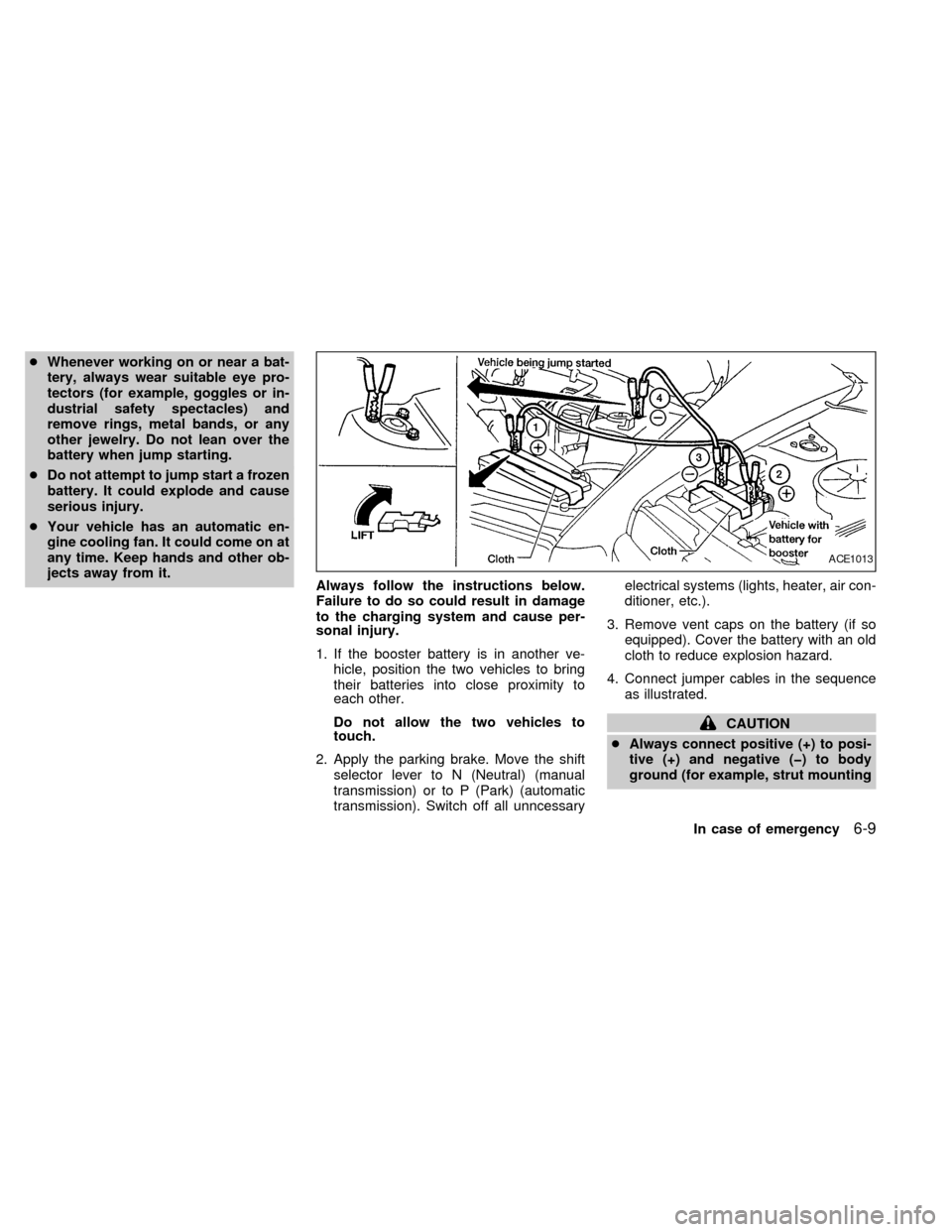
4. Connect jumper cables in the sequence
as illustrated.
CAUTION
cAlways connect positive (+) to posi-
tive (+) and negative (þ) to body
ground (for example, strut mounting
ACE1013
In case of emergency6-9
ZX
Page 163 of 242

8 Do-it-yourself
Maintenance precautions .......................................8-2
Engine compartment check locations ....................8-4
Engine cooling system ...........................................8-5
Checking engine coolant level ...............................8-5
Changing engine coolant .......................................8-6
Engine oil ...............................................................8-8
Checking engine oil level .......................................8-8
Changing engine oil ...............................................8-9
Changing engine oil filter .....................................8-10
Automatic transmission fluid ................................8-10
Temperature conditions for checking ...................8-11
Power steering fluid..............................................8-12
Brake fluid ............................................................8-12
Clutch fluid............................................................8-12
Window washer fluid ............................................8-13
Window washer fluid reservoir .............................8-13
Battery ..................................................................8-14
Jump starting ........................................................8-15
Drive belts ............................................................8-15
Spark plugs ..........................................................8-15
Replacing spark plugs ..........................................8-15
Air cleaner ............................................................8-16Windshield wiper blades ......................................8-18
Cleaning ...............................................................8-18
Replacing .............................................................8-18
Parking brake and brake pedal ............................8-19
Checking parking brake .......................................8-19
Checking brake pedal ..........................................8-19
Brake booster .......................................................8-20
Clutch pedal .........................................................8-21
Checking clutch pedal ..........................................8-21
Fuses ....................................................................8-21
Engine compartment ............................................8-21
Passenger compartment ......................................8-22
Multi-remote controller battery replacement ........8-23
Lights ....................................................................8-24
Headlights ............................................................8-24
Front turn signal lamp ..........................................8-27
Front parking and cornering lamp ........................8-27
Front sidemarker lamp .........................................8-28
Fog lights ..............................................................8-29
Exterior and interior lights ....................................8-30
Wheels and tires ..................................................8-34
Tire pressure ........................................................8-34
ZX
Page 186 of 242

Replace the battery in the multi-remote con-
troller as follows:
1. Open the lid using a coin.
2. Replace the battery with a new one.Recommended battery: Sanyo CR2025 or
equivalent.
3. Close the lid securely.
4. Press the
button, then thebutton
two or three times to check the multi-remotecontroller operation.
Each time the
button is pressed, the
hazard lights flash once.
If the battery is removed for any reason
other than replacement, perform step 4.
cAn improperly disposed battery can
hurt the environment. Always confirm
local regulations for battery disposal.
cThe multi-remote controller is water-
resistant; however, if it does get wet,
immediately wipe completely dry.
cThe operational range of the multi-
remote controller extends to approxi-
mately 33 ft (10 m) from the vehicle.
This range may vary with conditions.
FCC Notice:
Changes or modifications not expressly
approved by the manufacturer for com-
pliance could void the user's authority to
operate the equipment.
This device complies with part 15 of the
FCC Rules and RSS-210 of Industry
Canada.
APD1026
MULTI-REMOTE CONTROLLER
BATTERY REPLACEMENT
Do-it-yourself8-23
ZX
Page 187 of 242
HEADLIGHTS
The headlamp is a semi-sealed beam type
which uses a replaceable halogen bulb.
Because the headlamp assembly must be
removed from the vehicle for bulb replace-
ment, it is recommended that your vehicle
be taken to an authorized NISSAN Dealer.
Replacing the headlight bulb
CAUTION
cDo not leave the headlamp assembly
open without a bulb installed for a
long period of time. Dust, moisture,
smoke, etc. entering the headlamp
body may affect bulb performance.
Remove the bulb from the headlamp
assembly just before a replacement
bulb is installed.
cOnly touch the plastic base when
handling the bulb. Never touch the
glass envelope. Touching the glass
could significantly affect bulb life
and/or headlamp performance.cHigh pressure halogen gas is sealed
inside the halogen bulb. The bulb
may break if the glass envelope is
scratched or the bulb is dropped.
cUse the same number and wattage
as originally installed:
Wattage 65/55
Bulb no. 9007(HB5)
cAiming is not necessary after replac-
ing the bulb. When aiming adjust-
ment is necessary, contact an autho-
rized NISSAN dealer.
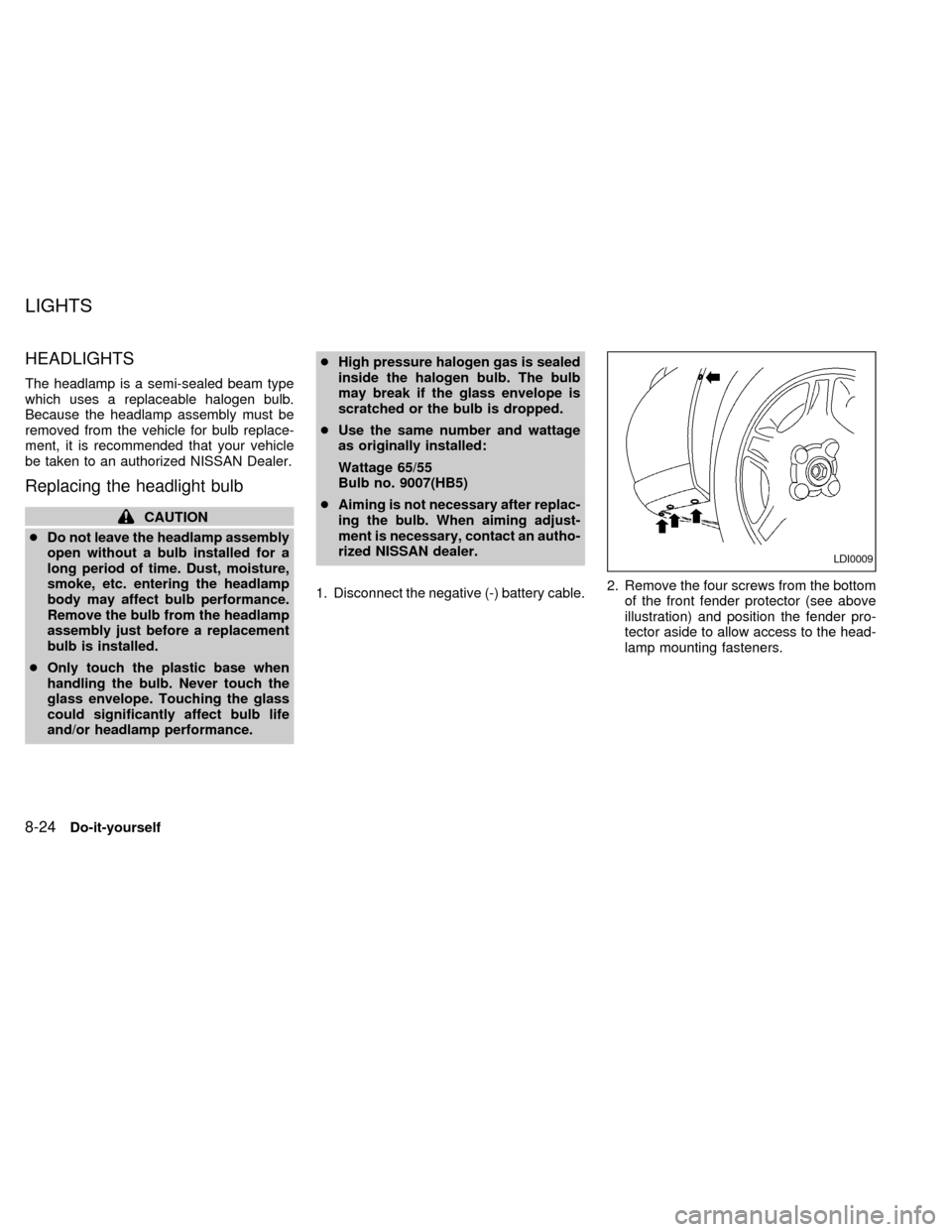
1. Disconnect the negative (-) battery cable.2. Remove the four screws from the bottom
of the front fender protector (see above
illustration) and position the fender pro-
tector aside to allow access to the head-
lamp mounting fasteners.
LDI0009
LIGHTS
8-24Do-it-yourself
ZX
Page 192 of 242
3. Remove the three nuts and one bolt
mounting the headlamp assembly (see
above illustration).
4. Pull the headlamp assembly evenly away
from the front of the vehicle to access the
bulb sockets.
5. Rotate the socket counter-clockwise and
pull it out of the headlamp assembly. Do
not shake the bulb socket when remov-
ing it.
6. Pull the bulb out of the socket.
7. Follow the instructions in reverse order to
install new bulb.Headlamp mounting nuts and bolt
torque: 36 to 47 in-lb (4.1 to 5.3 Nzm)
FOG LIGHTS
Replacing the fog light bulb
LDI0010
WDI0003
Do-it-yourself8-29
ZX
Page 193 of 242
EXTERIOR AND INTERIOR
LIGHTS
Item Wattage (W) Bulb No.
Headlamp assembly
High/Low 65/55 HB5 (9007)
Front turn signal 30 3457AK
Parking and cornering 27/8 4157K or 3157K
Side marker 3.8 194
Front fog light 37.5 881L
Rear combination light:
Turn signal: 27 3156K
Stop/Tail 27/8 3157K
Back-up 18 921
License plate light 5 168
High-mounted stop light 18 921
Interior light 8 68
Map light 10 578
Trunk light 3.4 158
Glove box light (if so equipped) 1.1 658
8-30Do-it-yourself
ZX
Page 194 of 242
Replacement procedures
All other lights are either type A, B, C or D.
When replacing a bulb, first remove the lens
and/or cover.
WDI0002
ADI1049
Do-it-yourself8-31
ZX