Page 96 of 280

INSTRUMENTS AND CONTROLS
4–30
D92C032a
Driving rangeED92C-Cb
For vehicles with MITSUBISHI genuine
audio, driving range can be displayed.
This value shows the distance (in km or
miles) that can be driven on the fuel remain-
ing in the fuel tank.NOTE
(1) When the driving range is displayed, if
the driving range drops below 50 km
(30 miles), alarm sounds and the dis-
play shows a flashing. When this oc-
curs, top up the fuel tank as soon as
possible.
Even when an item other than the driv-
ing range is currently displayed, the
alarm sounds and the driving range ap-
pears for 5 seconds when the driving
range drops to the 50 km, 25 km and
10 km (or 30 miles, 15 miles and
6 miles) levels. Then, the original item is
again displayed.
(2) The driving range varies depending on
road conditions, the manner of driving
and other related factors. Consequently,
the display should be used only as a
guide; top up the fuel tank as soon as
possible.
D92F001a
Average speedED92F-Db
For vehicles with MITSUBISHI genuine
audio, average speed can be displayed.
This value shows the average speed (in
km/h or mph) since the display was reset.
If you reset the display at the time when you
want to start the measurements, average
speed from that point of time can be dis-
played.
Page 98 of 280

INSTRUMENTS AND CONTROLS
4–32
D92J006a
2. Adjust the brightness by moving the
cursor with the “H” or “M” button.
H- Decrease brightness
M- Increase brightness
D92J004a
3. Press the “SET” button to determine
the setting. The display will return to
the original display item.
NOTE
(1) To cancel the brightness adjusting pro-
cedure before completion, press the
button (A).
(2) If the “SET” button is not pressed for
about 15 seconds or longer in the
middle of the adjustment, the currently
selected brightness is set automatically.
Then, the display returns to the original
display item.
D92J001a
Display unit selectionED92J-Ab
Originally, km/h and L/100 km are selected.
When you want to select the unit “mile”, fol-
low this procedure.
NOTE
For vehicles without MITSUBISHI genuine
audio system, only the unit of average fuel
consumption can be changed to km or miles
as you like.
1. Press the “M” button while pressing
the button (A) to activate the display
unit selection function. The currently
selected unit will appear.
Page 99 of 280

INSTRUMENTS AND CONTROLS
4–33
D92J002a
2. Use the “H” or “M” button to select the
desired speed unit, then press the
“SET” button to enter the setting.
H- km
M- mile
D92J003a
3. If the km unit was selected in step 2,
the fuel consumption unit must be se-
lected continuously using the “H” or
“M” button. The currently selected unit
will appear.
Use the “H” or “M” button to select the
desired fuel consumption unit, then
press the “SET” button to enter the set-
ting.
H- L/100 km
M- km/L
D92J004a
4. Press the “SET” button to determine
the setting. The display will return to
the original display item.
NOTE
(1) For vehicles without a MITSUBISHI
genuine audio system, only the unit of
fuel consumption can be changed to km
or miles as you like.
(2) If you select “M” (mile) unit in step 2, fuel
consumption is automatically shown in
“mpg (mile per gallon)”.
(3) To cancel the unit setting procedure be-
fore completion, press the button (A).
(4) The outside temperature and clock are
not shown during the unit selecting pro-
cedure.
(5) If the “SET” button is not pressed for
about 15 seconds or longer in the
middle of the selection, the currently se-
lected unit is set automatically. Then, the
display returns to the original display
item.
Page 141 of 280
For pleasant driving
UKW/MW/LW electronic tuning radio with
tape player* 6–2. . . . . . . . . . . . . . . . . . . . . . . . . . . . . .
UKW/MW/LW electronic tuning radio with
CD player* 6–15. . . . . . . . . . . . . . . . . . . . . . . . . . . . . . .
Audio system anti-theft feature 6–26. . . . . . . . . . . .
Roof antenna 6–29. . . . . . . . . . . . . . . . . . . . . . . . . . . .
Ventilators 6–29. . . . . . . . . . . . . . . . . . . . . . . . . . . . . . .
Heater/Manual air conditioning* 6–30. . . . . . . . . . . .
Automatic air conditioning* 6–36. . . . . . . . . . . . . . .
Sun visors 6–44. . . . . . . . . . . . . . . . . . . . . . . . . . . . . .
Vanity mirror 6–45. . . . . . . . . . . . . . . . . . . . . . . . . . . . .
Cigarette lighter 6–45. . . . . . . . . . . . . . . . . . . . . . . . . .
Ashtray 6–46. . . . . . . . . . . . . . . . . . . . . . . . . . . . . . . . .
Accessory boxes 6–47. . . . . . . . . . . . . . . . . . . . . . . .
Sunglasses pocket 6–48. . . . . . . . . . . . . . . . . . . . . . .
Rear shelf panel (Hatchback) 6–49. . . . . . . . . . . . . .
Installation position for first–aid kit 6–50. . . . . . . . .
Cargo net* 6–51. . . . . . . . . . . . . . . . . . . . . . . . . . . . . . .
Page 142 of 280

FOR PLEASANT DRIVING
6–2
H11A319d
UKW/MW/LW electronic tuning radio with tape player*EH30A-AeThe audio system can be used when the
ignition switch is in the “ON” or “ACC” posi-
tion.
A– Display window
B– Audio system
NOTE
(1) The MITSUBISHI Genuine CD player or
CD autochanger can be connected to
this audio system. The CD player or the
CD autochanger can be operated by
the switch on the audio body. Refer to
“Connection of a CD player or a CD
autochanger” on page 6–13.(2) To listen to the audio system while the
engine is stopped, turn the ignition key
to the “ACC” position.
(3) When a cellular phone is used inside
the vehicle, noise may be produced
from the audio equipment. This does
not mean that something is wrong with
the audio equipment. In such a case,
use the cellular phone at a place as far
as possible from the audio equipment.(4) In the case of misuse (entry of a foreign
object or water, smoke or odor, etc.), im-
mediately stop the operation and have
the audio system checked at an author-
ized MITSUBISHI dealer. Never try to
repair it by yourself. Avoid continuous
usage without inspection by a qualified
person.
(5) The audio system’s control panel can
be removed to deter thieves. For details,
refer to the section entitled “Audio sys-
tem anti-theft feature” on page 6–26.
Page 143 of 280
FOR PLEASANT DRIVING
6–3
H11A323d
To listen to the radioEH30B-Fb1-PWR (On-off) switch
2-VOL (Volume control) knob
3-U/M/L (UKW/MW/LW selection) button
4-Audio adjust button
5-AUDIO button
6-TUNE/SEEK (Down-step/Down-seek) button
7-TUNE/SEEK (Up-step/Up-seek) button
8-Memory select buttons
9-Frequency display window
10 - Preset memory number display
11-ST (Stereo) indicator
Page 144 of 280
FOR PLEASANT DRIVING
6–4
1. Press the PWR switch (1) to turn on
the radio.
Press the PWR switch again to switch
it off.
2. Press the U/M/L button (3) to select
the desired band (U1/U2/MW/LW).
3. Press the TUNE/SEEK button (6 or 7)
or one of the memory select buttons
(8) to tune to a station.
Refer to “How to adjust the tune” or
“How to enter frequencies in the mem-
ory” on page 6–5.
How to adjust the volume
VOL (Volume control)-2Turn the knob clockwise to increase the vol-
ume.
H11A348g
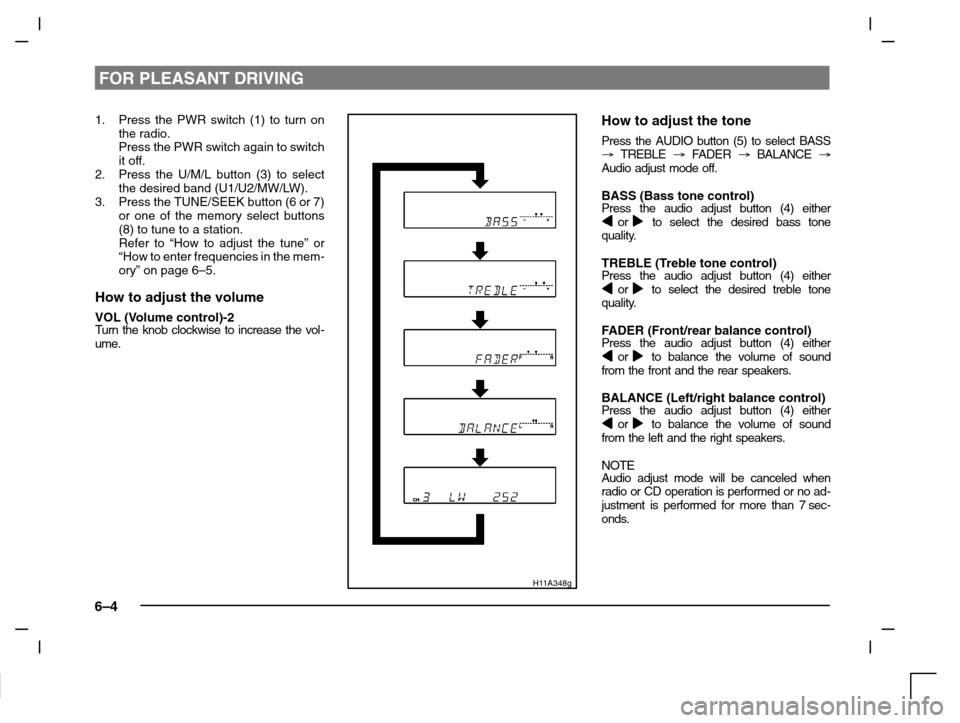
How to adjust the tone
Press the AUDIO button (5) to select BASS
� TREBLE � FA D E R � BALANCE �
Audio adjust mode off.
BASS (Bass tone control)Press the audio adjust button (4) either or to select the desired bass tone
quality.
TREBLE (Treble tone control)Press the audio adjust button (4) either or to select the desired treble tone
quality.
FADER (Front/rear balance control)Press the audio adjust button (4) either or to balance the volume of sound
from the front and the rear speakers.
BALANCE (Left/right balance control)Press the audio adjust button (4) either or to balance the volume of sound
from the left and the right speakers.
NOTEAudio adjust mode will be canceled when
radio or CD operation is performed or no ad-
justment is performed for more than 7 sec-
onds.
Page 150 of 280

FOR PLEASANT DRIVING
6–10
H11A204a
NOTE
While “TP” is illuminated, the radio stops only
at TP stations even if the TUNE/SEEK but-
ton (5 or 6) is pressed.
TP (Traffic information Program)
search function
The traffic information program standby
function is turned on (with the TP indicator
(11) shown on the display) and after about 45
seconds since the RDS indicator (9) turns off
due to weak signal or the tuning station is
changed over form a TP station to a station
which does not broadcast traffic information,
the sound will beep 5 times and seeks out a
TP station in all frequencies automatically.
To turn the function off, switch off the power
from UKW mode, and while pressing TP but-
ton (2), press the PWR switch (1) until it
beeps. The ”TP–S OFF” will be shown on
the display.To turn the function on, use the same pro-
cedure.
Emergency broadcastsIf an emergency broadcast is caught while
receiving a UKW broadcast or playing back
a cassette tape with the ignition switch in
“ACC” or “ON” position, the display will show
“ALARM” and the emergency broadcast will
interrupt the current program. The volume
level is set separately for listening to nor-
mal audio programs and for listening to
emergency broadcasts. The volume level
will therefore change automatically to that
set when an emergency broadcast was
last received. When the emergency broad-
cast is over, the radio will return to the pre-
viously received program and to the corre-
sponding volume level.
