Page 148 of 352
Climat
e Contro l Syste m
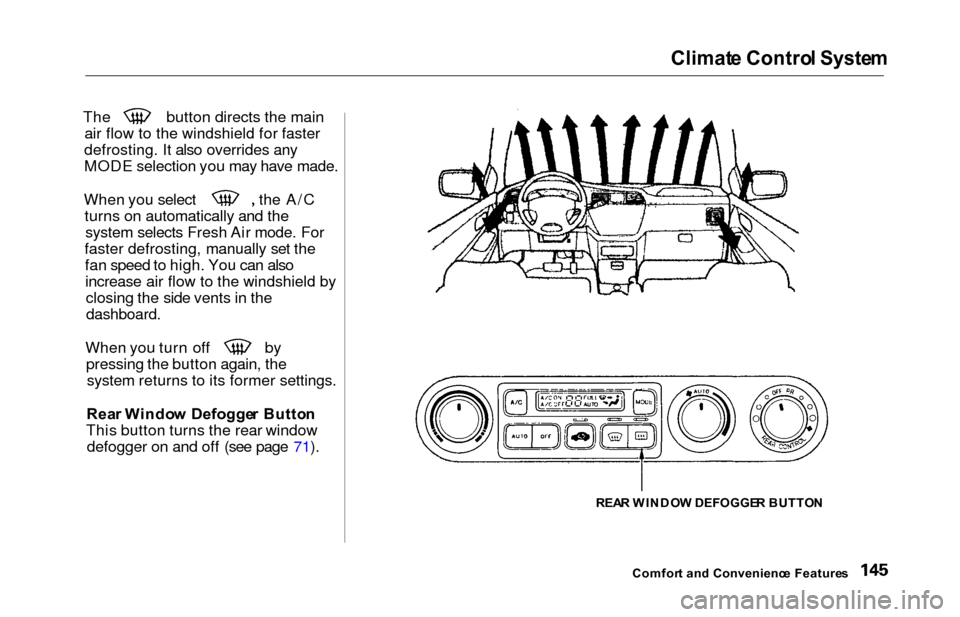
The button directs the main
air flow to the windshield for faster
defrosting. It also overrides any
MODE selection you may have made. When you select the A/C
turns on automatically and thesystem selects Fresh Air mode. For
faster defrosting, manually set the fan speed to high. You can alsoincrease air flow to the windshield byclosing the side vents in the
dashboard.
When you turn off by
pressing the button again, thesystem returns to its former settings.
Rea r Windo w Defogge r Butto n
This button turns the rear window defogger on and off (see page 71).
REAR WINDO W DEFOGGE R BUTTO N
Comfor t an d Convenienc e Feature s
Page 149 of 352

Climate Contro l Syste m
EX model with Navigation System
Fully-automati c Operatio n
To put the Automatic Climate Control in fully-automatic mode,
press the AUTO button. Then set
the desired temperature by pressing
either side of the TEMP button:
to raise the temperature above the
displayed value, or to lower the
temperature.
The system automatically selects the proper mix of conditioned and/or
heated air that will, as quickly as
possible, raise or lower the interior
temperature from its current level to
the set temperature.
When you set the temperature to its lower limit (60°F/18°C) or its upper
limit (90°F/32°C), the system runsat full cooling or heating only. It does
not regulate the interior temperature.
When the temperature is set between the lower and upper limits,
the system regulates the interior
TEMPERATUR E BUTTO N
AUTO BUTTO N
TEMPERATUR E DISPLA Y
temperature to the set value.
In cold weather, the fan will not
come on automatically until the
vehicle has been driven for a short time and the heater starts to develop
warm air. Pressing the OFF button shuts the
climate control system completely
off. Keep the system completely off
only for short periods. To keep stale
air and mustiness from collecting,
you should have the fan running at all times.
Comfor t an d Convenienc e Feature s
OFF BUTTO N
Page 153 of 352
Climate Contro l Syste m
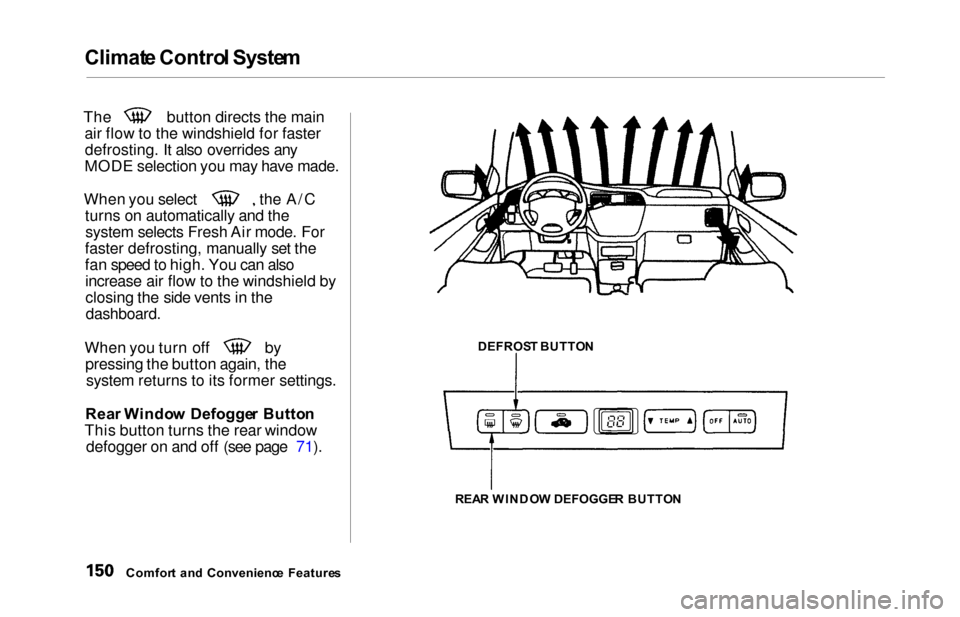
The button directs the main
air flow to the windshield for fasterdefrosting. It also overrides any
MODE selection you may have made.
When you select the A/C turns on automatically and thesystem selects Fresh Air mode. For
faster defrosting, manually set the
fan speed to high. You can also increase air flow to the windshield by
closing the side vents in the
dashboard.
When you turn off by pressing the button again, thesystem returns to its former settings.
Rea r Windo w Defogge r Butto n
This button turns the rear window defogger on and off (see page 71).
Comfor t an d Convenienc e Feature s DEFROS
T BUTTO N
REA R WINDO W DEFOGGE R BUTTO N
Page 158 of 352
Audio Syste m
AM/FM/Cassett e Stere o Audi o
Syste m
On LX model
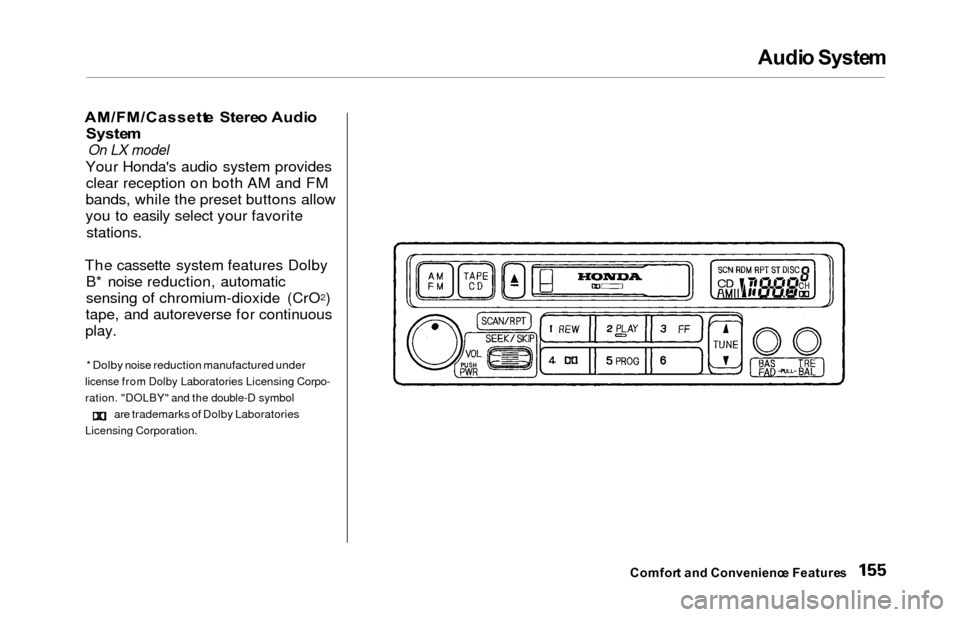
Your Honda's audio system provides
clear reception on both AM and FM
bands, while the preset buttons allow
you to easily select your favorite
stations.
The cassette system features Dolby B* noise reduction, automatic
sensing of chromium-dioxide (CrO
2)
tape, and autoreverse for continuous
play.
* Dolby noise reduction manufactured under
license from Dolby Laboratories Licensing Corpo-
ration. "DOLBY" and the double-D symbol
are trademarks of Dolby Laboratories
Licensing Corporation.
Comfor t an d Convenienc e Feature s
Page 163 of 352
Audio Syste m
Audio Syste m Lightin g
You can use the instrument panel brightness control knob to adjust theillumination of the audio system (see
page 67 ). The audio system illuminates when the parking lightsare on, even if the radio is turned off.
Operatin g th e Cassett e Playe r
Turn the audio system ON. Make sure the tape opening on the cassette
is facing to the right, then insert the cassette most of the way into the slot.
The system will pull it in the rest of the way, and begin to play.
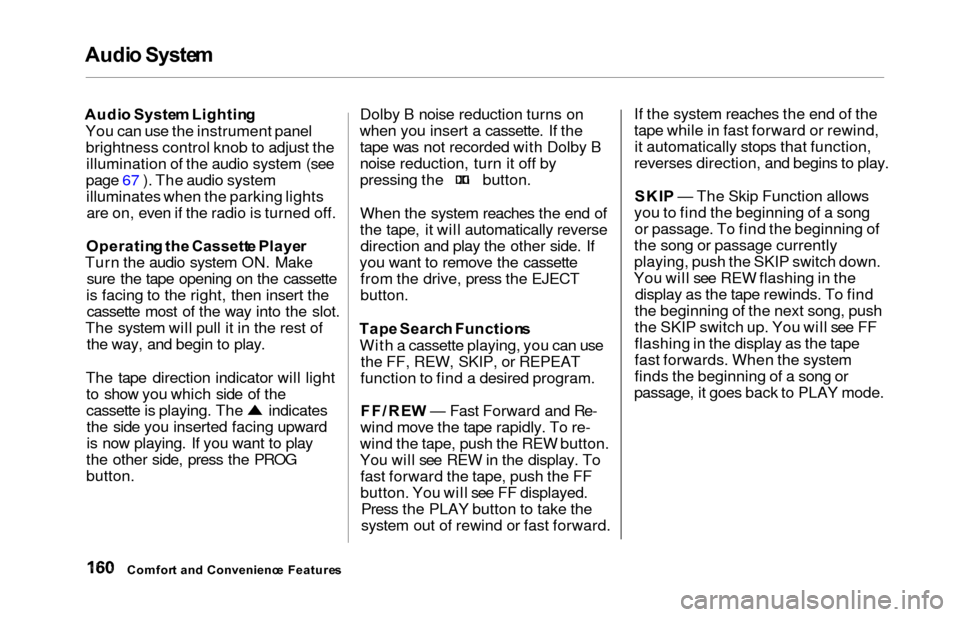
The tape direction indicator will light to show you which side of the
cassette is playing. The indicatesthe side you inserted facing upward
is now playing. If you want to play
the other side, press the PROG
button. Dolby B noise reduction turns on
when you insert a cassette. If the tape was not recorded with Dolby B
noise reduction, turn it off by
pressing the button.
When the system reaches the end of
the tape, it will automatically reversedirection and play the other side. If
you want to remove the cassette from the drive, press the EJECT
button.
Tap e Searc h Function s
With a cassette playing, you can use the FF, REW, SKIP, or REPEAT
function to find a desired program.
FF/RE W — Fast Forward and Re-
wind move the tape rapidly. To re-
wind the tape, push the REW button.
You will see REW in the display. To fast forward the tape, push the FF
button. You will see FF displayed. Press the PLAY button to take the
system out of rewind or fast forward. If the system reaches the end of the
tape while in fast forward or rewind,
it automatically stops that function,
reverses direction, and begins to play.
SKI P — The Skip Function allows
you to find the beginning of a song or passage. To find the beginning of
the song or passage currently
playing, push the SKIP switch down.
You will see REW flashing in the display as the tape rewinds. To find
the beginning of the next song, push
the SKIP switch up. You will see FF
flashing in the display as the tape
fast forwards. When the system
finds the beginning of a song or
passage, it goes back to PLAY mode.
Comfor t an d Convenienc e Feature s
Page 164 of 352
Audio Syste m
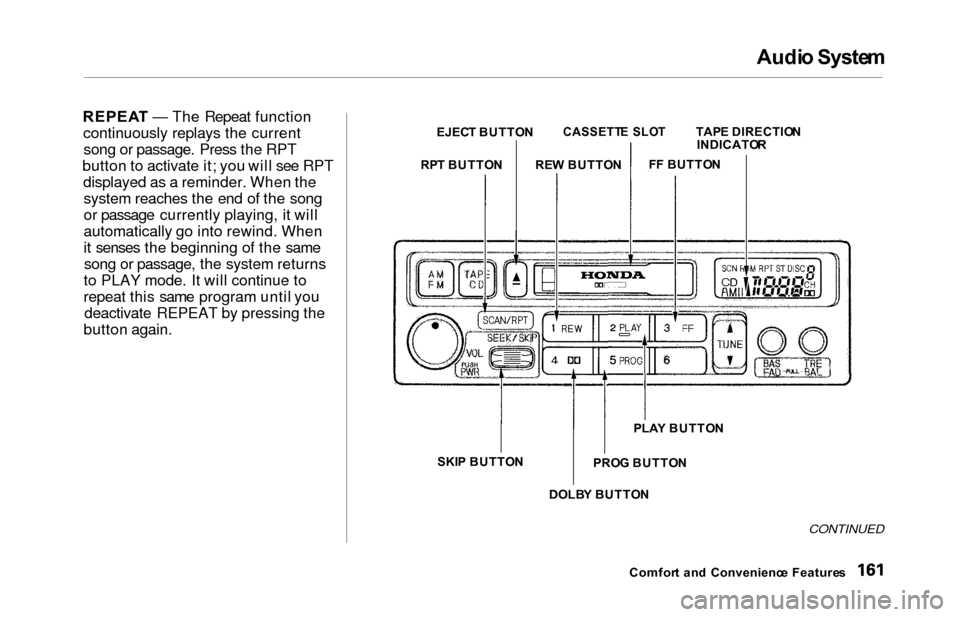
REPEA T — The Repeat function
continuously replays the current song or passage. Press the RPT
button to activate it; you will see RPT displayed as a reminder. When thesystem reaches the end of the song
or passage currently playing, it will
automatically go into rewind. When
it senses the beginning of the samesong or passage, the system returns
to PLAY mode. It will continue to
repeat this same program until you deactivate REPEAT by pressing the
button again.
CONTINUED
Comfor t an d Convenienc e Feature s
EJEC
T BUTTO N
CASSETT E SLO TTAPE DIRECTIO N
INDICATO R
F F BUTTO N
RE W BUTTO N
RP T BUTTO N
SKI P BUTTO N
PROG BUTTO N
PLA
Y BUTTO N
DOLB Y BUTTO N
Page 174 of 352
Audio Syste m
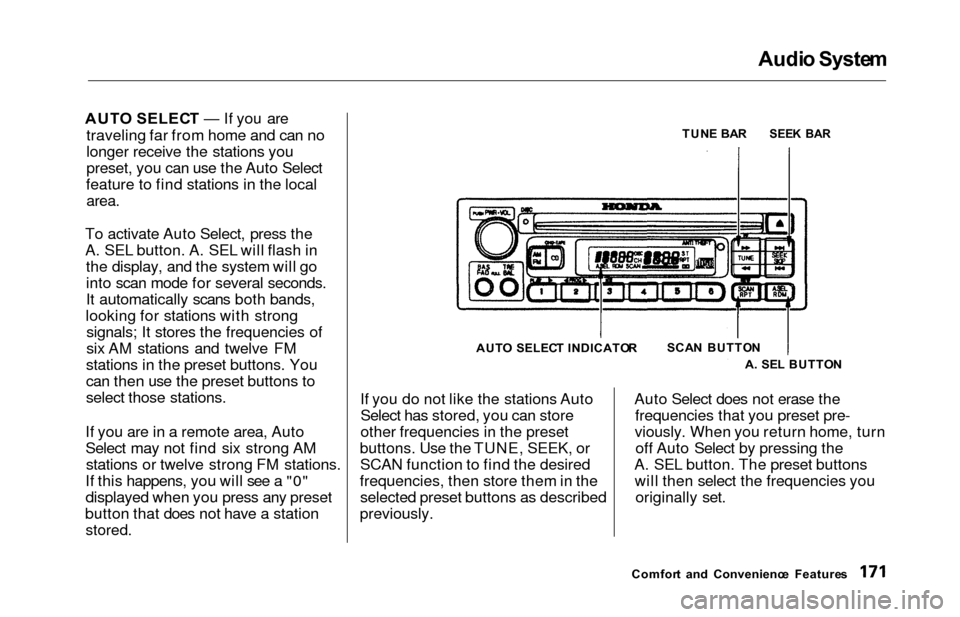
AUTO SELEC T — If you are
traveling far from home and can no
longer receive the stations you
preset, you can use the Auto Select
feature to find stations in the local
area.
To activate Auto Select, press the
A. SEL button. A. SEL will flash in the display, and the system will go
into scan mode for several seconds.
It automatically scans both bands,
looking for stations with strong signals; It stores the frequencies of
six AM stations and twelve FM
stations in the preset buttons. You
can then use the preset buttons to
select those stations.
If you are in a remote area, Auto
Select may not find six strong AM stations or twelve strong FM stations.
If this happens, you will see a "0"
displayed when you press any preset
button that does not have a station
stored.
If you do not like the stations Auto Select has stored, you can store
other frequencies in the preset
buttons. Use the TUNE, SEEK, or SCAN function to find the desired
frequencies, then store them in the selected preset buttons as described
previously. Auto Select does not erase the
frequencies that you preset pre-
viously. When you return home, turn off Auto Select by pressing the
A. SEL button. The preset buttons will then select the frequencies you originally set.
Comfor t an d Convenienc e Feature s
TUN
E BA R
SEE K BA R
SCA N BUTTO N
A . SE L BUTTO N
AUT
O SELEC T INDICATO R
Page 179 of 352

Audio Syste m
You can switch to the radio while a
CD is playing by pressing the AM/
FM button. Press the CD button to
return to playing the CD. The CD
will begin playing where it left off.
If you turn the system off while a CD
is playing, either with the PWR/VOL
knob or by turning off the ignition,
the disc will stay in the drive. When
you turn the system back on, the CD
will begin playing where it left off.
Press the eject button to remove the
disc from the drive.
If you eject the disc, but do not
remove it from the slot, the system
will automatically reload the disc after 15 seconds and put the CD
player in pause mode. To begin
playing the disc, press the CD button. You can use the TUNE and SEEK/
SKIP bars while a disc is playing toselect passages and change tracks.
To move rapidly within a track, press and hold the TUNE bar. Press the
side to move forward. You will
see CUE in the display. Press the
side to move backward. You
will see REW displayed. Release the bar when the system reaches the
point you want.
Each time you press the side of
the SEEK/SKIP bar, the system skips forward to the beginning of the
next track. Press the side toskip backward to the beginning of
the current track. Press it again to skip to the beginning of the previous
track. REPEA
T — To activate the Repeat
feature, press and release the RPT
button. You will see RPT in the display. The system continuously
replays the current track. Press the
RPT button again to turn it off.
RANDO M PLA Y — This feature,
when activated, plays the tracks on
the CD in random order, rather than in the order they are recorded on theCD. To activate Random Play, press
and release the A. SEL/RDM button.
You will see RDM in the display. The system will then select and play
tracks randomly. This continues
until you deactivate Random Play by
pressing A. SEL/RDM again.
If the system is in Repeat mode, you
must turn it off by pressing the RPT
button before selecting Random Play.
Comfor t an d Convenienc e Feature s