Page 188 of 352
Audio Syste m
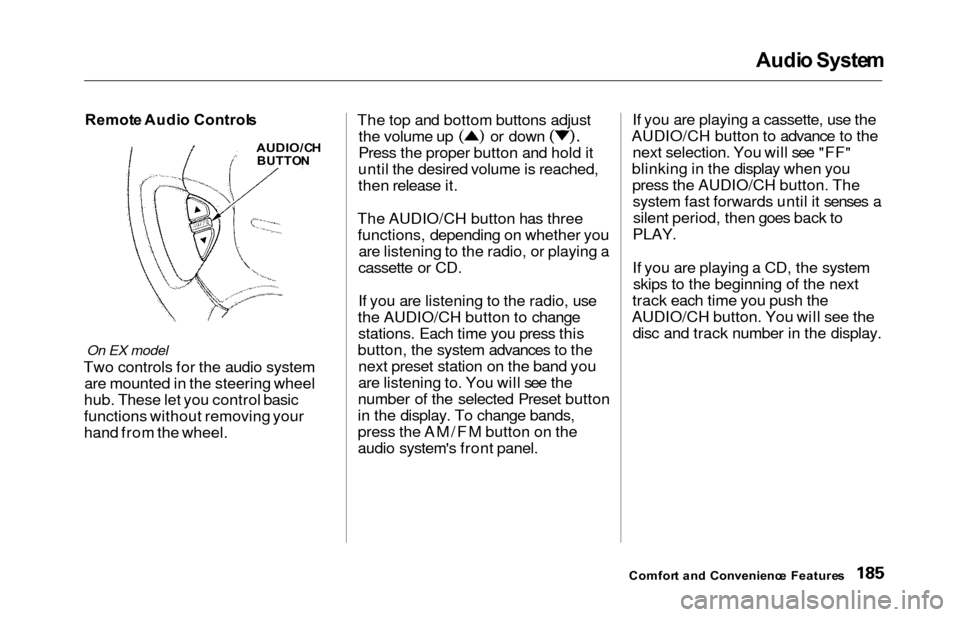
Remot e Audi o Control s
On EX model
Two controls for the audio system
are mounted in the steering wheel
hub. These let you control basic
functions without removing your
hand from the wheel. The top and bottom buttons adjust
the volume up or down
Press the proper button and hold it
until the desired volume is reached,
then release it.
The AUDIO/CH button has three functions, depending on whether you are listening to the radio, or playing a
cassette or CD.
If you are listening to the radio, use
the AUDIO/CH button to change stations. Each time you press this
button, the system advances to the next preset station on the band you
are listening to. You will see the
number of the selected Preset button
in the display. To change bands,
press the AM/FM button on the
audio system's front panel. If you are playing a cassette, use the
AUDIO/CH button to advance to the next selection. You will see "FF"
blinking in the display when you press the AUDIO/CH button. Thesystem fast forwards until it senses asilent period, then goes back to
PLAY.
If you are playing a CD, the system skips to the beginning of the next
track each time you push the
AUDIO/CH button. You will see the disc and track number in the display.
Comfor t an d Convenienc e Feature s
AUDIO/C H
BUTTO N
Page 189 of 352
Audio Syste m
Theft Protectio n
On EX model
Your vehicle's audio system will
disable itself if it is disconnected
from electrical power for any reason.
To make it work again, the user must enter a specific five-digit code
in the Preset buttons. Because there
are hundreds of number
combinations possible from fivedigits, making the system work
without knowing the exact code is nearly impossible.
You should have received a card that lists your audio system's codenumber and serial number. It is best
to store this card in a safe place at
home. In addition, you should write the audio system's serial number in
this Owner's Manual. If you should
happen to lose the card, you mustobtain the code number from your
Honda dealer. To do this, you will
need the system's serial number. If your vehicle's battery is discon-
nected or goes dead, or the radio
fuse is removed, the audio system
will disable itself. If this happens,
you will see in the frequency display the next time youturn on the system. Use the Preset
buttons to enter the five-digit code. Ifit is entered correctly, the radio willstart playing.
If you make a mistake entering the
code, do not start over or try to
correct your mistake. Complete the
five-digit sequence, then enter the correct code. You have ten tries toenter the correct code. If you are
unsuccessful in ten attempts, you
must then leave the system on for one hour before trying again. You will have to store your favorite
stations in the Preset buttons after
the system begins working. Your original settings were lost when
power was disconnected.
Comfor t an d Convenienc e Feature s
Page 218 of 352
Traction Contro l Syste m
The Traction Control System turns
on every time you start the engine,
even if you turned it off the last time
you drove the vehicle.TCS Indicator
The TCS indicator comes on or flashes under the following condi-tions:
When you turn the ignition switch
to ON (II).
When you manually turn off the
TCS.
It flashes when the TCS is
regulating wheelspin.
If the system's diagnostics senses
a problem in the TCS, the indica-
tor will come on and stay on.
If the brakes overheat, the
indicator will come on.
If the TCS indicator comes on and stays on for more than 10 minutes
while driving, pull to the side of the
road when it is safe and turn off the engine. Reset the system by
restarting the engine, and watch the
TCS indicator. If the indicator remains on, or comes back on whiledriving, have the system inspected
by your Honda dealer. You can still drive the vehicle without TCS.
This indicator will come on along with the ABS indicator if there is aproblem in the anti-lock brakesystem (see ABS Indicato r on page
212).
The TCS indicator may occasionally
come on for one or two seconds and
then go out. This is normal.
Drivin g
Page 261 of 352
Battery
If you need to connect the battery to
a charger, disconnect both cables to
prevent damage to the vehicle's electrical system.On EX model
If your vehicle's battery is
disconnected or goes dead, the audio
system will disable itself. The next
time you turn on the radio you will
see in the frequency
display. Use the Preset buttons to
enter the five-digit code (see page
186).
Charging the battery with the cables
connected can seriously damage your
vehicle's electronic controls. Detach the battery cables before connecting
the battery to a charger.
On EX model
If your vehicle's battery is
disconnected or goes dead while thesliding doors are open, the power
sliding door system needs to be
resynchronized (see page 93).
Maintenanc e
The battery gives off explosive
hydrogen gas during normal
operation.
A spark or flame can cause the battery to explode with enough
force to kill or seriously hurt you.
Wear protective clothing and a
face shield, or have a skilled mechanic do the battery
maintenance.
NOTIC E
Page 317 of 352
Fuses
If you cannot drive the vehicle
without fixing the problem, and you do not have a spare fuse, take a fuse
of the same rating or a lower rating
from one of the other circuits. Make sure you can do without that circuit
temporarily (such as the accessory
power socket or radio).
If you replace the blown fuse with a
spare fuse that has a lower rating, it
might blow out again. This does not
indicate anything wrong. Replace the
fuse with one of the correct rating as soon as you can.
Replacing a fuse with one that has a
higher rating greatly increases the
chances of damaging the electrical
system. If you do not have a replace-
ment fuse with the proper rating for the circuit, install one with a lower rating.
6. If the replacement fuse of the same rating blows in a short time,
there is probably a serious electrical problem in your vehicle.
Leave the blown fuse in that
circuit and have your vehicle checked by a qualified mechanic.
On EX model
If the radio fuse is removed, theaudio system will disable itself. The
next time you turn on the radio you
will see in the frequency display. Use the Preset buttons to
enter the five-digit code (see page
186).
Takin g Car e o f th e Unexpecte d
NOTICE
Page:
< prev 1-8 9-16 17-24