Page 98 of 352
HomeLink Universa l Transmitte r
On EX model
The HomeLink Universal
Transmitter built into your vehicle
can be programmed to operate
remotely controlled devices around
your home, such as garage doors, lighting, or home security systems.
It can replace up to three remote
transmitters.
Custome r Assistanc e
If you have problems with training
the HomeLink Universal Transmitter,
or would like information on home
products that can be operated by the
transmitter, call (800) 355-3515. On
the internet, go to
www.homelink.jci.com.
Importan t Safet y Precaution s
Always refer to the operating
instructions and safety information
that came with your garage door
opener or other equipment you
intend to operate with the HomeLink Universal Transmitter.
If you do not have this information,
you should contact the
manufacturer of the equipment.
While training or using the transmitter, make sure you have a
clear view of the garage door or
gate, and that no one will be injured
by its movement.
Genera l Informatio n
If you are training the transmitter to
operate a garage door or gate, it is
recommended that you unplug the
motor for that device during
training. Repeatedly pressing the
remote control button could burn
out the motor.
The HomeLink transmitter stores the code in a permanent memory.
There should be no need to retrain
the transmitter if your vehicle's
battery goes dead or is
disconnected.
If your garage door opener was manufactured before April 1982,
you may not be able to program the
HomeLink Universal Transmitter tooperate it. Garage door openers
manufactured before that date do
not have a safety feature that
causes them to stop and reverse ifan obstacle is detected during
closing, increasing the risk of injury. If you have questions, call(800) 355-3515.
Trainin g th e Transmitte r
Before you can use the HomeLink
Universal Transmitter to operate devices around your home, it must
"learn" the proper codes. For
example, to train the transmitter to
open and close the garage door:
CONTINUED
Instrument s an d Control s
Page 103 of 352
Seats
Seat Adjustment s
See pages 12 — 13 for important safety
information and warnings about how to
properly position seats and seat-backs.
The EX model has a power adjustable driver's seat. All other
models have manual driver's seat
adjustments.
The front passenger's seat, and the seats in the second and third rows
adjust manually.
Make all seat adjustments before
you start driving. To adjust the seat forward and
backward, pull up on the lever under
the seat cushion's front edge. Move
the seat to the desired position andrelease the lever. Try to move theseat to make sure it is locked in
position.
To adjust the bucket seats in the second row, pull up on the lever on
the front of the seat bottom.
Instrument s an d Control s
Page 129 of 352
Interio
r Light s
The cargo area light comes on when any door or the tailgate is opened if the switch in the light is
in the door activated (center)
position. When the doors and the
tailgate are closed, it can be turned on with the switch in the light. When the switch is in the ON
position:
All the individual map lights come
on and stay on as long as the
switch remains in the ON position. The cargo area light comes on and
stays on if the switch in the light is
in the door activated (center)
position.
On EX model
The lights go out about six seconds after all the doors and the tailgate
have closed.
With the light control switch in the Door Activated position, all the
individual map lights and the cargo
area light (with the switch in the
center position) come on when you
unlock the door with the remote
transmitter (see page 81).
With any door or the tailgate left open, the lights stay on about three
minutes, then go out.
Instrument s an d Control s
Page 136 of 352
Heating an d Coolin g
How to Us e th e Syste m
This section covers how to set up the
system controls for ventilation,
heating, cooling, dehumidifying, and
defrosting.
The engine must be running for the heater and air conditioning to
generate hot and cold air. The heater
uses engine coolant to warm the air.If the engine is cold, it will be several
minutes before you feel warm air
coming from the system.
The air conditioning does not rely on engine temperature.
It is best to leave the system in Fresh
Air mode under almost all conditions. Keeping the system in Recirculation
mode, particularly with the A/C off,
can cause the windows to fog up.
Switch to Recirculation mode when
you are driving through smoky or dusty conditions, then switch back to
Fresh Air mode when the conditionFA N CONTRO LDIALMOD E BUTTON STEMPERATUR ECONTROL DIA L
RECIRCULATIO N
BUTTO N
clears.
The outside air intakes for the
heating and cooling system are atthe base of the windshield. Keep
these clear of leaves and other
debris.
Ventilation
The flow-through ventilation system draws in outside air, circulates it
through the interior, then exhausts it
through vents near the rear side
panels.
1. Turn the temperature control dial all the way to the left.
Make sure the A/C is off.
2. Select and Fresh Air mode.
3. Set the fan to the desired speed.
Comfor t an d Convenienc e Feature s
CONTINUED
AIR CONDITIONIN G
BUTTO N
Page 137 of 352
Heating an d Coolin g
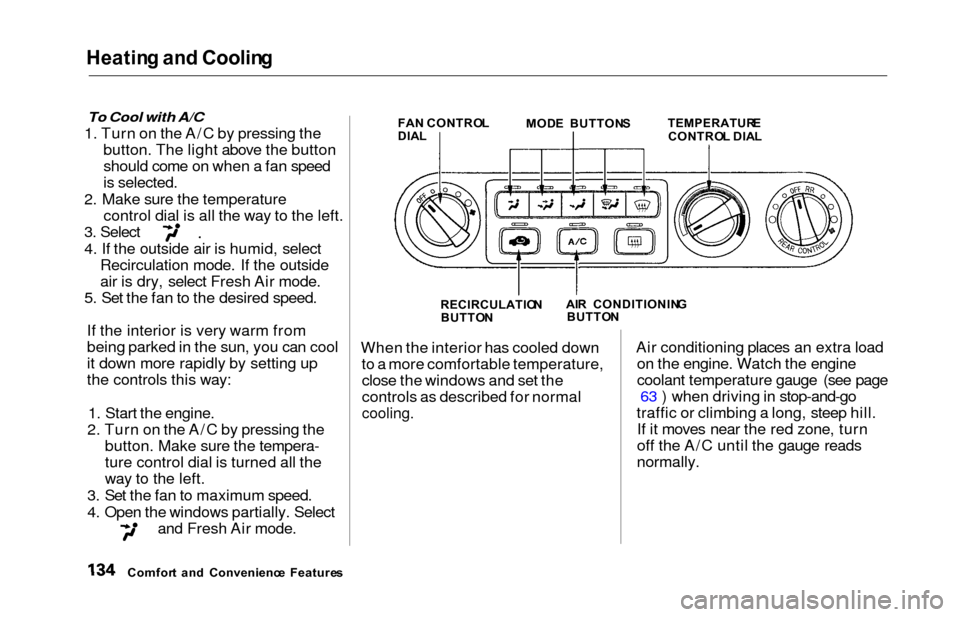
To Cool with A/C
1. Turn on the A/C by pressing the
button. The light above the button
should come on when a fan speed
is selected.
2. Make sure the temperature control dial is all the way to the left.
3. Select
4. If the outside air is humid, selectRecirculation mode. If the outside
air is dry, select Fresh Air mode.
5. Set the fan to the desired speed.
If the interior is very warm from
being parked in the sun, you can cool
it down more rapidly by setting up
the controls this way:
1. Start the engine.
2. Turn on the A/C by pressing the button. Make sure the tempera-
ture control dial is turned all the
way to the left.
3. Set the fan to maximum speed.
4. Open the windows partially. Select
and Fresh Air mode.
FA N CONTRO L
DIA L MOD
E BUTTON S TEMPERATUR ECONTROL DIA L
RECIRCULATIO N
BUTTO N AI
R CONDITIONIN G
BUTTO N
When the interior has cooled down
to a more comfortable temperature,close the windows and set the
controls as described for normal
cooling.
Air conditioning places an extra load on the engine. Watch the engine
coolant temperature gauge (see page 63 ) when driving in stop-and-go
traffic or climbing a long, steep hill. If it moves near the red zone, turn
off the A/C until the gauge reads
normally.
Comfor t an d Convenienc e Feature s
Page 143 of 352
Climate Contro l Syste m
EX model without Navigation System
Fully-automati c Operatio n
To put the Automatic Climate Control in fully-automatic mode,
press the AUTO button and set the
fan control dial to AUTO, then set the desired temperature by turning
the temperature control dial. You will see FULL AUTO in the system's
display. The light above the
button also shows you which
mode, Recirculation or Fresh Air, is
selected.
The system automatically selects the proper mix of conditioned and/or
heated air that will, as quickly as
possible, raise or lower the interior
temperature from its current level to
the set temperature.
TEMPERATUR ECONTROL DIA LFUL L AUT O
DISPLA YFAN CONTRO L DIA L
AUT O BUTTO N
Comfor t an d Convenienc e Feature s
OFF BUTTO N
Page 145 of 352

Climate Contro l Syste m
Semi-automati c Operatio n
You can manually select various
functions of the Climate Control system when it is in FULL AUTO.
All other features remain auto- matically controlled. Making any
manual selection causes the word
FULL to go out.
Air Conditioning (A/C) Button
Press the A/C button to turn the air
conditioning on and off. You will see
A/C ON or A/C OFF in the display.
When you turn the A/C off, the sys- tem cannot regulate the inside tem-
perature if you set the dial below theoutside temperature. With the A/C
on, use the temperature control dial
to adjust the temperature of the air
flow to a comfortable setting.
TEMPERATUR ECONTROL DIA L
AI R CONDITIONIN G
BUTTO N
RECIRCULATIO N BUTTO N
Recirculation Button
This button controls the source of
the air going into the system. When
the indicator above this button is lit,air from the vehicle's interior is sent
through the system again (Recircula-
tion mode). When the indicator is off, air is brought in from outside the
vehicle (Fresh Air mode). You can, for example, manually put
the system in recirculation mode
when driving through an area of
smoke or fumes.
Comfor t an d Convenienc e Feature s
Page 163 of 352
Audio Syste m
Audio Syste m Lightin g
You can use the instrument panel brightness control knob to adjust theillumination of the audio system (see
page 67 ). The audio system illuminates when the parking lightsare on, even if the radio is turned off.
Operatin g th e Cassett e Playe r
Turn the audio system ON. Make sure the tape opening on the cassette
is facing to the right, then insert the cassette most of the way into the slot.
The system will pull it in the rest of the way, and begin to play.
The tape direction indicator will light to show you which side of the
cassette is playing. The indicatesthe side you inserted facing upward
is now playing. If you want to play
the other side, press the PROG
button. Dolby B noise reduction turns on
when you insert a cassette. If the tape was not recorded with Dolby B
noise reduction, turn it off by
pressing the button.
When the system reaches the end of
the tape, it will automatically reversedirection and play the other side. If
you want to remove the cassette from the drive, press the EJECT
button.
Tap e Searc h Function s
With a cassette playing, you can use the FF, REW, SKIP, or REPEAT
function to find a desired program.
FF/RE W — Fast Forward and Re-
wind move the tape rapidly. To re-
wind the tape, push the REW button.
You will see REW in the display. To fast forward the tape, push the FF
button. You will see FF displayed. Press the PLAY button to take the
system out of rewind or fast forward. If the system reaches the end of the
tape while in fast forward or rewind,
it automatically stops that function,
reverses direction, and begins to play.
SKI P — The Skip Function allows
you to find the beginning of a song or passage. To find the beginning of
the song or passage currently
playing, push the SKIP switch down.
You will see REW flashing in the display as the tape rewinds. To find
the beginning of the next song, push
the SKIP switch up. You will see FF
flashing in the display as the tape
fast forwards. When the system
finds the beginning of a song or
passage, it goes back to PLAY mode.
Comfor t an d Convenienc e Feature s