2000 HONDA ODYSSEY ECO mode
[x] Cancel search: ECO modePage 63 of 352

Indicator Light s
Power Slidin g Doo r
Indicato r
EX model only
This indicator comes on for a few
seconds when you turn the ignition
switch ON (II). If it comes on at anyother time, there is a problem in the
power sliding door system. With this
light on, move the main switch on
the dashboard to the OFF position, and have the system checked by
your Honda dealer as soon as possible. You can still open or closeeach sliding door manually. For
more information on the power
sliding doors, see page 90.
Tur n Signa l an d
Hazar d Warnin g
Indicator s
The left or right turn signal light blinks when you signal a lane change or turn. If the light does not blink or
blinks rapidly, it usually means one of the turn signal bulbs is burned out (see page 273). Replace the bulb as
soon as possible, since other drivers
cannot see that you are signalling.
When you turn on the Hazard
Warning switch, both turn signal lights blink. All turn signals on theoutside of the vehicle should flash. Doo
r an d Brak e Lam p Monito r
The appropriate light comes on in this display if the tailgate or any dooris not closed tightly. If a brake light
does not work, the BRAK E LAM P
indicator comes on when you push
the brake pedal with the ignition switch ON (II).
A burned out brake light is a hazard
when drivers behind you cannot tell
you are braking. Have your brake lights repaired right away.
All the lights in the monitor display come on when you turn the ignitionswitch ON (II). The lights go off
after the engine starts and the
tailgate and all doors are closed
tightly.
Instrument s an d Control s
SLIDINGDOOR
BRAKE LAMP
Page 70 of 352
Control
s Nea r th e Steerin g Whee lAutomatic Lightin g Of f Featur e
On EX model
The Automatic Lighting Off feature
turns off the headlights, parking
lights, taillights, side marker lights,
license plate lights and instrument panel lights within 15 seconds of
removing the key from the ignition switch and closing the driver's door.
This feature activates if you leave
the headlight switch in the or
position, remove the key, open,
then close the driver's door. If you remove the key from the
ignition switch with the headlight switch on, but do not open the door
and get out, the lights will turn off
after 10 minutes. The lights will turn on again when
you unlock or open the driver's door.If you unlock the door, but do notopen it within 15 seconds, the lights
will go off. With the driver's door open, you will hear a lights-on
reminder chime.
Daytim e Runnin g Light s
(Canadia n Models )
With the headlight switch off, the
high beam headlights come on withreduced brightness when you turn
the ignition switch to ON (II) and
release the parking brake. They
remain on until you turn the ignitionoff, even if you set the parking brake.
The headlights revert to normal operation when you turn them on
with the switch. Instrumen
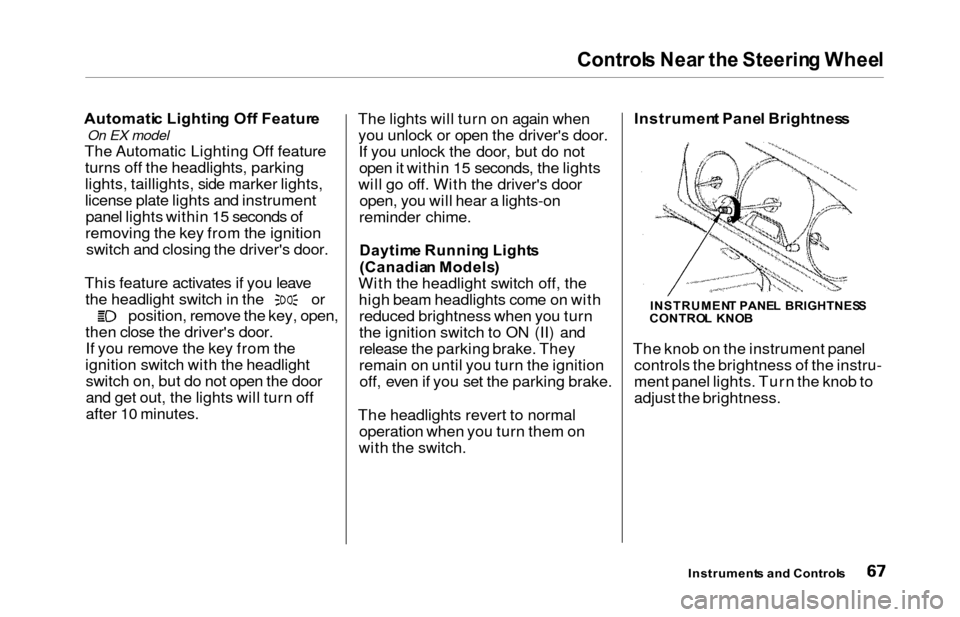
t Pane l Brightnes s
The knob on the instrument panel controls the brightness of the instru-
ment panel lights. Turn the knob to
adjust the brightness.
Instrument s an d Control s
INSTRUMEN T PANE L BRIGHTNES S
CONTRO L KNO B
Page 72 of 352
Controls Nea r th e Steerin g Whee l
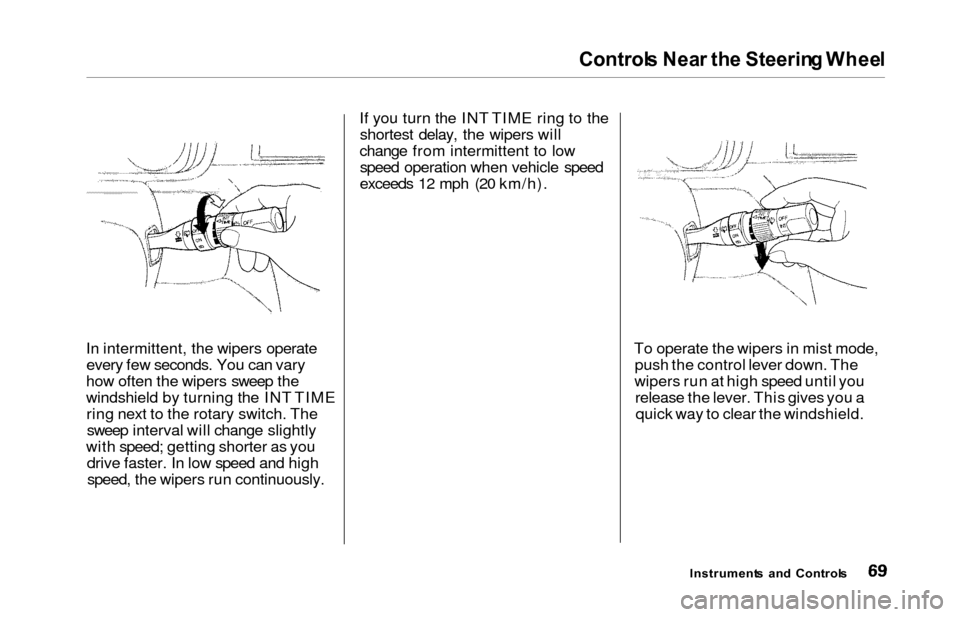
In intermittent, the wipers operate
every few seconds. You can vary
how often the wipers sweep the
windshield by turning the INT TIME ring next to the rotary switch. Thesweep interval will change slightly
with speed; getting shorter as you drive faster. In low speed and highspeed, the wipers run continuously. If you turn the INT TIME ring to the
shortest delay, the wipers will
change from intermittent to low speed operation when vehicle speed
exceeds 12 mph (20 km/h).
To operate the wipers in mist mode,push the control lever down. The
wipers run at high speed until you release the lever. This gives you aquick way to clear the windshield.
Instrument s an d Control s
Page 80 of 352
Keys an d Lock s
These keys contain electronic
circuits that are activated by the
Immobilizer System. They will not
work to start the engine if the circuits are damaged.
Protect the keys from directsunlight, high temperature, and
high humidity.
Do not drop the keys or set heavy
objects on them.
Keep the keys away from liquids.
If they get wet, dry them immedi-
ately with a soft cloth.
The keys do not contain batteries. Do not try to take them apart.
Remote Transmitter
Some models also come with a
remote transmitter; see page 81 for
an explanation of its operation. Immobilize
r Syste m
The Immobilizer System protects
your vehicle from theft. A properly- coded master or valet key must be
used in the ignition switch for theengine to start. If an improperly-
coded key (or other device) is used,
the engine's fuel system is disabled.
When you turn the ignition switch to ON (II), the Immobilizer System
indicator should come on for a few seconds, then go out. If the indicator
starts to blink, it means the system
does not recognize the coding of the
key. Turn the ignition switch to LOCK (0), remove the key, reinsert
it, and turn the switch to ON (II)
again.
The system may not recognize your key's coding if another immobilizer
key or other metal object is near the ignition switch when you insert the
key. To make sure the system recognizes the key code: Do not keep other immobilizer
keys on the same key ring.
Use a plastic or leather key fob,
not metal.
Keep other keys away from your
vehicle's key and the ignition switch while trying to start the
engine.
If the system repeatedly does not
recognize the coding of your key,
contact your Honda dealer.
This indicator will also blink several
times when you turn the ignitionswitch from ON (II) to ACCESSORY (I) or LOCK (0).
Do not attempt to alter this system
or add other devices to it. Electrical
problems could result that may make
your vehicle undriveable. If you have lost your key and you
cannot start the engine, contact your
Honda dealer.
Instrument s an d Control s
CONTINUED
Page 84 of 352
Keys an d Lock s
Remot e Transmitte r
On EX model
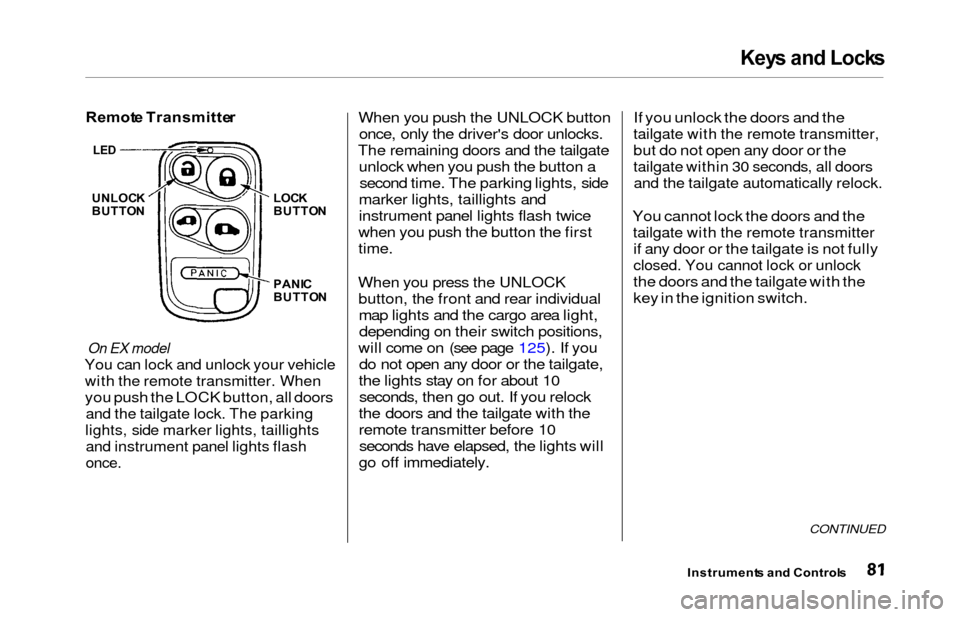
You can lock and unlock your vehicle
with the remote transmitter. When
you push the LOCK button, all doors
and the tailgate lock. The parking
lights, side marker lights, taillights
and instrument panel lights flash
once.
When you push the UNLOCK button
once, only the driver's door unlocks.
The remaining doors and the tailgate unlock when you push the button asecond time. The parking lights, side
marker lights, taillights and
instrument panel lights flash twice
when you push the button the first
time.
When you press the UNLOCK button, the front and rear individualmap lights and the cargo area light,depending on their switch positions,
will come on (see page 125). If you do not open any door or the tailgate,
the lights stay on for about 10 seconds, then go out. If you relock
the doors and the tailgate with the
remote transmitter before 10 seconds have elapsed, the lights will
go off immediately. If you unlock the doors and the
tailgate with the remote transmitter,
but do not open any door or the
tailgate within 30 seconds, all doors
and the tailgate automatically relock.
You cannot lock the doors and the
tailgate with the remote transmitter
if any door or the tailgate is not fully
closed. You cannot lock or unlock
the doors and the tailgate with the
key in the ignition switch.
CONTINUED
Instrument
s an d Control s
UNLOCK
BUTTO N LOC
K
BUTTO N
PANI C
BUTTO N
LED
Page 85 of 352
Keys an d Lock s
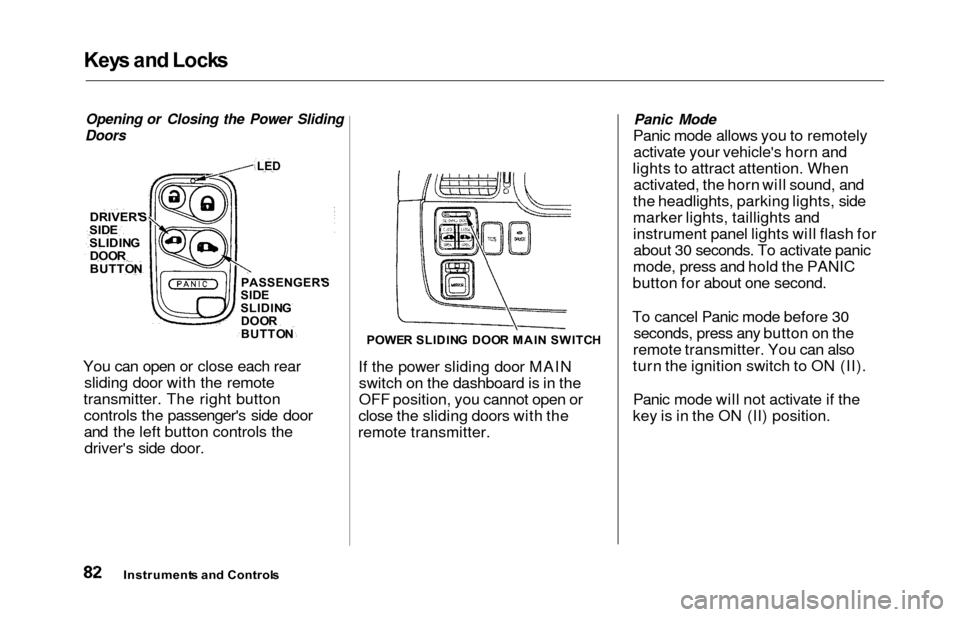
Opening or Closing the Power Sliding
Doors
You can open or close each rear sliding door with the remote
transmitter. The right button controls the passenger's side door
and the left button controls thedriver's side door.
POWE R SLIDIN G DOO R MAI N SWITC H
If the power sliding door MAIN
switch on the dashboard is in the
OFF position, you cannot open or
close the sliding doors with the
remote transmitter.
Panic Mode
Panic mode allows you to remotely activate your vehicle's horn and
lights to attract attention. When activated, the horn will sound, and
the headlights, parking lights, side
marker lights, taillights and
instrument panel lights will flash for about 30 seconds. To activate panic
mode, press and hold the PANIC
button for about one second.
To cancel Panic mode before 30 seconds, press any button on the
remote transmitter. You can also
turn the ignition switch to ON (II).
Panic mode will not activate if the
key is in the ON (II) position.
Instrument s an d Control s
DRIVER'
S
SIDESLIDIN G
DOO R
BUTTO NPASSENGER' S
SID E
SLIDIN G
DOO R
BUTTO N
LED
Page 94 of 352
Power Slidin g Door s (E X Model )
To open a door, make sure the door
is unlocked. Then push and release
the bottom of the switch. If you
forget to unlock the door first, you
will hear three beeps. Unlock the door and try again.
To close a sliding door, push and release the top of the appropriate
switch.
To stop the power sliding door'smovement, push either the top or the
bottom of the appropriate switch.
The door will stop, and you will hear three beeps.
To start the door moving again, push the switch again: bottom to open, or
top to close.
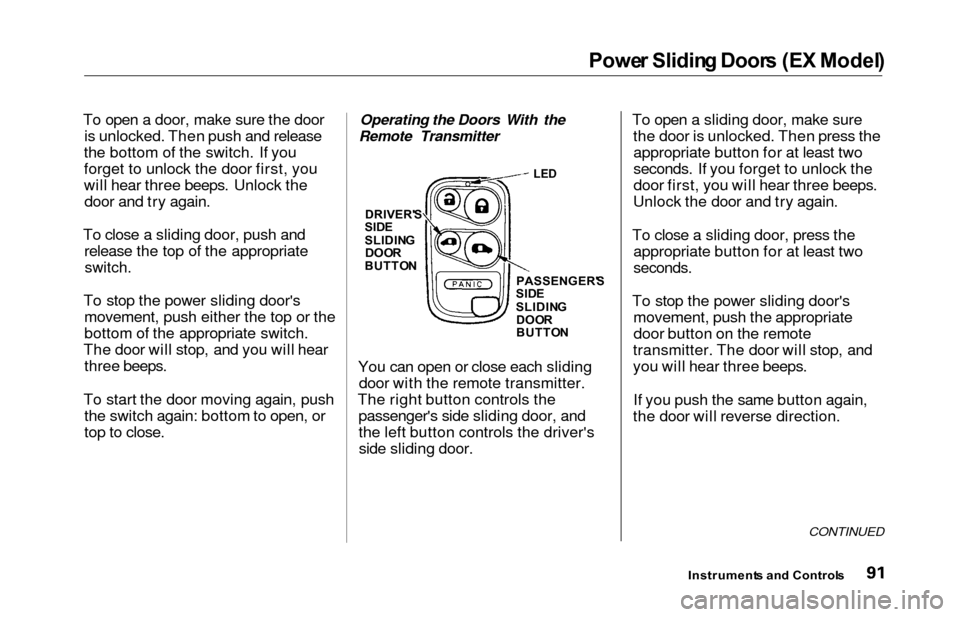
Operating the Doors With the
Remote Transmitter
You can open or close each slidingdoor with the remote transmitter.
The right button controls the passenger's side sliding door, and
the left button controls the driver'sside sliding door. To open a sliding door, make sure
the door is unlocked. Then press theappropriate button for at least two
seconds. If you forget to unlock the
door first, you will hear three beeps.
Unlock the door and try again.
To close a sliding door, press the appropriate button for at least two
seconds.
To stop the power sliding door'smovement, push the appropriate
door button on the remote
transmitter. The door will stop, and
you will hear three beeps.
If you push the same button again,
the door will reverse direction.
CONTINUED
Instrument s an d Control s
LED
DRIVER' S
SID E
SLIDIN G
DOORBUTTO N
PASSENGER'S
SID E
SLIDIN G
DOO R
BUTTO N
Page 96 of 352
Power Slidin g Door s (E X Model )
If a person or object is in the way
after the door begins to close, the
door handles cannot be used to stop
the door. To stop the door, use the dashboard switches or the remote
transmitter.
A Note About Refueling
Before refueling, make sure the driver's side sliding door is fully
closed. When you release the fuel fill
door, the driver's side sliding door
automatically locks so it cannot open
and interfere with the fuel door. If a
passenger attempts to unlock the door by cycling the lock knob several
times, the door may unlock and can be opened.
If a passenger needs to get out of the
vehicle while you are refueling, instruct that person to exit on the
passenger's side, not the driver's
side.
After you close the fuel fill door, the sliding door does not automatically
unlock. You must unlock it manually.
Parking Facing Downhill
When parking facing downhill on a steep grade, the power sliding doors
may not open or close as they do
normally.
Make sure the MAIN switch is in
the ON position. This allows the
power assist to keep the doors
from slamming shut.
If the MAIN switch is off, the doorcan slam shut and possibly injure
someone.
Make sure the power sliding doors
are latched in the fully-open
position, then hold the door open
while allowing your passengers to enter or exit the vehicle. Do not
pull the inside or outside door
handle, or the latch will release
and the door will close.
How to Reset the Power Sliding
Doors
If your vehicle's battery is
disconnected or goes dead while asliding door is open, the power
sliding door system needs to be reset.
After reconnecting the battery:
Close each sliding door completely
by hand; or
Move the MAIN switch on the
dashboard to the ON position.
Push and hold the top of each door switch until each sliding door
closes completely.
If the power sliding doors are closed, the system will reset itselfautomatically once the battery has
been reconnected. If the power sliding doors do notoperate properly after resetting,
have your vehicle checked by a Honda dealer.
Instrument s an d Control s
CONTINUED