2000 HONDA ODYSSEY spare
[x] Cancel search: sparePage 302 of 352
Changing a Fla t Tir e
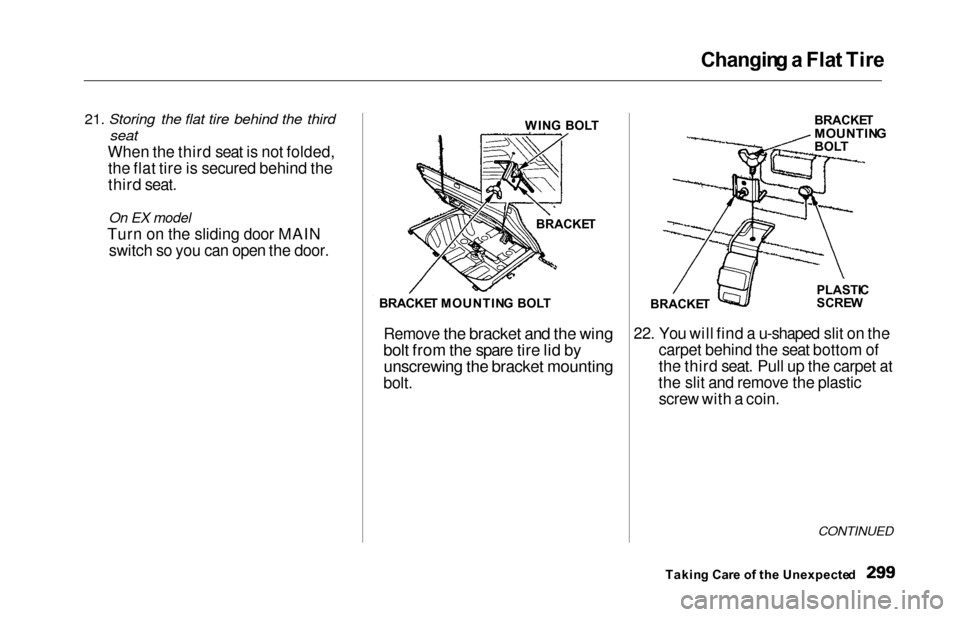
21. Storing the flat tire behind the third
seat
When the third seat is not folded,
the flat tire is secured behind the
third seat.
On EX model
Turn on the sliding door MAIN switch so you can open the door.
Remove the bracket and the wing
bolt from the spare tire lid by unscrewing the bracket mounting
bolt. 22. You will find a u-shaped slit on the
carpet behind the seat bottom of
the third seat. Pull up the carpet at
the slit and remove the plastic screw with a coin.
CONTINUED
Takin g Car e o f th e Unexpecte d
WIN
G BOL T
BRACKE T
BRACKE T MOUNTIN G BOL T BRACKE
T
MOUNTIN GBOLT
PLASTI C
SCRE W
BRACKE T
Page 303 of 352
Changing a Flat Tire
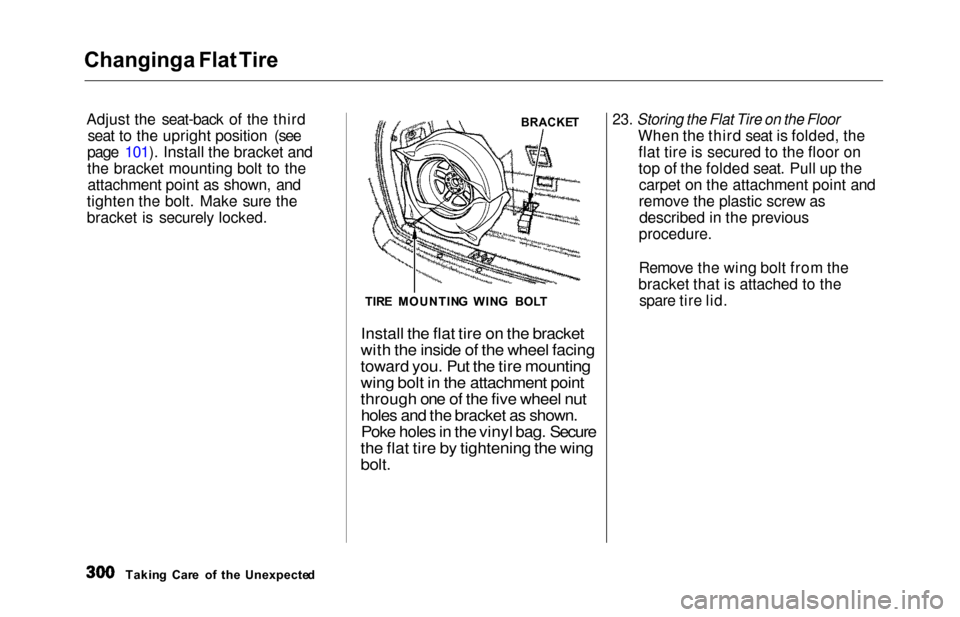
Adjust th
e seat-back of the third
seat to the upright position (see
page 101). Install the bracket and
the bracket mounting bolt to the attachment point as shown, and
tighten the bolt. Make sure the
bracket is securely locked.
23. Storing the Flat Tire on the Floor
When the third seat is folded, the
flat tire is secured to the floor on
top of the folded seat. Pull up thecarpet on the attachment point and
remove the plastic screw asdescribed in the previous
procedure.
Remove the wing bolt from the
bracket that is attached to the spare tire lid.
Takin g Car e o f th e Unexpecte d
BRACKE T
TIR E MOUNTIN G
WIN
G BOL T
Install the flat tire on the bracket
with the inside of the wheel facing
toward you. Put the tire mounting
wing bolt in the attachment point
through one of the five wheel nut
holes and the bracket as shown.
Poke holes in the vinyl bag. Secure
the flat tire by tightening the wing
bolt.
Page 304 of 352
Changin
g a Fla t Tir e
TIR E MOUNTIN G WIN G BOL T
ATTACHMEN T POIN T
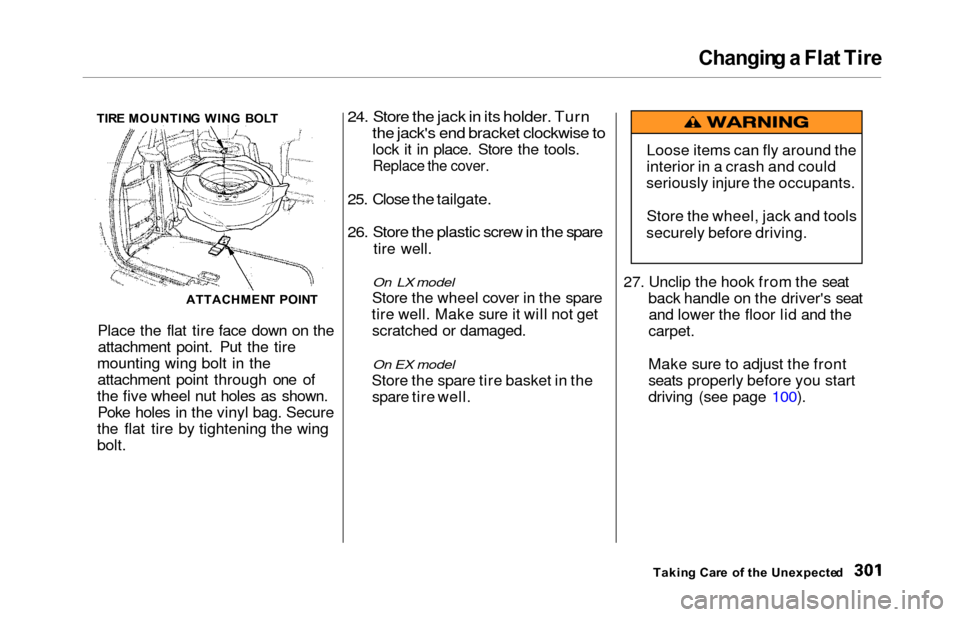
Place the flat tire face down on the attachment point. Put the tire
mounting wing bolt in the attachment point through one of
the five wheel nut holes as shown. Poke holes in the vinyl bag. Secure
the flat tire by tightening the wing
bolt.
24. Store the jack in its holder. Turn
the jack's end bracket clockwise to
lock it in place. Store the tools.
Replace the cover.
25. Close the tailgate.
26. Store the plastic screw in the spare
tire well.
On LX model
Store
th
e wheel cover in the spare
tire well. Make sure it will not get scratched or damaged.
On EX model
Store th
e spare tire basket in the
spare tire well. 27. Unclip the hook from the seat
back handle on the driver's seat
and lower the floor lid and the
carpet.
Make sure to adjust the front
seats properly before you start
driving (see page 100).
Takin g Car e
o
f th e Unexpecte d
Loose items can fly around the
interior in a crash and could
seriously injure the occupants.
Store the wheel, jack and tools
securely before driving.
Page 316 of 352

Fuses
3. Check each of the large fuses in
the primary under-hood fuse box
by looking through the top at the
wire inside. Removing these fuses requires a Phillips-head screw-driver. 4. Check the smaller fuses in the
under-hood fuse box and all the
fuses in the interior fuse boxes by
pulling out each fuse with the fuse
puller provided in the primary
under-hood fuse box.
5. Look for a burned wire inside the fuse. If it is burned, replace it with
one of the spare fuses of the same rating or lower.
CONTINUED
Takin g Car e o f th e Unexpecte d
BLOWNFUSE PULLE R
BLOWN
Page 317 of 352
Fuses
If you cannot drive the vehicle
without fixing the problem, and you do not have a spare fuse, take a fuse
of the same rating or a lower rating
from one of the other circuits. Make sure you can do without that circuit
temporarily (such as the accessory
power socket or radio).
If you replace the blown fuse with a
spare fuse that has a lower rating, it
might blow out again. This does not
indicate anything wrong. Replace the
fuse with one of the correct rating as soon as you can.
Replacing a fuse with one that has a
higher rating greatly increases the
chances of damaging the electrical
system. If you do not have a replace-
ment fuse with the proper rating for the circuit, install one with a lower rating.
6. If the replacement fuse of the same rating blows in a short time,
there is probably a serious electrical problem in your vehicle.
Leave the blown fuse in that
circuit and have your vehicle checked by a qualified mechanic.
On EX model
If the radio fuse is removed, theaudio system will disable itself. The
next time you turn on the radio you
will see in the frequency display. Use the Preset buttons to
enter the five-digit code (see page
186).
Takin g Car e o f th e Unexpecte d
NOTICE
Page 344 of 352

Index
Checklist, Before Driving............. 202
Childproof Door Locks.................. . 85
Child Safety..................................... . 22
Cleaner Element, Air..................... 252
Cleaning
Aluminum Wheels.................... 285
Carpeting................................... . 286
Exterior....................................... 284
Fabric.......................................... 286
Interior........................................ 286
Seat Belts.................................... 286
Vinyl........................................... . 286
Windows.................................... . 287
Climate Control System................ 138
Clock, Setting the.......................... 117 Coat Hook....................................... 123
Code, Audio System ..................... 186
CO in the Exhaust ........................ 328
Coin Holder................................... . 122
Cold Weather, Starting in............. 203
Compact Spare............................... 292
Consumer Information*................ 332
Controls, Instruments and.............. 55
Coolant
Adding ........................................ 243
Checking ....................................
193
Proper Solution.......................... 243
Replacing.................................... 245
Temperature Gauge.................... 63
Corrosion Protection..................... 288
Crankcase Emissions Control
System......................................... 328
Cruise Control Operation .............. 73
Customer Relations Office........... 332
DANGER, Explanation of................. ii
Dashboard.................................... 2, 56
Daytime Running Lights................. 67
Dead Battery, What to Do............ 303
Defects, Reporting Safety............. 336
Defogger, Rear Window................. 71 Defrosting the Windows...... 135, 145
DEXRON
® III Automatic
Transmission Fluid.................... 249
Dimensions..................................... 322
Dimming the Headlights................ 66
Dipstick Automatic Transmission........... 249
Engine Oil................................... 192
Directional Signals........................... 68
Disabled, Towing Your
Vehicle If..................................... 317
Disc Brake Wear Indicators ........ 210
Disposal of Used Oil ................... 242
Doors
Locking and Unlocking ............. 79
Lockout Prevention ................... 80
Manual Sliding Doors.................. 88
Monitor Light .............................. 60
Power Door Locks....................... 79
Power Sliding Doors .................. 90
DOT Tire Quality Grading........... 324
Drive Belts..................................... 262
Driver and Passenger Safety .......... 5
Driving............................................ 201
Economy.................................... 194
In Bad Weather ....................... 216
In Foreign Countries ............... 327
Economy, Fuel............................... 194
Emergencies on the Road............. 291
Battery, Jump Starting.............. 303
CONTINUED
Page 349 of 352

Index
Safety Labels, Location of.............. 54
Safety Messages................................ ii
Seat Belt, Additional Information.. 45 Lap/Shoulder Belt....................... 45Seat Belt Maintenance................ 47
Seat Belt System Components... 45
Seat Belts..................................... . 8, 45
Cleaning...................................... 286
Maintenance................................ . 47
Reminder Light and Beeper................................. 45, 57
System Components.................... 45
Tether Attachment Points.......... 43 Use During Pregnancy................ 20
Wearing a Lap/Shoulder Belt.... 15
Seats................................................. 99
Adjustments............................... 100
Folding the Third Seat .............. 109
Head Restraints ........................ 104
Passenger Seating....................... 99
Reclining the Second Seat ....... 101
Reclining the Third Seat ........... 101
Removing the Second
Seats........................................ 108
Third Seat Access ...................... 105
Serial Number................................ 320
Service Intervals............................ 230
Service Manual*............................ 337
Service Station Procedures .......... 189
Setting the Clock .......................... 117
Shifting the Automatic Transmission.............................. 205
Shift Lever Position Indicator...... 204 Shift Lock Release......................... 20 7
Side Marker Lights, Bulb
Replacement in.......................... 273
Signaling Turns................................ 68
Sliding Doors.................................... 88
Snow Tires...................................... 269
Solvent-type Cleaners.................... 284
Sound System........................ 155, 16 7
Spare Tire Inflating...................................... . 292
Specifications............................. 323
Spark Plugs..................................... 254
Specifications Charts..................... 322
Speed Control................................... 7 3
Speedometer.................................... 62
SRS, Additional Information........... 48 Additional Safety Precautions.... 52How the Automatic Seat Belt Tensioners Work..................... 50
How the SRS Indicator
Works........................................ 50
How Your Airbags Work............ 48
SRS Components ....................... . 48
SRS Service ................................. 51
SRS Indicator ............................. 50, 58
START (Ignition Key Position)..... 79
Starting the Engine........................ 203 In Cold Weather at High
Altitude.................................. . 203
With a Dead Battery................. 303
Steam Coming from Engine......... 305
Steering Wheel Adjustment.................................. . 72
Anti-theft Column Lock.............. 78
Stereo Sound System........... 155, 167
Storing Your Vehicle.................... 28 1
Storage Box.................................... 123
Sunglasses Holder......................... 120
Sun Visor......................................... 121
Supplemental Restraint System Servicing...................................... . 51
SRS Indicator......................... 50, 58
System Components.................... 48
Synthetic Oil................................... 240
Page 350 of 352

Index
Tachometer...................................... 62
Tailgate............................................. 85
Opening the.................................. 85
Open Monitor Light.................... 60
Taillights, Changing Bulbs in....... 275
Taking Care of the Unexpected .. 291
Tape Player ........................... 160, 181
Technical Descriptions DOT Tire Quality Grading....... 324
Driving in Foreign Countries... 327
Emissions Control Systems...... 328Oxygenated Fuels...................... 326
Three Way Catalytic Converter................................ 330
Temperature Gauge........................ 63 Tensioners, Seat Belts.................... 50Tether Attachment Points.............. 43
Theft Protection............................ .
186
Three Way Catalytic Converter... 330
Time, Setting the........................... 117
Timing Belt..................................... 263
Tire Chains..................................... 269
Tire, How to Change a Flat.......... 293 Tires...............................................
. 263
Air Pressure.............................. . 263
Balancing.................................... 266
Checking Wear.......................... 265
Compact Spare........................... 292
DOT Tire Quality Grading....... 324
Inflation....................................... 263
Inspection................................... 265 Replacing.................................... 267
Rotating....................................... 266
Snow........................................... . 269
Specifications............................ . 323
Tire Chains................................. 269
Towing
A Trailer ................................. 218
Emergency Wrecker................. 317
Traction Control System (TCS)... 213
Transmission
Checking Fluid Level................ 249
Fluid Selection........................... . 249
Identification Number............... 321
Shifting the Automatic.............. 205
Treadwear...................................... 324
Trip Meter......................................... 63
Turn Signals..................................... 68
Tools, Tire Changing ................... 293
Underside, Cleaning...................... 288
Unexpected, Taking Care
of the .......................................... 29 1
Uniform Tire Quality Grading .... 324
Unleaded Gasoline......................... 188
Upholstery Cleaning...................... 286
Used Oil, How to Dispose of........ 242
Vanity Mirror................................. 121
Vehicle Capacity Load.......... 198, 218
Vehicle Dimensions....................... 322
Vehicle Identification Number..... 320
Vehicle Storage.............................. 281
Ventilation............................. 133, 138
VIN ................................................. 320
Vinyl Cleaning ............................... 286
Viscosity, Oil.................................. . 240
CONTINUED