Page 36 of 224

approximately eight seconds. This continues until
you press the SCAN control a second time or eject
the CD. While in the scan mode, the display flashes
SCAN.
Reverse/fast forward
To quickly search for a
particular point in a
selection, press the
right side of the REV/FF control (to fast forward) or
the left side (to reverse). If you hold down the
desired function for longer than a few seconds, the
process will speed up. Release the button when you
have reached the desired point of the CD.
If you hold down the fast forward control until the
end of the CD is reached, the display will show the
end time of the last track and the sound will be
muted. When the fast forward control is released,
the player will resume play at the beginning of the
first track.
AMS control
The AMS (Automatic
Music Search) control
on your CD player
allows you to quickly find a particular selection on
the disc. Press the left side of the AMS control to
locate a previous selection, or the right side to
locate a later selection.
Compression feature
Press the COMPRESS
control to activate (and
deactivate)
compression adjust.
Compression adjust brings soft and loud CD
passages together for a more consistent listening
level.
REV/FF
AMS
COMPRESS
Controls and features
36
Page 38 of 224

Cleaning compact discs
Inspect all discs for contamination before playing. If
necessary, clean discs only with an approved CD
cleaner and wipe from the center out to the edge.
Do not use circular motion.
CD and CD player care
²Handle discs by their edges only. Never touch the
playing surface.
²Do not expose discs to direct sunlight or heat
sources for extended periods of time.
²Do not insert more than one disc into the slot of
the CD player.
Cleaning cassette player (if equipped)
Clean the tape player head with a cassette cleaning
cartridge after 10 to 12 hours of play in order to
maintain the best sound and operation.
Cassette and cassette player care
²Use only cassettes that are 90 minutes long or
less.
²Do not expose tapes to direct sunlight, high
humidity, extreme heat or extreme cold. Allow
tapes that may have been exposed to extreme
temperatures to reach a moderate temperature
before playing.
²Tighten very loose tapes by inserting a finger or
pencil into the hole and turning the hub.
²Remove loose labels before inserting tapes.
²Do not leave tapes in the cassette player for a
long time when not being played.
Radio frequency information
The Federal Communications Commission (FCC)
and the Canadian Radio and Telecommunications
Commission(CRTC) establish the frequencies AM
Controls and features
38
Page 83 of 224

Child and infant or child safety seats
Use a safety seat that is recommended for the size
and weight of the child. Carefully follow all of the
manufacturer's instructions with the safety seat you
put in your vehicle. If you do not install and use the
safety seat properly, the child may be injured in a
sudden stop or collision.
When installing a child safety seat:
²Review and follow
the information
presented in theAir
Bag Supplemental
Restraint System
section in this
chapter.
²Use the correct
safety belt buckle for that seating position (the
buckle closest to the direction the tongue is
coming from).
²Insert the belt tongue into the proper buckle until
you hear a snap and feel it latch. Make sure the
tongue is securely fastened in the buckle.
²Keep the buckle release button pointing up and
away from the safety seat, with the tongue
between the child seat and the release button, to
prevent accidental unbuckling.
²Place seat back in upright position.
²Put the safety belt in the automatic locking mode.
Refer toAutomatic locking mode(passenger
side front and outboard rear seating positions) (if
equipped).
Ford recommends the use of a child safety seat
having a top tether strap. Install the child safety seat
in a seating position which is capable of providing a
tether anchorage. For more information on top
tether straps, refer toAttaching safety seats with
tether straps.
Seating and safety restraints
83
Page 105 of 224
To return to(Overdrive) mode, press the
transmission control switch. The O/D OFF indicator
will no longer be illuminated.
Each time the vehicle is started, the transmission
will automatically return to normal overdrive mode.
Every time the vehicle is shut off and restarted, you
must press the transmission control switch to cancel
overdrive operation if driving in overdrive is not
desired.
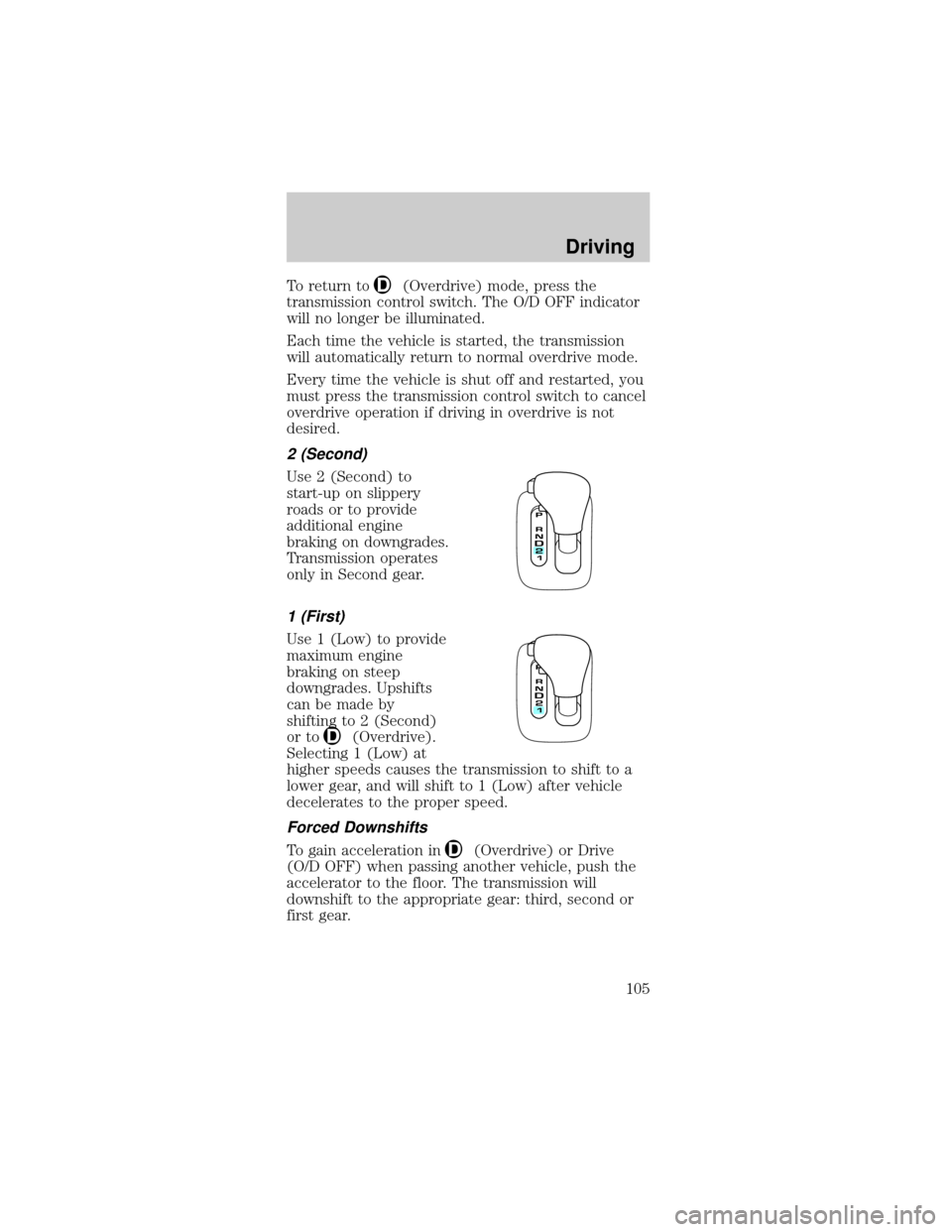
2 (Second)
Use 2 (Second) to
start-up on slippery
roads or to provide
additional engine
braking on downgrades.
Transmission operates
only in Second gear.
1 (First)
Use 1 (Low) to provide
maximum engine
braking on steep
downgrades. Upshifts
can be made by
shifting to 2 (Second)
or to
(Overdrive).
Selecting 1 (Low) at
higher speeds causes the transmission to shift to a
lower gear, and will shift to 1 (Low) after vehicle
decelerates to the proper speed.
Forced Downshifts
To gain acceleration in(Overdrive) or Drive
(O/D OFF) when passing another vehicle, push the
accelerator to the floor. The transmission will
downshift to the appropriate gear: third, second or
first gear.
Driving
105
Page 130 of 224
4.Make the final connection of the negative (-) cable
to an exposed metal part of the stalled vehicle's engine,
away from the battery and the carburetor/fuel injection
system.Do notuse fuel lines, engine rocker covers or
the intake manifold asgroundingpoints.
Do not connect the end of the second cable
to the negative (-) terminal of the battery to
be jumped. A spark may cause an explosion of the
gases that surround the battery.
5. Ensure that the cables are clear of fan blades,
belts, moving parts of both engines, or any fuel
delivery system parts.
Jump starting
1. Start the engine of the booster vehicle and run
the engine at moderately increased speed.
2. Start the engine of the disabled vehicle.
3. Once the disabled vehicle has been started, run
both engines for an additional three minutes before
disconnecting the jumper cables.
Removing the jumper cables
Remove the jumper cables in the reverse order
that they were connected.
+–+–
+–+–
Roadside emergencies
130
Page 173 of 224

4. Subtract your initial odometer reading from the
current odometer reading.
5. Follow one of the simple calculations in order to
determine fuel economy:
Multiply liters used by 100, then divide by total
kilometers traveled.
Divide total miles traveled by total gallons
used.
Keep a record for at least one month and record the
type of driving (city or highway). This will provide
an accurate estimate of the vehicle's fuel economy
under current driving conditions. Additionally,
keeping records during summer and winter will show
how temperature impacts fuel economy. In general,
lower temperatures give lower fuel economy.
Driving style Ð good driving and fuel economy
habits
Give consideration to the lists that follow and you
may be able to change a number of variables and
improve your fuel economy.
Habits
²Smooth, moderate operation can yield up to 10%
savings in fuel.
²Steady speeds without stopping will usually give
the best fuel economy.
²Idling for long periods of time (greater than one
minute) may waste fuel.
²Anticipate stopping; slowing down may eliminate
the need to stop.
²Sudden or hard accelerations may reduce fuel
economy.
²Slow down gradually.
²Driving at reasonable speeds (traveling at 88 km/h
[55 mph] uses 15% less fuel than traveling at 105
km/h [65 mph]).
Maintenance and care
173
Page 202 of 224

Board membership
The Board consists of:
²three consumer representatives
²a Ford or Lincoln Mercury dealership
representative
Consumer candidates for Board membership are
recruited and trained by an independent consulting
firm. The dealership Board member is chosen from
Ford and Lincoln Mercury dealership management,
recognized for their business leadership qualities.
What the Board needs
To have your case reviewed you must complete the
application in the DSB brochure and mail it to the
address provided on the application form. Some
states will require you to use certified mail, with
return receipt requested.
Your application is reviewed and, if it is determined
to be eligible, you will receive an acknowledgment
indicating:
²the file number assigned to your application
²the toll-free phone number of the DSB's
independent administrator
Your dealership and a Ford Motor Company
representative will then be asked to submit
statements.
To properly review your case, the Board needs the
following information:
²legible copies of all documents and maintenance
or repair orders relevant to the case
²the year, make, model, and Vehicle Identification
Number (VIN) listed on your vehicle ownership
license
²the date of repair(s) and mileage at the time of
occurrence(s)
²the current mileage
Customer assistance
202