Page 55 of 361
1-37
Larger Children
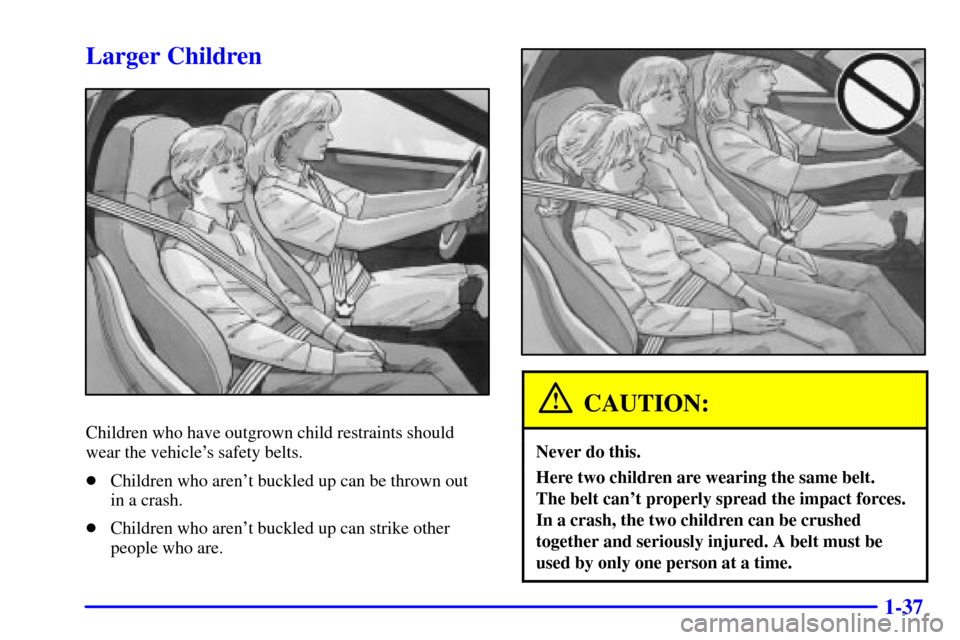
Children who have outgrown child restraints should
wear the vehicle's safety belts.
�Children who aren't buckled up can be thrown out
in a crash.
�Children who aren't buckled up can strike other
people who are.
CAUTION:
Never do this.
Here two children are wearing the same belt.
The belt can't properly spread the impact forces.
In a crash, the two children can be crushed
together and seriously injured. A belt must be
used by only one person at a time.
Page 56 of 361
1-38
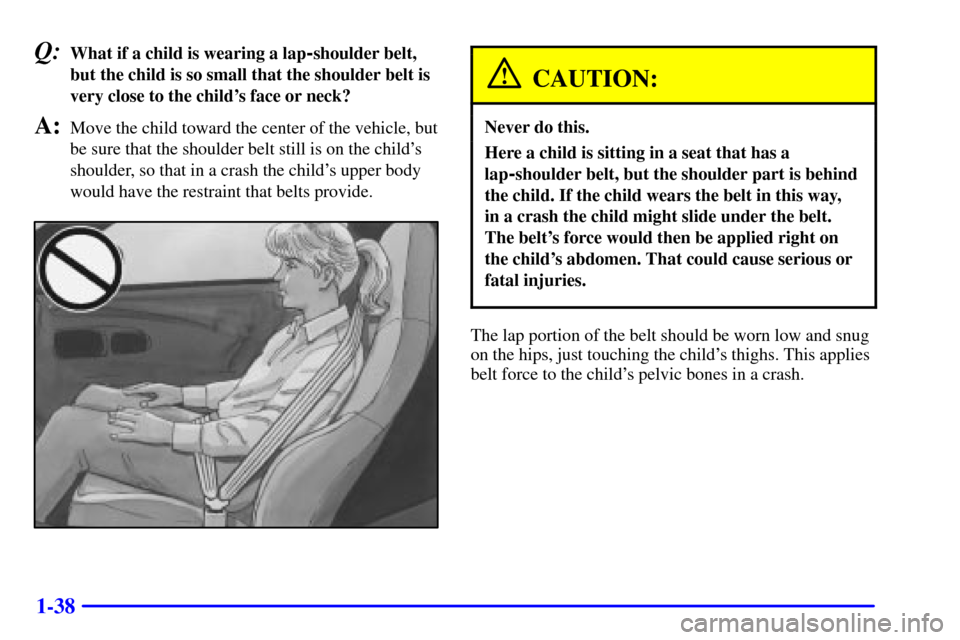
Q:What if a child is wearing a lap-shoulder belt,
but the child is so small that the shoulder belt is
very close to the child's face or neck?
A:Move the child toward the center of the vehicle, but
be sure that the shoulder belt still is on the child's
shoulder, so that in a crash the child's upper body
would have the restraint that belts provide.
CAUTION:
Never do this.
Here a child is sitting in a seat that has a
lap
-shoulder belt, but the shoulder part is behind
the child. If the child wears the belt in this way,
in a crash the child might slide under the belt.
The belt's force would then be applied right on
the child's abdomen. That could cause serious or
fatal injuries.
The lap portion of the belt should be worn low and snug
on the hips, just touching the child's thighs. This applies
belt force to the child's pelvic bones in a crash.
Page 57 of 361

1-39
Safety Belt Extender
If the vehicle's safety belt will fasten around you, you
should use it.
But if a safety belt isn't long enough to fasten, your
dealer will order you an extender. It's free. When you go
in to order it, take the heaviest coat you will wear, so the
extender will be long enough for you. The extender will
be just for you, and just for the seat in your vehicle that
you choose. Don't let someone else use it, and use it
only for the seat it is made to fit. To wear it, just attach it
to the regular safety belt.
Checking Your Restraint Systems
Now and then, make sure the safety belt reminder light
and all your belts, buckles, latch plates, retractors and
anchorages are working properly. Look for any other
loose or damaged safety belt system parts. If you see
anything that might keep a safety belt system from
doing its job, have it repaired.
Torn or frayed safety belts may not protect you in a
crash. They can rip apart under impact forces. If a belt
is torn or frayed, get a new one right away.
Also look for any opened or broken air bag covers, and
have them repaired or replaced. (The air bag system
does not need regular maintenance.)
Page 58 of 361
1-40
Replacing Restraint System Parts
After a Crash
If you've had a crash, do you need new belts?
After a very minor collision, nothing may be necessary.
But if the belts were stretched, as they would be if worn
during a more severe crash, then you need new belts.
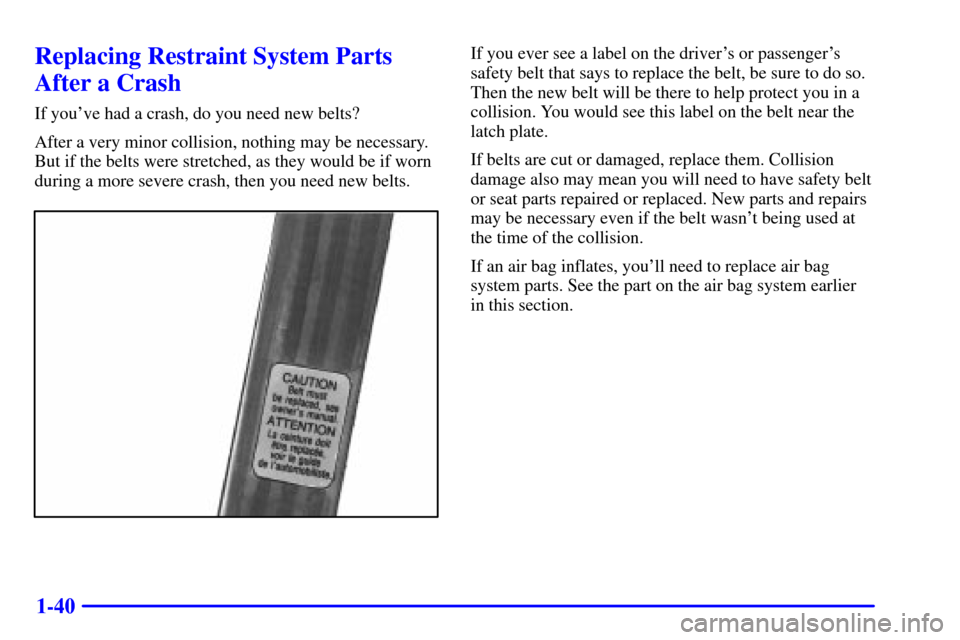
If you ever see a label on the driver's or passenger's
safety belt that says to replace the belt, be sure to do so.
Then the new belt will be there to help protect you in a
collision. You would see this label on the belt near the
latch plate.
If belts are cut or damaged, replace them. Collision
damage also may mean you will need to have safety belt
or seat parts repaired or replaced. New parts and repairs
may be necessary even if the belt wasn't being used at
the time of the collision.
If an air bag inflates, you'll need to replace air bag
system parts. See the part on the air bag system earlier
in this section.
Page 62 of 361
2-4
Door Locks
CAUTION:
Unlocked doors can be dangerous.
Passengers -- especially children -- can easily
open the doors and fall out. When a door is
locked, the inside handle won't open it.
Outsiders can easily enter through an unlocked
door when you slow down or stop your vehicle.
This may not be so obvious: You increase the
chance of being thrown out of the vehicle in a
crash if the doors aren't locked. Wear safety belts
properly, lock your doors, and you will be far
better off whenever you drive your vehicle.
There are several ways to lock and unlock your vehicle.
From the outside, use your door key or the remote
keyless entry transmitter.If your theft
-deterrent system is armed, unlock the
driver's door only with the key or by using the remote
keyless entry transmitter to open either door to avoid
setting off the alarm. See ªTheft
-Deterrent Systemº
in the Index.
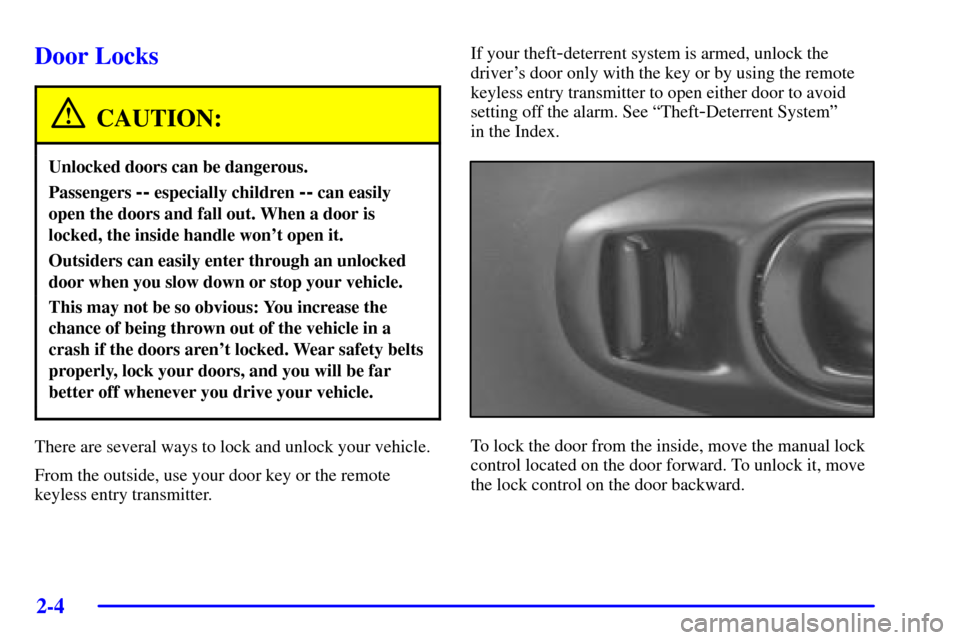
To lock the door from the inside, move the manual lock
control located on the door forward. To unlock it, move
the lock control on the door backward.
Page 132 of 361

2-74
When one of the warning lights comes on and stays on
when you are driving, or when one of the gages shows
there may be a problem, check the section that tells you
what to do about it. Please follow this manual's advice.
Waiting to do repairs can be costly
-- and even
dangerous. So please get to know your warning lights
and gages. They're a big help.
Your vehicle also has a driver information center that
works along with the warning lights and gages.
See ªDriver Information Centerº in the Index.
Safety Belt Reminder Light
When the key is turned to ON or START, a chime will
come on for about eight seconds to remind people to
fasten their safety belts, unless the driver's safety belt is
already buckled.
The safety belt light will
also come on and stay on
until the driver's belt
is buckled.
Air Bag Readiness Light
There is an air bag readiness light on the instrument
panel, which shows a deployed air bag symbol.
The system checks the air bag's electrical system for
malfunctions. The light tells you if there is an electrical
problem. The system check includes the air bag
modules, the wiring and the diagnostic module.
For more information on the air bag system,
see ªAir Bagº in the Index.
This light will come on
when you start your vehicle,
and it will flash for a few
seconds. Then the light
should go out. This means
the system is ready.
If the air bag readiness light stays on after you start the
vehicle or comes on when you are driving, your air bag
system may not work properly. Have your vehicle
serviced right away.
Page 159 of 361

2-101
SERVICE VEHICLE SOON: If this message appears
on the DIC, there may be an electrical or another system
problem with your vehicle. Have your vehicle checked
by your dealer if this message keeps appearing.
CHARGE SYSTEM FAULT: Press RESET to
acknowledge that you have read the message and to
remove it from the display. The message will reappear
every 10 minutes until this condition changes. You will
hear two chimes when this message is displayed.
If this message comes on while you are driving, you
may have a problem with the electrical charging system.
It could indicate that you have a loose or broken drive
belt or another electrical problem. Have it checked
right away. Driving while this light is on could drain
your battery.
If you must drive a short distance with the message on,
be certain to turn off your accessories, such as the radio
and air conditioner.
TRACTION SYS ACTIVE: When your Traction
Control System is limiting wheel spin, the TRACTION
SYS ACTIVE message will be displayed. Slippery road
conditions may exist if this message is displayed, so
adjust your driving accordingly. The message will stay
on for a few seconds after the traction control system
stops limiting wheel spin.TRACTION SYSTEM - ON: This message is
displayed when you decide to turn on the Traction
Control System by pressing the switch on the console.
This message will shut off automatically on its own.
TRACTION SYSTEM
- OFF: You will hear a single
quick tone when this message is displayed. This
message comes on and stays on when the Traction
Control System button on the console is pressed to
turn the system off. To acknowledge this message,
press RESET.
SERVICE TRACTION SYSTEM: If the SERVICE
TRACTION SYS message is displayed when you are
driving, there is a problem with your Traction Control
System and your vehicle is in need of service. When this
message is displayed, the system will not limit wheel
spin. Adjust your driving accordingly.
If you have the optional Active Handling System, the
SERVICE ACTIVE HNDLG message will also be
displayed and the instrument cluster car icon will also be
illuminated. The driver can acknowledge both messages
by pressing the reset button two times which will also
turn off the instrument cluster icon. When the service
messages are displayed, the computer controlled
systems will not assist the driver in controlling the
vehicle. Have the system repaired as soon as possible.
Adjust your driving accordingly.
Page 195 of 361

3-29 Care of Your Cassette Tape Player
A tape player that is not cleaned regularly can cause
reduced sound quality, ruined cassettes or a damaged
mechanism. Cassette tapes should be stored in their
cases away from contaminants, direct sunlight and
extreme heat. If they aren't, they may not operate
properly or may cause failure of the tape player.
Your tape player should be cleaned regularly after every
50 hours of use. Your radio may display CLN to indicate
that you have used your tape player for 50 hours without
resetting the tape clean timer. If this message appears
on the display, your cassette tape player needs to be
cleaned. It will still play tapes, but you should clean it as
soon as possible to prevent damage to your tapes and
player. If you notice a reduction in sound quality, try a
known good cassette to see if it is the tape or the tape
player at fault. If this other cassette has no improvement
in sound quality, clean the tape player.
The recommended cleaning method for your
cassette tape player is the use of a scrubbing action,
non
-abrasive cleaning cassette with pads which scrub
the tape head as the hubs of the cleaner cassette turn.
The recommended cleaning cassette is available through
your dealership (GM Part No. 12344789).When using a scrubbing action, non
-abrasive cleaning
cassette, it is normal for the cassette to eject because
your unit is equipped with a cut tape detection feature
and a cleaning cassette may appear as a broken tape.
To prevent the cleaning cassette from being ejected,
use the following steps.
1. Turn the ignition to ON or ACC.
2. Turn the radio off.
3. Press and hold the TAPE AUX button for five
seconds. The tape symbol on the display will flash
for two seconds.
4. Insert the scrubbing action cleaning cassette.
5. Eject the cleaning cassette after the manufacturer's
recommended cleaning time.
When the cleaning cassette has been ejected, the cut tape
detection feature is active again.
You may also choose a non
-scrubbing action, wet-type
cleaner which uses a cassette with a fabric belt to clean
the tape head. This type of cleaning cassette will not
eject on its own. A non
-scrubbing action cleaner may
not clean as thoroughly as the scrubbing type cleaner.
The use of a non
-scrubbing action, dry-type cleaning
cassette is not recommended.