Page 113 of 361
2-55 Convenience Net (Option)
Your vehicle may have a convenience net. You will see
it on the back wall of the rear area of the vehicle.
Put small loads, like grocery bags, in the net. It can help
keep them from falling over during sharp turns or quick
starts and stops. The convenience net is not for larger,
heavier loads.
You can unhook the net and place it in one of the rear
storage compartments when you are not using it.
On coupe models only, a vinyl storage bag has also
been provided.
Ashtray and Cigarette Lighter
The ashtray and cigarette lighter are located on the
instrument panel, in front of the shift lever. To use the
ashtray, lift up on the bottom of the door.
NOTICE:
Don't put papers and other things that burn
into the ashtray. If you do, cigarettes or other
smoking materials could set them on fire,
causing damage.
Loose objects (such as paper clips) can lodge behind and
beneath the ashtray lid and prevent movement of the lid.
You should avoid putting small, loose objects near
the ashtray.
To use the cigarette lighter, push it in all the way and let
go. When it's ready, it will pop back out by itself.
NOTICE:
Don't hold a cigarette lighter in with your hand
while it is heating. If you do, it won't be able to
back away from the heating element when it's
ready. That can make it overheat, damaging the
lighter and the heating element.
Sun Visors
To block out glare, you can swing down the visors.
You can also swing them to the side.
Visor Vanity Mirrors
Pull down the sun visor and lift the cover to expose the
vanity mirror.
Page 128 of 361
2-70
The Instrument Panel -- Your Information System
Page 129 of 361

2-71
The main components of your instrument panel are:
A. Instrument Panel Brightness Control
B. Head
-Up Display Controls (Option)
C. Turn Signal/Multifunction Lever
D. Driver Information Center (DIC)
(Located in the Instrument Cluster)
E. Instrument Panel Cluster
F. Windshield Wiper/Washer Lever
G. Driver Information Center (DIC) Buttons
H. Hazard Warning Flasher Button
I. Center Air Vents
J. Audio System
K. Comfort Controls
L. Fog Lamp Button (Option)
M. Remote Hatch Release Button (Coupe) or Remote
Trunk Release Button (Convertible/Hardtop)N. Horn
O. Ignition Switch
P. Shift Lever (Automatic Shown)
Q. Traction Control System (TCS) Switch/Active
Handling Switch (Option)
R. Accessory Power Outlet
(Located in the Center Console)
S. Selective Real Time Damping (SRTD) (Option)
T. Instrument Panel Cupholder
U. Remote Fuel Door Release Button
(Located in the Center Console)
V. Ashtray and Cigarette Lighter
W. Parking Brake
X. Glove Box
Y. Instrument Panel Fuse Block
(Located behind the Toe
-Board)
Page 130 of 361
2-72
Instrument Panel Cluster
Your instrument panel cluster and Driver Information Center (DIC) are designed to let you know at a glance how the
vehicle is running. You'll know how fast you're going, about how much fuel you have left and many other things
you'll need to know to drive safely and economically. The instrument panel cluster indicator warning lights, gages
and DIC messages are explained on the following pages.
United States Shown, Canadian Similar
Page 132 of 361

2-74
When one of the warning lights comes on and stays on
when you are driving, or when one of the gages shows
there may be a problem, check the section that tells you
what to do about it. Please follow this manual's advice.
Waiting to do repairs can be costly
-- and even
dangerous. So please get to know your warning lights
and gages. They're a big help.
Your vehicle also has a driver information center that
works along with the warning lights and gages.
See ªDriver Information Centerº in the Index.
Safety Belt Reminder Light
When the key is turned to ON or START, a chime will
come on for about eight seconds to remind people to
fasten their safety belts, unless the driver's safety belt is
already buckled.
The safety belt light will
also come on and stay on
until the driver's belt
is buckled.
Air Bag Readiness Light
There is an air bag readiness light on the instrument
panel, which shows a deployed air bag symbol.
The system checks the air bag's electrical system for
malfunctions. The light tells you if there is an electrical
problem. The system check includes the air bag
modules, the wiring and the diagnostic module.
For more information on the air bag system,
see ªAir Bagº in the Index.
This light will come on
when you start your vehicle,
and it will flash for a few
seconds. Then the light
should go out. This means
the system is ready.
If the air bag readiness light stays on after you start the
vehicle or comes on when you are driving, your air bag
system may not work properly. Have your vehicle
serviced right away.
Page 133 of 361
2-75
CAUTION:
If the air bag readiness light stays on after you
start your vehicle, it means the air bag system
may not be working properly. The air bags in
your vehicle may not inflate in a crash, or they
could even inflate without a crash. To help avoid
injury to yourself or others, have your vehicle
serviced right away if the air bag readiness light
stays on after you start your vehicle.
The air bag readiness light should flash for a few
seconds when you turn the ignition key to ON. If the
light doesn't come on then, have it fixed so it will be
ready to warn you if there is a problem.
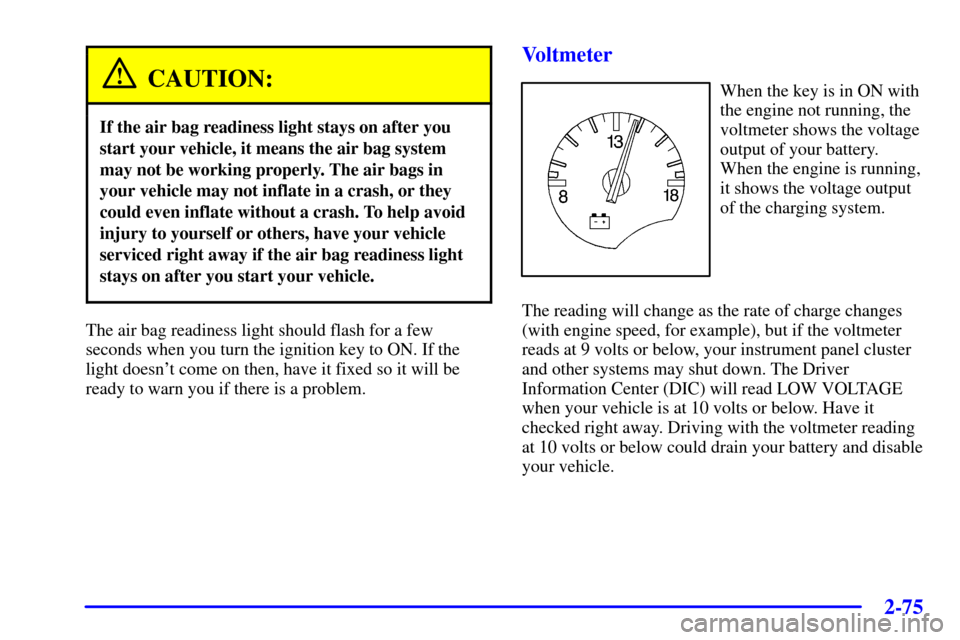
Voltmeter
When the key is in ON with
the engine not running, the
voltmeter shows the voltage
output of your battery.
When the engine is running,
it shows the voltage output
of the charging system.
The reading will change as the rate of charge changes
(with engine speed, for example), but if the voltmeter
reads at 9 volts or below, your instrument panel cluster
and other systems may shut down. The Driver
Information Center (DIC) will read LOW VOLTAGE
when your vehicle is at 10 volts or below. Have it
checked right away. Driving with the voltmeter reading
at 10 volts or below could drain your battery and disable
your vehicle.
Page 143 of 361
2-85
You should reset the fuel information display every
time you refuel. To reset the display, press FUEL until
AVERAGE appears. Then, press RESET on the Driver
Information Center (DIC).
Head-Up Display (Option)
CAUTION:
If the HUD image is too bright, or too high in
your field of view, it may take you more time to
see things you need to see when it's dark outside.
Be sure to keep the HUD image dim and placed
low in your field of view.
If your vehicle is equipped with the Head-Up Display
(HUD), you can see some of the driver information that
appears on your instrument panel cluster.The information may be displayed in English or metric
units and appears as an image focused out toward the
front of your vehicle. The HUD consists of the
following information:
�Speedometer
�Turn Signal Indicators
�High
-Beam Indicator Symbol
�Tachometer
�Oil, Temperature and Fuel Gages
�Shift Light (Performance SHIFT Light)
This light is used for performance driving to indicate
that the vehicle's best performance level has been
reached to shift the transmission into the next higher
gear. The SHIFT light will display at an engine
speed of about 5,750 rpm, just prior to reaching the
engine fuel cut
-off mode. To better understand the
vehicle's power curves, see ªCapacities and
Specificationsº in the Index.
�Check Gages Icon
Page 144 of 361
2-86
There are five HUD selections that you can choose to
view in the HUD display. By pressing and holding the
PAGE button, you can scroll through these pages in the
following order:
�Speed Only
�Speed and Gage
�Speed, Tachometer and Gage
�Speed and Tachometer
�Tachometer Only
When you have chosen the desired HUD display,
release the PAGE button.
Gages can be scrolled through by tapping the
PAGE button (only when a gage is displayed).
The gages shown are:
�Oil Pressure
�Coolant Temperature
�Fuel Level
The selections that you choose will remain in the
HUD display until they are changed.
Be sure to continue scanning your displays, controls and
driving environment just as you would in a vehicle
without HUD. If you never look at your instrument
panel cluster, you may not see something important,
such as a warning light. Under important warning
conditions, the CHECK GAGES icon will illuminate in
the HUD. View your Driver Information Center (DIC)
for more information.