Page 170 of 321
3-26
SOURCE: Press this button to select a source. The
audio source must be loaded to play. If none of the audio
sources are loaded, NO SOURCE LOADED will appear
on the display. Press this button again or press BAND to
switch back to the radio. (CD will be displayed for a few
seconds instead on the AM
-FM Stereo with Cassette
Tape Player, then the radio will play.)
EJECT: Slide the CD changer door all the way open
and the disc holder will automatically eject.
Compact Disc Changer Errors
CD CHANGER ERROR could be displayed for
the following:
�The road is too rough. The disc should play when
the road is smoother.
�The disc is dirty, scratched, wet or loaded label
side up.
�The air is very humid. If so, wait about an hour
and try again.CD CHANGER DOOR OPEN is displayed when the
CD changer door is left open. (CHEK DOOR will be
displayed instead on the AM
-FM Stereo with Cassette
Tape Player.) Completely close the changer door to
restore normal operation.
If any error occurs repeatedly or if an error cannot be
corrected, please contact your dealer.
Theft-Deterrent Feature
THEFTLOCK� is designed to discourage theft of your
radio. Your vehicle has a ªbuilt
-inº theft-deterrent
feature on each radio that is automatic
-- there is
no programming required. The radio in your vehicle
cannot be used in any other vehicle. When the radio
was originally installed in your vehicle at the factory, it
stored the Vehicle Identification Number (VIN). Each
time the ignition is turned on, the VIN is verified. If the
vehicle's VIN does not match the VIN stored in the
radio, THEFTLOCK will be activated and the audio
system will not play. If the radio is removed from your
vehicle, the original VIN in the radio can be used to
trace the radio back to your vehicle.
Page 171 of 321
3-27 Audio Steering Wheel Controls
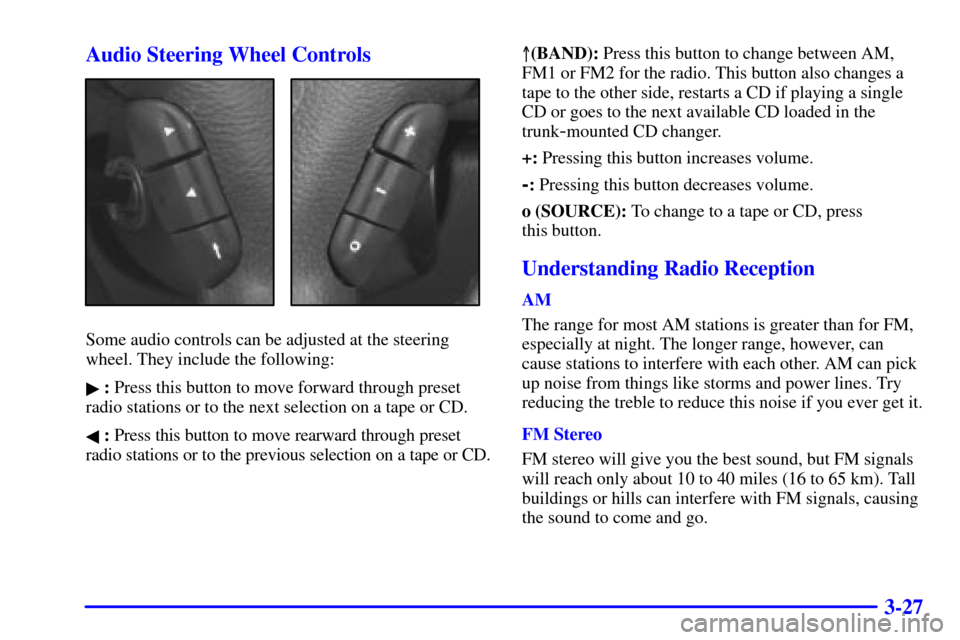
Some audio controls can be adjusted at the steering
wheel. They include the following:
� : Press this button to move forward through preset
radio stations or to the next selection on a tape or CD.
� : Press this button to move rearward through preset
radio stations or to the previous selection on a tape or CD.�(BAND): Press this button to change between AM,
FM1 or FM2 for the radio. This button also changes a
tape to the other side, restarts a CD if playing a single
CD or goes to the next available CD loaded in the
trunk
-mounted CD changer.
+: Pressing this button increases volume.
-: Pressing this button decreases volume.
o (SOURCE): To change to a tape or CD, press
this button.
Understanding Radio Reception
AM
The range for most AM stations is greater than for FM,
especially at night. The longer range, however, can
cause stations to interfere with each other. AM can pick
up noise from things like storms and power lines. Try
reducing the treble to reduce this noise if you ever get it.
FM Stereo
FM stereo will give you the best sound, but FM signals
will reach only about 10 to 40 miles (16 to 65 km). Tall
buildings or hills can interfere with FM signals, causing
the sound to come and go.
Page 172 of 321
3-28
Weather Band (If Equipped)
Weather band is restricted to speech and the audio
quality is not as good as with the AM or FM bands.
Depending on location, the radio should receive one or
two channels.
Tips About Your Audio System
Hearing damage from loud noise is almost undetectable
until it is too late. Your hearing can adapt to higher
volumes of sound. Sound that seems normal can be
loud and harmful to your hearing. Take precautions by
adjusting the volume control on your radio to a safe
sound level before your hearing adapts to it.
To help avoid hearing loss or damage:
�Adjust the volume control to the lowest setting.
�Increase volume slowly until you hear comfortably
and clearly.
NOTICE:
Before you add any sound equipment to your
vehicle
-- like a tape player, CB radio, mobile
telephone or two
-way radio -- be sure you
can add what you want. If you can, it's very
important to do it properly. Added sound
equipment may interfere with the operation
of your vehicle's engine, radio or other systems,
and even damage them. Your vehicle's systems
may also interfere with the operation of sound
equipment that has been added improperly.
So, before adding sound equipment, check with
your dealer and be sure to check Federal rules
covering mobile radio and telephone units.
Page 274 of 321

6-30
Battery
Your new vehicle comes with a maintenance free
ACDelco� battery. When it's time for a new battery,
get one that has the replacement number shown on
the original battery's label. We recommend an
ACDelco battery.
CAUTION:
Batteries have acid that can burn you and gas
that can explode. You can be badly hurt if you
aren't careful. See ªJump Startingº in the Index
for tips on working around a battery without
getting hurt.
After a power loss, such as disconnecting the battery
or removing the maxi fuses in the power distribution
fuse block, the following steps must be performed to
calibrate the Electronic Throttle Control. If this is not
done, the engine will not run properly.1. Turn the ignition key to the ON (II) position. Do not
start the engine.
2. Leave the ignition in the ON (II) position for at least
three minutes so that the electronic throttle control
will cycle and re
-learn its home position.
3. Turn the ignition to OFF.
4. Start and run the engine for at least 30 seconds.
Also, for your audio system, see ªTheft
-Deterrent
Featureº in the Index.
To reprogram your power windows and sunroof
(if equipped), see ªPower Windowsº and ªSunroofº
in the Index.
Bulb Replacement
For any bulb changing procedure not listed in this
section, contact your dealer service department.
For bulb types, see ªReplacement Bulbsº in the Index.