Page 93 of 392
2-28
Shifting Into PARK (P)
CAUTION:
It can be dangerous to get out of your vehicle if
the shift lever is not fully in PARK (P) with the
parking brake firmly set. Your vehicle can roll.
If you have left the engine running, the vehicle
can move suddenly. You or others could be
injured. To be sure your vehicle won't move,
even when you're on fairly level ground, use the
steps that follow. If you're pulling a trailer,
see ªTowing a Trailerº in the Index.
Steering Column Shift Lever
1. Hold the brake pedal down with your right foot and
set the parking brake.
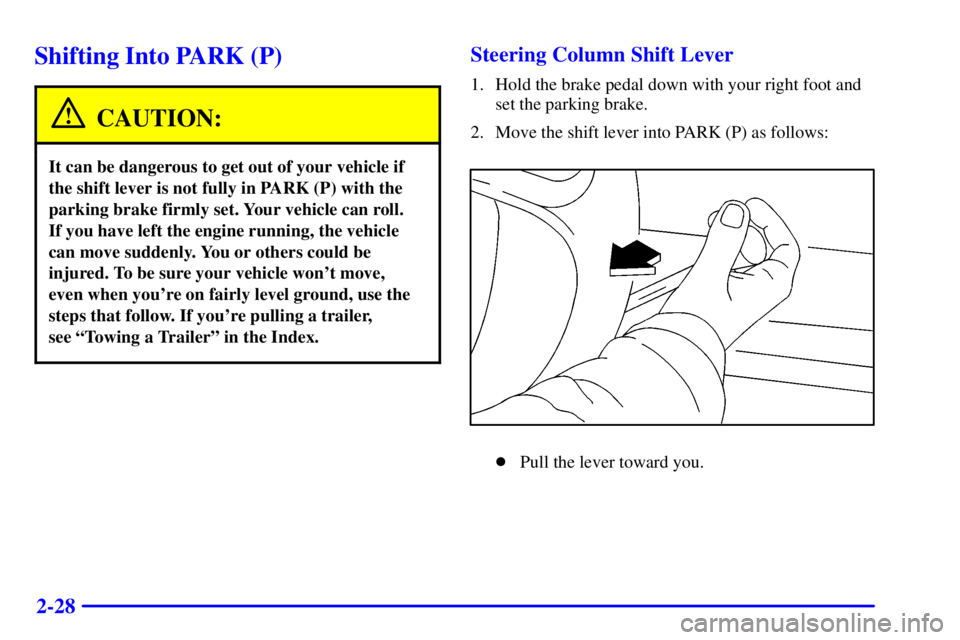
2. Move the shift lever into PARK (P) as follows:
�Pull the lever toward you.
Page 94 of 392
2-29
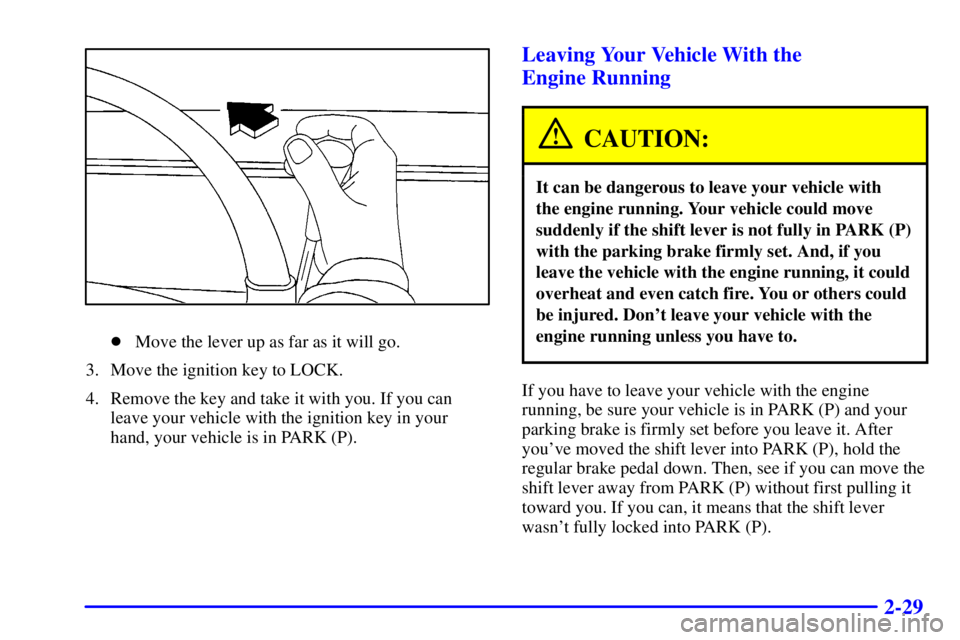
�Move the lever up as far as it will go.
3. Move the ignition key to LOCK.
4. Remove the key and take it with you. If you can
leave your vehicle with the ignition key in your
hand, your vehicle is in PARK (P).
Leaving Your Vehicle With the
Engine Running
CAUTION:
It can be dangerous to leave your vehicle with
the engine running. Your vehicle could move
suddenly if the shift lever is not fully in PARK (P)
with the parking brake firmly set. And, if you
leave the vehicle with the engine running, it could
overheat and even catch fire. You or others could
be injured. Don't leave your vehicle with the
engine running unless you have to.
If you have to leave your vehicle with the engine
running, be sure your vehicle is in PARK (P) and your
parking brake is firmly set before you leave it. After
you've moved the shift lever into PARK (P), hold the
regular brake pedal down. Then, see if you can move the
shift lever away from PARK (P) without first pulling it
toward you. If you can, it means that the shift lever
wasn't fully locked into PARK (P).
Page 96 of 392
2-31
Parking Over Things That Burn
CAUTION:
Things that can burn could touch hot exhaust
parts under your vehicle and ignite. Don't park
over papers, leaves, dry grass or other things that
can burn.
Engine Exhaust
CAUTION:
Engine exhaust can kill. It contains the gas
carbon monoxide (CO), which you can't see or
smell. It can cause unconsciousness and death.
You might have exhaust coming in if:
�Your exhaust system sounds strange
or different.
�Your vehicle gets rusty underneath.
�Your vehicle was damaged in a collision.
�Your vehicle was damaged when driving over
high points on the road or over road debris.
�Repairs weren't done correctly.
�Your vehicle or exhaust system had been
modified improperly.
If you ever suspect exhaust is coming into
your vehicle:
�Drive it only with all the windows down to
blow out any CO; and
�Have your vehicle fixed immediately.
Page 97 of 392
2-32
Running Your Engine While
You're Parked
It's better not to park with the engine running. But if you
ever have to, here are some things to know.
CAUTION:
Idling the engine with the climate control system
off could allow dangerous exhaust into your
vehicle (see the earlier Caution under
ªEngine Exhaustº).
Also, idling in a closed-in place can let deadly
carbon monoxide (CO) into your vehicle even if
the fan switch is at the highest setting. One place
this can happen is a garage. Exhaust
-- with
CO
-- can come in easily. NEVER park in a
garage with the engine running.
Another closed-in place can be a blizzard.
(See ªBlizzardº in the Index.)
CAUTION:
It can be dangerous to get out of your vehicle if
the shift lever is not fully in PARK (P) with the
parking brake firmly set. Your vehicle can roll.
Don't leave your vehicle when the engine is
running unless you have to. If you've left the
engine running, the vehicle can move suddenly.
You or others could be injured. To be sure your
vehicle won't move, even when you're on fairly
level ground, always set your parking brake and
move the shift lever to PARK (P).
Follow the proper steps to be sure your vehicle won't
move. See ªShifting Into PARK (P)º in the Index.
If you are parking on a hill and if you're pulling a
trailer, also see ªTowing a Trailerº in the Index.
Page 109 of 392

2-44
When it's dark enough outside, your high-beam
headlamps will change to low
-beam headlamps at full
brightness. The other lamps that turn on with your
headlamps will also turn on. When it's bright enough
outside, the regular lamps will turn off, and your
high
-beam headlamps change to the reduced brightness
of DRL.
To idle your vehicle with the DRL off, shift the
transaxle into PARK (P). The DRL will stay off until
you shift out of PARK (P).
To turn off all exterior lighting at night when you are
parked, turn off the headlamps and move the Twilight
Sentinel control all the way to the left in the slider
control. When released, the control will return to the
Twilight Sentinel minimum delay position and the lights
will turn off.
As with any vehicle, you should turn on the regular
headlamp system when you need it.
Cornering Lamps
The cornering lamps are designed to come on when you
signal a turn. This will provide more light for cornering
at night.
Twilight Sentinel�
Twilight Sentinel turns
your headlamps on and off
by sensing how dark it
is outside.
To operate this feature, slide the control to any position
to vary the lamp timeout.
If you move the control all the way to MAX, your lamps
will remain on for three minutes after you turn off your
engine. If you move the control almost all the way in the
other direction, so it's just on, the lamps will go off
quickly when you turn off your engine. You can set this
delay time from only a few seconds to three minutes.
Light Sensor
Your Twilight Sentinel and Daytime Running Lamps
work with the light sensor on top of the instrument
panel. Don't cover it up. If you do, it will read ªdarkº
and the headlamps will come on.
Page 110 of 392
2-45
Interior Lamps
Instrument Panel Intensity Control
Instrument panel light brightness can be adjusted by
turning the headlamp knob counterclockwise
and clockwise.
Courtesy Lamps
When any door is opened, several lamps go on. They
make it easy for you to enter and leave the car. You can
also turn these lamps on by turning the headlamp knob
clockwise all the way past the normal stop.
Illuminated Entry System
When you open either front door or press the button
with the unlock symbol on the remote keyless entry
transmitter, the lamps inside your vehicle will turn on.
These lamps will turn off after about 40 seconds. These
lamps will also turn off if you start the engine or activate
the power door locks.
Delayed Entry Lighting
When you open the door, the interior lamps will come
on. When you close the door with the ignition off, the
interior lamps will stay on for 25 seconds or until the
ignition is turned to an on position. Locking the doors
with the power door lock switch will override the
delayed entry lighting feature and the lamps will turn off
right away.
Using the remote keyless entry transmitter to lock the
door will not cancel delayed lighting.
Theater Dimming
This feature allows for a three to five-second fade out of
the courtesy lamps instead of immediate turn off.
Delayed Exit Lighting
With this feature, the interior lamps will come on for
25 seconds after you remove the key from the ignition.
This will give you time to find the door handle or
lock switches.
Page 128 of 392

2-63
This device complies with RSS-210 of Industry Canada.
Operation is subject to the following two conditions: (1) this
device may not cause interference, and (2) this device must
accept any interference, including interference that may
cause undesired operation of the device.
Changes and modifications to this system by other than
an authorized service facility could void authorization to
use this equipment.
Programming the HomeLink� Transmitter
Do not use the HomeLink Transmitter with any garage
door opener that does not have the ªstop and reverseº
safety feature. This includes any garage door opener
model manufactured before April 1, 1982.
Be sure that people and objects are clear of the garage
door you are programming.
Your vehicle's engine should be turned off while
programming the transmitter. Follow these steps to
program up to three channels:
1. If you have previously programmed a transmitter
channel, proceed to Step 2. Otherwise, hold down
the two outside buttons on the HomeLink
Transmitter until the indicator light begins to flash
rapidly (after 20 seconds). Then release the buttons.
This procedure initializes the memory and erases any
previous settings for all three channels.2. Decide which one of the three channels you want to
program. Hold the end of the hand
-held transmitter
about 2 to 5 inches (5 to 13 cm) away from the
surface of the HomeLink Transmitter so that you can
still see the indicator light.
3. Using both hands, press the hand
-held transmitter
button and the desired button on the HomeLink
Transmitter. Continue to press both buttons
through Step 4.
4. Hold down both buttons until you see the indicator light
on the HomeLink Transmitter flash slowly and then
rapidly. The rapid flashing indicates that the HomeLink
Transmitter has been programmed. Release both
buttons once the indicator light starts to flash rapidly.
If you have trouble programming the HomeLink
Transmitter, make sure that you have followed the
directions exactly as described. The HomeLink
Transmitter may not work with older garage door openers
that do not meet current Federal Consumer Safety
Standards. If you cannot program the transmitter after
repeated attempts, refer to ªRolling Code Programmingº
later in this section or contact the HomeLink Transmitter
manufacturer at 1
-800-355-3515.
Be sure to keep the original hand
-held transmitter
in case you need to erase and reprogram the
HomeLink Transmitter.
Page 135 of 392

2-70 Speedometer and Odometer
Your speedometer lets you see your speed in both miles
per hour (mph) and kilometers per hour (km/h). Your
odometer shows how far your vehicle has been driven,
in either miles (used in the United States) or kilometers
(used in Canada).
Your vehicle has a tamper
-resistant odometer. You may
wonder what happens if your vehicle needs a new
odometer installed. If possible, the new one has to be set
to the same reading the old one had. If it can't be, then
it's set at zero and a label must be put on the driver's
door to show the old mileage reading and when the new
odometer was installed.
Trip Odometer
A trip odometer can tell how far you've driven since
you last set it back to zero. To reset it, push the RESET
button. The trip odometer is reset through the DIC if
your vehicle is equipped with this feature.
Tachometer
The tachometer tells you
how fast the engine is
running. It displays engine
speed in thousands of
revolutions per
minute (rpm).
NOTICE:
Do not operate the engine with the tachometer in
the red area, or engine damage may occur.