2000 AUDI ALLROAD steering
[x] Cancel search: steeringPage 172 of 306
---------------------CONTROLS
AND EQUIPMENT
Interior lights, reading lights
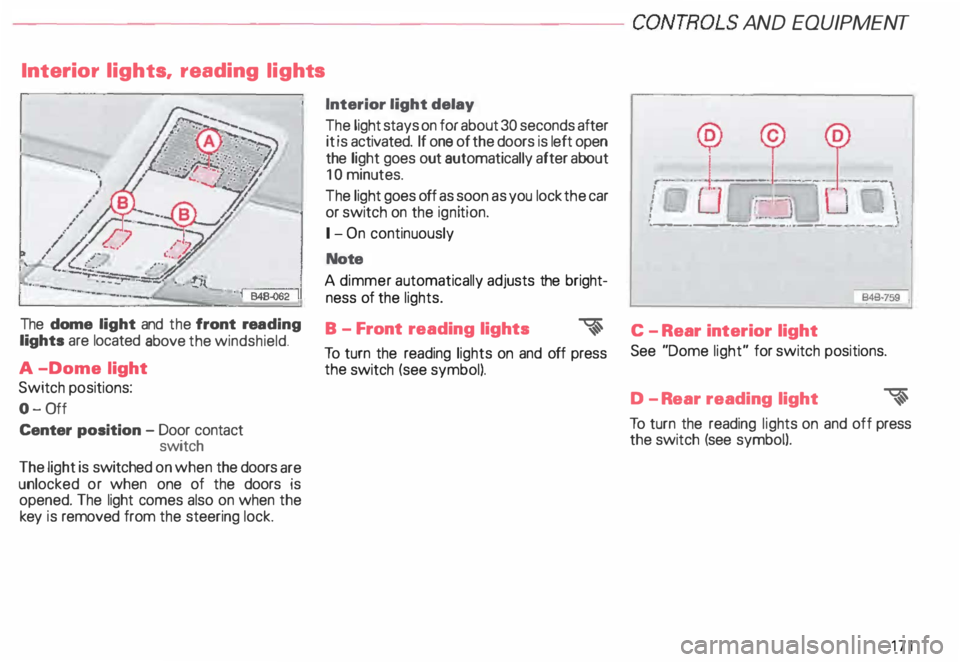
The dome light and the front rea ding
lights are located above the windshield.
A -Dome light
Switch positions:
0- 0ff
Center position -Door contact
switch
The light is switched on when the doors are
unlocked or when one of the doors is
opened. The light comes also on when the
key is removed from the steering lock. Interior light
delay
The light stays on for about 30 seconds after
it is activated. If one of the doors is left open
the light goes out automatically after about
10 minutes.
The light goes off as soon as you lock the car
or switch on the ignition.
1- On continuously
Note
A dimmer automatically adjusts the bright
ness of the lights.
B - Front reading lights
�
To turn the reading lights on and off press
the switch (see symbol). --
--� J: ___ ! __
\
I
Ot.:-= � :UJ,-.
i ·��-_:]
: \
·- ------- -···----·--- --·
846·759
'
C - Rear interior light
See "Dome light" for switch positions.
D -R ear reading light
�
To turn the reading lights on and off press
the switch (see symbol).
171
Page 186 of 306
--------------------CONTROLS AND
EQUIPMENT
Steering wheel with Audio controls*
To help make certain that you are not diS
tracted from paying proper attention to the
traffic conditions when you are using the ra
dio, switches have been provided on the
st eering wheel for basic audio functions for
factory installed radios. The radio, cassette
player, or CD player, can, of course, also be
operated without restriction on the unit it
self.
A detailed description of the radio is pro
vided in a separate Sound System manual.
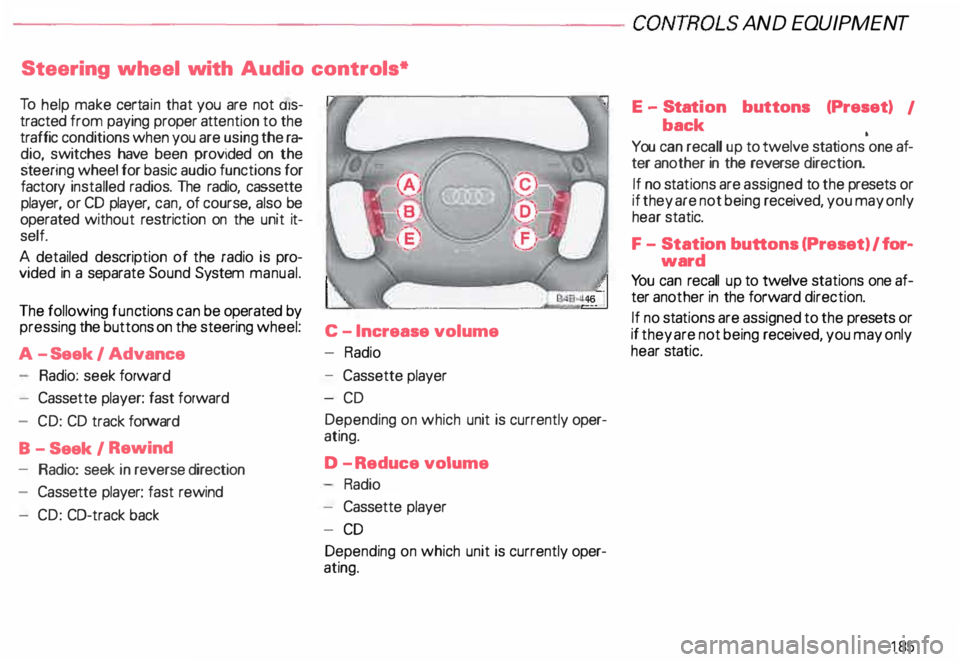
The following functions can be operated by
pressing the buttons on the steering wheel:
C -I ncrease volume
A -S eek I Advance -
Radio
Radio: seek forward
- Cassette player: fast forward
- CD: CD track forward
B - Seek I Rewind
- Radio: seek in reverse direction
- Cassette player: fast rewind
- CD: CO-track back -
Cassette player
-C D
Depending on which unit is currently oper
ating.
D -R educe volume
Radio
- Cassette player
- CD
Depending on which unit is currently oper
ating. E
-Stat ion buttons (Preset) I
back •
You can recall up to twelve stations one af-
ter another in the reverse direction.
If no sta tions are assigned to the presets or
if they are not being received, you may only
hear static.
F - Station buttons (Preset) I for�
ward
Yo u can recall up to twelve stations one af
ter another in the forward direction.
If no stations are assigned to the presets or
if they are not being received, you may only
hear static.
185
Page 187 of 306
CONT
ROLS AND
EQUIPMENT--------------------
Steering wheel with radio and
telephone equipment in the steering wheel*
If your radio or mobile telephone are factory
ins talled, switches for the radio and tele
phone functions are provided in the steering
wheel to help you give your fullest attention
to your driving responsibilities while operat
ing the radio or telephone system. Of
course, all the operating features of your ra
dio, cassette/CO player, or telephone can
still be accessed on this equipment itself.
Detailed description of the radio and Audi
telephone are provided in separate operat
ing manuals.
18 6 The following
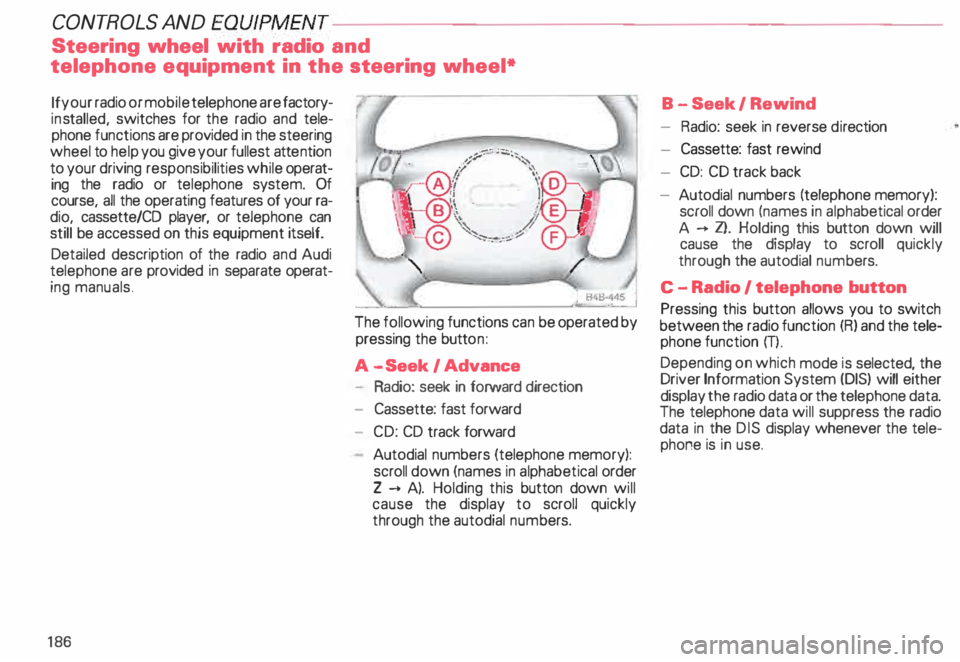
functions can be operated by
pressing the button:
A -S eek I Advance
- Radio: seek in forward direction
- Cassette: fast forward
- CD: CD track forward
Autodial numbers (telephone memory):
scroll down (names in alphabetical order
Z --+ A). Holding this button down will
cause the display to scroll quickly
through the autodial numbers. B
-Seek I Rewind
- Radio: seek in reverse direction
- Cassette: fast rewind
- CD: CD track back
- Autodial numbers (telephone memory):
scroll down (names in alphab etical order
A --+ Z}. Holding this button down will
cause the display to scroll quickly
through the autodial numbers.
C -Radio I telephone button
Pressing this button allows you to switch
between the radio function (R) and the tele
phone function m.
Depending on which mode is selected, the
Driver Information System (DIS) will either
display the radio data or the telephone data.
The telephone data will suppress the radio
data in the DIS display whenever the tele
phone is in use.
Page 207 of 306

VEHICLE
OPER ATION----------------------
Operation
The Anti-Lock Brake System (ABS) and the
Electronic Differential Lock (EDU are inte
grat _ed in the Electronic Stability Progr am. In
a _ddrtron to the data provided by these func
tions, the ESP control unit requires addition
al measurement data provided by hig h-per
forman ?e sensors. The rotat ional speed of
the veh1cle about its vertical axis, vehicle lat
eral acceleration, brake pressure and the
steering angle are measured.
The direction in which the driverwishes to
travel is determined with the aid of the
stee �ing angle and the vehicle speed and is
contmually compared with the actual be
havior of the vehicle.
If the data do not match - for example when
a vehrcle is beginning to spin out of control
- the ESP applies the brakes to the appropri
ate wheels for the given situation and, if
necessar y, changes the vehicle traction
forces so as to reduce the slipping of individ
ual wheels (ASR anti-slip regulation).
206 The
vehicle is then stabilized by the forces
a ?tin � on the wheel during braking. If the ve
hicle IS overstee ring (rear tends to skid out
of the turn), the brakes are mainly applied on
the wheel that is on the outside ofthe curve.
In the case of a vehicle that is und ersteering
(tendency to slide out of the curve). the
brakes are applied at the rear wheel that is
on the inside of the curve. An audible signal
�rll accompany the brake application func
tion.
All �SP senso rs a�e monitored continuously
wh1le the vehicle IS being driven. However,
when the vehicle is driven at low speed on
ex tremely rugged terrain, it is not always
possrble to monrtor the ESP sensors contin
uously. Thus, in rare and exceptional cases
the ESP itself can deactivate (ESP and ABS
ind icator lights will be lit continuously).
In this case. the ride level adjustment sys
tem lowers the vehicle to the normal level
If this happens, you may need to select th�
ride level again (see page 153).
Operation of the ESP and ABS is restored
whenever you restart the engine. m
WAR NING
! he Electronic Stability Program
•• nevertheless subject to the laws
of physics. It is particularly impor
tant to pay attention to this fact on
wet and slippery roads.
It is therefore important that you
always adapt your driving to the
condition of the road and traffic
conditions. Do not allow the in
creased safety provided by the
Electro nic Stability Program sys
tem to lull you into accepting addi
tional safety risks.
Page 212 of 306
-----------------------VEHICL E OPER ATION
Tr ailer towing tips
Yo ur vehicle handles differently when tow
ing a trailer because of the additional weight
and weight distribution. Safety, perfor
mance and economy will greatly depend on
how carefully you load your trailer and oper
ate your rig.
Before you actually tow your trailer, practice
turning, stopping and backing up in an area
away from traffic until you learn the feel of
your vehicle and trailer unit.
Backing up is difficult and requir es practice.
Steering while backing up is generally oppo
site of that when backing your vehicle with
out a trailer.
Maintain a greater distance between your
vehicle and the one in front of you. You will
need more room to stop.
To compensate for the trailer, you will need
a larger than normal turning radius. When
passing, remember that you cannot
accelerate as fast as you normally would be
cause of the added load. Make sure you
have enough room to pass. After passing,
allow plenty of room for your trailer before
changing lanes again.
Avoid jerky starts, sharp turns or rapid lane
changes.
After parking, always block the wheels of
both vehicle and trailer. Do not park with a
trailer on a slope. If it cannot be avoided, do
so only after doing the following:
• Apply foot brake.
• Have someone place chocks under both
vehicle and trailer wheels.
• With chocks in place, slowly release
brakes until wheel blocks absorb the load.
• Turn wheels to curb.
o Apply parking brake.
• Place automatic transmission in "P". If
you move the selector lever of the auto
matic transmission to "P" before applying
the parking brake and before blocking the
wheels, you may require more force later to
move the lever out of the "P" position.
When restarting after parking on a slope, re
verse the procedure:
• Start the engine.
• Shift transmission into gear.
o Release the parking brake and slowly
move away from the wheel blocks.
• Stop and have someone retrieve the
wheel blocks.
Notes
• Do not tow a trailer during the
break-in period of your vehicle.
• If you tow a trailer, your Audi may require
more frequent maintenance due to the ex
tra load -see also page 228.
211
Page 219 of 306
VE
HICL E CA
RE-------------------------
Dust and small particles of dirt lodging in the
pores, grain and seams can have an abra
sive effect and damage the surface and the
seams. If the vehicle is left standing for a
long time in the sun, cover the upholstery or
use the sun blinds to protect the leather
from direct sunlight and prevent fading or
discoloration.
Depending on the amount of use, clean it
occasionally according to the following
instructions. Never use solvents, wax
polish, shoe cream, spot removers
or similar materials.
For normal cleaning of leather -covered
steering wheels, leather seat upholstery,
etc., slightly moisten a cotton or woollen
cloth with water and wipe over the areas af
fected.
218 More
stubborn dirt can be removed using a
mild soap solution (pure liquid soap: two
tablespoons dissolved in 1 quart of water).
It is very important not to let the wa
ter soak through the leather or pene
trate into the seams. Then wipe off with
a soft, dry cloth.
In addition to this regular cleaning, it is
worth while treating the leather with a suit
able leather -care product. This should be
done about twice a year for uphol stery in
normal use. Apply these products very spar
ingly and follow the manufacturer's direc
tions.
Safety belts
Keep belts clean! Dirty belts may
not retract properly.
For cleaning, use a mild soap and water
solution. Let belts dry thoroughly and away
from direct sunlight.
Do not allow inertia reel safety belts to re
tract before they are completely dry. �W
ARNING
• Any thing that might damage
your safety balta could mean that
you and your passengers would
not be adequately protected in an
accident.
• Do not use chemical cleaning
agents, bleach or dyes. They have
corrosive properties which weak
en the webbing.
• When cleaning your safety
belts, inspect them for damage. If
you discover damage. see your
Audi Dealer.
• Safety belt performance de
pends on correct installation.
Never remove belts from the ve
hicle to clean them.
Page 234 of 306
When
adding fluids, always make
sure that they are poured into the
proper container or filler opening,
otherwise serious damage to ve
hicle systems will occur. r:Gb To detect leaks in time, inspect
� the vehicle floor pen from under
neath regular ly. If you see spots
from oil or other vehicle fluids, have
your vehicle inspected by an autho
ri zed Audi Dealer .
D Always heed all WA RNINGS
� on page 232.
Always exercise extreme caution
when working under the engine
hood. -
VE HICLE CARE
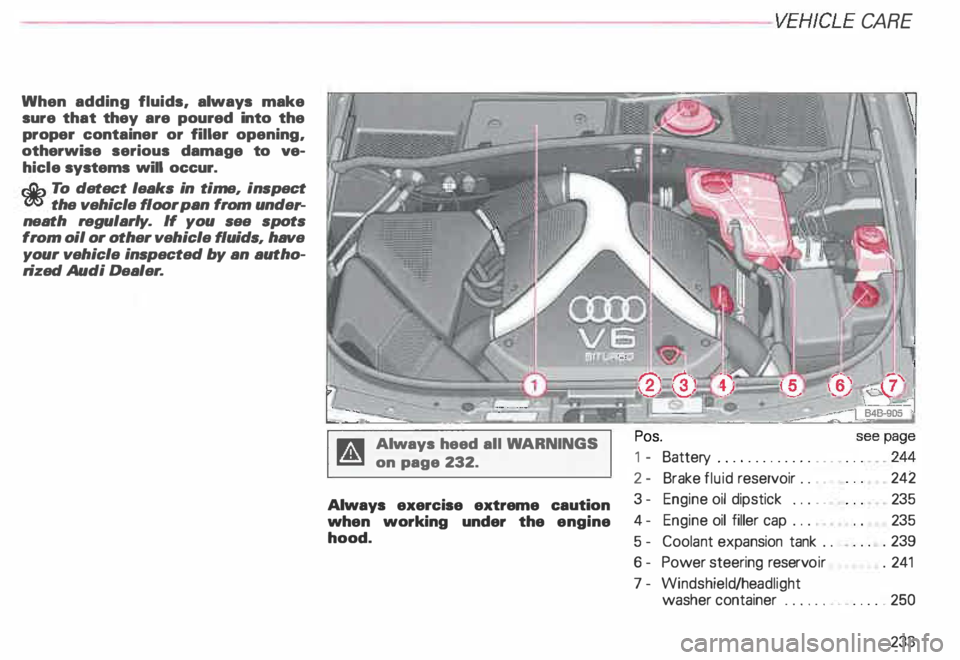
Pos.
1 - Battery ............. . _ .. .. .
2- Brake fluid reservoir . . . 242
3 - Engine oil dipstick ... . _ 235
4- Engine oil filler cap . . . 235
5- Coolant expansion tank . . . 239
6 - Power steering reservoir .
241
7 - Windshield /headlight
washer container ......•• _ .... . 250
233
Page 242 of 306
Radiator
fan
The radiator fan is driven by the engine via
the V-belt. The viscous clutch regulates the
speed of the fan according to the tempera
ture of the coolant.
An auxiliary electric radiator fan switches on
and off depending on coolant temperature
and other vehicle operation conditions.
� WARNING
• Always use extreme caution to
prevent clothing. jewelry, or long
hair from getting caught in the en
gine driven radiator fan, V-belt or
other moving parts.
• Never touch the auxiliary elec
tric radiator fan. The fan can
switch on suddenly and injure you.
Always heed all WA RNINGS
on page 232. Power
steering
Yo ur vehicle is equipped with a Servotro
nic power steering. The degree of
power assistance is regulated electronically
according to road speed.
The fluid reservoir is in the engine compart
ment near the windshield washer container.
The correct fluid level in the reserv oir is im
portant for the proper functioning of power
steer ing.
The power steering fluid level is checked
during the scheduled Maintenance ser
vices.
If the electronic regulating system is not
working properly, this is most noticeable
when turning the steering wheel at low
speeds (for example when parking) -more
effort will be required than usual. The fault
should be rectified by an Audi Dealer as
soon as possible. VEH
ICLE CARE
Note
• When the engine is running, never hold
the steering wheel turned all the way to the
right or to the left for longer than 15 sec
onds. The power steering pump will over
heat the hydraulic fluid if you hold the steer
ing wheel all the way turned.
This will damage the power steering
system.
Each time the steering wheel is turned all
the way to the right or left when stopped,
you will hear noises caused by the severe
stress placed on the power steering pump.
At the same time, engine idle speed drops.
• If the power steering system
should fail, or if the engine is not
running (for example, while being
towed). you will still be able to steer
the vehicle, however. more effort
will be required.
• If the power steering system should
have a leak, or is not functioning properly,
contact your authorized Audi Dealer imme
diately.
241