2000 AUDI ALLROAD key
[x] Cancel search: keyPage 72 of 306
---------------------CONTROLS AND EQUIPMEN T
Convenience close I open
feature
For the convenience of the driver all win
dows can be closed I opened centrally with
the ignition key while locking I unlocking the
vehicle:
Closing windows
In sert key into the lock of driver's door,
turn and hold in the locking position until all
windows are closed. The automatic close
func tion will stop imme diately if the key is
released.
�W ARNING
• Be careful when closing the win
dows.
• Check to see that no one is in
the way, or serious injury could re
sult. Opening
windows
Inse rt key into the lock of driver's door,
turn the key and hold in the unlocking posi
tion until all windows are opened.
This feature enables the driver, to let the
heat escape from the interior of the car, af
ter having parked in direct sunlight.
The convenience close I open feature is not
available when locking the vehicle using the
remote control. Note
If you disconnect and then reconnect the
battery, the convenience open and close
feature will not work.
The follow ing steps describe how to reacti
vate the convenience open I close feature
after reconnecting the battery:
• Close the window completely by lifting
the power window switch and holding.
• Release the switch and then lift it again
for a second.
• The convenience feature is now acti
vated.
71
Page 80 of 306
Before
adjusting your seat there are some
important considerations to keep in mind.
• To prevent interference with the seat ad
justment, never store anything under the
seats.
• The front seats should be adjusted be
fore fastening the safety belts.
• The position of the driver's seat you find
most comforta ble can be stored in the me
IT]Ory. See page 81 for details.
�W ARNING
Because the seats can be electri
cally adjusted with the ignition
key removed, never leave children
unattended in the vehicle. Unsu
pervised use of the electric seat
adjustments may cause serious in
iury. Seat
adjustment
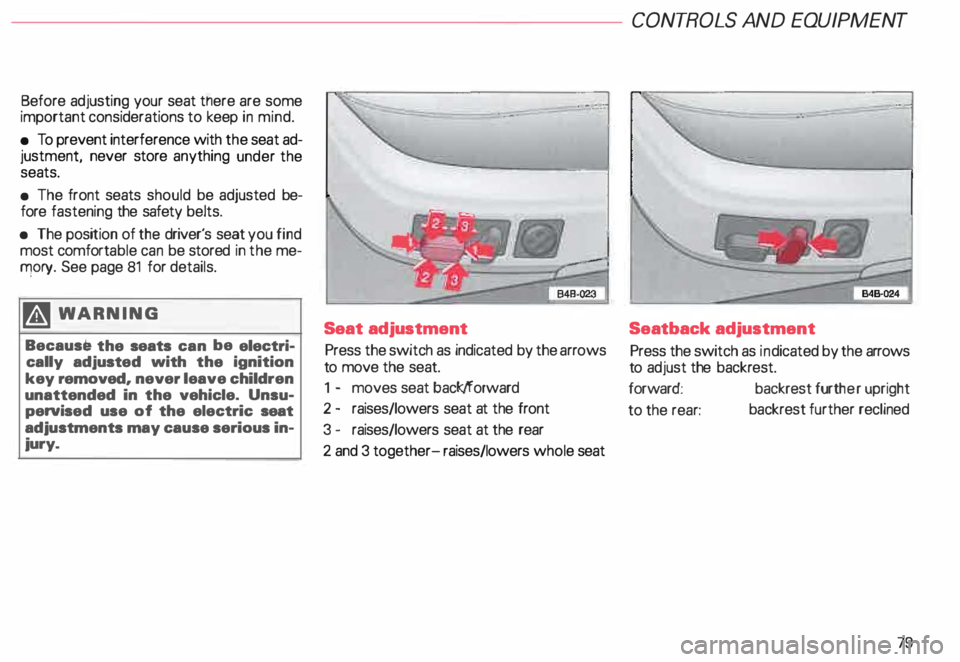
Press the switch as indicated by the arrows
to move the seat.
1 - moves seat back/forward
2 - raises/lowers seat at the front
3 - raises/lowers seat at the rear
2 and 3 together- raises/lowers whole seat CONT
ROLS AND EQUIPMENT
Seatback adjustment
Press the switch as indicated by the arrows
to adjust the backrest.
forward: backrest further upright
to the rear: backrest
further reclined
79
Page 83 of 306
CONTROLS AND
EQUIPMENT---------------------
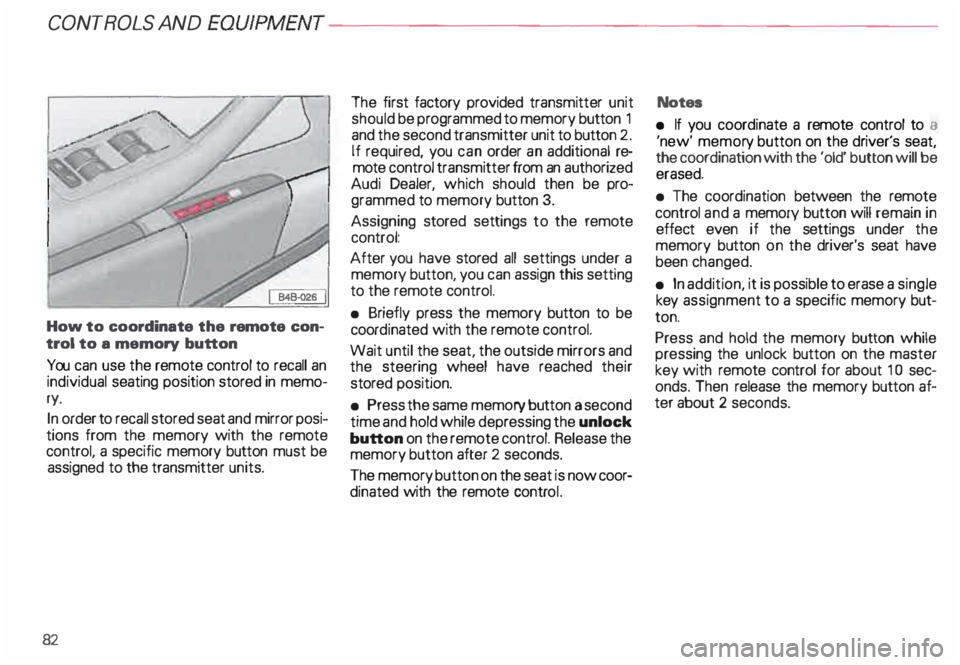
How to coordinate the remote con
trol to a memory button
You can use the remote control to recall an
individual seating position stored in memo
ry.
In order to recall stored seat and mirror posi
tions from the memory with the remote
control, a specific memory button must be
assigned to the transmitter units.
82 The
first factory provided transmitter unit
should be programmed to memory button 1
and the second transmitter unit to button 2.
If required, you can order an additional re
mote control transmitter from an authorized
Audi Dealer, which should then be pro
grammed to memory button 3.
Assigning stored settings to the remote
control:
After you have stored all settings under a
memory button, you can assign this setting
to the remote control.
• Briefly press the memory button to be
coord inated with the remote control.
Wait until the seat, the outside mirrors and
the steering wheel have reached their
stored position.
• Press the same memory button a second
time and hold while depressing the unlock
button on the remote control. Release the
memory button after 2 seconds.
The memory button on the seat is now coor
dinated with the remote control. Notes
• If you coordinate a remote control to a
'new' memor y button on the driver's seat,
the coordination with the 'old' button will be
erased.
• The coordination between the remote
control and a memory button will remain in
effect even if the settings under the
memory button on the driver's seat have
been changed.
• In addition, it is possible to erase a single
key assignment to a specific memory but
ton.
Press and hold the memory button while
pressing the unlock button on the master
key with remote control for about 1 0 sec
onds. Then release the memory button af
ter about 2 seconds.
Page 85 of 306
CONTROLS AND EQ
UIPMEN T---------------------
Retrieving using the
memory buttons
• With the passenger's door open, de
press and release the desired memory but
ton. The seat will automatically adjust to the
stored position.
• If the door has been closed, you must
then depress and hold the memory button
until the seat has reached its stored posi
tion.
Note
You can not reca ll the stored seat adjust
ment for the front passenger's seat using
the remote control in the master key.
84 Emergency
Off
In an emergency, you can interrupt
any retrieval procedure by
• pressing the '"STOP'" button (see il
lustration on page 81 and 83). or
• tapping one of the memory buttons.
Pushing the"ON/OFF"button to the OFF
position only switches off the Memory. The
stored settings will not be erased.
It's a good idea to turn the Memory off if the
vehicle is going to be used temporarily by a
driver whose driving position will not be
memorized.
The advantage is that the personal settings
that have already been memorized will re
main intact and will not change each time
the vehicle is unlocked using the remote
control. Note
The memory function is switched off when
the STOP button is pressed. The word
''OFF" lights up if the headlights are
switched on. However, the programmed
seat, outside mirrors and steering wheel
positions remain stored in the memory.
Page 102 of 306
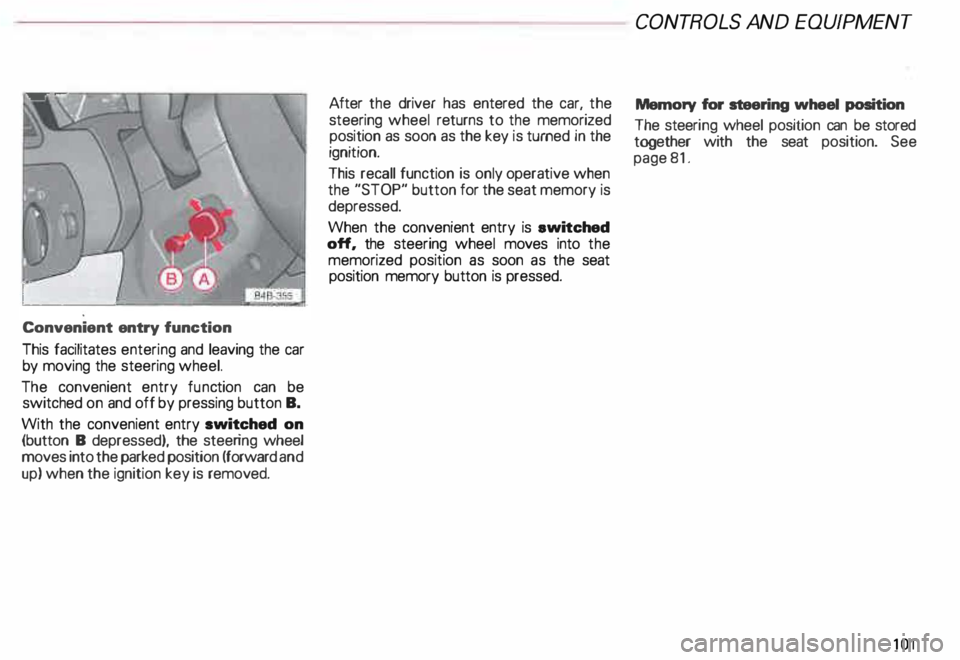
Convenient
entry function
This facilitates entering and leaving the car
by moving the steering wheel.
The convenient entry function can be
switched on and off by pressing button B.
With the convenient entry switched on
(button B depressed), the steering wheel
moves into the parked position (forward and
up) when the ignition key is removed. After
the driver has entered the car, the
steering wheel returns to the memorized
position as soon as the key is turned in the
ignition.
This recall function is only operative when
the "STOP" button for the seat memory is
depressed.
When the convenient entry is ewitched
off, the steering wheel moves into the
memorized position as soon as the seat
position memory button is pressed. CONT
ROLS AND EQUIPMEN T
Memory for steering wheel position
The steeri ng wheel position can be stored
together with the seat position. See
page 81.
101
Page 105 of 306

CONT
ROLS AND EQUIPMENT--------------------
5-spaad automatic transmission (Tiptronic®)*
Yo ur vehicle is equip ped with an electroni
cally controlled five-speed automatic trans
missi �n, upshifting and downshifting is au
tomatiC. You can also manually select a shift
program mptronic®).
Ignition key safety interlock
After switching off the ignition, you can re
move the ignition key only when the selec
tor lever is in the P (Park) position. When
the ignition key is removed, the selector le
ver will be locked in the P (Park) position.
10 4 Shift
programs
The transmission is "self adapting" and will
automa tically select the most appropri
ate sh1ft program suited to the driving condi
tions and driving style.
The transmission will select one of the eco
nomy programs when you drive at a steady
speed or at gradually changing speeds with
out heavy acceleration. This gives best fuel
efficiency, with early upshifting and delayed
down shifting.
The transmission will automatically select
the _sporty shift programs when you drive
at h1 gh er speeds, or with heavy acceleration
and frequently changing speeds. Upshifts
are then delayed to make full use of engine
P ?Wer, an9 downshifting takes place at
higher eng1ne speeds than in the economy
programs. The s
�lection o � the most suitable shift pro
gram JS a contmuous automatic process.
Regardless of this, the driver can also make
the transmission switch to a sporty pro
gram by pressing down the gas pedal
quickly.
This causes the transmission to shift down
into a lower gear and makes quick accelera
tion possible (for example to pass another
vehicle). You do not need to depress the gas
pedal into the kick-down range. After the
transmission _has upsh ifted again, the origi
n� ! program IS selected according to your
dnv1ng style.
An additional shift program allows the auto
matic t�ansmission to select the proper gear
for uphill and downhill driving.
This prevents the transmission from shift
ing up �n� dow � un necessarily on hills. The
transmiSSion w1ll also shift down to a lower
gear when the driver presses the brake
pedal while driving downhill. This makes
use of the braking effect of the engine with
out the need to shift down manually.
With this function the transmission will
however, only shift down as far as 2nd gear :
Page 108 of 306
In selector
lever positions "P" (Park) a no
"N" (Neutral), the instruction "WHEN
STA TIONARY APPLY FOOTBRAKE WHILE
SELECTING GEAR" appears in the instru
ment cluster as a reminder for the driver.
Also, the symbol in the shift console will
light up.
A time delay element prevents the selector
lever from locking when it is moved through
the "N"' (Neutral) position (for example,
going from "R" to "D"). The locking ele
ment only locks the selector lever if it is left
in the "N" (Neutral) position for more than
about one second without the brake pedal
being depressed.
In the N (Neutral) position, the selector le
ver will not lock when the vehicle is driving
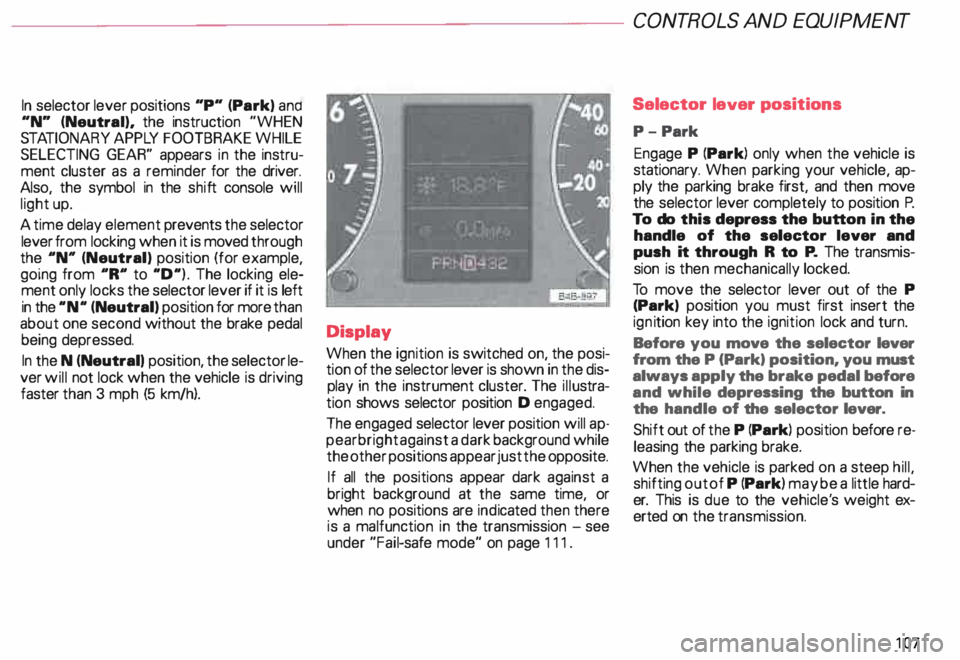
faster than 3 mph (5 km/h). Display
When the ignition is switched on, the posi
tion of the selector lever is shown in the dis
play in the instrument cluster. The illustra
tion shows selector position D engaged.
The engaged selector lever position will ap
pear bright against a dark background while
the other positions appear just the opposite.
If all the positions appear dark against a
bright background at the same time, or
when no positions are indicated then there
is a malfunction in the transmission -see
under "Fail-safe mode" on page 111. CONT
ROLS AND EQUIPMENT
Selector lever positions
P- Park
Engage P (Park) only when the vehicle is
stationary. When parking your vehicle, ap
ply the parking brake first, and then move
the selector lever completely to position P.
To do this depress the button in the
handle of the selector lever and
push it through R to P. The transmis
sion is then mechanically locked.
To move the selector lever out of the P
(Park) position you must first insert the
ign ition key into the ignition lock and turn.
Before you move the selector lever
from the P (Park) position, you must
always apply the brake pedal before
and while depressing the button in
the handle of the selector lever.
Shift out of the P (Park) position before re
leasing the parking brake.
When the vehicle is parked on a steep hill,
shifting out of P (Park) may be a little hard
er. This is due to the vehicle' s weight ex
erted on the transmission.
107
Page 114 of 306
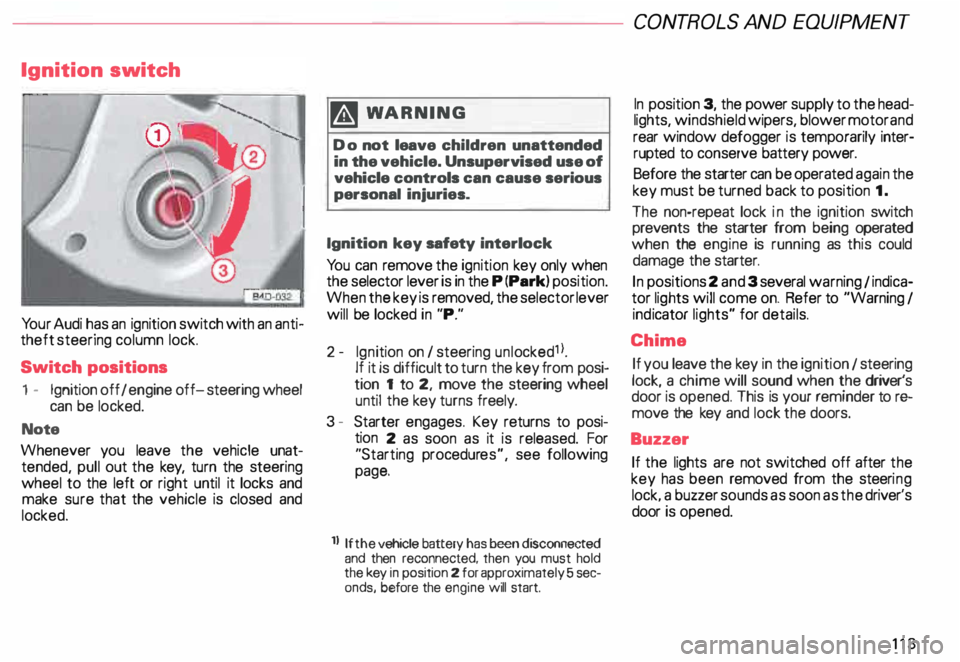
Ignition
switch
Yo ur Audi has an ignition switch with an anti
theft steering column lock.
Switch positions
1 - Ignition off I engine off-steering wheel
can be locked.
Note
Whenever you leave the vehicle unat
tended, pull out the key, turn the steering
wheel to the left or right until it locks and
make sure that the vehicle is closed and
locked. m
WARNING
Do not leave children unattended
in the vehicle. Unsupervised use of
vehicle controls can cause serious
personal injuries.
Ignition key safety interlock
Yo u can remove the ignition key only when
the selector lever is in the P (Park) position.
When the key is removed, the selector lever
will be locked in "P."
2- Ignition on I steering unlocked1 l.
If it is difficult to turn the key from posi
tion 1 to 2, move the steering wheel
until the key turns freely.
3 - Starter engages. Key returns to posi
tion 2 as soon as it is released. For
"Starting procedures", see following
page.
ll If the
vehicle battery has been disconnected
and then reconnected, then you must hold
the key in position 2 for approximately 5 sec
onds, before the engine will start. CONT
ROLS AND EQUIPMEN T
In position 3, the power supply to the head
lights, windshield wipers, blower motor and
rear window defogger is temporarily inter·
rupted to conserve battery power.
Before the starter can be operated again the
key must be turned back to position 1.
The non-repeat lock in the ignition switch
prevents the starter from being operated
when the engine is running as this could
damage the starter.
In positions 2 and 3 several warning 1 indica
tor lights will come on. Refer to "Warning I
ind icator lights" for details.
Chime If you leave the key in the ignition 1 steering
lock, a chime will sound when the driver's
door is opened. This is your reminder tor&
move the key and lock the doors.
Buzzer If the lights are not switched off after the
key has been removed from the steeri ng
lock. a buzzer sounds as soon as the driver's
door is opened.
113