1999 NISSAN MAXIMA turn signal
[x] Cancel search: turn signalPage 43 of 233

2 Instruments and controlsInstrument panel ....................................................... 2-2
Meters and gauges ................................................... 2-3
Speedometer and odometer ..................................... 2-4
Tachometer ............................................................... 2-4
Engine coolant temperature gauge ........................... 2-5
Fuel gauge ................................................................ 2-5
Warning/indicator lights and chimes ......................... 2-7
Checking bulbs.......................................................... 2-7
Warning lights ........................................................... 2-7
Indicator lights ........................................................... 2-9
Chimes .................................................................... 2-11
Security system ....................................................... 2-12
Theft warning (if so equipped) ................................ 2-12
Nissan Vehicle Immobilizer System ....................... 2-13
Windshield wiper and washer switch ...................... 2-15
Rear window and outside mirror (if so equipped)
defogger switch ....................................................... 2-16
Headlight and turn signal switch ............................. 2-17
Headlight switch ...................................................... 2-17
Turn signal switch ................................................... 2-18
Front fog light switch (if so equipped)..................... 2-18
Hazard warning flasher switch ................................ 2-19
Horn......................................................................... 2-19
Heated seats (if so equipped) ................................. 2-20Traction control system (TCS) cancel switch
(if so equipped) ....................................................... 2-21
Cigarette lighter and ashtray ................................... 2-21
Storage .................................................................... 2-22
Trays ....................................................................... 2-22
Cup holder............................................................... 2-24
Glove box ................................................................ 2-24
Console box ............................................................ 2-25
Windows .................................................................. 2-25
Power windows ....................................................... 2-25
Sunroof (if so equipped) ......................................... 2-26
Automatic sunroof ................................................... 2-26
Clock ....................................................................... 2-27
Adjusting the time ................................................... 2-27
Interior light ............................................................. 2-28
Ceiling ..................................................................... 2-28
Personal light .......................................................... 2-28
Vanity mirror light (if so equipped) .......................... 2-29
Trunk light ............................................................... 2-29
Integrated HomeLink
Universal Transceiver
(if so equipped) ....................................................... 2-30
Programming HomeLink........................................ 2-31
Canadian programming ........................................... 2-31
Z
01.1.22/A32-D/V5.0
X
Page 45 of 233

Windshield wiper/washer switch (P.2-15)
Instrument brightness control switch (P.2-17)
Meters/gauges (P.2-3)
Theft warning light (P.2-12) (if so equipped)
Cruise control main switch (P.5-14)
Headlight, fog light (if so equipped) and
turn signal switch (P.2-17)
Hood release handle (P.3-8)
Outside mirror remote control (P.3-13)
Fuse box cover (P.8-23)
Tilting steering wheel lock lever (P.3-12)
Driver supplemental air bag (P.1-6)
Ignition switch/steering lock (P.5-4)
Cruise control set switch (P.5-14)
Cigarette lighter (accessory) (P.2-21)Hazard warning flasher switch (P.2-19)
Ventilator (P.4-2)
Heater/air conditioner control (P.4-3)
Clock (P.2-27)
Radio/cassette player (P.4-13)/CD player (P.4-19)
Rear window and outside mirror (if so equipped) defogger switch (P.2-16)
Passenger supplemental air bag (P.1-6)
Glove box (P.2-24)
Ashtray (P.2-21)
Heated seat switch (P.2-20) (if so equipped)
SIC1064
See the page indicated in parentheses for operating details.
Traction control system (TCS) cancel switch (if so equipped) (P.2-21)
INSTRUMENT PANEL2-2
Instruments and controls
Z
01.1.22/A32-D/V5.0
X
Page 50 of 233

Engine oil pressure warning light
or
Brake warning light
High beam indicator light (Blue)
Charge warning light
or
Anti-lock brake warning light
(if so equipped)
Cruise indicator light
Door open warning light
Low fuel warning light
Malfunction indicator light (MIL)
Seat belt warning light
Overdrive off indicator light
Traction control system indicator light (if
so equipped)
Supplemental air bag warning light
Turn signal/hazard indicator light
Slip indicator light (if so equipped)
Low washer fluid warning light (if so
equipped)
CHECKING BULBSApply the parking brake and turn the ignition
key to ON without starting the engine. The
following lights will come on:
,
or
,
,
,
,
The following lights come on briefly and then
go off:
or
,
,
If any light fails to come on, it may indicate a
burned-out bulb or an open circuit in the elec-
trical system. Have the system repaired
promptly.
WARNING LIGHTS
Engine oil pressure warning
light
This light warns of low engine oil pressure. If
the light flickers or comes on during normal
driving, pull off the road in a safe area, stop the
engineimmediatelyand call a NISSAN dealer
or other authorized repair shop.
The oil pressure warning light is not de-
signed to indicate a low oil level. Use the
dipstick to check the oil level.See ªEngine
oilº in the ª8. Do-it-yourselfº section.
Running the engine with the oil pressure
warning light on could cause serious
damage to the engine almost immedi-
ately. Turn off the engine as soon as it is
safe to do so.
Charge warning light
If the light comes on while the engine is
running, it may indicate that there is something
wrong with the charging system. Turn the
WARNING/INDICATOR LIGHTS
AND CHIMES
Instruments and controls
2-7
Z
01.1.22/A32-D/V5.0
X
Page 53 of 233

lows the vehicle to be driven even in the event
of damage to the electrical circuits. If this
occurs, the gears automatically engage and
lock into third gear.
See the ªDriving the vehicleº in the ª5. Starting
and drivingº section for fail-safe before visiting
your NISSAN dealer.
Turn signal/hazard indicator
lights
The light flashes when the turn signal switch
lever or hazard switch is turned on.
High beam indicator light
(Blue)
This light comes on when the headlight high
beam is on and goes out when the low beam is
selected.
Cruise indicator light
The light comes on while the vehicle speed is
controlled by the cruise control system. If the
light flickers while the engine is running, it may
indicate there is something wrong with the
cruise control system. Have the system
checked by your NISSAN dealer.
Malfunction indicator light
(MIL)
If the malfunction indicator light comes on
steady or blinks while the engine is running, it
may indicate a potential emission control prob-
lem.
The malfunction indicator light may also come
on steady or blink if the fuel filler cap has not
been closed tightly or if the fuel tank is nearly
empty. Check to make sure the fuel cap is
secure and that you have at least 3 US gallons
(14 liters) of fuel in the fuel tank.
After driving for a while, the light should remain
off if no other potential emission control sys-
tem problem exists.
Operation
The malfunction indicator light will come on in
one of two ways:
IMalfunction indicator light on steady Ð An
emission control system malfunction has
been detected. Have the vehicle inspected
by an authorized NISSAN dealer. You do
not need to have your vehicle towed to the
dealer.
IMalfunction indicator light blinking Ð An
engine misfire has been detected which
may damage the emission control system.To reduce or avoid emission control system
damage:
a) Do not drive at speeds above 45 MPH
(72 km/h).
b) Avoid hard acceleration or deceleration.
c) Avoid steep uphill grades.
d) If possible, reduce the amount of cargo
being hauled or towed.
The malfunction indicator light may stop
blinking and come on steady.
Have the vehicle inspected by an autho-
rized NISSAN dealer. You do not need to
have your vehicle towed to the dealer.
Continued vehicle operation without
having the emission control system
checked and repaired as necessary
could lead to poor driveability, reduced
fuel economy, and possible damage to
the emission control system.
Traction control system
indicator light (if so equipped)
The traction control system indicator light
should come on when you turn the ignition key
2-10
Instruments and controls
Z
01.1.22/A32-D/V5.0
X
Page 55 of 233
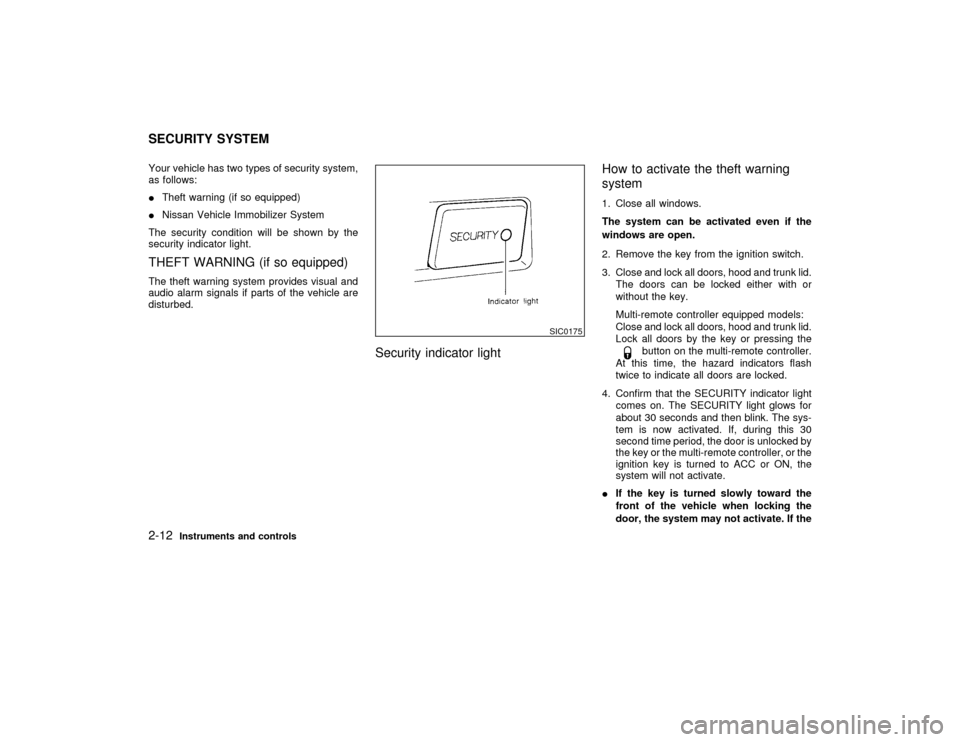
Your vehicle has two types of security system,
as follows:
ITheft warning (if so equipped)
INissan Vehicle Immobilizer System
The security condition will be shown by the
security indicator light.THEFT WARNING (if so equipped)The theft warning system provides visual and
audio alarm signals if parts of the vehicle are
disturbed.
Security indicator lightHow to activate the theft warning
system
1. Close all windows.
The system can be activated even if the
windows are open.
2. Remove the key from the ignition switch.
3. Close and lock all doors, hood and trunk lid.
The doors can be locked either with or
without the key.
Multi-remote controller equipped models:
Close and lock all doors, hood and trunk lid.
Lock all doors by the key or pressing the
button on the multi-remote controller.
At this time, the hazard indicators flash
twice to indicate all doors are locked.
4. Confirm that the SECURITY indicator light
comes on. The SECURITY light glows for
about 30 seconds and then blink. The sys-
tem is now activated. If, during this 30
second time period, the door is unlocked by
the key or the multi-remote controller, or the
ignition key is turned to ACC or ON, the
system will not activate.
IIf the key is turned slowly toward the
front of the vehicle when locking the
door, the system may not activate. If the
SIC0175
SECURITY SYSTEM2-12
Instruments and controls
Z
01.1.22/A32-D/V5.0
X
Page 60 of 233
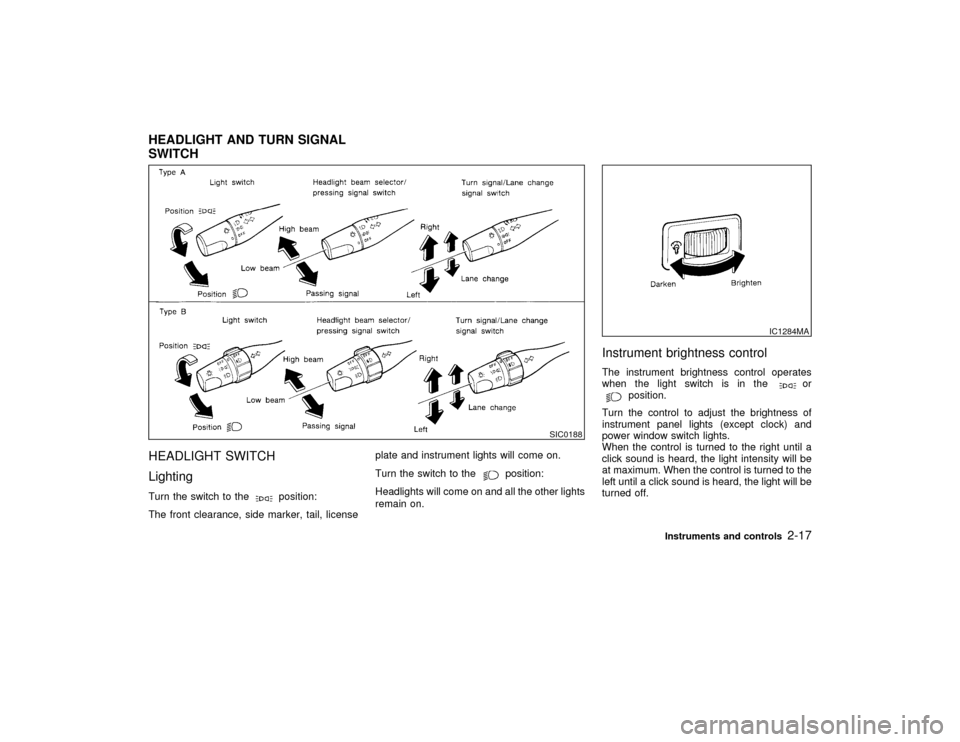
HEADLIGHT SWITCH
LightingTurn the switch to the
position:
The front clearance, side marker, tail, licenseplate and instrument lights will come on.
Turn the switch to the
position:
Headlights will come on and all the other lights
remain on.
Instrument brightness controlThe instrument brightness control operates
when the light switch is in the
or
position.
Turn the control to adjust the brightness of
instrument panel lights (except clock) and
power window switch lights.
When the control is turned to the right until a
click sound is heard, the light intensity will be
at maximum. When the control is turned to the
left until a click sound is heard, the light will be
turned off.
SIC0188
IC1284MA
HEADLIGHT AND TURN SIGNAL
SWITCH
Instruments and controls
2-17
Z
01.1.22/A32-D/V5.0
X
Page 61 of 233

Headlight beam selectTo select the high beam, push the lever for-
ward. Pull it back to select the low beam.Passing signalPulling the lever toward you will flash the
headlight high beam.Daytime running light system
(Canada only)The headlights automatically illuminate at a
reduced intensity when the engine is started
with the parking brake released. The daytime
running lights operate with the headlight switch
in the OFF position or in the
position.
Turn the headlight switch to theposition
for full illumination when driving at night.
If the parking brake is applied before the
engine is started, the daytime running lights do
not illuminate. The daytime running lights illu-
minate once the parking brake is released.
The daytime running lights will remain on until
the ignition switch is turned off.
When the daytime running light system
is active, tail lights on your vehicle are
not on. It is necessary at dusk to turn on
your headlights. Failure to do so could
cause an accident injuring yourself and
others.TURN SIGNAL SWITCH
Turn signalMove the lever up or down to signal the turning
direction. When the turn is completed, the turn
signals cancel automatically.Lane change signalTo indicate a lane change, move the lever up
or down to the point where lights begin flash-
ing.To turn the fog lights on, turn the headlight
switch to the
position, then turn the
switch to theposition. To turn them off,
turn the switch to the OFF position.
The headlights must be on for the fog lights to
operate.
SIC0880
FRONT FOG LIGHT SWITCH (if so
equipped)
2-18
Instruments and controls
Z
01.1.22/A32-D/V5.0
X
Page 62 of 233

Push the switch on to warn other drivers when
you must stop or park under emergency con-
ditions. All turn signal lights will flash.
Some state laws may prohibit the use of the
hazard warning flasher switch while driv-
ing.IWhen stalled or stopped on the road-
way under emergency conditions,
move the vehicle well off the road.
IDo not use the switch while movingon the highway unless unusual cir-
cumstances force you to drive so
slowly that your vehicle might be-
come a hazard to other traffic.
ITurn signals do not work when the
switch is operating.
The flasher can be actuated with the ignition
switch either off or on.
To sound the horn, push the center pad area of
the steering wheel.
SIC0178
SIC0909
HAZARD WARNING FLASHER
SWITCHHORN
Instruments and controls
2-19
Z
01.1.22/A32-D/V5.0
X