Page 1392 of 1529
IN CAR ENTERTAINMENT
DESCRIPTION AND OPERATION 86-6-25
Connector C09
Connector C09 is located in the harness from the audio head unit to the CD switch.
Pin No. Description Input/Output
1 Audio right + from CD switch to head unit Input
2 Audio right – from CD switch to head unit Input
3 – 4 Not used–
5 I Bus data connection between CD switch and head unit Input/Output
6 Audio left + from CD switch to head unit Input
7 Audio left – from CD switch to head unit Input
8 Power ground from head unit to CD autochanger Input
9 Not used–
10 Battery power from head unit to CD autochanger Input
Page 1393 of 1529

IN CAR ENTERTAINMENT
86-6-26 DESCRIPTION AND OPERATION
Connector C05
Connector C05 is located passenger compartment fusebox and supplies power and ground to CD switch unit.
Electrical Supply
The complete system is connected via a connection in the passenger compartment fusebox. A plug is connected to
an auxiliary socket in the fusebox and supplies the ground, accessory power and permanent battery power supplies
to the system via the CD switch and main DVD harness.
The system is connected by two fuses in the passenger compartment fusebox as follows:
lFuse 15 (20A) – Auxiliary power supply
lFuse 27 (15A) – Permanent battery supply.
CAUTION: Always replace fuses with a fuse of the correct Amperage rating.
Voltage Protection System
The DVD system has a voltage protection system to protect the vehicle battery from further loads if battery voltage is
low or to protect the DVD system if the battery voltage is high.
If the battery voltage falls to 11 volts or below, the system will shutdown to protect the battery from further drain. A
message 'Voltage Error shutdown' will appear in the LCD monitor before the system shuts down. When the battery
voltage reaches 11.5 volts or above, the system will restart when the power button on the remote control handset is
pressed.
If the battery voltage exceeds 17 volts, the system will shutdown to a low voltage 'dormant' mode to protect the system
from excessive voltage. A message 'Voltage Error Shutdown' will be displayed in the LCD monitor before the system
shuts down. When the voltage has fallen to 16.5 volts or lower the system will restart when the power button on the
remote control is pressed.
Pin No. Description Input/Output
1 Main ground Input
2 Not used–
3 Accessory power supply Input
4 Battery power Input
5 Not used–
Page 1395 of 1529

IN CAR ENTERTAINMENT
86-6-28 DESCRIPTION AND OPERATION
Fault Finding
The following table details potential faults, possible causes and rectification suggestions.
Fault Possible Cause Rectification
System fails to power up Missing or blown fuse Check both fuses in passenger compartment fusebox
Battery voltage too low or too high Voltage protection system may be active. Check battery
voltage output
Faulty connections Check all DVD harness connections for security and
correct location of pins
Faulty overhead console Replace overhead console
Damaged DVD harness Check all DVD harnesses for damage and repair or
replace as required
Faulty noise filter connection Check power supply wires into and out of the noise filter
on the CD switch box
No picture or sound Missing or blown fuse Check both fuses in passenger compartment fusebox
Low or high battery voltage Check battery voltage output
Vehicle interior is too hot or too
coldAllow vehicle interior to warm up or cool down before
switching on the system
DVD parental rating system is
preventing DVD playRefer to DVD System Owner's Manual and check the
parental control rating setting
LCD monitor is pushed too far
forwardReturn LCD monitor to an angle for normal viewing
Good picture, no sound Volume setting on audio head unit
too lowCheck and adjust head unit volume control
Headphone not connected, faulty
headphone or headphone volume
control incorrectly setEnsure headphone is correctly connected.
Check headphone for correct operation.
check headphone remote volume control setting.
Faulty connections Check all DVD harness connections for security and
correct location of pins
CD switch box or harness fault Check all harnesses to and from the CD switch box. If
harnesses OK, replace CD switch
Faulty overhead console Replace overhead console
Good sound, poor or no
pictureVehicle interior is too cold Allow the vehicle interior to warm up before switching on
the system
Source mode set incorrectly Press the 'Source' button on the remote handset to set
the correct operating mode
Faulty overhead console Replace overhead console
Remote control handset
does not functionCheck batteries in remote control
handsetReplace batteries with new batteries
Ensure that infra-red sensor on
overhead console is not
obstructedLower LCD monitor and check that sensor is not
obstructed or dirty
Status LED on overhead
console is flashingVehicle interior is too hot allow vehicle interior to cool down before switching on
the system
Audio through vehicle
speakers but not through
wired headphonesFaulty headphones Check headphone for correct operation.
Faulty overhead console Replace overhead console
Audio through vehicle
speakers but not through
wireless headphonesFaulty batteries in wireless
headphonesReplace batteries
Faulty headphones Test with known operational headphones and replace
headphones if necessary
Faulty RF transmitter or connector Replace overhead console
Faulty overhead console Replace overhead console
Page 1400 of 1529
IN CAR ENTERTAINMENT
REPAIRS 86-6-33
Switches - remote control - ICE
$% 86.50.13
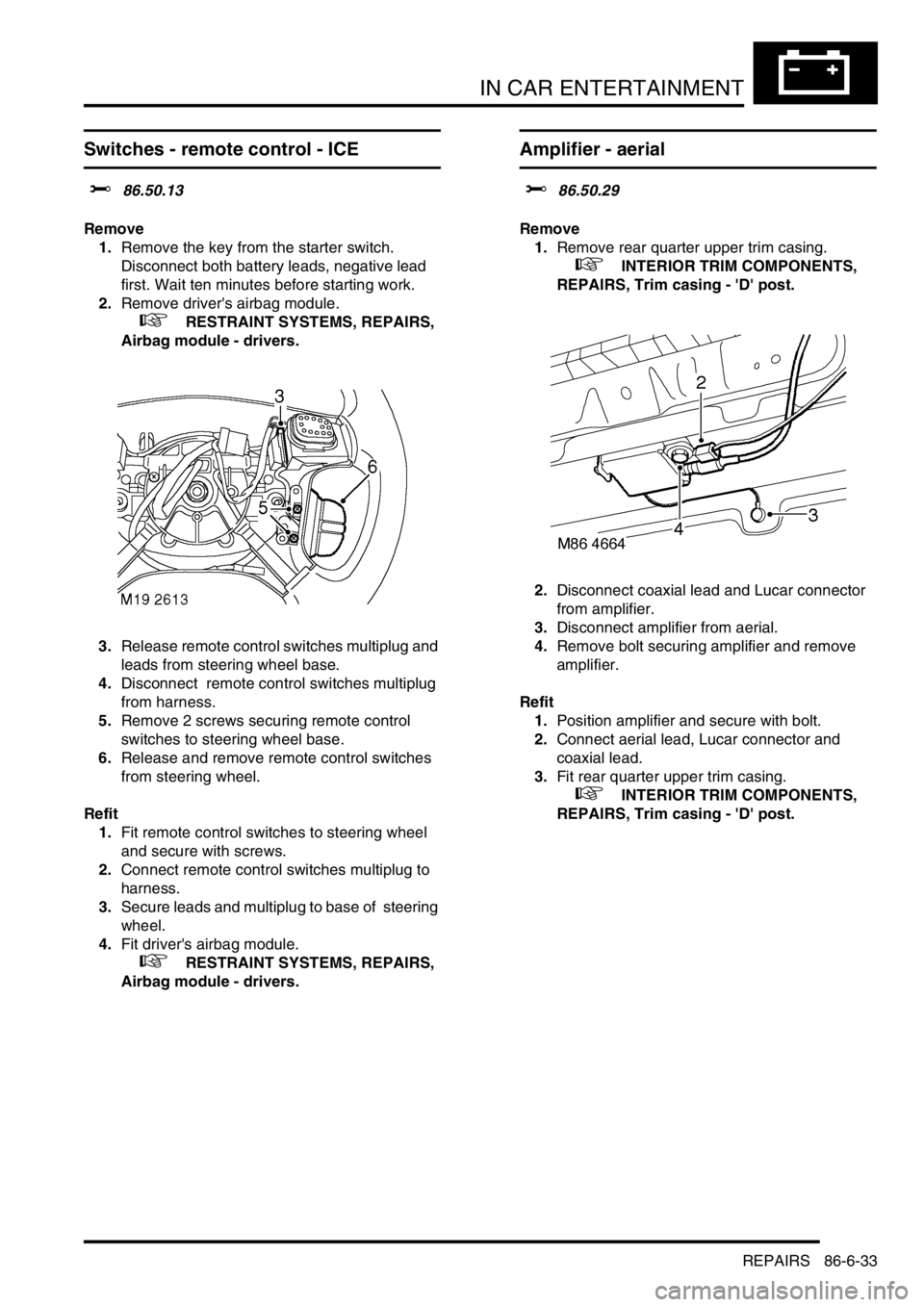
Remove
1.Remove the key from the starter switch.
Disconnect both battery leads, negative lead
first. Wait ten minutes before starting work.
2.Remove driver's airbag module.
+ RESTRAINT SYSTEMS, REPAIRS,
Airbag module - drivers.
3.Release remote control switches multiplug and
leads from steering wheel base.
4.Disconnect remote control switches multiplug
from harness.
5.Remove 2 screws securing remote control
switches to steering wheel base.
6.Release and remove remote control switches
from steering wheel.
Refit
1.Fit remote control switches to steering wheel
and secure with screws.
2.Connect remote control switches multiplug to
harness.
3.Secure leads and multiplug to base of steering
wheel.
4.Fit driver's airbag module.
+ RESTRAINT SYSTEMS, REPAIRS,
Airbag module - drivers.
Amplifier - aerial
$% 86.50.29
Remove
1.Remove rear quarter upper trim casing.
+ INTERIOR TRIM COMPONENTS,
REPAIRS, Trim casing - 'D' post.
2.Disconnect coaxial lead and Lucar connector
from amplifier.
3.Disconnect amplifier from aerial.
4.Remove bolt securing amplifier and remove
amplifier.
Refit
1.Position amplifier and secure with bolt.
2.Connect aerial lead, Lucar connector and
coaxial lead.
3.Fit rear quarter upper trim casing.
+ INTERIOR TRIM COMPONENTS,
REPAIRS, Trim casing - 'D' post.
Page 1402 of 1529
IN CAR ENTERTAINMENT
REPAIRS 86-6-35
Amplifier - power
$% 86.50.36
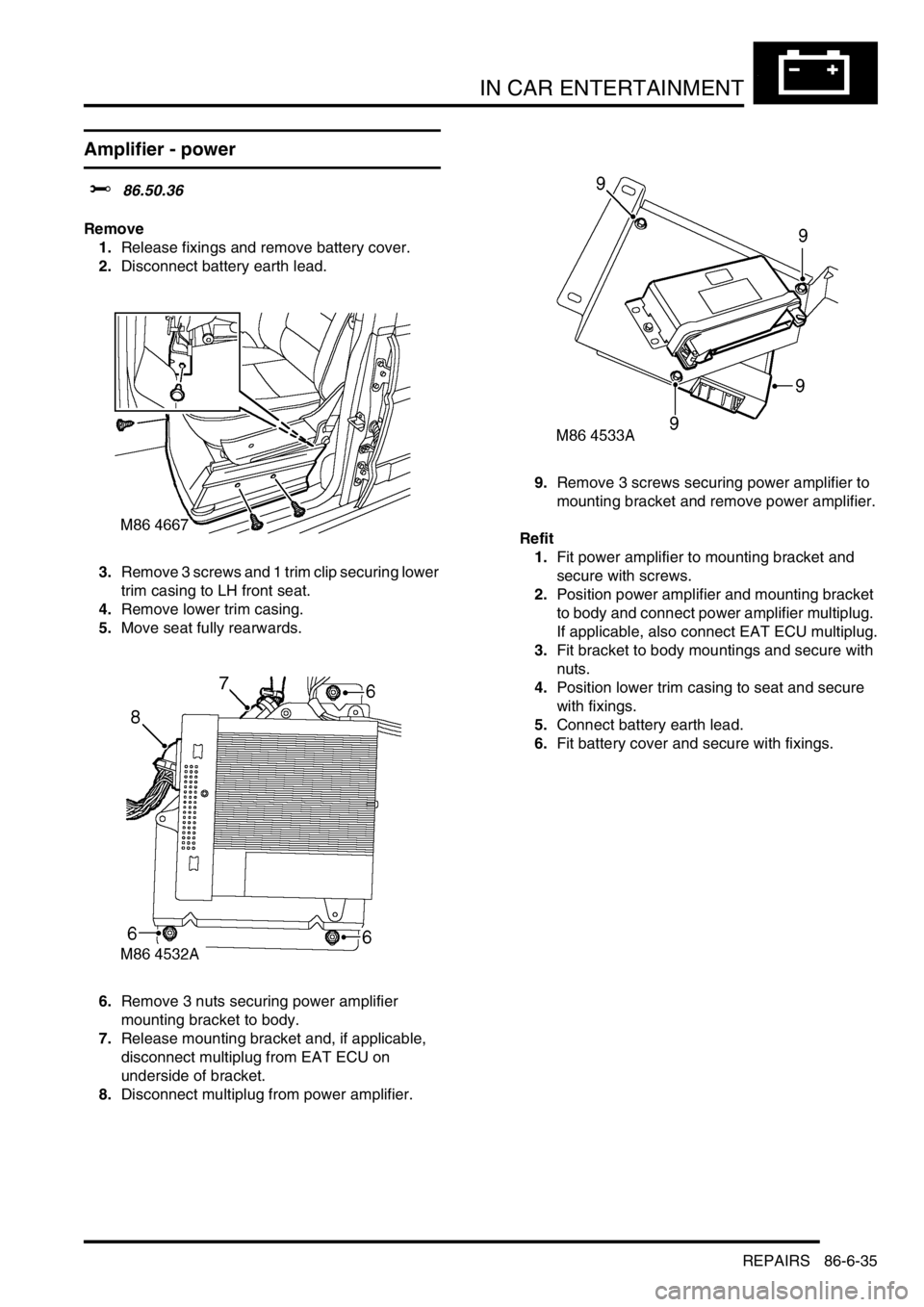
Remove
1.Release fixings and remove battery cover.
2.Disconnect battery earth lead.
3.Remove 3 screws and 1 trim clip securing lower
trim casing to LH front seat.
4.Remove lower trim casing.
5.Move seat fully rearwards.
6.Remove 3 nuts securing power amplifier
mounting bracket to body.
7.Release mounting bracket and, if applicable,
disconnect multiplug from EAT ECU on
underside of bracket.
8.Disconnect multiplug from power amplifier. 9.Remove 3 screws securing power amplifier to
mounting bracket and remove power amplifier.
Refit
1.Fit power amplifier to mounting bracket and
secure with screws.
2.Position power amplifier and mounting bracket
to body and connect power amplifier multiplug.
If applicable, also connect EAT ECU multiplug.
3.Fit bracket to body mountings and secure with
nuts.
4.Position lower trim casing to seat and secure
with fixings.
5.Connect battery earth lead.
6.Fit battery cover and secure with fixings.
Page 1405 of 1529
IN CAR ENTERTAINMENT
86-6-38 REPAIRS
Switch box - CD/DVD player
$% 86.53.41
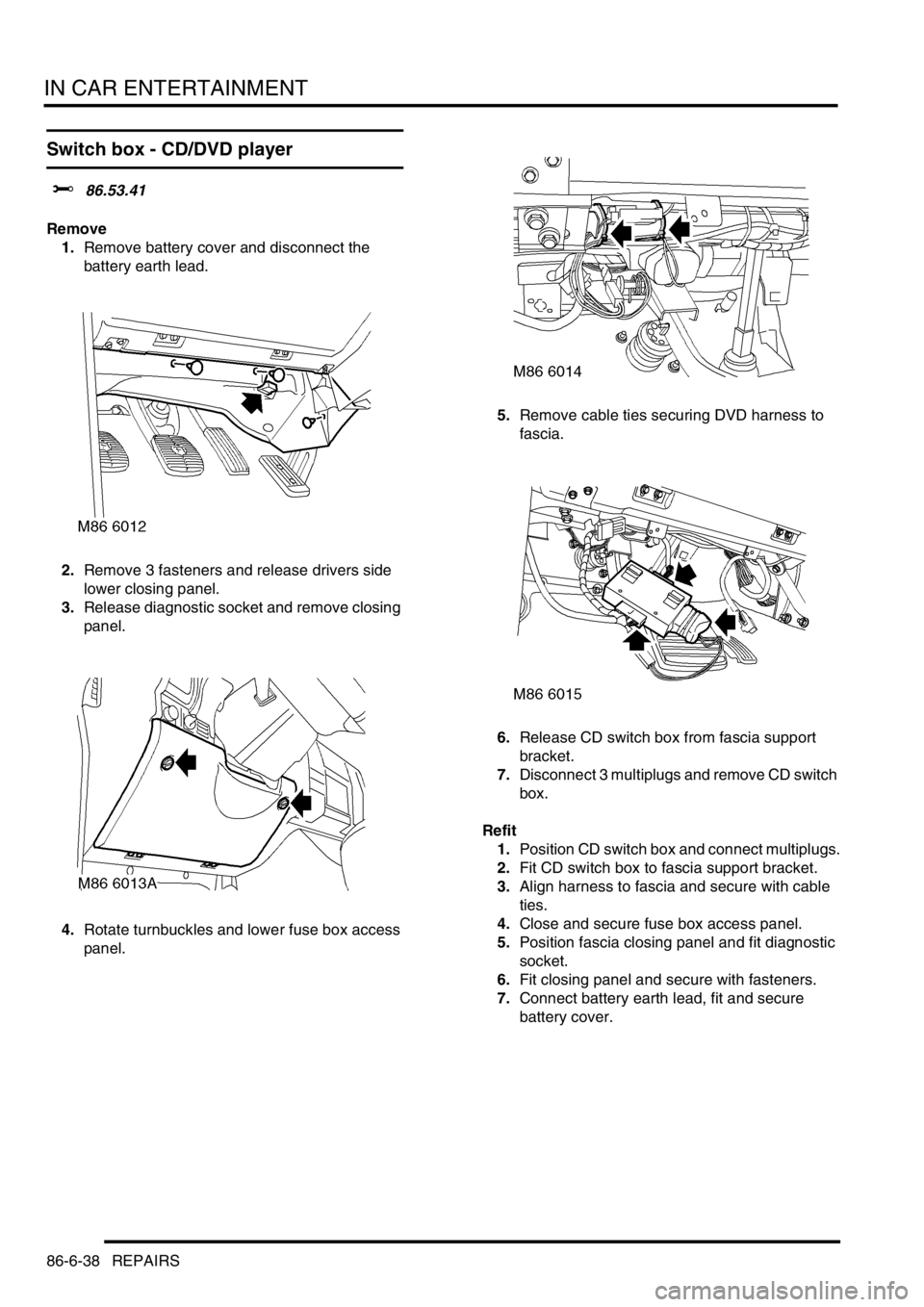
Remove
1.Remove battery cover and disconnect the
battery earth lead.
2.Remove 3 fasteners and release drivers side
lower closing panel.
3.Release diagnostic socket and remove closing
panel.
4.Rotate turnbuckles and lower fuse box access
panel.5.Remove cable ties securing DVD harness to
fascia.
6.Release CD switch box from fascia support
bracket.
7.Disconnect 3 multiplugs and remove CD switch
box.
Refit
1.Position CD switch box and connect multiplugs.
2.Fit CD switch box to fascia support bracket.
3.Align harness to fascia and secure with cable
ties.
4.Close and secure fuse box access panel.
5.Position fascia closing panel and fit diagnostic
socket.
6.Fit closing panel and secure with fasteners.
7.Connect battery earth lead, fit and secure
battery cover.
Page 1414 of 1529
HARNESSES
REPAIRS 86-7-9
6.Disconnect air conditioning compressor
multiplug.
7.Remove 2 nuts securing alternator cables and
release cables. 8.Disconnect coolant temperature sensor
multiplug.
9.Release 2 harness clips from coolant rail.
10.Remove nut securing engine harness positive
lead to battery, release lead and position
aside.
Page 1416 of 1529
HARNESSES
REPAIRS 86-7-11
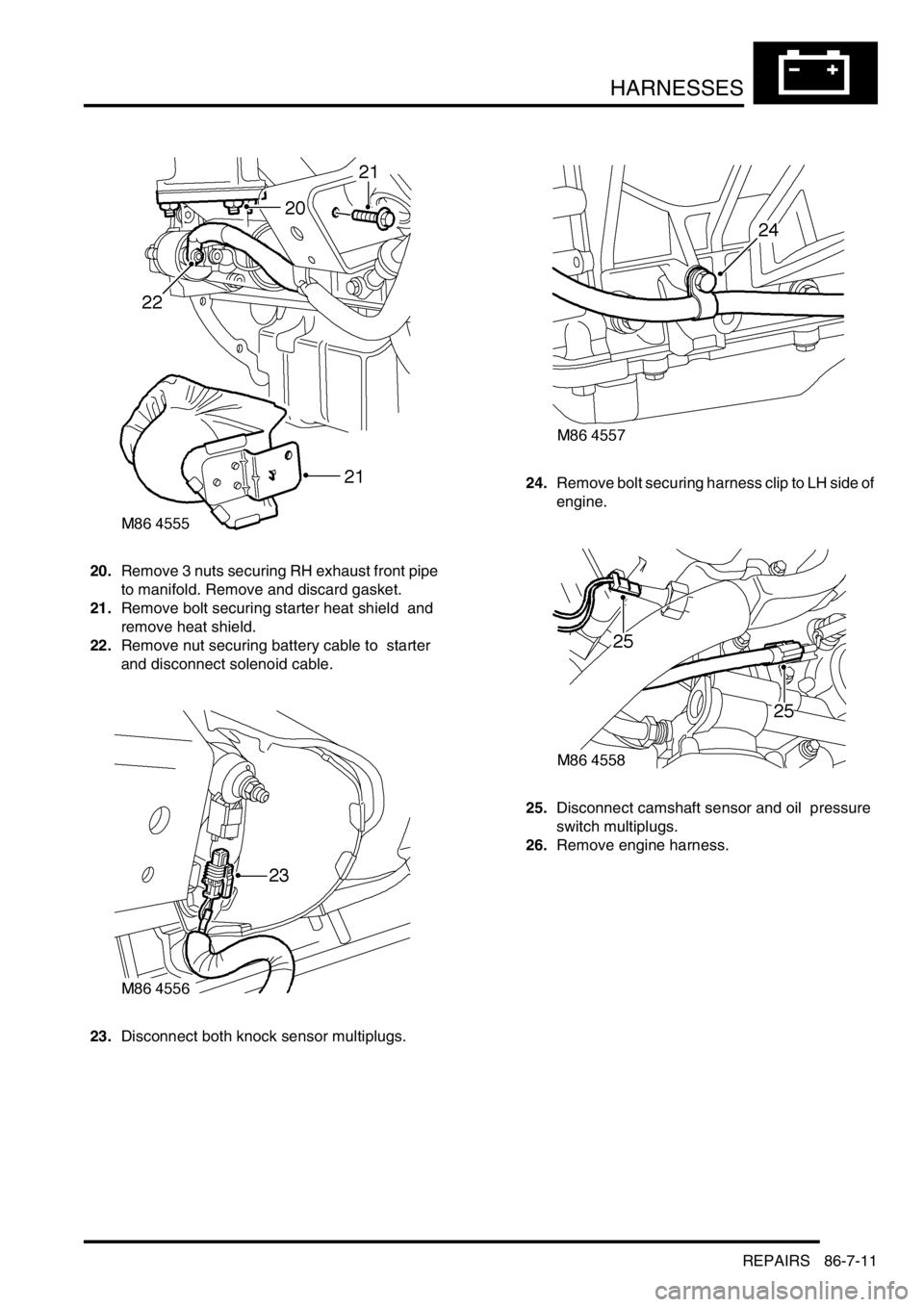
20.Remove 3 nuts securing RH exhaust front pipe
to manifold. Remove and discard gasket.
21.Remove bolt securing starter heat shield and
remove heat shield.
22.Remove nut securing battery cable to starter
and disconnect solenoid cable.
23.Disconnect both knock sensor multiplugs.24.Remove bolt securing harness clip to LH side of
engine.
25.Disconnect camshaft sensor and oil pressure
switch multiplugs.
26.Remove engine harness.