Page 150 of 269
The Braking System
On
DX,
HX
and
EX in
the
U.S., DX
and
EX models in Canada
All Civics are equipped with front disc brakes. The brakes on the rear
wheels are drum. A power assist helps reduce the effort needed on
the brake pedal.
(On the Si model in the U.S., SiR model
in Canada)
Your Honda is equipped with disc brakes at all four wheels. A power assist helps reduce the effort needed
on the brake pedal.
Put your foot on the brake pedal only
when you intend to brake. Resting
your foot on the pedal keeps the brakes applied lightly, causing themto build up heat. Heat build-up can
reduce how well your brakes work. It
also keeps your brake lights on all
the time, confusing drivers behind
you.
Constant application of the brakes
when going down a long hill builds up heat and reduces their effective-ness. Use the engine to assist the
brakes by downshifting to a lower
gear and taking your foot off the accelerator pedal.
Check your brakes after driving
through deep water. Apply the
brakes moderately to see if they feel normal. If not, apply them gently and
frequently until they do. Since a
longer distance is needed to stop
with wet brakes, be extra cautious and alert in your driving. Brake Wear Indicators
The front disc brakes on all models have audible brake wear indicators.
When the brake pads need replacing,
you will hear a distinctive metallic "screeching" sound when you apply
the brakes. If you do not have the
brake pads replaced, they will begin screeching all the time.
Your brakes may sometimes squeal or squeak when you apply them
lightly. Do not confuse this with the
brake wear indicators. They make a
very audible "screeching."
DrivingMain Menu Table of Contents s t
Page 153 of 269
The Braking System
*U.S. indicator shown
The ABS is self-checking. It also checks itself whenever you use the
brakes.
If anything goes wrong, the ABS
indicator on the instrument panelcomes on (see page 55). This means
the anti-lock function of the braking system has shut down. The brakes
still work like a conventional system
without anti-lock, providing normal stopping ability. You should have the dealer inspect your car as soon as
possible if this light stays on after
you start the engine, or comes on
while driving.
Driving
ABS Indicator
ABS INDICATOR'Main Menu Table of Contents s t
Page 156 of 269

Maintenance
This section explains why it is important to keep your car wellmaintained and to follow basic
maintenance safety precautions.
This section also includes Maintenance Schedules for normal
driving and severe driving conditions,
a Maintenance Record, and instruc-
tions for simple maintenance tasks
you may want to take care of yourself.
If you have the skills and tools to per-form more complex maintenance
tasks on your Honda, you may want
to purchase the Service Manual. See
page 263 for information on how to obtain a copy, or see your Honda
dealer.
Maintenance Safety....................... 158
Important Safety Precautions.. 159
Maintenance Schedule.................. 160
Maintenance Record..................... 167 Owner Maintenance Checks........ 169
Fluid Locations............................... 170
Engine Oil....................................... 171
Adding Oil................................... 171
Recommended Oil..................... 171Synthetic Oil............................... 172
Additives..................................... 172
Changing the Oil and Filter...... 173
Cooling System.............................. 175
Adding Engine Coolant............. 175Replacing Engine Coolant........ 177
Windshield Washers..................... 180
Transmission Fluid........................ 180
Automatic
Transmission.......................... 180
5-speed Manual
Transmission.......................... 182
Brake and Clutch Fluid................. 182
Brake System............................. 183
Clutch System............................ 183
Power Steering............................... 184
Air Cleaner Element...................... 185 Hood Latch..................................... 186
Spark Plugs..................................... 187
Replacement............................... 187
Specifications............................. 188
Battery............................................ 189
Wiper Blades.................................. 191
Air Conditioning System............... 193 Drive Belts...................................... 194
Timing Belt..................................... 194
Tires................................................ 195 Inflation....................................... 195
Recommended Tire Pressures
for Normal Driving............ 196
Inspection................................... 197
Maintenance............................... 197
Tire Rotation.............................. 198
Replacing Tires and Wheels .... 199
Wheels and Tires....................... 200
Winter Driving........................... 200
Snow Tires.............................. 200
Tire Chains............................. 201
Lights.............................................. 202 Replacing Bulbs......................... 204
Storing Your Car............................ 212
MaintenanceMain Menu s t
Page 158 of 269
Maintenance Safety
Important Safety Precautions Before you begin any maintenance,
make sure your car is parked on
level ground and that the parking
brake is set. Also, be sure the engine is off. This will help to eliminate several potential hazards:
Carbon monoxide poisoning
from engine exhaust. Be sure there is adequate ventilation
whenever you operate the engine.
Burns from hot parts. Let the
engine and exhaust system cool
before touching any parts. Injury from moving parts. Do
not run the engine unless in-
structed to do so. Read the instructions before you
begin, and make sure you have the
tools and skills required.
To reduce the possibility of fire or explosion, be careful when working
around gasoline or batteries. Use a
commercially available degreaser or
parts cleaner, not gasoline, to clean
parts. Keep cigarettes, sparks, and
flames away from the battery and all
fuel-related parts.
You should wear eye protection and protective clothing when working
near the battery or when using
compressed air.
MaintenanceMain Menu Table of Contents s t
Page 159 of 269

Maintenance Schedule
The Maintenance Schedule specifies how often you should have your carserviced and what things need
attention. It is essential that you have
your car serviced as scheduled to retain its high level of safety,dependability, and emissions control
performance.
The services and time or distance
intervals shown in the maintenanceschedule assume you will use your
car as normal transportation for
passengers and their possessions.
You should also follow these
recommendations:
Avoid exceeding your car's loadlimit. This puts excess stress onthe engine, brakes, and many
other parts of your car. The load
limit is shown on the label on thedriver's doorjamb.
Operate your car on reasonable
roads within the legal speed limit.
Drive your car regularly over adistance of several miles
(kilometers).
Always use unleaded gasoline with
the proper octane rating (see page
124). Which Schedule to Follow:
Service your car according to the
time and mileage periods on one of
the Maintenance Schedules on the
following pages. Select the schedule
for "Severe Conditions" if most of
your driving is done under one or more of the conditions listed on that
page. Otherwise, follow the schedule
for "Normal Conditions."
MaintenanceMain Menu Table of Contents s t
Page 168 of 269
Owner Maintenance Checks
You should check the following items at the specified intervals. If
you are unsure of how to perform any check, turn to the page given. Engine oil level — Check every
time you fill the fuel tank. See
page 111. Engine coolant level — Check the
radiator reserve tank every time
you fill the fuel tank. See page 127. Windshield washer fluid — Check
the level in the reservoir monthly.If weather conditions cause you to
use the washers frequently, check
the reservoir each time you stop
for fuel. See page 180. Automatic transmission — Check
the fluid level monthly. See page
180.
Brakes — Check the fluid level
monthly. See page 183.Tires — Check the tire pressure
monthly. Examine the tread for
wear and foreign objects. See page 196. Lights — Check the operation of
the headlights, parking lights,
taillights, high-mount brake light,
turn signals, brake lights, and
license plate lights monthly. See
page 202.
MaintenanceMain Menu Table of Contents s t
Page 169 of 269
Fluid Locations
Maintenance
COOLANT
RESERVOIR
AUTOMATIC
TRANSMISSION
FLUID DIPSTICK(Yellow loop)
(Including CVT)
BRAKE FLUID
(Gray cap)
CLUTCH FLUID (5-speed Manual
Transmission only) (Gray cap)
ENGINE OIL DIPSTICK
(Orange loop) ENGINE OIL
FILL CAP
WASHER FLUID (Blue cap)
POWER STEERING FLUID (Red cap)Main Menu Table of Contents s t
Page 170 of 269
Engine Oil
Adding Oil
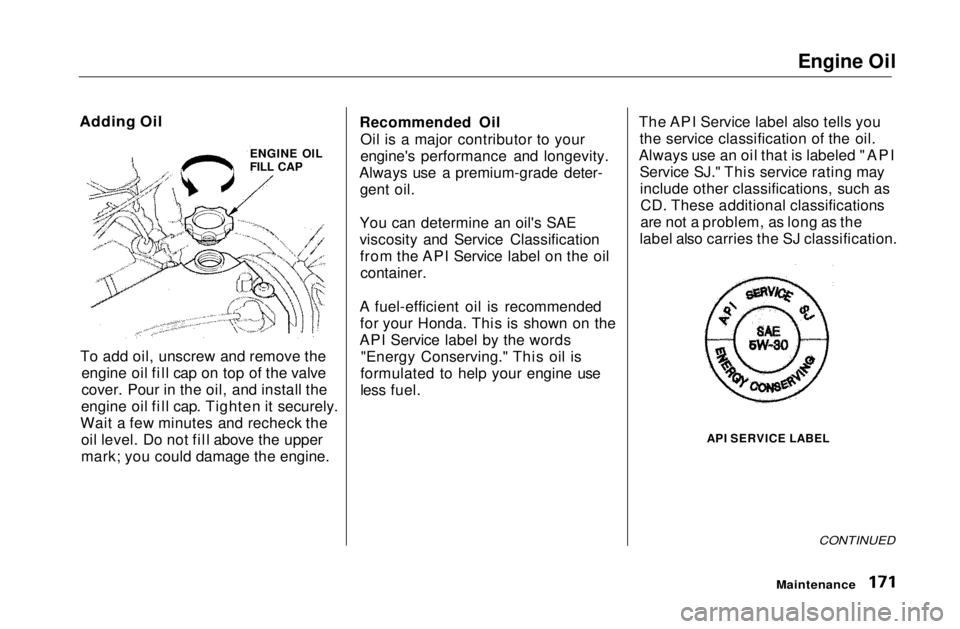
To add oil, unscrew and remove the engine oil fill cap on top of the valve
cover. Pour in the oil, and install the
engine oil fill cap. Tighten it securely.
Wait a few minutes and recheck the oil level. Do not fill above the upper
mark; you could damage the engine. Recommended Oil
Oil is a major contributor to your
engine's performance and longevity.
Always use a premium-grade deter- gent oil.
You can determine an oil's SAE
viscosity and Service Classification from the API Service label on the oilcontainer.
A fuel-efficient oil is recommended for your Honda. This is shown on the
API Service label by the words "Energy Conserving." This oil is
formulated to help your engine use
less fuel. The API Service label also tells you
the service classification of the oil.
Always use an oil that is labeled "API Service SJ." This service rating mayinclude other classifications, such asCD. These additional classifications
are not a problem, as long as the
label also carries the SJ classification.
API SERVICE LABEL
CONTINUED
Maintenance
ENGINE OIL
FILL CAPMain Menu Table of Contents s t