Page 58 of 269

Gauges
Speedometer U.S. Models
This shows your speed in miles per
hour (mph). The smaller inner
numbers are the speed in kilometers
per hour (km/h).
Canadian Models
This shows your speed in kilometers per hour (km/h). The smaller innernumbers are the speed in miles per hour (mph).
Tachometer
On HX, EX, and Si models in the U.S.,
and Si and SiR models in Canada
The tachometer shows the engine speed in revolutions per minute (rpm). To protect the engine from
damage, never drive with the
tachometer needle in the red zone. Odometer
The odometer shows the total dis- tance your car has been driven. Itmeasures miles in U.S. models and
kilometers in Canadian models. It is illegal under U.S. federal law andCanadian provincial regulations to
disconnect, reset, or alter the
odometer with the intent to change
the number of miles or kilometers
indicated.
Trip Meter
This meter shows the number of miles (U.S.) or kilometers (Canada)driven since you last reset it. To
reset it, push the trip meter reset
button.
Instruments and Controls
U.S.: EX Instrument Panel
TACHOMETER TRIP METERSPEEDOMETER
FUEL GAUGETEMPERATURE
GAUGE
ODOMETER
MAINTENANCE
REQUIRED INDICATOR
TRIP METER
RESET BUTTONMain Menu Table of Contents s t
Page 59 of 269

Gauges
Fuel Gauge
This shows how much fuel you have. It is most accurate when the car is on
level ground. It may show slightlymore or less than the actual amount
when you are driving on curvy or hilly roads. The gauge stays at the same fuel
level reading after you turn off the
ignition. When you add fuel, the
gauge slowly changes to the new
reading after you turn the ignitionswitch back ON (II). Temperature Gauge
This shows the temperature of the
engine's coolant. During normal
operation, the pointer should rise
from the bottom white mark to about
the middle of the gauge. In severe driving conditions, such as very hot
weather or a long period of uphill driving, the pointer may rise to the
upper blue zone. If it reaches the red (Hot) mark, pull safely to the side of
the road. Turn to page 229 for
instructions and precautions on checking the engine's cooling
system.
Instruments and Controls
U.S.: DX Instrument Panel
TEMPERATUREGAUGE TRIP METER
SPEEDOMETER
FUEL GAUGE
ODOMETER MAINTENANCE
REQUIRED INDICATOR
(U.S. Cars only)
TRIP METER
RESET BUTTONMain Menu Table of Contents s t
Page 60 of 269
Gauges
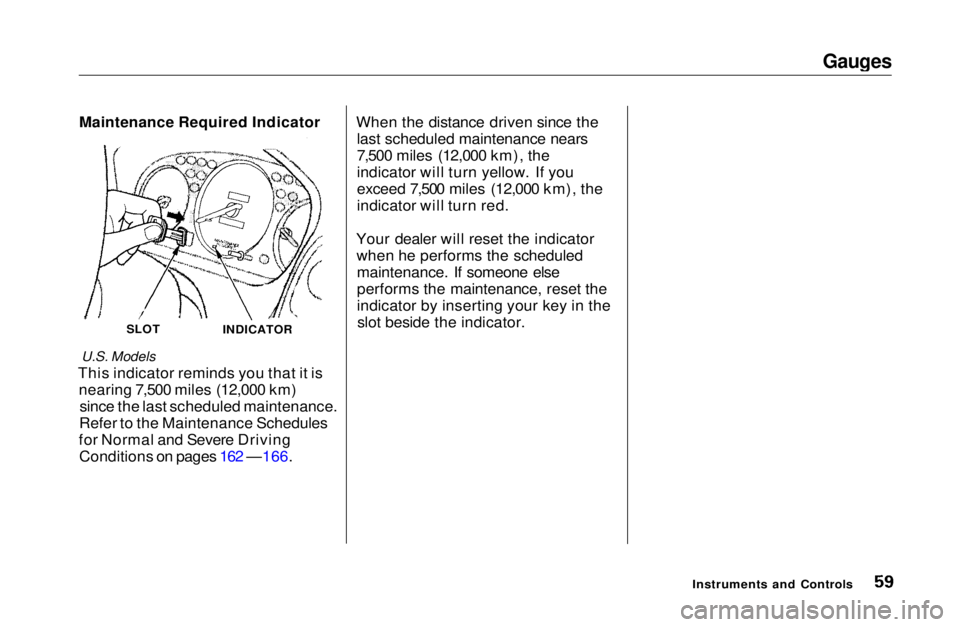
Maintenance Required Indicator
U.S. Models
This indicator reminds you that it is nearing 7,500 miles (12,000 km)since the last scheduled maintenance.
Refer to the Maintenance Schedules
for Normal and Severe Driving Conditions on pages 162 —166. When the distance driven since the
last scheduled maintenance nears
7,500 miles (12,000 km), the
indicator will turn yellow. If you
exceed 7,500 miles (12,000 km), the
indicator will turn red.
Your dealer will reset the indicator when he performs the scheduledmaintenance. If someone else
performs the maintenance, reset the
indicator by inserting your key in theslot beside the indicator.
Instruments and Controls
INDICATOR
SLOTMain Menu Table of Contents s t
Page 206 of 269
Lights
4. Pull the bulb straight out of its
socket.
Push the new bulb straight into
the socket until it bottoms.
5. Reinstall the socket into the light assembly by turning it clockwise
until it locks.
6. Test the lights to make sure the new bulb is working.
7. Reinstall the trunk lining.
8. Reset the fastener by pushing onthe pointed end until it pops backalmost flush with the fingers on
the housing.
9. Put the fastener in the hole on the side of the trunk lining and push
on the center until it locks (the
center is flush with the head).
MaintenanceMain Menu Table of Contents s t