Page 133 of 328

yellowblue
2-71
This light should come on, as a check to show you it is
working, when the ignition is on and the engine is not
running. If the light doesn't come on, have it repaired.
This light will also come on during a malfunction in one
of two ways:
�Light Flashing
-- A misfire condition has been
detected. A misfire increases vehicle emissions and
may damage the emission control system on your
vehicle. Dealer or qualified service center diagnosis
and service may be required.
�Light On Steady
-- An emission control system
malfunction has been detected on your vehicle.
Dealer or qualified service center diagnosis and
service may be required.
If the Light Is Flashing
The following may prevent more serious damage to
your vehicle:
�Reducing vehicle speed.
�Avoiding hard accelerations.
�Avoiding steep uphill grades.
�If you are towing a trailer, reduce the amount of
cargo being hauled as soon as it is possible.If the light stops flashing and remains on steady, see ªIf
the Light Is On Steadyº following.
If the light continues to flash, when it is safe to do so,
stop the vehicle. Find a safe place to park your vehicle.
Turn the key off, wait at least 10 seconds and restart the
engine. If the light remains on steady, see ªIf the Light
Is On Steadyº following. If the light is still flashing,
follow the previous steps, and drive the vehicle to your
dealer or qualified service center for service.
If the Light Is On Steady
You may be able to correct the emission system
malfunction by considering the following:
Did you recently put fuel into your vehicle?
If so, reinstall the fuel cap, making sure to fully install
the cap. See ªFilling Your Tankº in the Index. The
diagnostic system can determine if the fuel cap has been
left off or improperly installed. A loose or missing fuel
cap will allow fuel to evaporate into the atmosphere. A
few driving trips with the cap properly installed should
turn the light off.
Did you just drive through a deep puddle of water?
If so, your electrical system may be wet. The condition
will usually be corrected when the electrical system
dries out. A few driving trips should turn the light off.
Page 134 of 328

yellowblue
2-72
Are you low on fuel?
As your engine starts to run out of fuel, your engine may
not run as efficiently as designed since small amounts of
air are sucked into the fuel line causing a misfire. The
system can detect this. Adding fuel should correct this
condition. Make sure to install the fuel cap properly. See
ªFilling Your Tankº in the Index. It will take a few
driving trips to turn the light off.
Have you recently changed brands of fuel?
If so, be sure to fuel your vehicle with quality fuel (see
ªFuelº in the Index). Poor fuel quality will cause your
engine not to run as efficiently as designed. You may
notice this as stalling after start
-up, stalling when you
put the vehicle into gear, misfiring, hesitation on
acceleration or stumbling on acceleration. (These
conditions may go away once the engine is warmed up.)
This will be detected by the system and cause the light
to turn on.
If you experience one or more of these conditions,
change the fuel brand you use. It will require at least one
full tank of the proper fuel to turn the light off.
If none of the above steps have made the light turn off,
have your dealer or qualified service center check the
vehicle. Your dealer has the proper test equipment and
diagnostic tools to fix any mechanical or electrical
problems that may have developed.
Oil Pressure Light/Gage
The light and gage tell you if there could be a problem
with the engine oil pressure.
The gage shows the engine
oil pressure in pounds per
square inch (psi). Canadian
vehicles show pressure in
kilopascals (kPa).
The oil light goes on when
you turn the key to ON or
START. It goes off once you
start the engine. That's a
check to be sure the
light works.
If it doesn't come on, be sure to have it fixed so it will
be there to warn you if something goes wrong.
Page 135 of 328

yellowblue
2-73
When the light comes on and stays on, it means that oil
isn't flowing through the engine properly. You could
be low on oil and you might have some other
system problem.
CAUTION:
Don't keep driving if the oil pressure is low. If
you do, your engine can become so hot that it
catches fire. You or others could be burned.
Check your oil as soon as possible and have your
vehicle serviced.
NOTICE:
Damage to your engine from neglected oil
problems can be costly and is not covered by
your warranty.
Check Oil Light
This light will come on for
a few seconds when the
ignition is turned on. If the
light doesn't come on, have
it repaired.
If the light comes on while starting and stays on for
about one minute or comes on while driving, the engine
oil level should be checked. Prior to checking the oil
level, be sure your vehicle has been shut off for several
minutes and is on a level surface. Check the oil level and
bring it to the proper level. See ªEngine Oilº in
the Index.
Brake To Shift Light
This light will come on to
remind you that you must
press the brake pedal to
shift out of PARK (P).
Page 136 of 328
yellowblue
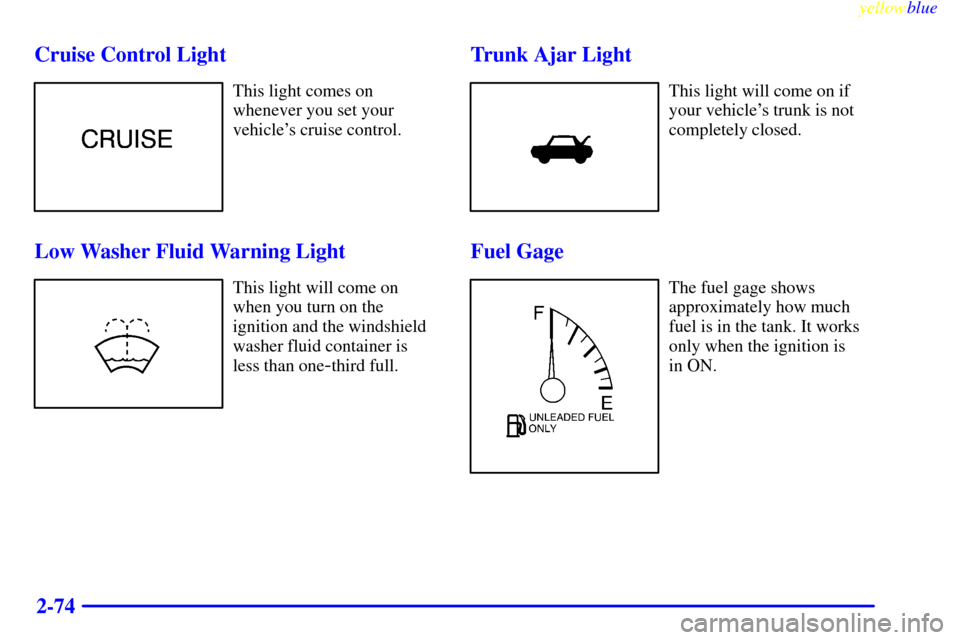
2-74 Cruise Control Light
This light comes on
whenever you set your
vehicle's cruise control.
Low Washer Fluid Warning Light
This light will come on
when you turn on the
ignition and the windshield
washer fluid container is
less than one
-third full.
Trunk Ajar Light
This light will come on if
your vehicle's trunk is not
completely closed.
Fuel Gage
The fuel gage shows
approximately how much
fuel is in the tank. It works
only when the ignition is
in ON.
Page 137 of 328

yellowblue
2-75
Here are a few concerns some owners have had about
the fuel gage. All of these situations are normal and do
not indicate that anything is wrong with the fuel gage.
�At the gas station the gas pump shuts off before
the gage reads F.
�The gage may change when you turn, stop or
speed up.
Low Fuel Light
If the fuel level is low,
approximately two gallons
(7.57 L) of fuel remaining
in the fuel tank, a light will
come on and stay on.
When the fuel level reaches one gallon (8.8 L), the light
will flash until fuel is added.
It will also come on for a few seconds when you first
turn on the ignition as a check to show it's working. If it
doesn't come on then, have it fixed.
Fuel Cap Indicator Light (If Equipped)
This light will come on
if the fuel cap has not
been fully tightened, is
missing or has been
improperly installed.
You should recheck your fuel cap to make sure it is
on tight.
If you continue to drive with a loose fuel cap, the
diagnostic system in your vehicle can determine if the
fuel cap has been left off or improperly installed. A
loose or missing fuel cap will allow fuel to evaporate
into the atmosphere. If this happens, the CHECK
ENGINE light may come on. For more information,
see ªMalfunction Indicator Lampº earlier in this section.
Page 138 of 328
yellowblue
2-76 Automatic Transmission Warning Light
(If Equipped)
This light comes on briefly
when the ignition is turned
on. If the light remains on
or lights up while driving,
there may be a fault in the
automatic transmission.
Have your vehicle serviced.
Leveling Indicator Light
This light comes on steady
when the rear load level in
your vehicle changes.Do not drive your vehicle when this light is on. The rear
of your vehicle is too low and part of the body or the
rear axle may be damaged when driving over bumpy
roads. When the light goes out, leveling is complete.
This procedure is automatic
-- you don't have to
do anything.
If the light comes on flashing, there may be a problem
with the leveling system. You should reduce your
vehicle speed and have your vehicle serviced soon.
Brake Pad Wear Indicator Light
This light comes on when
the brake pads on your
vehicle have significantly
worn. The pads will have to
be replaced, so have your
vehicle serviced soon.
Page 147 of 328

yellowblue
3-9
Audio Systems
Your Cadillac audio system has been designed to operate
easily and give years of listening pleasure. You will get
the most enjoyment out of it if you acquaint yourself
with it first. Find out what your audio system can do and
how to operate all its controls, to be sure you're getting
the most out of the advanced engineering that went
into it.
Setting the Clock
Press and hold HR or MN until the time display begins
to change. Release the button as you get close to the
correct time. The time may be set anytime the clock is
displayed. There is a two
-second delay before the clock
goes into time
-set mode.
AM-FM Stereo with Cassette Tape Player
Playing the Radio
PWR/VOL: Press this knob lightly to turn the system
on. Press the knob again to turn the system off. To
increase volume, turn the knob clockwise. Turn it
counterclockwise to decrease volume. The volume level
will appear on the display.
HR or MN: Display the time with the ignition off by
pressing this button.
DSPL: Press this button to display the radio station
being played.
Page 149 of 328

yellowblue
3-11
Setting the Tone
BASS: Press this knob lightly so it extends. Turn the
knob clockwise to increase and counterclockwise to
decrease bass.
TREB: Press this knob lightly so it extends. Turn the
knob clockwise to increase and counterclockwise to
decrease treble. If a station is weak or noisy, you may
want to decrease the treble.
Push these knobs back into their stored positions when
you're not using them.
Adjusting the Speakers
BAL: Press this knob lightly so it extends. Turn the
knob clockwise to adjust sound to the right speakers and
counterclockwise for the left speakers. The middle
position balances the sound between the speakers.
FADE: Press this knob lightly so it extends. Turn the
knob clockwise to adjust the sound to the front speakers
and counterclockwise for the rear speakers. The middle
position balances the sound between the speakers.
Push these knobs back into their stored positions when
you're not using them.Playing a Cassette Tape
With the radio on, insert a cassette tape. The tape will
begin playing as soon as it is inserted. When one side of
your cassette tape is done playing, auto reverse plays the
other side of your cassette tape. If you want to insert a
cassette tape when the ignition is off, first press the
eject button.
While the tape is playing, use the VOL, FADE, BAL,
BASS and TREB controls just as you do for the radio.
Other controls may have different functions when a tape
is inserted. The display will show TAPE with an arrow
to indicate which side of the tape is playing. PLAY will
appear on the display temporarily when a tape is
playing. The display will then revert back to showing
the time.