Page 275 of 368

yellowblue
6-35 Replacing Brake System Parts
The braking system on a vehicle is complex. Its many parts
have to be of top quality and work well together if the vehicle
is to have really good braking. Your vehicle was designed
and tested with top
-quality GM brake parts. When you
replace parts of your braking system
-- for example, when
your brake linings wear down and you have to have new ones
put in
-- be sure you get new approved GM replacement
parts. If you don't, your brakes may no longer work properly.
For example, if someone puts in brake linings that are wrong
for your vehicle, the balance between your front and rear
brakes can change
-- for the worse. The braking performance
you've come to expect can change in many other ways if
someone puts in the wrong replacement brake parts.
Battery
Your new vehicle comes with an ACDelco Freedom�
battery. When it's time for a new battery, we recommend
an ACDelco Freedom battery. Get one that has the
replacement number shown on the original
battery's label.
If your battery has a very low charge or is dead, you
may not be able to remove the ignition key from the
ignition switch or shift out of PARK (P). Refer to ªPark
Lock Systemº in the Index.
Vehicle Storage
If you're not going to drive your vehicle for 25 days or
more, remove the black, negative (
-) cable from the
battery. This will help keep your battery from
running down.
CAUTION:
Batteries have acid that can burn you and gas
that can explode. You can be badly hurt if you
aren't careful. See ªJump Startingº in the Index
for tips on working around a battery without
getting hurt.
Contact your dealer to learn how to prepare your vehicle
for longer storage periods.
Also, for your audio system, see ªTheft
-Deterrent
Featureº in the Index.
ProCarManuals.com
Page 277 of 368

yellowblue
6-37
5. Remove the rubber access cover (from behind the
bulb you are replacing).
6. Quarter twist and turn the bulb socket and remove it
from the lamp.
7. Lift the plastic locking tab on the electrical
connector and pull the connector from the headlamp
bulb socket.
8. Connect the new headlamp bulb to the wiring harness,
making sure the connector tab snaps into place.
9. Insert the bulb socket into the headlamp assembly.10. Reverse all steps and reassemble the headlamp
assembly, then check the lamps.
Headlamp Aiming
Your vehicle has a headlamp system equipped with
horizontal and vertical aim indicators. The aim has been
pre
-set at the factory and should need no further
adjustment. This is true even though your vertical and
horizontal aim indicators may not fall exactly on the ª0º
(zero) marks on their scales.
If your vehicle is damaged in an accident, the headlamp
aim may be affected. Aim adjustment may be necessary
if it is difficult to see lane markers (for horizontal aim),
or if oncoming drivers flash their high beams at you (for
vertical aim). If you believe your headlamps need to be
re
-aimed, we recommend that you take it to your dealer
for service; however, it is possible for you to re
-aim
your headlamps as described in the following procedure.
NOTICE:
To make sure your headlamps are aimed
properly, read all the instructions before
beginning. Failure to follow these instructions
could cause damage to headlamp parts.
ProCarManuals.com
Page 279 of 368
yellowblue
6-39
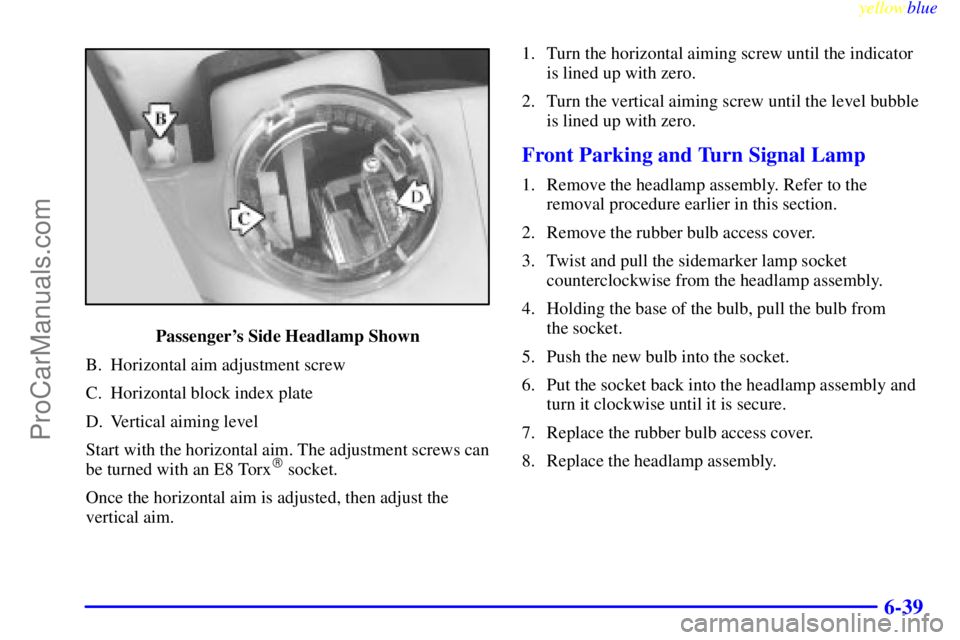
Passenger's Side Headlamp Shown
B. Horizontal aim adjustment screw
C. Horizontal block index plate
D. Vertical aiming level
Start with the horizontal aim. The adjustment screws can
be turned with an E8 Torx
� socket.
Once the horizontal aim is adjusted, then adjust the
vertical aim.1. Turn the horizontal aiming screw until the indicator
is lined up with zero.
2. Turn the vertical aiming screw until the level bubble
is lined up with zero.
Front Parking and Turn Signal Lamp
1. Remove the headlamp assembly. Refer to the
removal procedure earlier in this section.
2. Remove the rubber bulb access cover.
3. Twist and pull the sidemarker lamp socket
counterclockwise from the headlamp assembly.
4. Holding the base of the bulb, pull the bulb from
the socket.
5. Push the new bulb into the socket.
6. Put the socket back into the headlamp assembly and
turn it clockwise until it is secure.
7. Replace the rubber bulb access cover.
8. Replace the headlamp assembly.
ProCarManuals.com
Page 280 of 368
yellowblue
6-40 Center High-Mounted Stoplamp
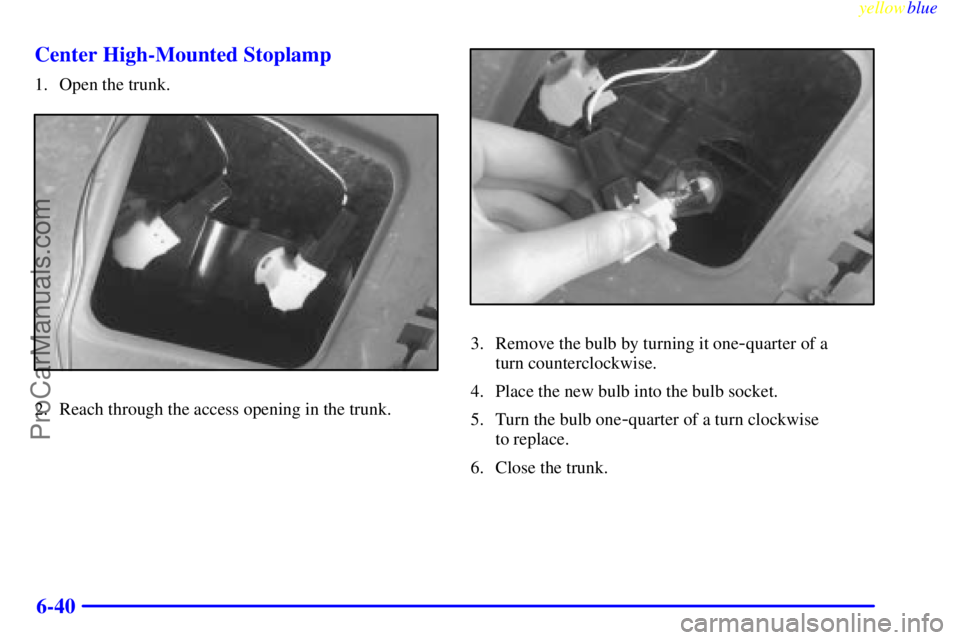
1. Open the trunk.
2. Reach through the access opening in the trunk.
3. Remove the bulb by turning it one-quarter of a
turn counterclockwise.
4. Place the new bulb into the bulb socket.
5. Turn the bulb one
-quarter of a turn clockwise
to replace.
6. Close the trunk.
ProCarManuals.com
Page 281 of 368
yellowblue
6-41 Tail/Stop/Turn Signal Lamp
1. Remove the three plastic wing nuts (A). (Pliers may
be required to remove the wing nuts.)2. Pull the taillamp housing (B) away from the body
of the vehicle.
3. Squeeze the tab on the socket and turn the
socket counterclockwise.
4. Pull out the socket.
5. Pull the bulb out of the socket. (There are two bulbs
on each taillamp.)
6. Push in a new bulb.
7. Replace the socket into the housing and
turn clockwise.
8. Replace the taillamp housing to the body of
the vehicle.
9. Install and tighten the three plastic wing nuts.
ProCarManuals.com
Page 282 of 368
yellowblue
6-42 Trunk Lid Applique
1. Open the trunk lid halfway.2. Remove the wing nuts (A) from the studs on the
applique. (There are eight wing nuts. Pliers may be
required to remove them.)
3. Remove the applique from the trunk lid.
4. Turn the sockets (B) counterclockwise.
5. Pull the bulb out of the socket.
6. Push in the new bulb.
7. Replace the socket in the housing and
turn clockwise.
8. Connect the applique to the lid.
9. Reconnect the wing nuts to the studs on the
applique and hand
-tighten.
10. Close the trunk lid.
ProCarManuals.com
Page 283 of 368

yellowblue
6-43 Back-Up Lamp
The back-up lamps are located in the trunk lid applique.
(Refer to the trunk lid applique removal procedure earlier
in this section for graphic and further instructions.)
1. Remove the trunk lid applique.
2. Twist and pull the back
-up lamp socket from the
trunk lid applique.
3. Twist and pull the bulb from the back
-up
lamp socket.
To install the new bulb:
1. Twist and push the bulb into the back
-up
lamp socket.
2. Twist and push the back
-up lamp socket into the
trunk lid applique.
3. Reinstall the trunk lid applique.
Dome Lamp (If Equipped)
1. Grasp the front center and rear center positions of the
dome lamp housing and squeeze together until the
housing releases from the base plate. A screwdriver
may be necessary to pry the assembly loose.
2. Lift the plastic locking tab on the electrical
connector and pull the connector from the dome
lamp assembly.
3. Grasp the bulb housing located in the center of the
assembly and pull straight up.
4. Pull the bulb out of the socket.
5. Push in a new bulb.
6. Replace the socket into the dome lamp assembly.
7. Reconnect the dome lamp assembly to the wiring
harness, making sure the connector tab snaps
into place.
8. Reposition the dome lamp assembly to the roof, and
gently push the assembly into the base plate.
ProCarManuals.com
Page 288 of 368

yellowblue
6-48
To reset (calibrate) the system: turn the ignition switch
to RUN. Then press and hold the RESET button for
about five seconds.
The red RESET button is
located inside your
instrument panel fuse block.
The fuse block is located under the cover labeled
FUSES, which is at the end of the instrument panel on
the passenger's side of the vehicle. The RESET button is
the first button in the top row of the fuse block. The
LOW TIRE light will come on and flash three times.
Then it will go off. If the light doesn't go off, see your
dealer for service.
The system completes the calibration process
during driving.The system normally takes 15 to 20 minutes of driving
in each of three speed ranges to ªlearnº tire pressures.
The speed ranges are 15 to 40 mph (25 to 65 km/h),
40 to 65 mph (65 to 105 km/h) and above 65 mph
(105 km/h). When learning is complete, the system will
alert you after 2-8 minutes if a tire is 12 psi (83 kPa)
different from the other three tires. Detection thresholds
may be higher and detection times may be longer on
rough roads, curves and at high speeds. The system is
not capable of detection at speeds greater than
60 mph (95 km/h).
Tire Inspection and Rotation
Tires should be rotated every 6,000 to 8,000 miles
(10 000 to 13 000 km). Any time you notice unusual
wear, rotate your tires as soon as possible and check
wheel alignment. Also check for damaged tires or
wheels. See ªWhen It's Time for New Tiresº and
ªWheel Replacementº later in this section for
more information.
The purpose of regular rotation is to achieve more
uniform wear for all tires on the vehicle. The first
rotation is the most important. See ªScheduled
Maintenance Servicesº in the Index for scheduled
rotation intervals.
ProCarManuals.com