1998 TOYOTA T100 reset
[x] Cancel search: resetPage 4 of 214

T100(U)
4
1. Engine coolant temperature gauge
2. Service reminder indicators or indicator lights
3. Trip meter 4. Odometer
5. Speedometer
6. Fuel gauge
7. Trip meter reset knob
Instrument cluster overview
Without tachometer
Page 5 of 214

T100(U)5
1. Engine coolant temperature gauge
2. Oil pressure gauge
3. Tachometer
4. Service reminder indicators or indicatorlights 5. Odometer
6. Speedometer
7. Trip meter
8. Voltmeter
9. Low fuel level warning light
10. Fuel gauge 11. Trip meter reset knob
With tachometer
Page 60 of 214
T100(U)
60
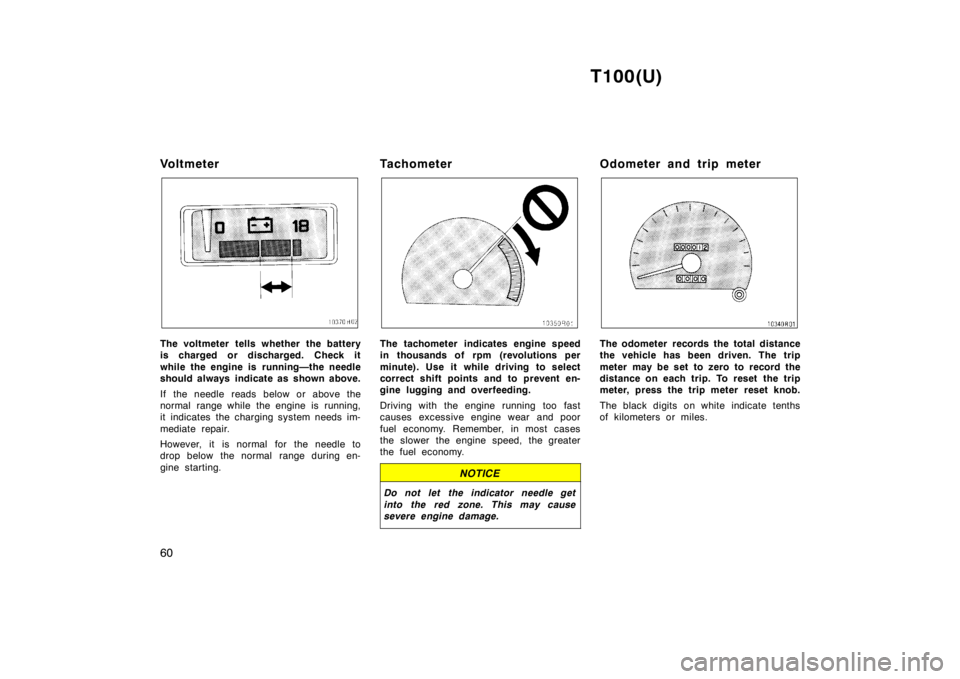
Vo l t m e t e r
The voltmeter tells whether the battery
is charged or discharged. Check it
while the engine is running—the needle
should always indicate as shown above.
If the needle reads below or above the
normal range while the engine is running,
it indicates the charging system needs im-
mediate repair.
However, it is normal for the needle to
drop below the normal range during en-
gine starting.
TachometerThe tachometer indicates engine speed
in thousands of rpm (revolutions per
minute). Use it while driving to select
correct shift points and to prevent en-
gine lugging and overfeeding.
Driving with the engine running too fast
causes excessive engine wear and poor
fuel economy. Remember, in most cases
the slower the engine speed, the greater
the fuel economy.
NOTICE
Do not let the indicator needle get
into the red zone. This may cause
severe engine damage.
Odometer and trip meter
The odometer records the total distance
the vehicle has been driven. The trip
meter may be set to zero to record the
distance on each trip. To reset the trip
meter, press the trip meter reset knob.
The black digits on white indicate tenths
of kilometers or miles.
Page 75 of 214
T100(U)75
CAUTION
To avoid accidental cruise control en-
gagement, keep the ”CRUISE ON-
OFF” switch off when not using the
cruise control.
SETTING AT A DESIRED SPEED
On vehicles with automatic transmission,
the transmission must be in ”D” before
you set the cruise control speed.
Bring your vehicle to the desired speed,
push the lever down in the ”SET/COAST”
direction and release it. This sets the ve-
hicle at that speed. If the speed is not
satisfactory, tap the lever up for a faster
speed, or tap it down for a slower speed.
Each tap changes the set speed by 1.6
km/h (1.0 mph). You can now take your
foot off the accelerator pedal.
If you need acceleration—for example,
when passing–depress the accelerator
pedal enough for the vehicle to exceed
the set speed. When you release it, the
vehicle will return to the speed set prior
to the acceleration.
CAUTION
For manual transmission:
While driving with the cruise control
on, do not shift to neutral without
depressing the clutch pedal, as this
may cause engine racing or overrev-
ving.
CANCELLING THE PRESET SPEED
You can cancel the preset speed by:
a. Pulling the control lever in the ”CAN-CEL” direction and release it.
b. Depressing the brake pedal.
c. Depressing the clutch pedal (manual transmission).
If the vehicle speed falls below about 40
km/h (25 mph), the preset speed will auto-
matically cancel out.
If the vehicle speed drops 16 km/h (10
mph) below the preset speed, the preset
speed will also automatically cancel out.
If the preset speed automatically cancels
out other than for the above cases, have
your vehicle checked by your Toyota deal-
er at the earliest opportunity. RESETTING AT A FASTER SPEED
Press the control lever upward in the
”RES/ACC” direction and hold it. Release
the lever when the desired speed is at-
tained. While the lever is held upward, the
vehicle will gradually gain speed.
However, a faster way to reset is to ac-
celerate the vehicle and then press the
control lever downward in the ”SET/
COAST” direction.
RESETTING AT A SLOWER SPEED
Press the control lever downward in the
”SET/COAST” direction and hold it. Re-
lease the lever when the desired speed is
attained. While the lever is held, the ve-
hicle speed will gradually decrease.
However, a faster way to reset is to de-
press the brake pedal and then press the
control lever downward in the ”SET/
COAST” direction.
On vehicles with automatic transmission,
even if you turn off the overdrive switch
with the cruise control on, engine braking
will not be applied because the cruise
control is not cancelled. To decrease the
vehicle speed, reset to a slower speed
with the cruise control lever or depress
the brake pedal. If you use the brake
pedal, cruise control is cancelled.
Page 76 of 214

T100(U)
76
RESUMING THE PRESET SPEED
If the preset speed is cancelled by pulling
the control lever or by depressing the
brake pedal or clutch pedal, pushing the
lever up in the ”RES/ACC” direction will
restore the speed set prior to cancellation.
However, once the vehicle speed falls be-
low about 40 km/h (25 mph), the preset
speed will not be resumed.
CRUISE CONTROL FAILURE WARNING
If the ”CRUISE” indicator light in the
instrument cluster flashes when using the
cruise control, there is some trouble in the
cruise control system. Contact your Toyota
dealer and have your vehicle inspected.
To crank the engine without depressing
the clutch pedal, push the switch with
the ignition on.
The switch stays on as long as the igni-
tion is on. And it will automatically turn off
when the ignition is off.
This switch cancels the clutch start sys-
tem, which is designed to keep the starter
motor from operating if the clutch pedal is
not depressed all the way down.
The switch allows the vehicle to be driven
out of difficult situations by cranking the
engine with the clutch engaged.
Never use the switch for normal engine
starting. Be sure to follow the starting
procedure instructed in ”How to start the
engine” in Part 3.
Clutch start cancel switch
(four-wheel drive models
with manual transmission)
Page 81 of 214

T100(U)81
1 2 3 4 5 6 (Preset buttons)
These buttons are used to preset and
tune in radio stations.
To preset a station to a button: Tune in
the desired station (see ”TUNE” button).
Push and hold down the button until you
hear a beep
this will set the station to
the button. The button number will appear
on the display.
To tune in to a preset station: Push the
button for the station you want. The but-
ton number and station frequency will ap-
pear on the display.
These systems can store one AM and one
FM station for each button. The preset
station memory will be canceled out if the
power source is interrupted (battery dis-
connected or fuse blown).
(Eject button)
Push this button to eject a cassette. AM
FM
Push ”AM
F M” to switch between the AM
and FM bands. ”AM” or ”FM” will appear
on the display.
If the audio system is off, you can turn
on the radio by pushing ”AM
FM”. Also,
push ”AM
F M” to switch from cassette op-
eration to radio operation. BAL (Balance)
Move the ”BAL” ring around ”TONE” to
adjust the balance between the right and
left speakers
FF (Fast forward)
Push the ”FF” to fast forward a cassette
tape.
To stop the tape while it is fast forward-
ing, lightly push the ”REW”.
If a tape fast forwards completely, the
cassette player will play the other side of
the tape, using the auto
−reverse feature.
PROG (Program)
Push ”PROG” to select the other side of
a cassette tape.
Auto −reverse feature: After the cassette
player reaches the end of a tape side, it
automatically reverses and begins to play
the other side. This is true whether the
cassette was playing or fast forwarding.
REW (Rewind)
Push the ”REW” to rewind to a tape.
To stop the tape while it is rewinding,
lightly push the ”FF”.
If a tape side rewinds completely, the cas-
sette player will stop and then play that
same side. ST (Stereo reception) display
Your radio automatically changes to stereo
reception when a stereo broadcast is re-
ceived. ”ST” appears on the display. If the
signal becomes weak, the radio reduces
the amount of channel separation to prev-
ent the weak signal from creating noise.
If the signal becomes extremely weak, the
radio switches from stereo to mono recep-
tion.
TA P E
Push ”TAPE” to switch from radio opera-
tion to cassette operation. If the audio
system is off, you can turn on the cas-
sette player by pushing ”TAPE”. In both
cases, a cassette must already be loaded
in the player.
TONE
Turn the ”TONE” knob to adjust the tone.
Page 84 of 214

T100(U)
84
1 2 3 4 5 6 (Preset buttons)
These buttons are used to preset and
tune in radio stations.
To preset a station to a button: Tune in
the desired station (see ”TUNE” button).
Push and hold down the button until you
hear a beep
this will set the station to
the button. The button number will appear
on the display.
To tune in to a preset station: Push the
button for the station you want. The but-
ton number and station frequency will ap-
pear on the display.
These systems can store one AM and two
FM stations for each button (The display
will show ”AM”, ”FM1” or ”FM2” when you
push ”AM” or ”FM”).
(Eject button)
Push this button to eject a cassette.
After you turn the ignition to ”LOCK”, you
will be able to eject a cassette but you
will not be able to reinsert it.
(Reverse/Fast forward buttons)
Cassette Player
Push the fast forward button to fast for-
ward a cassette tape. ”FF” will appear on
the display. Push the reverse button to
rewind a tape. ”REW” will appear on the
display.
To stop the tape while it is fast forward-
ing, push the fast forward button or
”TAPE”; to stop the tape while it is re-
winding, push the reverse button or
”TAPE”.
If a tape side rewinds completely, the cas-
sette player will stop and then play that
same side. If a tape fast forwards com-
pletely, the cassette player will play the
other side of the tape, using the auto −re-
verse feature.
Compact Disc Player
If you want to fast forward or reverse
through a compact disc track, push and
hold in the fast forward or reverse button.
When you release the button, the compact
disc player will resume playing. AM
Push ”AM” to switch the AM band. ”AM”
will appear on the display.
If the audio system is off, you can turn
on the radio by pushing ”AM”. Also, push
”AM” to switch from cassette or compact
disc operation to radio operation.
AUDIO CONTROL / MODE
Manual tone adjustment function—
This knob is used to adjust the tone
manually.
For low
−pitch tone adjustment, push
”AUDIO CONTROL / MODE” repeatedly
until ”BAS” appears on the display. Then
turn the knob to suit your preference.
The display will show the range from
”BAS −5” to ”BAS 5”.
For high −pitch tone adjustment, push
”AUDIO CONTROL / MODE” repeatedly
until ”TRE” appears on the display. Then
turn the knob to suit your preference.
The display will show the range from
”TRE −5” to ”TRE 5”.
Page 87 of 214

T100(U)87
RPT (Repeat)
There are two repeat features—you can
either replay a disc track or a whole com-
pact disc.
Repeating a track:
Quickly push and release ”RPT” while the
track is playing. ”RPT” will appear on the
display. If you hear a beep, you held the
button too long, and the player will repeat
the whole disc. When the track ends, it
will automatically be replayed. This pro-
cess will be continued until you push the
button again to turn off the repeat feature.
Compact disc auto changer only—
Repeating a disc:
Push and hold ”RPT” until you hear a
beep. ”D·RPT” will appear on the display.
The player will repeat all the tracks on the
disc you are listening to. When the disc
ends, the player will automatically go back
to the top track of the disc and replay.
This process will be continued until you
push the button again to turn off the re-
peat feature.
SCAN
Radio
You can either scan all the frequencies on
a band or scan only the preset stations
for that band.
To scan all the frequencies:
Quickly push and release ”SCAN”. If you
hear a beep, you held the button too long,
and the radio will scan the preset sta-
tions. The radio will find the next station
up the station band, stay there for a few
seconds, and then scan again. To select
a station, push ”SCAN” a second time.
To scan the preset stations:
Push and hold ”SCAN” until you hear a
beep. The radio will tune in the next pres-
et station up the band, stay there for a
few seconds, and then move to the next
preset station. To select a station, push
”SCAN” a second time.
Compact disc player
There are two scan features—you can ei-
ther scan the tracks on a specific disc or
scan the first tracks of all the discs in the
magazine.
Scanning for the tracks on a disc:
Quickly push and release ”SCAN”. ”SCAN”
will appear on the display and the player
will scan all the tracks on the disc you
are listening to. If you hear a beep, you
held the button too long, and the player
will scan the first tracks of all the discs
in the magazine. To select a track, push
the ”SCAN” a second time. If the player
scanned all the tracks on the disc, it will
stop scanning.
Compact disc auto changer only—
Scanning for the first tracks of all the
discs in the magazine:
Push and hold ”SCAN” until you hear a
beep. ”D·SCAN” will appear on the display
and the player will perform the first track
of the next disc. To select a disc, push
the ”SCAN” a second time. If the player
has scanned all the di
scs, it will stop
scanning.