1998 TOYOTA T100 light
[x] Cancel search: lightPage 76 of 214

T100(U)
76
RESUMING THE PRESET SPEED
If the preset speed is cancelled by pulling
the control lever or by depressing the
brake pedal or clutch pedal, pushing the
lever up in the ”RES/ACC” direction will
restore the speed set prior to cancellation.
However, once the vehicle speed falls be-
low about 40 km/h (25 mph), the preset
speed will not be resumed.
CRUISE CONTROL FAILURE WARNING
If the ”CRUISE” indicator light in the
instrument cluster flashes when using the
cruise control, there is some trouble in the
cruise control system. Contact your Toyota
dealer and have your vehicle inspected.
To crank the engine without depressing
the clutch pedal, push the switch with
the ignition on.
The switch stays on as long as the igni-
tion is on. And it will automatically turn off
when the ignition is off.
This switch cancels the clutch start sys-
tem, which is designed to keep the starter
motor from operating if the clutch pedal is
not depressed all the way down.
The switch allows the vehicle to be driven
out of difficult situations by cranking the
engine with the clutch engaged.
Never use the switch for normal engine
starting. Be sure to follow the starting
procedure instructed in ”How to start the
engine” in Part 3.
Clutch start cancel switch
(four-wheel drive models
with manual transmission)
Page 81 of 214

T100(U)81
1 2 3 4 5 6 (Preset buttons)
These buttons are used to preset and
tune in radio stations.
To preset a station to a button: Tune in
the desired station (see ”TUNE” button).
Push and hold down the button until you
hear a beep
this will set the station to
the button. The button number will appear
on the display.
To tune in to a preset station: Push the
button for the station you want. The but-
ton number and station frequency will ap-
pear on the display.
These systems can store one AM and one
FM station for each button. The preset
station memory will be canceled out if the
power source is interrupted (battery dis-
connected or fuse blown).
(Eject button)
Push this button to eject a cassette. AM
FM
Push ”AM
F M” to switch between the AM
and FM bands. ”AM” or ”FM” will appear
on the display.
If the audio system is off, you can turn
on the radio by pushing ”AM
FM”. Also,
push ”AM
F M” to switch from cassette op-
eration to radio operation. BAL (Balance)
Move the ”BAL” ring around ”TONE” to
adjust the balance between the right and
left speakers
FF (Fast forward)
Push the ”FF” to fast forward a cassette
tape.
To stop the tape while it is fast forward-
ing, lightly push the ”REW”.
If a tape fast forwards completely, the
cassette player will play the other side of
the tape, using the auto
−reverse feature.
PROG (Program)
Push ”PROG” to select the other side of
a cassette tape.
Auto −reverse feature: After the cassette
player reaches the end of a tape side, it
automatically reverses and begins to play
the other side. This is true whether the
cassette was playing or fast forwarding.
REW (Rewind)
Push the ”REW” to rewind to a tape.
To stop the tape while it is rewinding,
lightly push the ”FF”.
If a tape side rewinds completely, the cas-
sette player will stop and then play that
same side. ST (Stereo reception) display
Your radio automatically changes to stereo
reception when a stereo broadcast is re-
ceived. ”ST” appears on the display. If the
signal becomes weak, the radio reduces
the amount of channel separation to prev-
ent the weak signal from creating noise.
If the signal becomes extremely weak, the
radio switches from stereo to mono recep-
tion.
TA P E
Push ”TAPE” to switch from radio opera-
tion to cassette operation. If the audio
system is off, you can turn on the cas-
sette player by pushing ”TAPE”. In both
cases, a cassette must already be loaded
in the player.
TONE
Turn the ”TONE” knob to adjust the tone.
Page 101 of 214

T100(U)101
Here are some common reception prob-
lems that probably do not indicate a prob-
lem with your radio: FM
Fading and drifting stations—Generally, the
effective range of FM is about 40 km (25
miles). Once outside this range, you may
notice fading and drifting, which increase
with the distance from the radio transmit-
ter. They are often accompanied by distor-
tion.
Multi
−path—FM signals are reflective,
making it possible for two signals to reach
your antenna at the same time. If this
happens, the signals will cancel each oth-
er out, causing a momentary flutter or
loss of reception.
Static and fluttering—These occur when
signals are blocked by buildings, trees, or
other large objects. Increasing the bass
level may reduce static and fluttering.
Station swapping—If the FM signal you
are listening to is interrupted or weak-
ened, and there is another strong station
nearby on the FM band, your radio may
tune in the second station until the origi-
nal signal can be picked up again. AM
Fading—AM broadcasts are reflected by
the upper atmosphere—especially at night.
These reflected signals can interfere with
those received directly from the radio sta-
tion, causing the radio station to sound
alternately strong and weak.
Station interference—When a reflected sig-
nal and a signal received directly from a
radio station are very nearly the same
frequency, they can interfere with each
other, making it difficult to hear the broad-
cast.
Static—AM is easily affected by external
sources of electrical noise, such as high
tension power lines, lightening, or electri-
cal motors. This results in static.
CARING FOR YOUR CASSETTE PLAYER
AND TAPES
For high performance from your cassette
player and tapes:
Clean the tape head and other parts regu-
larly.
A dirty tape head or tape path can
decrease sound quality and tangle your
cassette tapes. The easiest way to
clean them is by using a cleaning tape.
(A wet type is recommended.) Use high
−quality cassettes.
Low −quality cassette tapes can cause
many problems, including poor sound,
inconsistent playing speed, and
constant auto −reversing. They can also
get stuck or tangled in the cassette
player.
Do not use a cassette if it has been
damaged or tangled or if its label is
peeling off.
Do not leave a cassette in the player
if you are not listening to it, especially
if it is hot outside.
Store cassettes in their cases and out
of direct sunlight.
Avoid using cassettes with a total play-
ing time longer than 100 minutes (50
minutes per side). The tape used in
these cassettes is thin and could get
stuck or tangled in the cassette player.
Page 102 of 214

T100(U)
102
CARING FOR YOUR COMPACT DISC
PLAYER AND DISCS Use only compact discs labeled as
shown.
Extremely high temperatures can keep
your compact disc player from working.
On hot days, use the air conditioning
to cool the vehicle interior before you
listen to a disc.
Bumpy roads or other vibrations may
make your compact disc player skip.
If moisture gets into your compact disc
player, you may not hear any sound
even though your compact disc player
appears to be working. Remove the
disc from the player and wait until it
dries.
Handle compact discs carefully, espe-
cially when you are inserting them.
Hold them on the edge and do not
bend them. Avoid getting fingerprints
on them, particularly on the shiny side.
Dirt, scrapes, warping, pin holes, or
other disc damage could cause the
player to skip or to repeat a section of
a track. (To see a pin hole, hold the
disc up to the light.)
Remove discs from the compact disc
player when you are not listening
to them. Store them in their plastic
cases away from moisture, heat, and
direct sunlight.
To clean a compact disc: Wipe it with a
soft, lint −free cloth that has been damp-
ened with water. Wipe in a straight line
from the center to the edge of the disc
(not in circles). Dry it with another soft,
lint −free cloth. Do not use a conventional
record cleaner or anti −static device.A new disc may have rough edges on
its inner and outer perimeter. Remove
the rough edges by pressing the side
of a ball −point pen or pencil against
the inner and outer perimeter of the
disc as shown.
If you continue to play a disc with rough
edges, flakes will fall on to the signal side
of the disc and cause sound skipping or
other problems.
Page 111 of 214

T100(U)111
Part 1
OPERATION OF
INSTRUMENTS
AND CONTROLS—
Chapter 1
−8
Other equipment
Clock
Cigarette lighter and ashtray
Glovebox
Auxiliary box
Cup holder
Floor mat
Clock
The digital clock indicates the time with
the ignition key at the ”ACC” or ”ON”
position. To reset the hour, depress the
”H” button. To reset the minutes, de-
press the ”M” button. To adjust the
time to a full hour, depress the ”:00”
button.
For example, if the ”:00” button is de-
pressed when the time is between
1:01—1:29, the time will change to 1:00.
If the time is between 1:30—1:59, the
time will change to 2:00.
When the instrument panel lights are
turned on, the brightness of the time in-
dication will be reduced. Once the electrical power source has
been disconnected from the clock, the
time is automatically set to 1:00 (one
o’clock).
Page 112 of 214
T100(U)
11 2
Cigarette lighter and ashtray
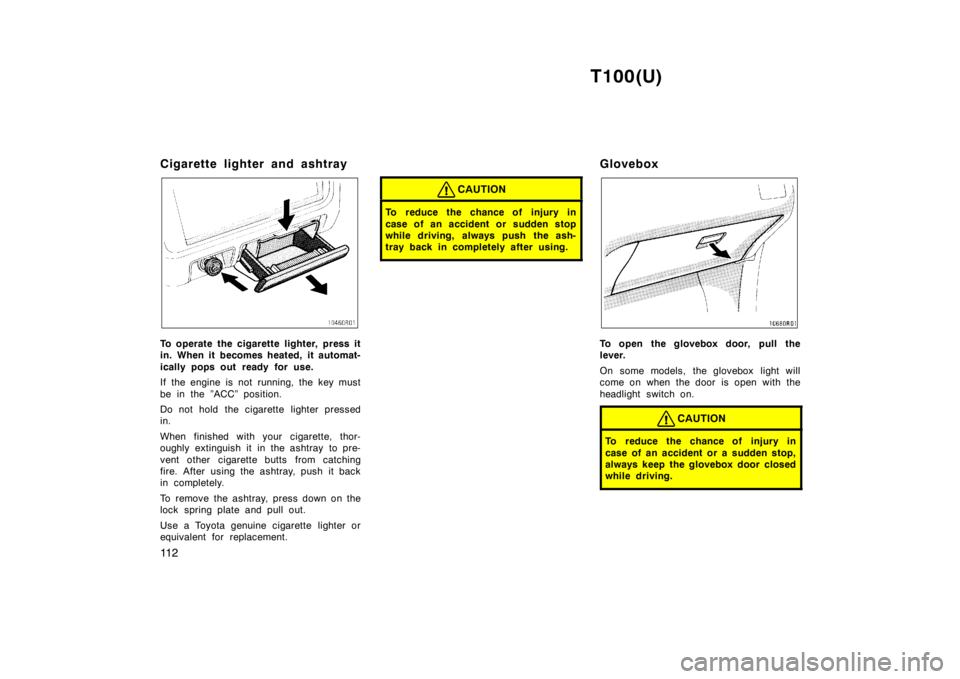
To operate the cigarette lighter, press it
in. When it becomes heated, it automat-
ically pops out ready for use.
If the engine is not running, the key must
be in the ”ACC” position.
Do not hold the cigarette lighter pressed
in.
When finished with your cigarette, thor-
oughly extinguish it in the ashtray to pre-
vent other cigarette butts from catching
fire. After using the ashtray, push it back
in completely.
To remove the ashtray, press down on the
lock spring plate and pull out.
Use a Toyota genuine cigarette lighter or
equivalent for replacement.
CAUTION
To reduce the chance of injury in
case of an accident or sudden stop
while driving, always push the ash-
tray back in completely after using.
Glovebox
To open the glovebox door, pull the
lever.
On some models, the glovebox light will
come on when the door is open with the
headlight switch on.
CAUTION
To reduce the chance of injury in
case of an accident or a sudden stop,
always keep the glovebox door closed
while driving.
Page 117 of 214

T100(U)11 7
OCTANE RATING
Select Octane Rating 87 (Research Oc-
tane Number 91) or higher.
Use of unleaded gasoline with an octane
rating or research octane number lower
than stated above will cause persistent
heavy knocking. If it is severe, this will
lead to engine damage.
If your engine knocks...
If you detect heavy knocking even when
using the recommended fuel, or if you
hear steady knocking while holding a
steady speed on level roads, consult your
Toyota dealer.
However, now and then, you may notice
light knocking for a short time while accel-
erating or driving up hills. This is no need
of concern.
GASOLINES CONTAINING DETERGENT
ADDITIVES
Toyota recommends use of gasolines
that contain detergent additives to
avoid build-up of engine deposits.
For further details, ask your Toyota dealer
or a local gasoline retailer.
IMPROVED GASOLINES
The American Automobile Manufacturers
Association (AAMA) has developed a
specification of improved gasolines. The
AAMA specification offers optimal fuel
information for better vehicle perfor-
mance and better protection of your en-
gine.
Toyota recommends the use of gasolines
that meet the AAMA specification, if avail-
able, for improved driveability and emis-
sion control system.
GASOLINES CONTAINING MTBE
Gasolines that contain MTBE (Methyl
Tertiary-Butyl Ether) are available in the
market. If you use a gasoline mixed
with MTBE, make certain that it does
not contain more than 15% of MTBE.
If the use of gasolines containing MTBE
causes poor driveability and/or poor fuel
economy, you should discontinue the use
of fuels containing MTBE.
GASOLINES CONTAINING MMT
Some gasolines contain an octane
−en-
hancing additive called MMT (methylcy-
clopentadienyl manganese tricarbonyl).
Toyota does not recommend the use of
gasolines that contain MMT. If fuels con-
taining MMT are used, your emission con-
trol system may be adversely affected.
The Malfunction Indicator Lamp on the in-
strument cluster may come on. If this hap-
pens, contact your Toyota dealer for ser-
vice.
GASOLINES CONTAINING ALCOHOL
If you use gasohol in your Toyota, be
sure that it is unleaded, has an octane
rating no lower than 87 and does not
contain more than 10% ethanol.
Gasohol is a mixture of gasoline and etha-
nol.
Toyota does not recommend the use of
gasolines containing methanol. If you use
gasoline containing methanol, use only
gasoline meeting the requirements above
and also containing less than 5% metha-
nol with cosolvents and corrosion inhibi-
tors for methanol.
Page 122 of 214
T100(U)
122
Brake system
TANDEM MASTER CYLINDER BRAKE SYSTEM
The tandem master cylinder brake system
is a hydraulic system with two separate
sub-systems. If either sub-system s
hould
fail, the other will still work. However, the
pedal will be harder to press, and your
stopping distance will be longer. Also, the
brake system warning light may come on.
CAUTION
Do not drive your vehicle with only a
single brake system. Have your
brakes fixed immediately.
BRAKE BOOSTER
The brake booster uses engine vacuum to
power-assist the brakes. If the engine
should quit while you are driving, you can
bring the vehicle to a stop with normal
pedal pressure. There is enough reserve
vacuum for one or two stops–but no more!
CAUTION
Do not pump the brake pedal if the
engine stalls. Each push on the
pedal uses up your vacuum reserve.
Even if the power assist is com-
pletely lost, the brakes will still
work. But you will have to push the
pedal hard—much harder than nor-
mal. And your braking distance will
be longer.
ANTI-LOCK BRAKE SYSTEM (with
”ABS” warning light)
The anti-lock brake system is designed to
automatically help prevent lock −up of the
wheels during sudden braking or braking
on slippery road surfaces. This assists in
providing directional stability and steering
performance of the vehicle under these
circumstances.
The anti-lock brake system becomes op-
erative after the vehicle has accelerated
to a speed in excess of approximately 10
km/h (6 mph). It stops operating when the
vehicle decelerates to a speed below
approximately 5 km/h (3 mph). You may hear a sound in the engine
compartment for a few seconds when the
engine is started or just after the vehicle
is started. This means that the anti-lock
brake system is in the self check mode,
and does not indicate a malfunction.
Effective way to press the ”ABS” brake
pedal: When the anti
−lock brake system
function is in action, you may feel the
brake pedal pulsating and hear a noise.
In this situation, to let the anti −lock
brake system work for you, just hold
the brake pedal down more firmly. Do
not pump the brake. This will result in
reduced braking performance.
The brake pedal pulsation caused by the
anti-lock brake system may indicate haz-
ardous road surface conditions. Although
the anti-lock brake system assists in pro-
viding vehicle control, it is still important
to drive with all due care, because the
anti-lock brake system cannot overcome
the laws of physics that act on your ve-
hicle: Braking capability is dependent on tire
friction with the road surface.