1998 PONTIAC GRAND PRIX door lock
[x] Cancel search: door lockPage 108 of 402
Power Windows
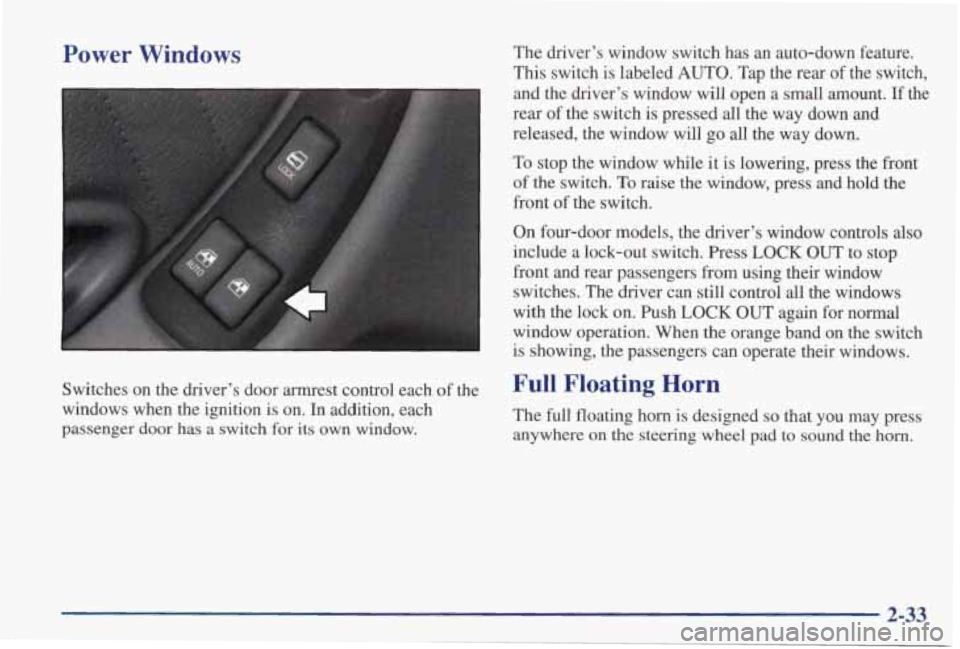
Switches on the driver’s door armrest control each of the
windows when the ignition
is on. In addition, each
passenger door has a switch
for its own window. The
driver’s window switch has an auto-down feature.
This switch is labeled AUTO. Tap the rear of the switch,
and the driver’s window will open a small amount.
If the
rear of the switch is pressed
all the way down and
released, the window will go
all the way down.
To stop the window while it is lowering, press the front
of the switch.
To raise the window, press and hold the
front of the switch.
On four-door models, the driver’s window controls also
include a lock-out switch. Press LOCK OUT to stop
front and rear passengers from using their window
switches. The driver can still control
all the windows
with the lock on. Push
LOCK OUT again for normal
window operation. When the orange band
on the switch
is showing, the passengers can operate their windows.
Full Floating Horn
The full floating horn is designed so that you may press
anywhere
on the steering wheel pad to sound the horn.
2-33
Page 117 of 402

To turn the fog lamps on, press the right side of the fog lamps
switch.
A light will glow on the switch to let you know that
they are on. (Your parking lamps must be on, or your fog
lamps won’t come
on.) Press the left side of the switch to turn
the fog lamps off.
The fog lamps will go off whenever you change to
high-beam headlamps. When you return
to low beams, the
fog lamps will come on again.
Interior Lamps
Instrument Panel Intensity Control
You can brighten or dim
the instrument panel lights
by turning the interior
lamps
dial.
Turn the dial to the right to increase the brightness of the
instrument panel lights, to the left to decrease the
brightness.
Turn the control all the way to the left to turn
them off.
Courtesy Lamps
When any door is opened, several lamps come on. These
lamps are courtesy lamps. They make it easy for you
to
enter and leave your vehicle at night. You can also turn
these lamps on by turning the interior lamps dial all the
way to the right.
Illuminated Entry
The Illuminated Entry feature will illuminate the interior so
that you can see the inside of your vehicle before you enter at
night. The interior lamps will come on for
40 seconds when
you unlock
your doors using the remote keyless entry
transmitter
(ifequipped) and the ignition is in LOCK or OFF.
After 40 seconds have elapsed, the interior lamps will slowly
fade out. The lamps
will fade out before 40 seconds have
elapsed
if you:
0 Lock all doors using your remote keyless
0 Lock the doors using the power door lock switch.
When any door is opened, illuminated entry is canceled.
The interior lamps will stay on while any
door is opened
and slowly fade out when all doors are closed. The
interior lamps may stay
on for up to 25 seconds after all
doors have been closed if they have not been locked.
See “Delayed Illumination” later
in this section.
entry transmitter.
Page 118 of 402
Delayed Illumination
The Delayed Illumination feature will continue to illuminate the interior for
25 seconds after all the doors
have been closed
so that you can find the ignition and
buckle your seat belt at night. Delayed Illumination will not occur while the ignition is in RUN or ACCESSORY.
After
25 seconds have elapsed, the interior lamps will
slowly fade out. The lamps will fade out before the
25 seconds have elapsed if you:
Turn the ignition to RUN or ACCESSORY.
Lock all doors using your remote keyless entry
Lock the doors using the power door lock switch.
To turn Delayed Illumination feature
off or on, see
“Locks and Lighting Choices” in the Index.
Exit Lighting
transmitter (if equipped).
For exiting your vehicle at night, your vehicle is
equipped with the Exit Lighting feature. The interior
lamps will illuminate for up to
25 seconds when you
remove your key from the ignition. After
25 seconds
have elapsed, the interior lamps will slowly fade out.
The lamps will fade out before the
25 seconds have
elapsed if you:
0 Turn the ignition to RUN or ACCESSORY.
0 Lock all doors using your remote keyless entry
0 Lock the doors using the power door lock switch.
When any door is opened, exit lighting is canceled. The
interior lamps will stay on while any door is opened and
will slowly fade out when all the doors are closed. The
interior lamps may stay on for up to
25 seconds after all
the doors have been closed if they have not been locked.
See “Delayed Illumination” earlier
in this section.
To turn the Exit Lighting feature
off or on, see “Locks
and Lighting Choices” in the Index.
Battery Saver
Your vehicle has a feature to help prevent you from
draining the battery in case you accidentally leave the
interior, trunk or underhood lamps on. If you leave any
of these lamps on while the ignition is in LOCK or
OFF,
they will automatically turn off after 10 minutes. The
lamps won’t come back on again until you do one of
the following:
Turn the ignition to RUN or ACCESSORY.
0 Turn the interior lamp dial all the way to the right,
Open (or close and reopen) a door that is closed.
transmitter (if equipped).
then back slightly to
the left.
2-43
Page 120 of 402

Locks and Lighting Choices
Your vehicle’s locks and lighting systems can be programmed with several different f\
eatures. The features you can
program depend on the options that came with your vehicle. The following chart shows the features that can be
programmed
and which options you need to have to program them.
I
~
Feature
Door
Driver’s Remote
Locking/ Door
Lockout
Unlock
Deterrent Control
I 2 I X I x I X I
3
X X X X 4
X X X X
Remote
Lock/
Unlock
Confirma -
tion Content
Theft Content
Theft
Arming/
Disarming
X X X
2-45
Page 122 of 402
Delayed IlluminatiodExit Lighting
Your vehicle comes with this feature set in mode 4. To
change the factory setting while in the programming
mode do the following:
1. Turn the interior lamps dial all the way to the right
and then back slightly to the left.
2. Count the number of chimes you hear. The number
of chimes tells you which mode your vehicle is set
for. You change the mode by turning the interior
lamps dial all the way to the right and then back
slightly to the left.
3. Repeat Step 2 until you hear the number of chimes
that matches the mode you want.
Mode 1: Both Off (The interior lamps will turn on or off
at the same instant that a door is opened or closed.)
Mode 2: Delayed Illumination Only (The interior lamps
will stay on for about 25 seconds after all the doors
are
closed, or until you lock the doors.)
Mode 3: Exit Lighting Only (The interior lamps will
come on whenever you remove the
key from the ignition
and stay on for about 25 seconds, or until you lock
the
doors.)
Mode 4: Both On (This combines modes 2 and 3.)
Automatic Door Locks
Your vehicle comes with this feature set in mode 3. To
change the factory setting, while in the programming
mode do the following:
1. Press LOCK on the power lock switch.
2. Count the number of chimes you hear. The number
of chimes tells you which mode your vehicle is set
for. You change the mode by pressing LOCK again.
3. Repeat Step 2 until you hear the number of chimes
that matches the mode you want.
Mode 1: Off (Automatic door locking and unlocking are
disabled.) You will always need to lock your door
manually while driving to increase occupant safety.
0 To lock: All doors will lock when you press the
power door lock switch or when you lock the vehicle
using
the remote keyless entry transmitter.
To unlock: All doors will unlock when you press the
power door lock switch again or when you press
UNLOCK on the remote keyless entry transmitter.
2-47
Page 123 of 402
Mode 2: Automatic Locking Only
0 Automatic Door Unlocking: Off
Automatic Door Locking: Shift out of PARK (P)
with the ignition on and the driver’s door closed, all
doors will lock automatically.
Mode 3: Automatic Unlocking with Ignition Off
Automatic Door Unlocking: ?’urn off the ignition
with the transaxle in PARK (P) and all doors will
unlock automatically.
Automatic Door Locking: Shift out of PARK (P)
with the ignition on and the driver’s door closed and,
all doors will lock automatically.
Mode 4: Automatic Unlocking and Locking with
Transaxle in
PARK (P)
Automatic Door Unlocking: Shift into PARK (P)
with the ignition
on and all doors will
unlock automatically.
Automatic Door Locking: Shift out of PARK (P)
with the ignition on and the driver’s door closed and
all doors will lock automatically.
Lockout Deterrennast Door
Closed Locking
Your vehicle comes with this feature set in mode 2. To
change the factory setting, do the following:
1. Press UNLOCK on the power lock switch.
2. Count the number of chimes you hear. The number
of chimes tells you which mode your vehicle is set
for. You change the mode by pressing
UNLOCK again.
3. Repeat Step 2 until you hear the number of chimes
Mode 1: Both Off (Doors will always lock immediately
when you press LOCK
on the power lock switch or the
remote keyless entry transmitter,
if equipped.)
that matches the mode you want.
Mode 2: Lockout Deterrent Only (If you leave your key
in the
ignition with the driver’s door open, you will not
be able to lock the doors using your power locks.)
Mode 3: Last Door Closed Locking Only (If the power
lock switch or remote keyless entry transmitter
(if
equipped) is used to lock the vehicle while any door is
open and the key is out of the ignition, you will hear three
chimes. The doors will not lock. Five seconds after the last
door
is closed, all doors will lock.)
Mode 4: Both On (This combines modes 2 and 3.)
2-48
Page 124 of 402

Remote Drivc Unlock Control
Your vehicle comes with this feature set in mode 2. To
change the factory setting while in the programming mode, do the following:
1. Press UNLOCK on the remote keyless
entry transmitter.
2. Count the number of chimes you hear. The number
of chimes tells you which mode your vehicle is set
for. You change the mode by pressing
UNLOCK again.
that matches
the mode you want.
3. Repeat Step 2 until you hear the number of chimes
Mode 1: Remote All Doors Unlock (When you press
UNLOCK on your remote keyless entry transmitter, all
doors will unlock.)
Mode 2: Remote Driver’s Door and All Doors Unlock
(When you press UNLOCK on
your remote keyless
entry transmitter once, the driver’s door will unlock.
If
you press UNLOCK again within five seconds, all doors
will unlock.)
Remote LocWUnlock Confirmation
Your vehicle comes with this feature set in mode 4. TO
change the factory setting while in the programming
mode do the following:
1. Press the LOCK button on the remote keyless
entry transmitter.
2. Count the number of chimes you hear. The number
of chimes tells you which mode your vehicle is set
for. You change the mode by pressing LOCK
on
your remote keyless entry transmitter again.
3. Repeat Step 2 until you hear the number of chimes
that matches the mode you want.
This feature provides feedback to the driver when the
vehicle receives a lockhnlock command from the
remote keyless entry transmitter. The
fsllowing modes
may be selected:
Mode 1: Off (Remote lock and unlock confirmation
are disabled.)
Mode 2: Remote Lock Confirmation with Exterior
Lamps Only Remote Lock Confirmation:
When you use the remote keyless entry transmitter to
lock your vehicle, your headlamps will flash briefly
to let you
know your command is received.
Page 125 of 402

e Remote Unlock Confirmation: When you use the
remote keyless entry
transmitter to unlock your vehicle
or open your trunk, your headlamps will flash briefly
to let you
know when your command is received.
Mode 3: Remote Lock Confirmation with Exterior
Lamps and
Horn
Remote Lock Confirmation: When you use the remote
keyless
entry transmitter to lock your vehicle, the horn
will sound briefly and your headlamps will flash
briefly to let you
know your command is received.
Remote Unlock Confmnation: When you use the
remote keyless entry transmitter to unlock your vehicle
or open your
trunk, your headlamps will flash briefly
to let you
know your command is received.
Mode 4: Remote Lock Confirmation with Exterior
Lights and
Horn (on second LOCK press)
Remote Lock Confirmation: When you use the
remote keyless entry transmitter to lock your vehicle,
your headlamps will flash briefly to let you
know
your command is received. The horn will sound
briefly and the headlamps will flash briefly
if you
press the LOCK button again within five seconds.
remote keyless entry
transmitter to unlock your vehicle
e Remote Unlock Confirmation: When you use the or open your
trunk, your headlamps will flash briefly
to let you know your command is received.
Content Theft-Deterrent
Your vehicle comes with this feature set in mode 4. To
change the factory setting while in the programming
mode, do the following:
1. Turn the parking lamps on, then off.
2. Count the number of chimes you hear. The number
of chimes tells you which mode your vehicle is set
for. You change the mode by turning the parking
lamps on, then
off again.
3. Repeat Step 2 until you hear the number of chimes
that matches the mode you want.
Mode 1: Damage Detection with Reduced Sensitivity
(If anyone seriously damages your vehicle, tampers with
the trunk lock or opens a door while your Content
Theft-Deterrent system is armed,
an alarm will sound
and your headlamps will flash for up to two minutes).
Mode 2: Damage Detection Off (If anyone tampers with
your
trunk lock or opens a door while your Content
Theft-Deterrent system is armed,
an alarm will sound
and your headlamps will flash for up to two minutes.)
Mode 3: All Off (Your Content Theft-Deterrent system
is always disarmed.)
2-50