Page 816 of 6000

5A–6
BRAKE CONTROL SYSTEM
Test Driving ABS Complaint Vehicles
In case that there has been an malfunction in the lighting
pattern of “ABS” warning light, the fault can be located in
accordance with the “DIAGNOSIS BY “ABS” WARNING
LIGHT ILLUMINATION PATTERN” . In case of such
trouble as can be detected by the driver as a vehicle
symptom, however, it is necessary to give a test drive
following the test procedure mentioned below, thereby
reproducing the symptom for trouble diagnosis on a
symptom basis:
1. Start the engine and make sure that the “ABS” W/L
goes OFF. If the W/L remains ON, it means that the
Diagnostic Trouble Code (DTC) is stored. Therefore,
read the code and locate the fault.
2. Start the vehicle and accelerate to about 30 km/h (19
mph) or more.
3. Slowly brake and stop the vehicle completely.
4. Then restart the vehicle and accelerate to about 40
km/h (25 mph) or more.
5. Brake at a time so as to actuate the ABS and stop the
vehicle.
6. Be cautious of abnormality during the test. If the W/L
is actuated while driving, read the DTC and locate the
fault.
7. If the abnormality is not reproduced by the test, make
best efforts to reproduce the situation reported by the
customer.
8. If the abnormality has been detected, repair in
accordance with the “SYMPTOM DIAGNOSIS” .NOTE:Be sure to give a test drive on a wide, even road with
little traffic.
If an abnormality is detected, be sure to suspend the
test and start trouble diagnosis at once.
“ABS” Warning Light
When ABS trouble occurs and actuates when possible
the “ABS” warning light, the trouble code corresponding
to the trouble is stored in the EHCU. Only the ordinary
brake system is available when the ABS is turned off.
When the “ABS” warning light is actuated, if the starter
switch is set ON after setting it OFF once, the EHCU
checks up on the entire system and, if there is no
abnormality, judges ABS to work currently and the
warning light works normally even though the trouble
code is stored.
NOTE: Illumination of the “ABS” warning light indicates
that anti-lock braking is no longer available. Power
assisted braking without anti-lock control is still available.
Normal Operation
“ABS” Warning Light
W h e n t h e i g n i t i o n i s f i r s t m o v e d f r o m “ O F F ” t o “ R U N ” , t h e
amber “ABS” warning light will turn “ON” . The “ABS”
warning light will turn “ON” during engine starting and will
usually stay “ON” for approximately three seconds after
the ignition switch is returned to the “ON” position. The
warning light should remain “OFF” at all other times.
Basic Diagnostic Flow Chart
StepActionYe sNo
11. Customer complaint.
2. Questioning to customer.
3. Basic inspection (Refer to “Basic inspection procedure”)
Using TECH 2?
Go to Step 2Go to Step 4
2Make sure of DTC by mode “F0: Diagnostic Trouble Codes”.
Is EHCU including DTC?
Go to Step 3Go to Step 5
31. Repair of faulty part.
2. Elimination of DTC.
3. Inspection of “ABS” W/L Illumination pattern with ignition SW
“ON”.
4. Test drive.
Does repeat trouble?
Repeat the
diagnosis it the
symptom or DTC
appears again Go
to Step 1
Go to Step 5
4Check if the DTC is stored.
Is EHCU including DTC?
Go to Step 3
Trouble diagnosis
based on
symptom (Refer
to “SYMPTOM
DIAGNOSIS”) Go
to Step 3
51. Reconnect all components and ensure all component are
properly mounted.
2. Clear diagnostic trouble code.
Was this step finished?
FinishedGo to Step 5
Page 817 of 6000

5A–7 BRAKE CONTROL SYSTEM
Basic Inspection Procedure
1. Basic Inspection of System Brake
StepActionYe sNo
1Is the fluid level normal?
Go to Step 2
Replenish with
fluid.
Go to Step 2
2Does fluid leak?Repair.
Go to Step 3
Go to Step 3
3Is the booster functioning normal?
Go to Step 4
Repair.
Go to Step 4
4Is the pad and rotor normal?
Go to Step 5
Repair.
Go to Step 5
5Reconnect all components and ensure all component are
properly mounted.
Was this step finished?
FinishedGo to Step 5
2. Inspection of Front Axle Switch
StepActionYe sNo
1Turn the key switch on and shift the T/F to 4WD position.
Does the 4WD light come on?
Go to Step 2
Repair.
Go to Step 2
2Reconnect all components and ensure all components are
properly mounted.
Was this step finished?
FinishedGo to Step 2
3. Ground Inspection
StepActionYe sNo
1Are ABS—related ground points ok?
Go to Step 2
Repair.
Go to Step 2
2Reconnect all components and ensure all components are
properly mounted.
Was this step finished?
FinishedGo to Step 2
Page 818 of 6000
5A–8
BRAKE CONTROL SYSTEM
Tech 2 Scan Tool
From 98 MY, Isuzu dealer service departments are
recommended to use Tech 2. Please refer to Tech 2 scan
tool user guide.
901RW257
Legend
(1) PCMCIA Card
(2) SAE 16/19 Adaptor(3) DLC Cable
(4) Tech–2
Page 819 of 6000
5A–9 BRAKE CONTROL SYSTEM
Getting Started
Before operating the Isuzu PCMCIA card with the
Tech 2, the following steps must be performed:
1. The Isuzu 98 System PCMCIA card (1) inserts into
the Tech 2 (4).
2. Connect the SAE 16/19 adapter (2) to the DLC cable
(3).
3. Connect the DLC cable to the Tech 2 (4).
4. Make sure the vehicle ignition is off.
5. Connect the Tech 2 SAE 16/19 adapter to the vehicle
DLC connector.
350RV014
6. The vehicle ignition turns on.
7. Power up the Tech 2.8. Verify the Tech 2 power up display.
060RW009
Page 820 of 6000
5A–10
BRAKE CONTROL SYSTEM
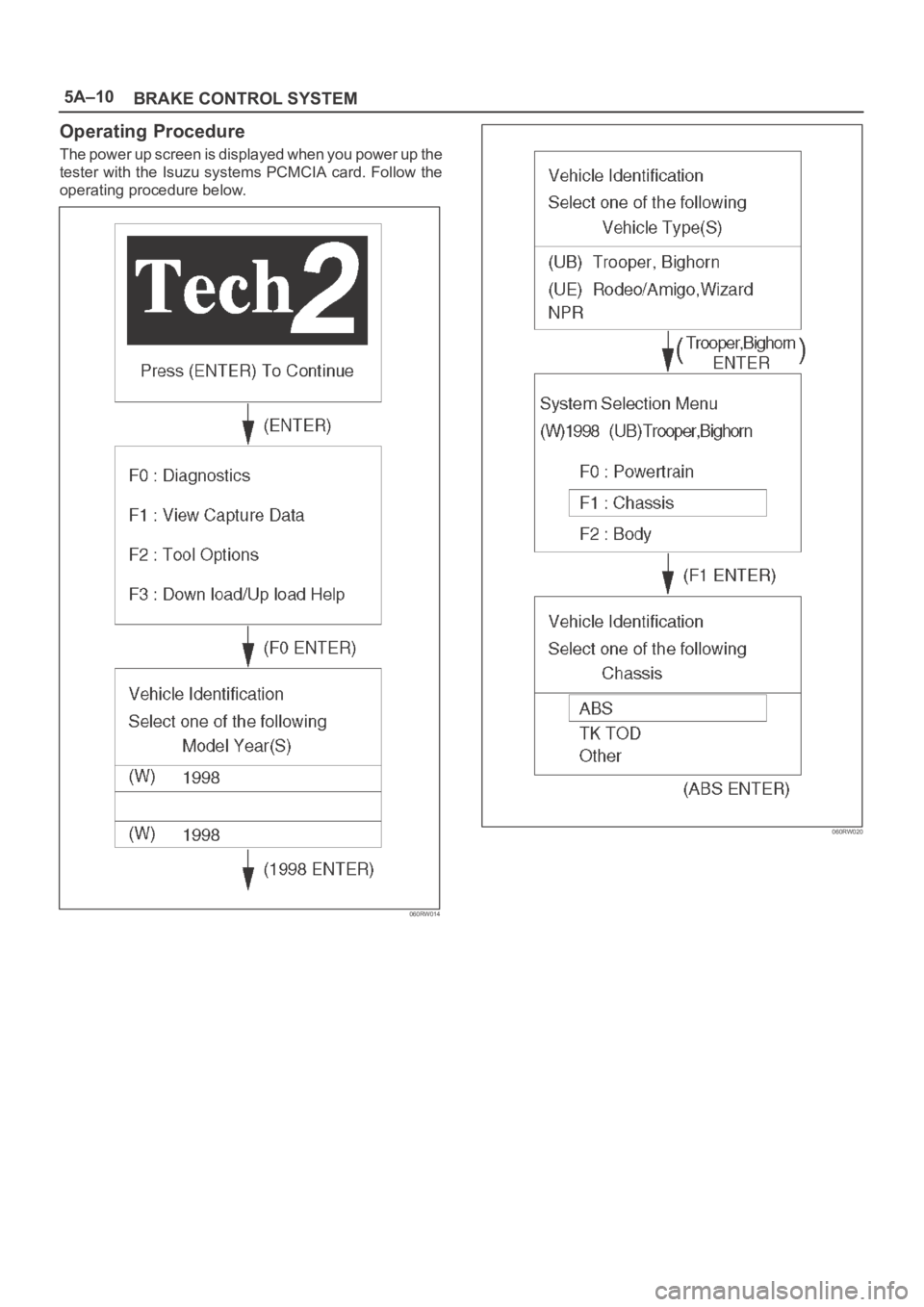
Operating Procedure
The power up screen is displayed when you power up the
tester with the Isuzu systems PCMCIA card. Follow the
operating procedure below.
060RW014
060RW020
Page 821 of 6000

5A–11 BRAKE CONTROL SYSTEM
Data List
DisplayContentOK/NG Criteria for Data
Battery VoltageVo l t a g eBetween 10-16.9V
Brake Light SwitchOpen/CloseOpen(0V) when pedal is released
Closed(12V) when pedal is depressed.
Front Left Wheel Speed
Front Right Wheel Speed
Rear Left Wheel Speed
Rear Right Wheel SpeedMPH(km/h)Start the vehicle and make sure of linear change in each
wheel speed.
Turn each wheel by hand and make sure that each
speed data change.
Wheel Sensor StatusOK/NGTo be OK usually
G-sensorLow/HighTo be Low usually
Transfer Monitor(TOD)2 Wheel Drive
4 Wheel DriveWhen 2WD: 2 Wheel Drive
When 4WD: 4 Wheel Drive
Off-Road Switch
(Transmission Input)
Active/InactiveWhen shift lever position is 1, 2 and R: Active (M/T)
(Transmission Input)When shift lever position is L and R: Active (A/T)
Valve RelayActive/InactiveTo be Active usually
ABS StateON/OFFTo be OFF usually
ABS RelayActive/InactiveTo be Active usually
Return Pump RelayActive/InactiveTo be Inactive usually
Front Left Isolation ValveActive/InactiveTo be Inactive usually
Front Left Dump Valve
Front Right Isolation Valve
Front Right Dump Valve
Rear Isolation Valve
Rear Dump Valve
ABS Warning LampON/OFFTo be ON usually (while engine stopped)
Page 822 of 6000
5A–12
BRAKE CONTROL SYSTEM
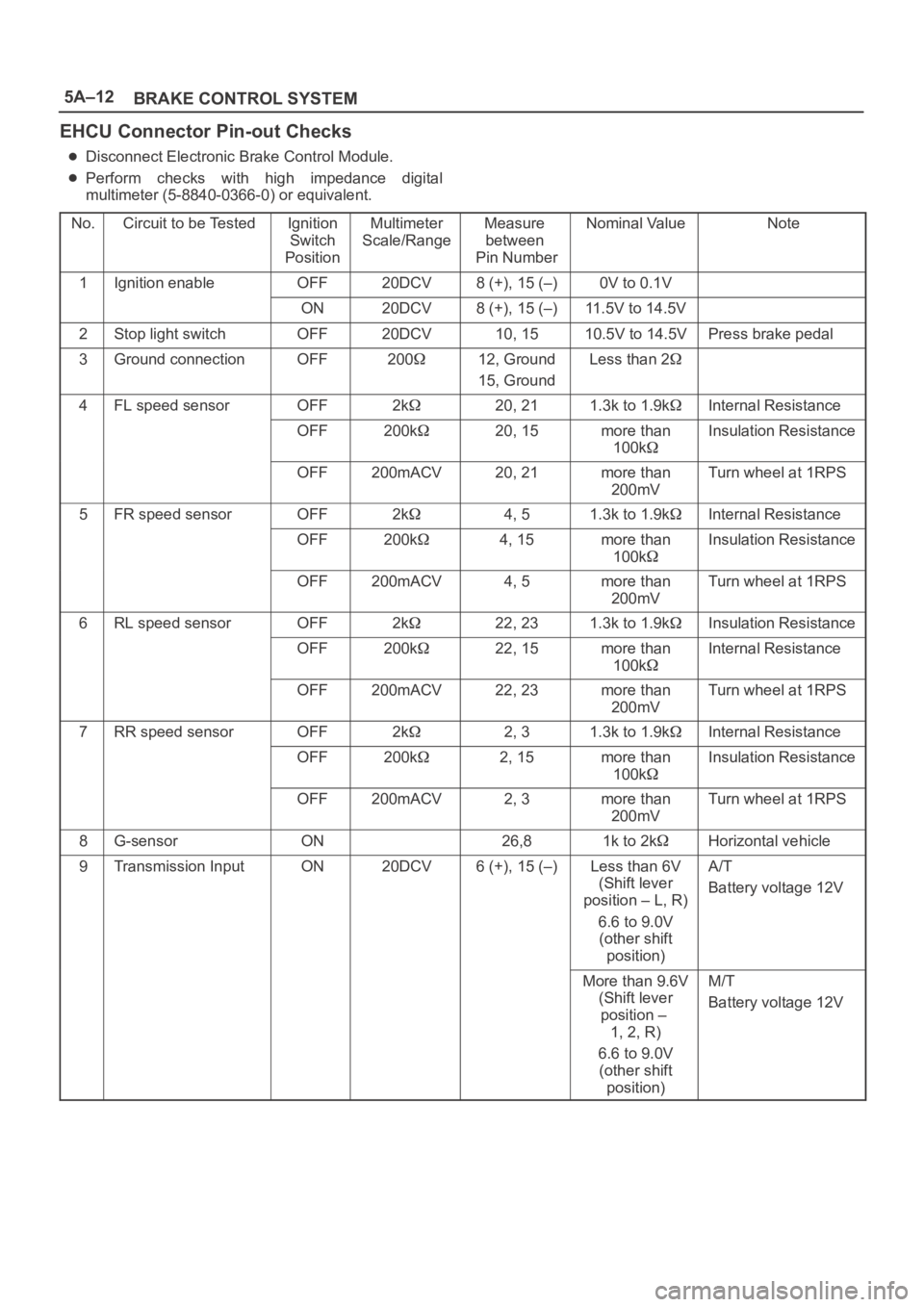
EHCU Connector Pin-out Checks
Disconnect Electronic Brake Control Module.
Perform checks with high impedance digital
multimeter (5-8840-0366-0) or equivalent.
No.
Circuit to be TestedIgnition
Switch
PositionMultimeter
Scale/RangeMeasure
between
Pin NumberNominal ValueNote
1Ignition enableOFF20DCV8 (+), 15 (–)0V to 0.1V
ON20DCV8 (+), 15 (–)11.5V to 14.5V
2Stop light switchOFF20DCV10, 1510.5V to 14.5VPress brake pedal
3Ground connectionOFF20012, Ground
15, GroundLess than 2
4FL speed sensorOFF2k20, 211.3k to 1.9kInternal Resistance
OFF200k20, 15more than
100kInsulation Resistance
OFF200mACV20, 21more than
200mVTurn wheel at 1RPS
5FR speed sensorOFF2k4, 51.3k to 1.9kInternal Resistance
OFF200k4, 15more than
100kInsulation Resistance
OFF200mACV4, 5more than
200mVTurn wheel at 1RPS
6RL speed sensorOFF2k22, 231.3k to 1.9kInsulation Resistance
OFF200k22, 15more than
100kInternal Resistance
OFF200mACV22, 23more than
200mVTurn wheel at 1RPS
7RR speed sensorOFF2k2, 31.3k to 1.9kInternal Resistance
OFF200k2, 15more than
100kInsulation Resistance
OFF200mACV2, 3more than
200mVTurn wheel at 1RPS
8G-sensorON26,81k to 2kHorizontal vehicle
9Transmission InputON20DCV6 (+), 15 (–)Less than 6V
(Shift lever
position – L, R)
6.6 to 9.0V
(other shift
position)A/T
Battery voltage 12V
More than 9.6V
(Shift lever
position –
1, 2, R)
6.6 to 9.0V
(other shift
position)M/T
Battery voltage 12V
Page 823 of 6000
5A–13 BRAKE CONTROL SYSTEM
Circuit Diagram (LHD model / 6VD1 and 4JG2)
D08RW793