Page 8 of 26
Removal
CAUTION:
+Before removing the rear axle, disconnect the ABS wheel
sensor from the assembly. Then move it away from the
axle. Failure to do so may result in damage to the sensor
wires and the sensor becoming inoperative.
+Wheel bearing does not require maintenance.
+If growling noise is emitted from wheel bearing during
operation, replace wheel bearing assembly.
+If the wheel bearing assembly is removed, it must be renewed.
The old assembly must not be re-used.
1. Disconnect parking brake cable and brake tube.
2. Remove nuts securing wheel bearing cage with baffle plate.
3. Draw out axle shaft with Tool.
When drawing out axle shaft, be careful not to damage oil seal.
4. Remove O-ring.
5. Remove oil seal with a screwdriver.
Do not reuse oil seal once it is removed.
Always install new one.
6. Remove ABS sensor rotor. Ð Models with ABS Ð
SRA757A
SRA845A
SRA846A
SRA799A
REAR AXLE
RA-7
Page 11 of 26
6. Install a new wheel bearing lock washer.
7. Tighten wheel bearing lock nut to speci®ed torque.
: 441 - 490 Nzm (45 - 50 kg-m, 325 - 362 ft-lb)
Be sure to bend bearing lock washer up.
8. Check wheel bearing preload.
a. Turn bearing cage (with respect to axle shaft) two or three
times. It must turn smoothly.
b. Attach spring gauge to bearing cage bolt (as shown at left) and
pull it at a speed of 10 rpm to measure preload.
Spring gauge indication:
8.8 - 42.2 N (0.9 - 4.3 kg, 2.0 - 9.5 lb)
9. Install new oil seal to rear axle housing using a suitable tool.
After installing new oil seal, coat sealing lip with multi-purpose
grease.
10. Install new O-ring to rear axle housing.
11. Press ABS sensor rotor onto axle shaft until it contacts wheel
bearing lock nut.
12. Install axle shafts in rear axle housing.
Be careful not to damage oil seal.
SRA828A
SRA821A
SRA850A
SRA822A
SRA823A
REAR AXLE
Installation (Cont'd)
RA-10
Page 14 of 26
Removal and Installation
+Support axle and suspension components with a suitable jack
and block.
+Disconnect brake hydraulic line and parking brake cables at
back plates.
CAUTION:
+Use ¯are nut wrench when removing or installing brake
tubes.
+Before removing the rear suspension assembly, discon-
nect the ABS wheel sensor from the assembly. Then move
it away from the rear suspension assembly. Failure to do
so may result in damage to the sensor wires and the sen-
sor becoming inoperative.
+Remove stabilizer bar from body.
+Remove upper links and lower links from body.
+Remove panhard rod from body.
+Disconnect rear end of propeller shaft. Refer to PD section.
+Remove upper end nuts of shock absorber.
SRA825A
SBR820BA
REAR SUSPENSION
RA-13
Page 17 of 26

System Components
Roll rigidity is increased by activating the stabilizer function (turning the stabilizer ON) on good roads. On rough
roads, deactivating the stabilizer function (turning the stabilizer OFF) reduces stabilizer swing-back behavior.
As a result, the stabilizer release device serves to increase driving capability and riding comfort on rough roads.
The stabilizer release device is electrically activated (turned ON) or deactivated (turned OFF) by the stabilizer
switch in the driver's compartment.
System Description
CONTROL UNIT
The stabilizer control unit controls the actuator motor using the
stabilizer switch and a signal sent from the vehicle speed sensor.
When vehicle speed exceeds 20 km/h (12 MPH), the stabilizer
control unit maintains the clutch cylinder position and activates the
stabilizer function, regardless of the position of the stabilizer switch.
The system is provided with a timer function to cut the actuator
activating power output in about 15 seconds, in consideration of a
possible system abnormality.
ACTUATOR
The actuator motor is turned on by a signal sent from the control
unit. When the motor operates, the cable moves to activate the
stopper pin at the end of the cable.
CLUTCH CYLINDER
The stopper pin (at the end of the cable) moves in and out of the
cylinder (toward the piston rod or away from the piston rod) to turn
the stabilizer ON or OFF.
SRA832A
SRA833A
SRA834A
STABILIZER RELEASE DEVICE
RA-16
Page 22 of 26
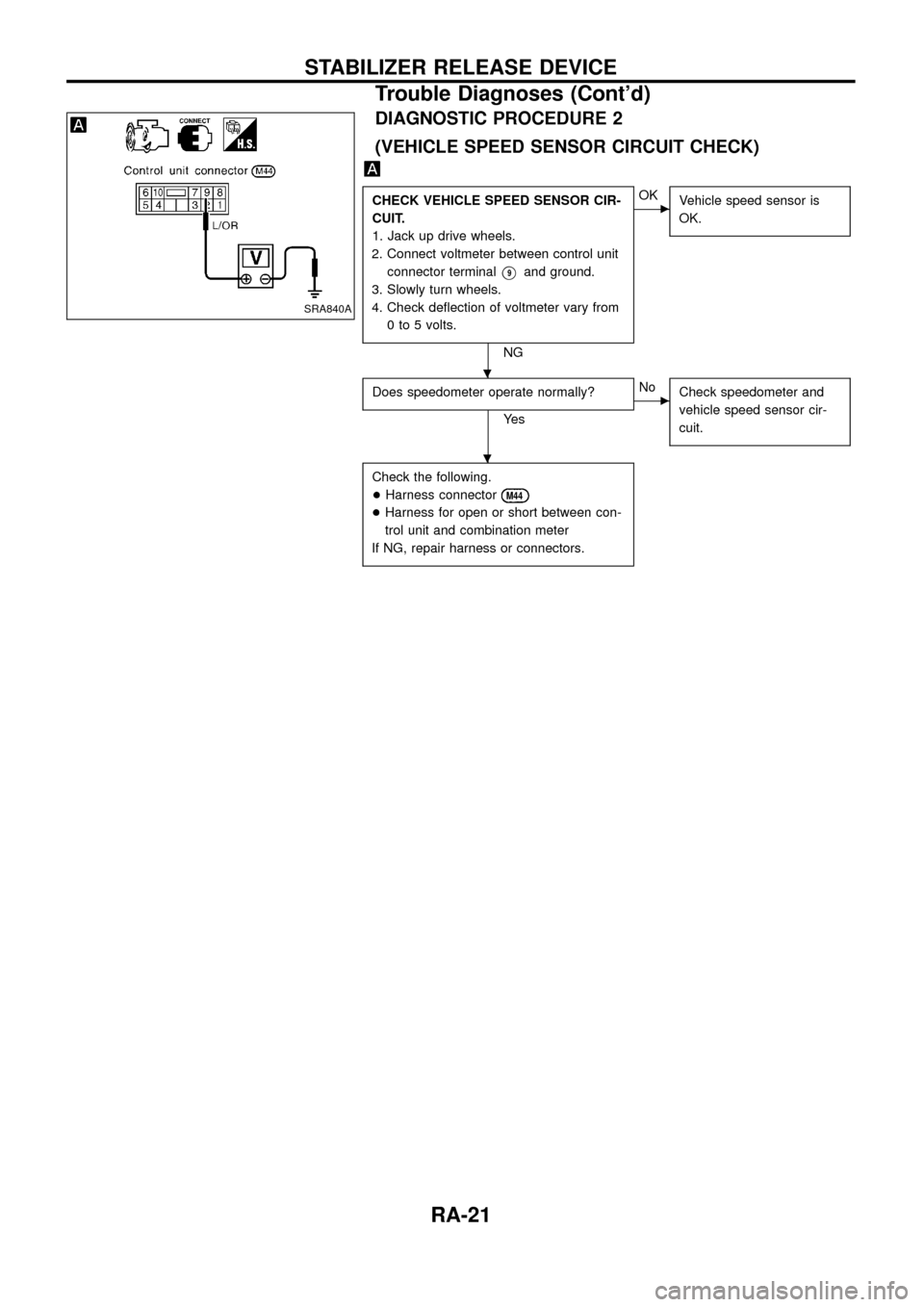
DIAGNOSTIC PROCEDURE 2
(VEHICLE SPEED SENSOR CIRCUIT CHECK)
CHECK VEHICLE SPEED SENSOR CIR-
CUIT.
1. Jack up drive wheels.
2. Connect voltmeter between control unit
connector terminal
V9and ground.
3. Slowly turn wheels.
4. Check de¯ection of voltmeter vary from
0 to 5 volts.
NG
cOK
Vehicle speed sensor is
OK.
Does speedometer operate normally?
Ye s
cNo
Check speedometer and
vehicle speed sensor cir-
cuit.
Check the following.
+Harness connector
M44
+Harness for open or short between con-
trol unit and combination meter
If NG, repair harness or connectors.
SRA840A
.
.
STABILIZER RELEASE DEVICE
Trouble Diagnoses (Cont'd)
RA-21
Page 25 of 26
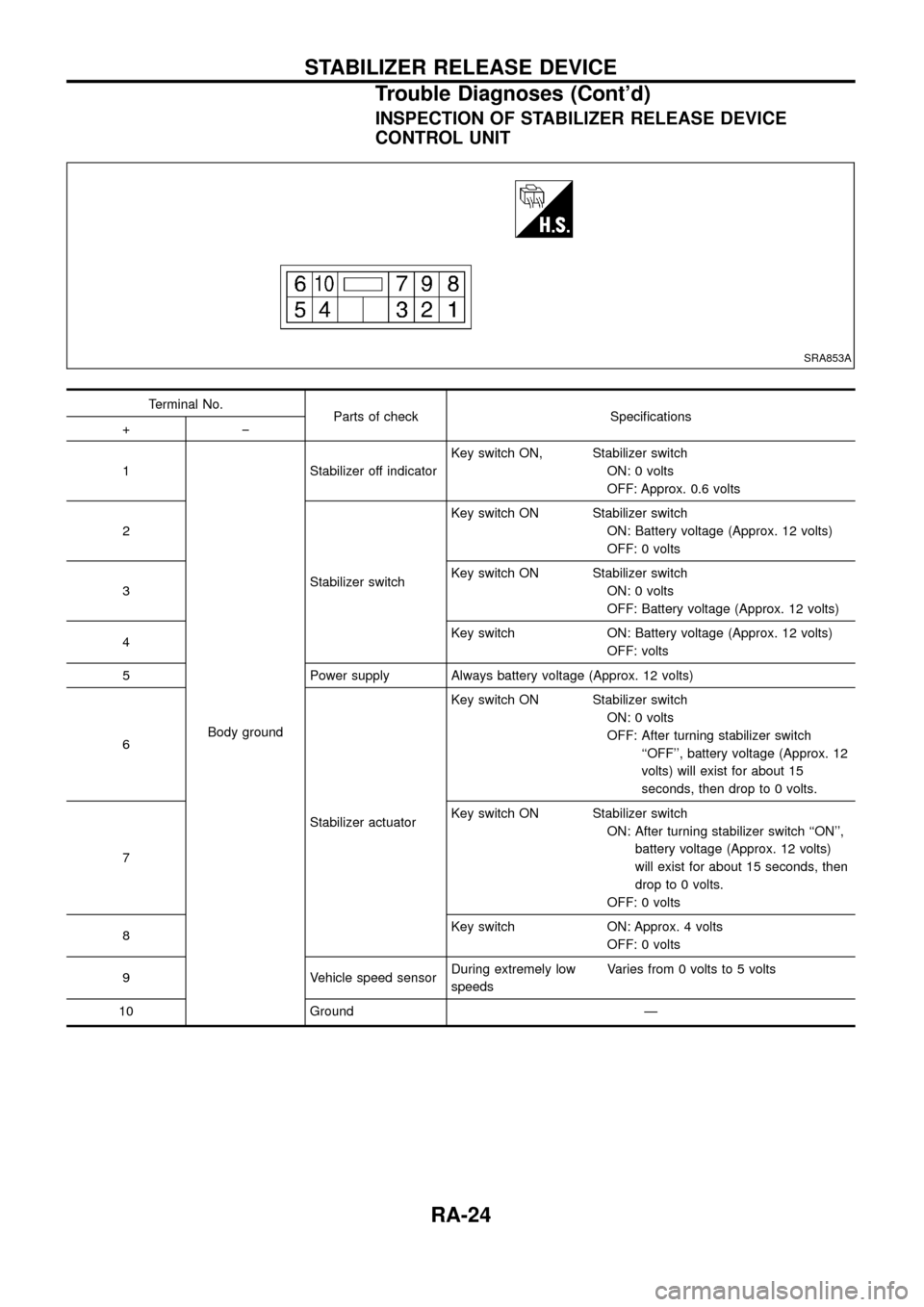
INSPECTION OF STABILIZER RELEASE DEVICE
CONTROL UNIT
Terminal No.
Parts of check Speci®cations
+þ
1
Body groundStabilizer off indicatorKey switch ON, Stabilizer switch
ON: 0 volts
OFF: Approx. 0.6 volts
2
Stabilizer switchKey switch ON Stabilizer switch
ON: Battery voltage (Approx. 12 volts)
OFF: 0 volts
3Key switch ON Stabilizer switch
ON: 0 volts
OFF: Battery voltage (Approx. 12 volts)
4Key switch ON: Battery voltage (Approx. 12 volts)
OFF: volts
5 Power supply Always battery voltage (Approx. 12 volts)
6
Stabilizer actuatorKey switch ON Stabilizer switch
ON: 0 volts
OFF: After turning stabilizer switch
``OFF'', battery voltage (Approx. 12
volts) will exist for about 15
seconds, then drop to 0 volts.
7Key switch ON Stabilizer switch
ON: After turning stabilizer switch ``ON'',
battery voltage (Approx. 12 volts)
will exist for about 15 seconds, then
drop to 0 volts.
OFF: 0 volts
8Key switch ON: Approx. 4 volts
OFF: 0 volts
9 Vehicle speed sensorDuring extremely low
speedsVaries from 0 volts to 5 volts
10 Ground Ð
SRA853A
STABILIZER RELEASE DEVICE
Trouble Diagnoses (Cont'd)
RA-24