1998 NISSAN FRONTIER clock
[x] Cancel search: clockPage 20 of 224
The ON/OFF switch should ONLYbe used
to turn the passenger supplemental air bag
OFF when the following government criteria
exist:
cInfants (less than 1 year old) in rear
facing child restraints MUST
be placed
in the front passenger seat.
cChildren ages 1-12 years MUST
be
placed in the front passenger seat.
c
The passenger has a medical condition
which, according to a physician, causes
the air bag to pose a special risk and
makes the potential harm from the air
bag greater than the potential harm
from turning off the air bag.
Seat belts and child restraints should al-
ways be properly used. See ªPrecautions
on seat belt usageº and ªChild restraintsº
later in this section for details.
To turn the passenger supplemental air bag
OFF, insert the ignition key in the passenger
supplemental air bag ON/OFF switch and
turn the switch clockwise to the OFF posi-
tion. Then remove the key. When the igni-
tion is turned to the ON or START position
the passenger air bag OFF indicator light
will illuminate to indicate the air bag is OFF.To turn the passenger supplemental air bag
ON, insert the ignition key in the passenger
supplemental air bag ON/OFF switch and
turn the switch counter clockwise to the ON
position. Then remove the key. When the
ignition is turned to the ON or START
position the passenger air bag OFF indica-
tor light will illuminate for 7 seconds to
indicate the system is working properly and
then go out to indicate that the passenger
supplemental air bag is ON.
When the switch is turned to the ON posi-
tion, the passenger supplemental air bag is
enabled and could inflate in a frontal colli-
sion. When the switch is turned to the OFF
position, the passenger supplemental air
bag is disabled and will not inflate in a
frontal collision. The passenger supplemen-
tal air bag OFF indicator light on the instru-
ment panel illuminates when the passenger
supplemental air bag ON/OFF switch is
turned to the OFF position. The driver's side
supplemental air bag always remains en-
abled and is not affected by the passenger
supplemental air bag ON/OFF switch.
The passenger supplemental air bag light,
displaying OFF in the center of the instru-
ment panel, monitors the position of thepassenger supplemental air bag ON/OFF
switch. When the ignition key is in the ON or
START position, the light illuminates for
about 7 seconds and then turns off if the air
bag is ON, or stays on if the air bag is OFF.
WARNING
cDo not switch the air bag OFF unless
you meet the federal government cri-
teria outlined below. This vehicle is
equipped with seat belts with a ``load
limiter'' feature. The seat belts are
designed to work with the air bags to
reduce the risk of injury in a colli-
sion. The seat belts are designed to
release additional belt webbing dur-
ing some collisions to reduce the
concentration of force on the occu-
pant's chest area. In a collision with
the air bag turned OFF, the seat belt
may allow the occupant enough for-
ward movement to incur serious or
fatal injuries.
Seats, restraints and supplemental air bag systems
1-13
ZX
Page 61 of 224
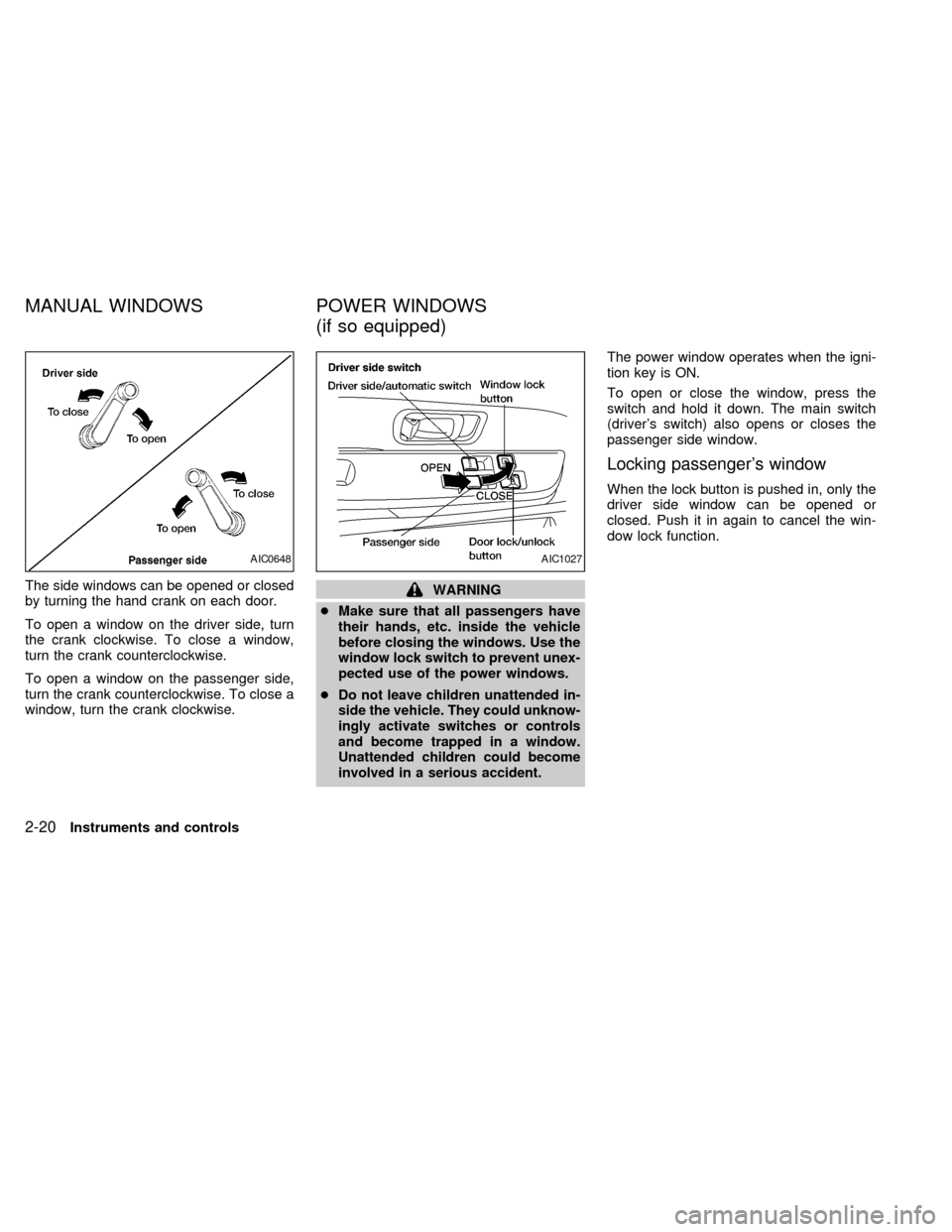
The side windows can be opened or closed
by turning the hand crank on each door.
To open a window on the driver side, turn
the crank clockwise. To close a window,
turn the crank counterclockwise.
To open a window on the passenger side,
turn the crank counterclockwise. To close a
window, turn the crank clockwise.WARNING
cMake sure that all passengers have
their hands, etc. inside the vehicle
before closing the windows. Use the
window lock switch to prevent unex-
pected use of the power windows.
c
Do not leave children unattended in-
side the vehicle. They could unknow-
ingly activate switches or controls
and become trapped in a window.
Unattended children could become
involved in a serious accident.
The power window operates when the igni-
tion key is ON.
To open or close the window, press the
switch and hold it down. The main switch
(driver's switch) also opens or closes the
passenger side window.
Locking passenger's window
When the lock button is pushed in, only the
driver side window can be opened or
closed. Push it in again to cancel the win-
dow lock function.
AIC0648AIC1027
MANUAL WINDOWS POWER WINDOWS
(if so equipped)
2-20Instruments and controls
ZX
Page 64 of 224
WARNING
Do not remove or install the sun shade
while driving so that full attention may
be given to the driving operation.
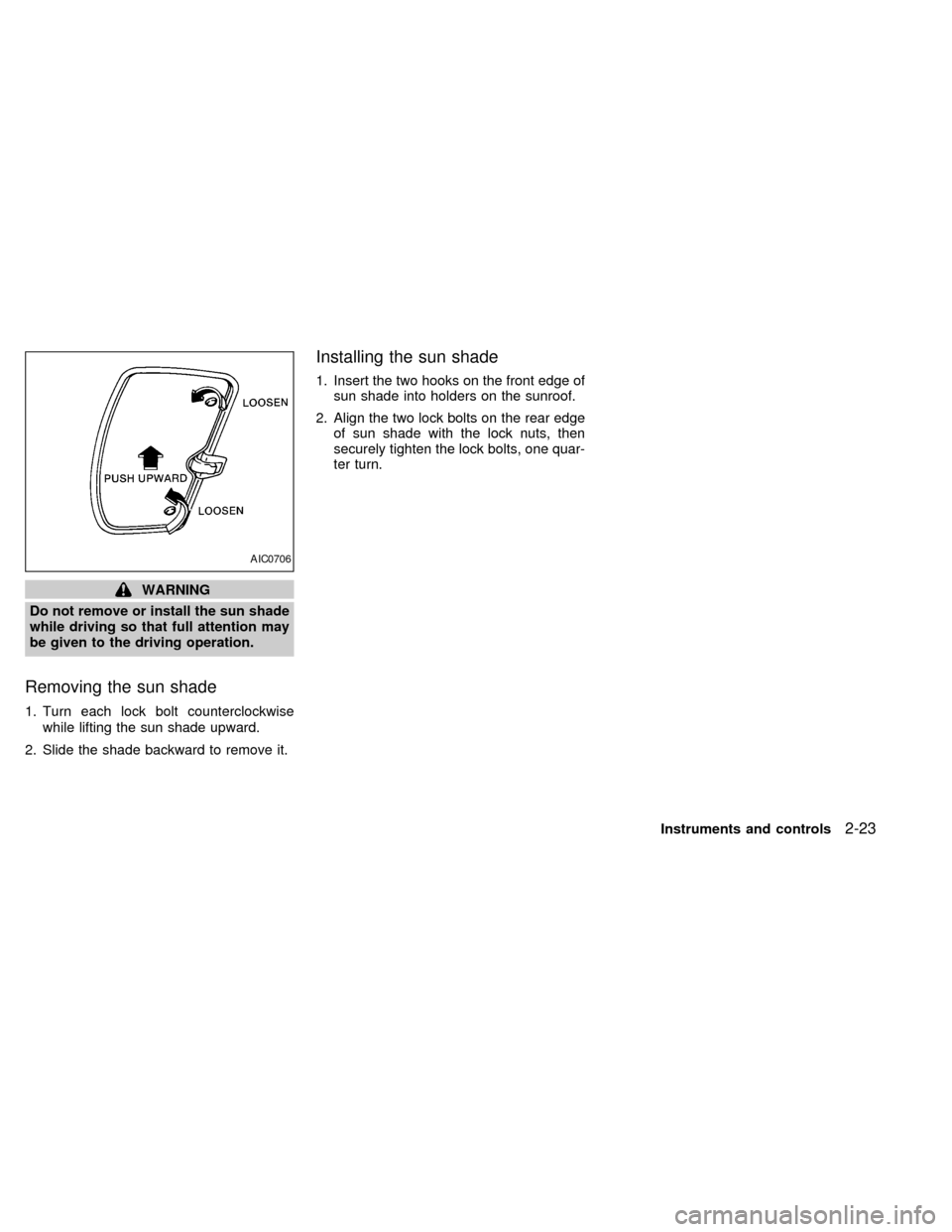
Removing the sun shade
1. Turn each lock bolt counterclockwise
while lifting the sun shade upward.
2. Slide the shade backward to remove it.
Installing the sun shade
1. Insert the two hooks on the front edge of
sun shade into holders on the sunroof.
2. Align the two lock bolts on the rear edge
of sun shade with the lock nuts, then
securely tighten the lock bolts, one quar-
ter turn.
AIC0706
Instruments and controls2-23
ZX
Page 74 of 224
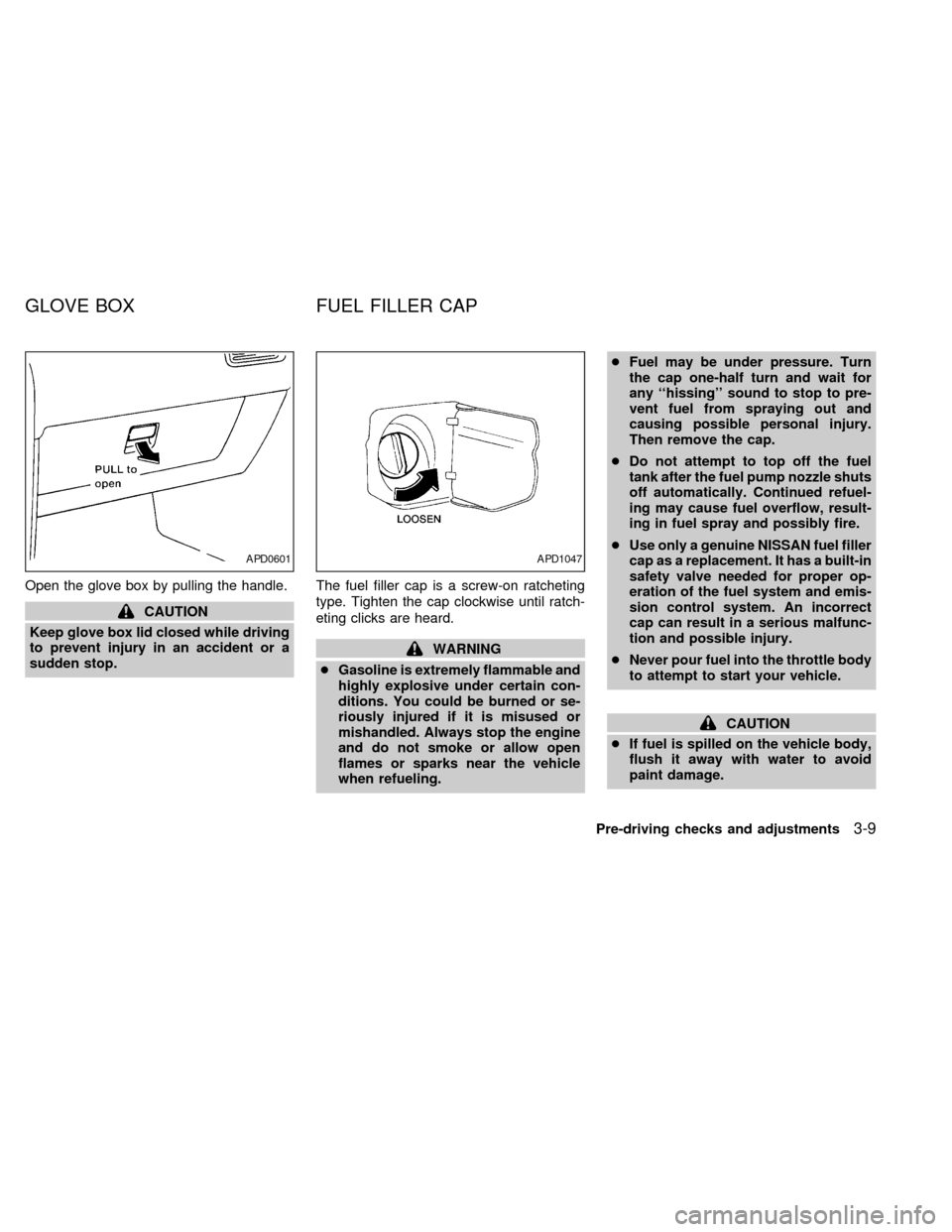
Open the glove box by pulling the handle.
CAUTION
Keep glove box lid closed while driving
to prevent injury in an accident or a
sudden stop.The fuel filler cap is a screw-on ratcheting
type. Tighten the cap clockwise until ratch-
eting clicks are heard.
WARNING
cGasoline is extremely flammable and
highly explosive under certain con-
ditions. You could be burned or se-
riously injured if it is misused or
mishandled. Always stop the engine
and do not smoke or allow open
flames or sparks near the vehicle
when refueling.cFuel may be under pressure. Turn
the cap one-half turn and wait for
any ``hissing'' sound to stop to pre-
vent fuel from spraying out and
causing possible personal injury.
Then remove the cap.
cDo not attempt to top off the fuel
tank after the fuel pump nozzle shuts
off automatically. Continued refuel-
ing may cause fuel overflow, result-
ing in fuel spray and possibly fire.
cUse only a genuine NISSAN fuel filler
cap as a replacement. It has a built-in
safety valve needed for proper op-
eration of the fuel system and emis-
sion control system. An incorrect
cap can result in a serious malfunc-
tion and possible injury.
cNever pour fuel into the throttle body
to attempt to start your vehicle.
CAUTION
cIf fuel is spilled on the vehicle body,
flush it away with water to avoid
paint damage.
APD0601APD1047
GLOVE BOX FUEL FILLER CAP
Pre-driving checks and adjustments3-9
ZX
Page 90 of 224
Clock operation
Pressing the CLOCK button alternates the
clock and the radio/cassette tape options in
the display.
Clock set
Depressing the CLOCK and thebuttons
together sets hours. Depressing the CLOCK
and
buttons together sets minutes.
Clock priority mode
In this mode the clock is shown in the
display. If any radio or cassette tape func-
tions are activated, the radio (or cassette
tape) display illuminates for 10 seconds
then returns to the clock mode.
NOTE:
After clock adjustment, the radio is in the
clock priority mode.
Radio/Cassette tape priority mode
In this mode, the radio station illuminates in
the display during radio operation. During
cassette tape operation, TAPE illuminates
in the display.
Selecting the desired band
Push thebutton to change from AM
to FM reception.
The FM stereo indicator, ST, illuminates
during FM stereo reception. When the ste-
reo broadcast signal is weak, the radio au-
tomatically changes from stereo to monaural
reception.
TUNE buttons
WARNING
The radio should not be tuned while
driving in order that full attention may
be given to the driving operation.
Use the
andbuttons for
manual tuning. To move quickly through the
channels, hold either of the tune buttons
down for more than 1.5 seconds.
SEEK tuning
Push thetuning buttonfor less
than 1.5 seconds. SEEK tuning begins from
low to high frequencies and stops at the next
broadcasting station. Pushing the button
again continues the SEEK function. Once the
highest broadcasting station is reached, theradio continues in the SEEK mode at the
lowest broadcast station.
SCAN tuning
Push thetuning buttonfor more
than 1.5 seconds. SCAN illuminates in the
display window. SCAN tuning begins from
low to high frequencies and stops at each
broadcasting station for five seconds. Push-
ing the button again during this five second
period stops SCAN tuning and the radio
remains tuned to that station.
Heater, air conditioner and audio systems4-11
ZX
Page 93 of 224

This system searches at the blank intervals
between selections. If there is a blank inter-
val within one selection or there is no inter-
val between selections, the system may not
stop in the desired or expected location.
Changing the direction of tape play
Push the(program) select button.
The moving digital squares illuminate on
either the right or left side of the display
window to indicate the side of program play.
Playing and stopping the cassette
tape
Push thebutton while the cassette
tape is playing to stop the tape. Push the
button again to play the tape.
Dolby NR (noise reduction)
Push thebutton for Dolby NR en-
coded tapes to reduce high frequency tape
noise. The
symbol illuminates in the
display.
If the display is in the clock priority mode
when the
button is pressed,and TAPE illuminate in the display
window for about 10 seconds. The clock
mode then returns to the display window.Dolby NR is manufactured under license
from Dolby Laboratories Licensing Corpora-
tion. DOLBY NR and the double-D symbol
are trademarks of Dolby Laboratories Li-
censing Corporation.
Metal or chrome tape usage
The cassette player is automatically set to
high performance play when playing a metal
or chrome cassette tape.
Ejecting the cassette tape
Push thebutton. The cassette tape
automatically comes out.
4-14Heater, air conditioner and audio systems
ZX
Page 95 of 224
Clock operation
Pressing the clock button alternates the
clock and the radio/cassette/CD player op-
tions in the display.
Clock set
Depressing the clock andbuttons to-
gether sets hours. Depressing the clock and
buttons together sets minutes.
Clock priority mode
In this mode the clock is shown in the
display. If any radio, cassette or CD func-
tions are activated, the radio, cassette or
CD display illuminates for 10 seconds then
returns to the clock mode.
NOTE:
After clock adjustment, the radio is in the
clock priority mode.
FM-AM band select button
Pushing thebutton changes the band.
The FM stereo indicator, ST, illuminates
during FM stereo reception. When the ste-
reo broadcast signal is weak, the radio
automatically changes from stereo to mon-
aural reception.
TUNE/DISC buttons
WARNING
The radio should not be tuned while
driving in order that full attention may
be given to the driving operation.
Use the
andbuttons for manual
tuning. To move quickly through the chan-
nels, hold either of the tuning buttons down
for more than 1.5 seconds.
SEEK/SCAN buttons
SEEK tuning
Push the SEEK/SCAN tuning buttonorfor less than 1.5 seconds. SEEK tuning
begins from low to high frequencies or high
to low frequencies, depending on which but-
ton is pressed, and stops at the next broad-
casting station. Once the highest broadcast-
ing station is reached, the radio continues in
the SEEK mode at the lowest broadcasting
station. If using the
button, once the
lowest broadcasting station is reached, the
radio continues in the SEEK mode at the
highest broadcasting station.
SCAN tuning
Push the SEEK/SCAN tuning buttonorfor more than 1.5 seconds. SCAN illu-
minates in the display window, and the radio
station blinks. SCAN tuning begins from low
to high frequencies or high to low frequen-
cies, depending on which button is pressed.
SCAN tuning stops at each broadcasting
station for five seconds. Pushing the button
again during this five second period stops
SCAN tuning and the radio remains tuned to
that station.
4-16Heater, air conditioner and audio systems
ZX
Page 100 of 224
RANDOM:Selections are played at ran-
dom, not following the sequence on the
compact disc. The same program may be
repeated twice.
Blank(no symbol): All selections are played
in sequence, and the compact disc stops
when the last selection is finished.
When a new compact disc is inserted,
the play pattern automatically changes
to ALL.
CD EJECT button
When thebutton is pushed with a com-
pact disc loaded, the compact disc ejects.
When the
button is pushed while the
compact disc is playing, the compact disc
ejects and the system turns off.If the compact disc ejects and is not
removed within 10 seconds, it is pulled
back into the slot.
CD (DISC) indicator light
This light comes on when a compact disc is
loaded into the player.
CAUTION
cDuring cold weather or rainy days,
the player may malfunction due to
the humidity. If this occurs, remove
the CD and dehumidify or ventilate
the player completely.
cThe player may skip while driving on
rough roads.
cThe CD player sometimes cannot
function when the compartment tem-
perature is extremely high. Decrease
the temperature before use.
cDo not expose the CD to direct sun-
light.
Manual antenna
The manual antenna cannot be shortened,
but can be removed. When you need to
remove the antenna, turn its base counter-
clockwise.
ANTENNA
Heater, air conditioner and audio systems4-21
ZX