1998 LINCOLN CONTINENTAL Rack
[x] Cancel search: RackPage 43 of 176

²Typically, voice communication with an operator is established within
one minute after an assistance control is pressed.
²The operator verbally obtains details of your situation and, if
necessary, ties your vehicle into a three-way phone call with the
United States Auto Club or local 911 or other emergency services to
dispatch the appropriate assistance to your location.
²Once the situation has been appropriately handled, the operator will
terminate the call, the system warning light will stop flashing and the
system will be reset. In most situations, only the response center can
terminate an assistance request.
General description
Lincoln's Remote Emergency Satellite Cellular Unit (RESCU) is designed
to expedite roadside, emergency or information assistance to distressed
motorists who are uncertain of their location and/or are uncertain of who
to contact for assistance.
The Lincoln RESCU system utilizes Global Positioning System (GPS)
technology and the nation's cellular phone network to track vehicle
location and, at the touch of a control, put you in voice contact with the
Lincoln Security Response Center.
Two controls in the overhead console will activate the system:
An Information icon is provided for
customer information, such as
points of interest in your current
location, route assistance and other
services as they become available.
An Emergency icon for is for
emergency assistance.
When you select a control, the vehicle's cellular phone will automatically
place a data call to the response center's central computer. Once contact
is made, an electronic data message will be transmitted. This data
message will include:
²Type of alarm (Information, emergency or air bag acitvation)
²Vehicle Identification Number (VIN)
²Latitude and longitude coordinates
INFO
i
S.O.S.
Controls and features
43
Page 47 of 176

Similarly, if the cellular call is disconnected by the network prior to
receipt of the termination tone, another call to the response center will
also automatically be dialed. The message ªREDIAL IN PROGRESSº will
be displayed on the message center and voice communication with an
operator will be restored.
During redial calls, full control of the cellular phone is returned to you.
Pressing either PWR or END on the cellular handset will terminate the
assistance request and reset the system.
Location data retransmit capability
During an activation, the Lincoln Security Response Center operator has
the capability to initiate a retransmission of the electronic data message.
This may be necessary to ensure a more precise determination of vehicle
location or to track a vehicle that is moving. To accomplish the
retransmit, a special tone is sent to the vehicle by the response center.
In this situation you will temporarily lose voice contact with the operator
and the messages ªSENDING LOCATION DATAº and ªDATA RECEIVEDº
will be respectively displayed on the message center. After the data
retransmission is complete, voice communication will be restored and the
CID, LAT, LON and HDG message will again alternately toggle on the
message center display.
Global positioning system
Vehicle location is continuously updated via Global Positioning System
(GPS) technology. GPS was developed by the U.S. Department of
Defense for worldwide navigational and positioning purposes. It utilizes a
constellation of 24 orbiting satellites located more than 20 000 km
(12 428 miles) above the earth. At any given time, several of the
24 satellites should be visible to the vehicle's GPS receiver. Based on the
time for signals emitted by these satellites to reach the receiver, an
on-board computer will determine the vehicle's location, typically within
30 meters (100 feet). In addition to latitude and longitude, the system
also determines heading and speed.
Vehicle positioning information is relayed to the Lincoln Security
Response Center only during roadside or emergency requests. The
response center will not be able to track your location while in an
inactive state.
Controls and features
47
Page 79 of 176
Conditions of operation
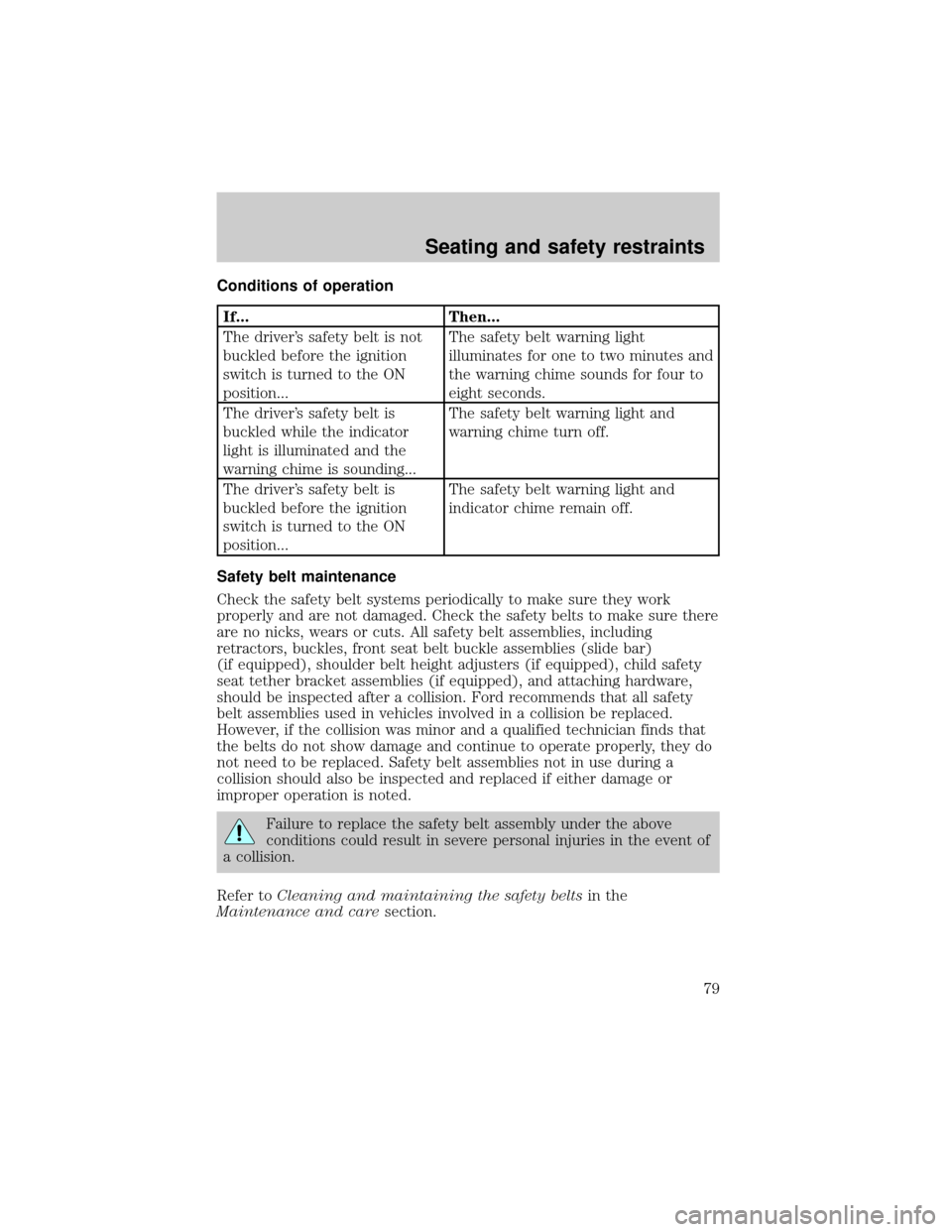
If... Then...
The driver's safety belt is not
buckled before the ignition
switch is turned to the ON
position...The safety belt warning light
illuminates for one to two minutes and
the warning chime sounds for four to
eight seconds.
The driver's safety belt is
buckled while the indicator
light is illuminated and the
warning chime is sounding...The safety belt warning light and
warning chime turn off.
The driver's safety belt is
buckled before the ignition
switch is turned to the ON
position...The safety belt warning light and
indicator chime remain off.
Safety belt maintenance
Check the safety belt systems periodically to make sure they work
properly and are not damaged. Check the safety belts to make sure there
are no nicks, wears or cuts. All safety belt assemblies, including
retractors, buckles, front seat belt buckle assemblies (slide bar)
(if equipped), shoulder belt height adjusters (if equipped), child safety
seat tether bracket assemblies (if equipped), and attaching hardware,
should be inspected after a collision. Ford recommends that all safety
belt assemblies used in vehicles involved in a collision be replaced.
However, if the collision was minor and a qualified technician finds that
the belts do not show damage and continue to operate properly, they do
not need to be replaced. Safety belt assemblies not in use during a
collision should also be inspected and replaced if either damage or
improper operation is noted.
Failure to replace the safety belt assembly under the above
conditions could result in severe personal injuries in the event of
a collision.
Refer toCleaning and maintaining the safety beltsin the
Maintenance and caresection.
Seating and safety restraints
79
Page 88 of 176
Installing a child safety seat in the center seating position with
adjustable lap belt
1. Lengthen the lap belt. To lengthen the belt, hold the tongue so that its
bottom is perpendicular to the direction of webbing while sliding the
tongue up the webbing.
2. Place the child safety seat in the center seating position.
3. Route the tongue and webbing through the child seat according to the
child seat manufacturer's instructions.
4. Insert the belt tongue into the proper buckle for the center seating
position until you hear a snap and feel it latch. Make sure the tongue is
securely fastened to the buckle by pulling on tongue.
5. Push down on the child seat while pulling on the loose end of the lap
belt webbing to tighten the belt.
6. Before placing the child into the child seat, forcibly tilt the child seat
from side to side and in forward direction to make sure that the seat is
held securely in place. If the child seat moves excessively, repeat steps 5
through 6, or properly install the child seat in a different position.
Attaching safety seats with tether straps
Some manufacturers make safety seats that include a tether strap that
goes over the back of the vehicle seat and attaches to an anchoring
point. Other manufacturers offer the tether strap as an accessory.
Contact the manufacturer of your child safety seat for information about
ordering a tether strap.
Tether anchorage hardware
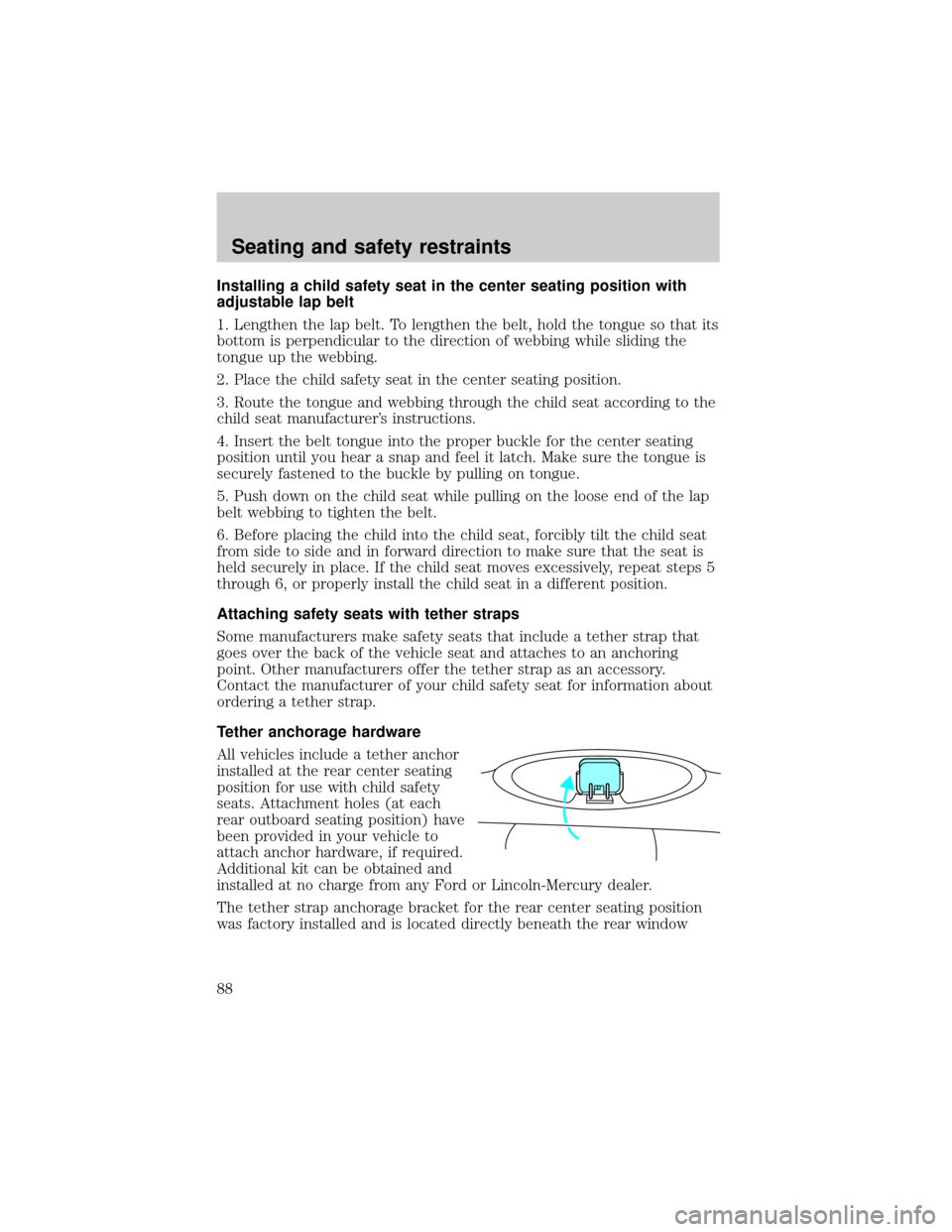
All vehicles include a tether anchor
installed at the rear center seating
position for use with child safety
seats. Attachment holes (at each
rear outboard seating position) have
been provided in your vehicle to
attach anchor hardware, if required.
Additional kit can be obtained and
installed at no charge from any Ford or Lincoln-Mercury dealer.
The tether strap anchorage bracket for the rear center seating position
was factory installed and is located directly beneath the rear window
Seating and safety restraints
88
Page 89 of 176
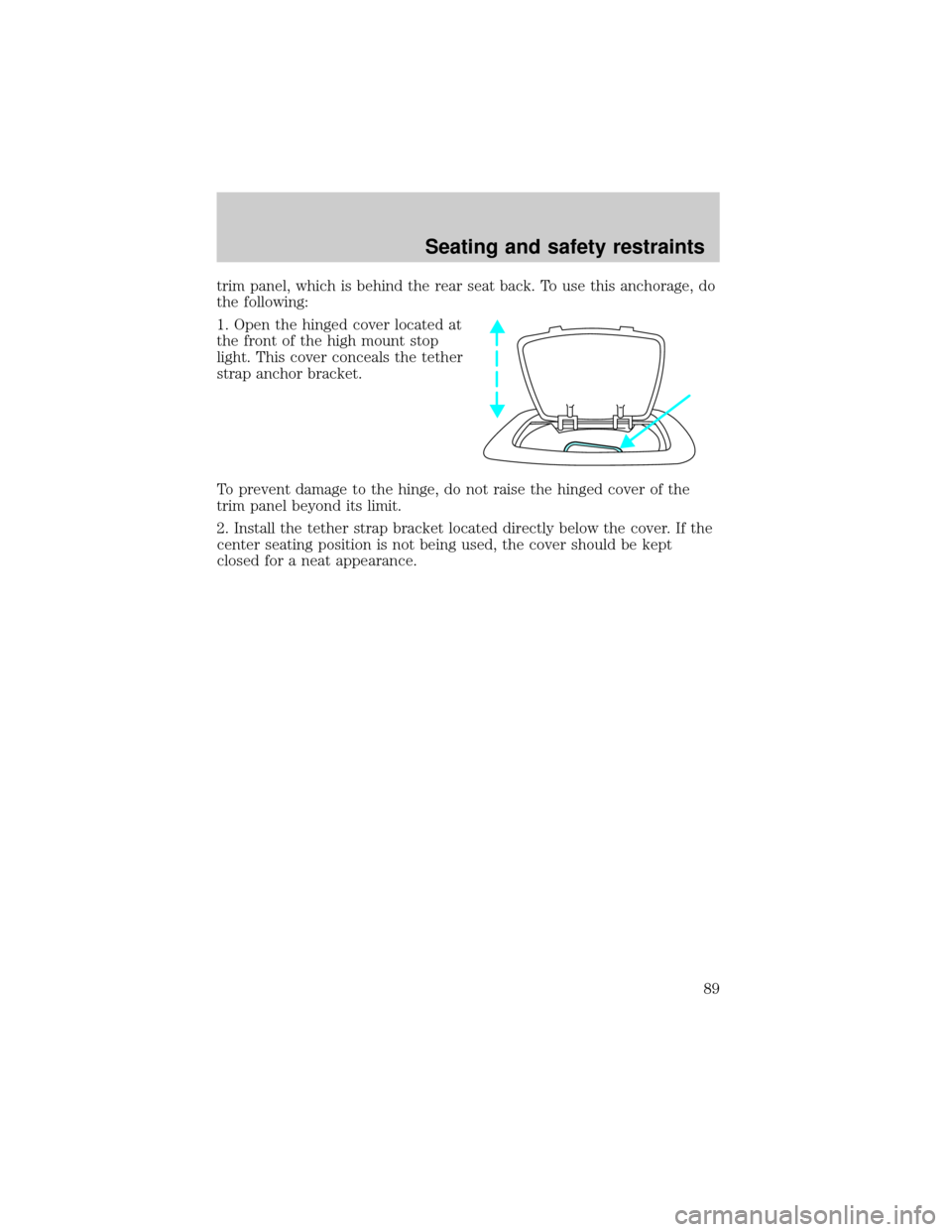
trim panel, which is behind the rear seat back. To use this anchorage, do
the following:
1. Open the hinged cover located at
the front of the high mount stop
light. This cover conceals the tether
strap anchor bracket.
To prevent damage to the hinge, do not raise the hinged cover of the
trim panel beyond its limit.
2. Install the tether strap bracket located directly below the cover. If the
center seating position is not being used, the cover should be kept
closed for a neat appearance.
Seating and safety restraints
89
Page 126 of 176

SERVICE RECOMMENDATIONS
To help you service your vehicle:
²We highlight do-it-yourself items in the engine compartment for easy
location.
²We provide a ªService Guideº which makes tracking routine service
easy.
If your vehicle requires professional service, your dealership can provide
necessary parts and service. Check your ªWarranty Guideº to find out
which parts and services are covered.
Use only recommended fuels, lubricants, fluids and service parts
conforming to specifications. Motorcraft parts are designed and built to
provide the best performance in your vehicle.
PRECAUTIONS WHEN SERVICING YOUR VEHICLE
Be especially careful when inspecting or servicing your vehicle.
²Do not work on a hot engine.
²When the engine is running, avoid wearing loose clothing, jewelry or
long hair that could get caught up in moving parts.
²Do not work on a vehicle with the engine running in an enclosed
space, unless you are sure you have enough ventilation.
²Keep all lit cigarettes, open flames and other lit material away from
the battery and all fuel related parts.
If you disconnect the battery, the engine must ªrelearnº its idle
conditions before your vehicle will drive properly, as explained in
theBatterysection in this chapter.
Working with the engine off
1. Set the parking brake, and ensure the gearshift is securely latched in
park.
2. Turn off the engine and remove the key.
3. Block the wheels to prevent the vehicle from moving unexpectedly.
Working with the engine on
1. Set the parking brake and
ensure the gearshift is securely latched in P (Park).
2. Block the wheels to prevent the vehicle from moving unexpectedly.
Maintenance and care
126
Page 151 of 176

3. At the back of the headlamp, pull back and up slightly on the two
right angle brackets to release the headlamp assembly from the vehicle.
4. Carefully pull the headlamp assembly away from the vehicle to expose
the back of the bulb and wiring connector.
5. Disconnect the electrical
connector from the bulb by pulling
the connector rearward.
6. Remove the bulb retaining ring by
rotating it counterclockwise (when
viewed from the rear) about an
eighth of a turn to free it from the
bulb socket, and by sliding the ring
off the plastic base. Keep the ring
because it will be used again to
retain the new bulb.
7. Remove the old bulb from its socket by gently pulling it straight back
out of the socket. Do not turn the bulb while removing it.
To install the new bulb:
1. With the flat side of the bulb's
plastic base facing upward, insert
the glass end of the bulb into the
socket. You may need to turn the
bulb left or right to line up the
grooves in the plastic base with the
tabs in the socket. When the
grooves are aligned, push the bulb into the socket until the plastic base
contacts the rear of the socket.
2. Slip the bulb retaining ring over the plastic base until it contacts the
rear of the socket by rotating it clockwise until you feel a ªstop.º
3. Push the electrical connector into the rear of the plastic base until it
snaps, locking it into position.
4. Before reinstalling the plastic sight shield, make sure the sight shield
tabs are properly seated under the grille molding.
Maintenance and care
151
Page 156 of 176
Repairing paint chips
Minor scratches or paint damage from road debris may be repaired with
touch-up paint, repair foil or aerosol paint spray from the Ford accessory
line. Observe the application instructions on the products.
Remove particles such as bird droppings, tree sap, insect remains, tar
spots, road salt and industrial fallout immediately.
Cleaning the wheels
Wash with the same detergent as the body of your vehicle. Do not use
acid-based wheel cleaners, steel wool, fuel or strong detergents. Never
use abrasives that will damage the finish of special wheel surfaces. Use a
tar remover to remove grease and tar.
Cleaning the engine
Engines are more efficient when they are clean because grease and dirt
buildup keep the engine warmer than normal. When washing:
²Take care when using a power washer to clean the engine. The high
pressure fluid could penetrate the sealed parts and cause damage.
²Do not spray with cold water to avoid cracking the engine block or
other engine components.
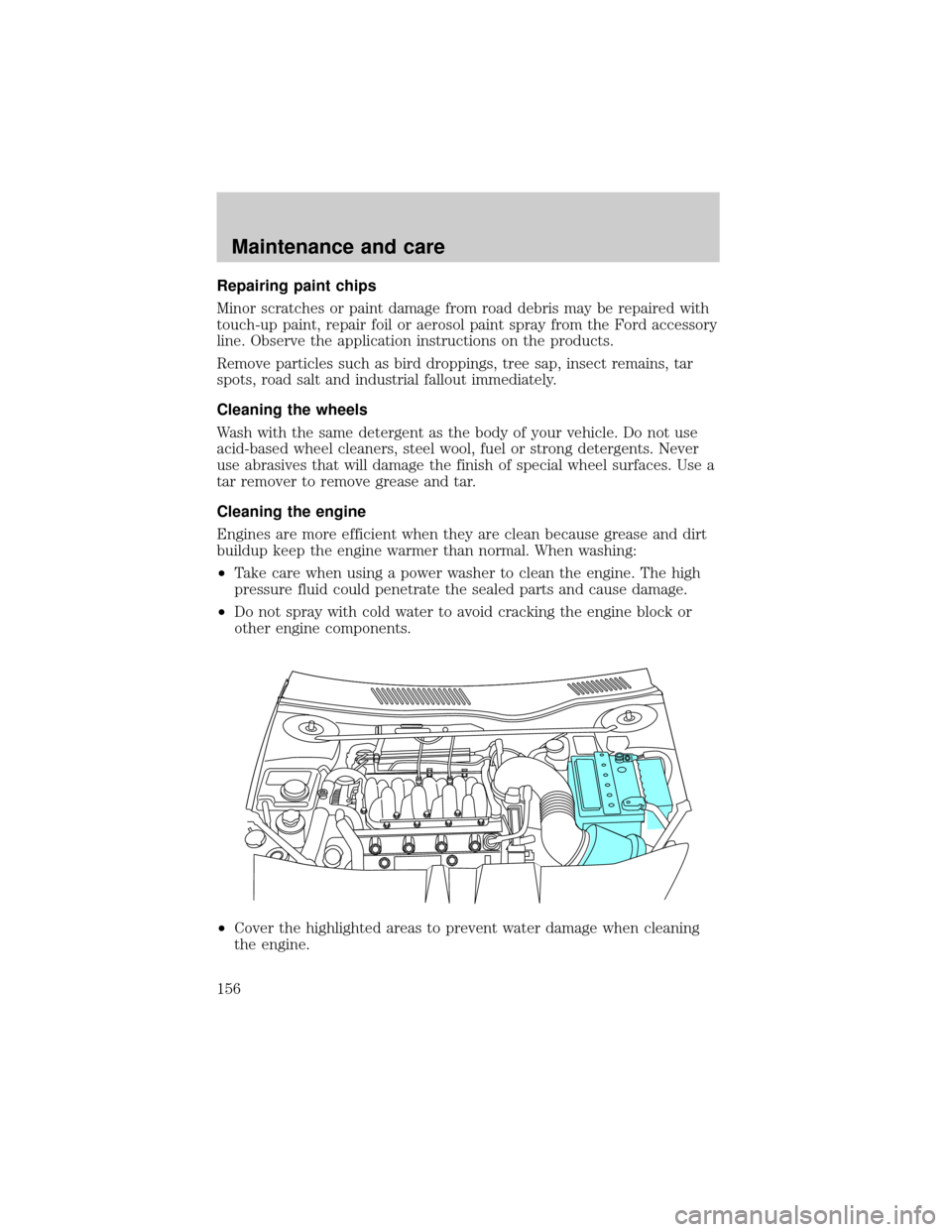
²Cover the highlighted areas to prevent water damage when cleaning
the engine.
Maintenance and care
156