1998 LINCOLN CONTINENTAL warning
[x] Cancel search: warningPage 20 of 176

settings (not individualized settings). To change a feature setting see
Driver profile featuresin this section.
Associated systems
Keyless Entry System
Programming personalized codes:
With a key and/or Key FOB outside of the vehicle:
²Enter the factory code
²Press the 1/2 control
²Enter the five digit personalized code
Press:
²The 1/2 control to save the code as Driver 1.
²The 3/4 control to save the code as Driver 2.
²The 5/6 control to save as a third code that will not identify the driver
to the System and turn the system OFF.
²When the desired codes have been entered, press the 7/8 and 9/0
controls simultaneously to end programming, and to lock all of the
doors.
²Test the programmed codes by entering them and verifying the
driver's door unlocks. Press 7/8 and 9/0 simultaneously to lock all of
the doors. Repeat for other codes as required.
The Message Center System
The Message Center is used to display Driver Profile messages and
warning and program many of the Driver Profile System features. Press
the following controls for desired programming:
²The MENU control will display options for the Express Window, Auto
Door Locks, Horn Chirp, Easy Entry/Exit Seat Access and Reverse
Mirror features which can be set by using the SELECT control.
²The VEHICLE HANDLING control will display options for Adjustable
Steering and Adjustable Ride (DSS only) features which can be set
using the SELECT control.
²The DRIVER ID control will display the option of selecting Driver 1,
Driver 2 or OFF.
Instrumentation
20
Page 34 of 176
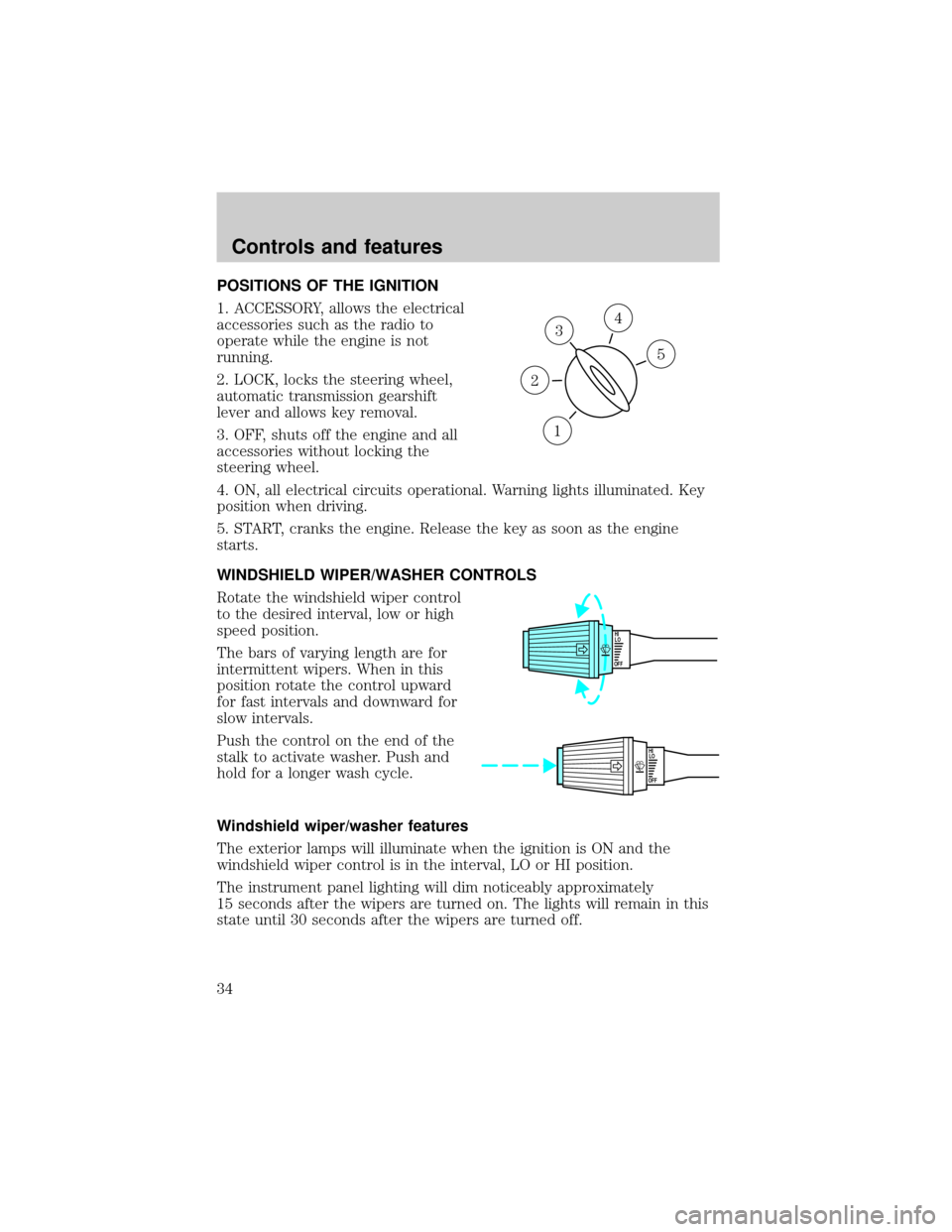
POSITIONS OF THE IGNITION
1. ACCESSORY, allows the electrical
accessories such as the radio to
operate while the engine is not
running.
2. LOCK, locks the steering wheel,
automatic transmission gearshift
lever and allows key removal.
3. OFF, shuts off the engine and all
accessories without locking the
steering wheel.
4. ON, all electrical circuits operational. Warning lights illuminated. Key
position when driving.
5. START, cranks the engine. Release the key as soon as the engine
starts.
WINDSHIELD WIPER/WASHER CONTROLS
Rotate the windshield wiper control
to the desired interval, low or high
speed position.
The bars of varying length are for
intermittent wipers. When in this
position rotate the control upward
for fast intervals and downward for
slow intervals.
Push the control on the end of the
stalk to activate washer. Push and
hold for a longer wash cycle.
Windshield wiper/washer features
The exterior lamps will illuminate when the ignition is ON and the
windshield wiper control is in the interval, LO or HI position.
The instrument panel lighting will dim noticeably approximately
15 seconds after the wipers are turned on. The lights will remain in this
state until 30 seconds after the wipers are turned off.
3
1
2
5
4
OFFHI
LO
OFFHI
LO
Controls and features
34
Page 41 of 176

Rear courtesy/reading lamps
The courtesy lamp lights when:
²any door is opened.
²when the instrument panel
dimmer switch is turned to the
courtesy lamp position.
²if any of the keyless entry keypad
controls are pressed and the
ignition is OFF.
With the ignition key in the ACC or ON position, the reading lamp can be
turned on by pressing the rocker control.
LINCOLN RESCU SYSTEM (IF EQUIPPED)
Lincoln RESCU runs a self-test
when you start your vehicle. During
this test, the Lincoln RESCU
warning light (located in the
overhead console) will illuminate
briefly. If a problem is detected
during the self-check, the light will
remain lit and the message ªRESCU
FAILUREº will be displayed on the
vehicle's message center for several
seconds.
If the warning light fails to briefly
illuminate when you start your
vehicle, or if it remains lit, have
your Lincoln RESCU System
checked by an authorized dealer as
soon as possible. Your system may be inoperative.
It is important that you understand the limitations of your
Lincoln RESCU System prior to initiating an activation. See
Lincoln RESCU System Limitationslater in this chapter for details.
The RESCU system can be activated in three ways:
S.O.S.INFO
S.O.S.INFO
i
i
S.O.S.
INFO
i
Controls and features
41
Page 42 of 176

1. By pressing the Information
control.
2. By pressing the Emergency
(S.O.S) control.
3. The system will automatically activate if the vehicle's air bags have
been deployed.
Quick summary
²To utilize your vehicle's RESCU system, your cellular phone must be
activated.
²Information or emergency assistance can be requested whenever your
key is in the RUN/START position and for six minutes after the vehicle
is turned off.
²An assistance request is initiated by pressing either the Information or
Emergency control located in the overhead console.
²When a control is pressed, a warning lamp located in the overhead
console will begin to flash and status messages are displayed on the
vehicle's message center (messages can only be displayed when the
key is in the RUN/START position).
²The vehicle's cellular phone automatically places a call to a 24 hour
emergency response center.
²When contact is made, the vehicle sends an electronic data message
to the response center's computer. This data message includes latitude
and longitude coordinates obtained from the vehicle's positioning
system.
²Once the data transmission is complete, the call is forwarded to a
response center operator who confirms your location using a
computerized map.
²The vehicle's cellular handset is locked-out, the phone is automatically
placed in the ªhands-freeº mode and voice communication is
established with the operator through the ªhands-freeº microphone.
INFO
i
S.O.S.
Controls and features
42
Page 43 of 176

²Typically, voice communication with an operator is established within
one minute after an assistance control is pressed.
²The operator verbally obtains details of your situation and, if
necessary, ties your vehicle into a three-way phone call with the
United States Auto Club or local 911 or other emergency services to
dispatch the appropriate assistance to your location.
²Once the situation has been appropriately handled, the operator will
terminate the call, the system warning light will stop flashing and the
system will be reset. In most situations, only the response center can
terminate an assistance request.
General description
Lincoln's Remote Emergency Satellite Cellular Unit (RESCU) is designed
to expedite roadside, emergency or information assistance to distressed
motorists who are uncertain of their location and/or are uncertain of who
to contact for assistance.
The Lincoln RESCU system utilizes Global Positioning System (GPS)
technology and the nation's cellular phone network to track vehicle
location and, at the touch of a control, put you in voice contact with the
Lincoln Security Response Center.
Two controls in the overhead console will activate the system:
An Information icon is provided for
customer information, such as
points of interest in your current
location, route assistance and other
services as they become available.
An Emergency icon for is for
emergency assistance.
When you select a control, the vehicle's cellular phone will automatically
place a data call to the response center's central computer. Once contact
is made, an electronic data message will be transmitted. This data
message will include:
²Type of alarm (Information, emergency or air bag acitvation)
²Vehicle Identification Number (VIN)
²Latitude and longitude coordinates
INFO
i
S.O.S.
Controls and features
43
Page 45 of 176

Activation and deactivation
When either of the two Lincoln RESCU controls are pressed, or the air
bags are deployed (this will activate the system as an emergency
automatically), a warning light, located in the overhead console, will
begin to flash and status messages will be displayed on the vehicle's
message center, confirming an assistance request has been made. The
warning light will continue to flash throughout the activation.
The system can be activated whenever your ignition key is in the
RUN/START position and for six minutes after your vehicle is turned off.
Once a RESCU control has been pressed, do not attempt to cranks the
engine as this may cancel the activation. In most situations, the
assistance request can only be terminated and the system reset when a
special tone is sent to the vehicle by the Lincoln Security Response
Center. (SeeAutomatic rediallater in this chapter for exceptions.)
Operation will continue even if the vehicle is turned off during an
activation (although visual feedback via the message center will not be
available in this situation).
Cellular phone interface
The cellular phone must be connected to the vehicle and activated for
the system to work. During an activation, Lincoln RESCU takes control
of the vehicle's cellular phone. If the phone is in use, the call will be
terminated and the Lincoln Security Response Center will automatically
be dialed. The cellular handset becomes inoperative and all voice
communication with the operator is accomplished via the cellular phone's
ªhands-freeº microphone.
When an activation is terminated, your phone is left unlocked, in the ON
state and may not return to its previous call restriction or system
selection setting. It can be reprogrammed to your previous setting as
desired.
Refer to your cellular phone user's manual for further information.
Message center interface
During an activation, Lincoln RESCU communication with the vehicle's
message center. Status message describing the sequence of the steps
being executed are displayed, allowing you to visually follow the
activation process. The following messages are typical of those displayed
during an assistance request. They are as shown in the order in which
they would appear:
Controls and features
45
Page 78 of 176
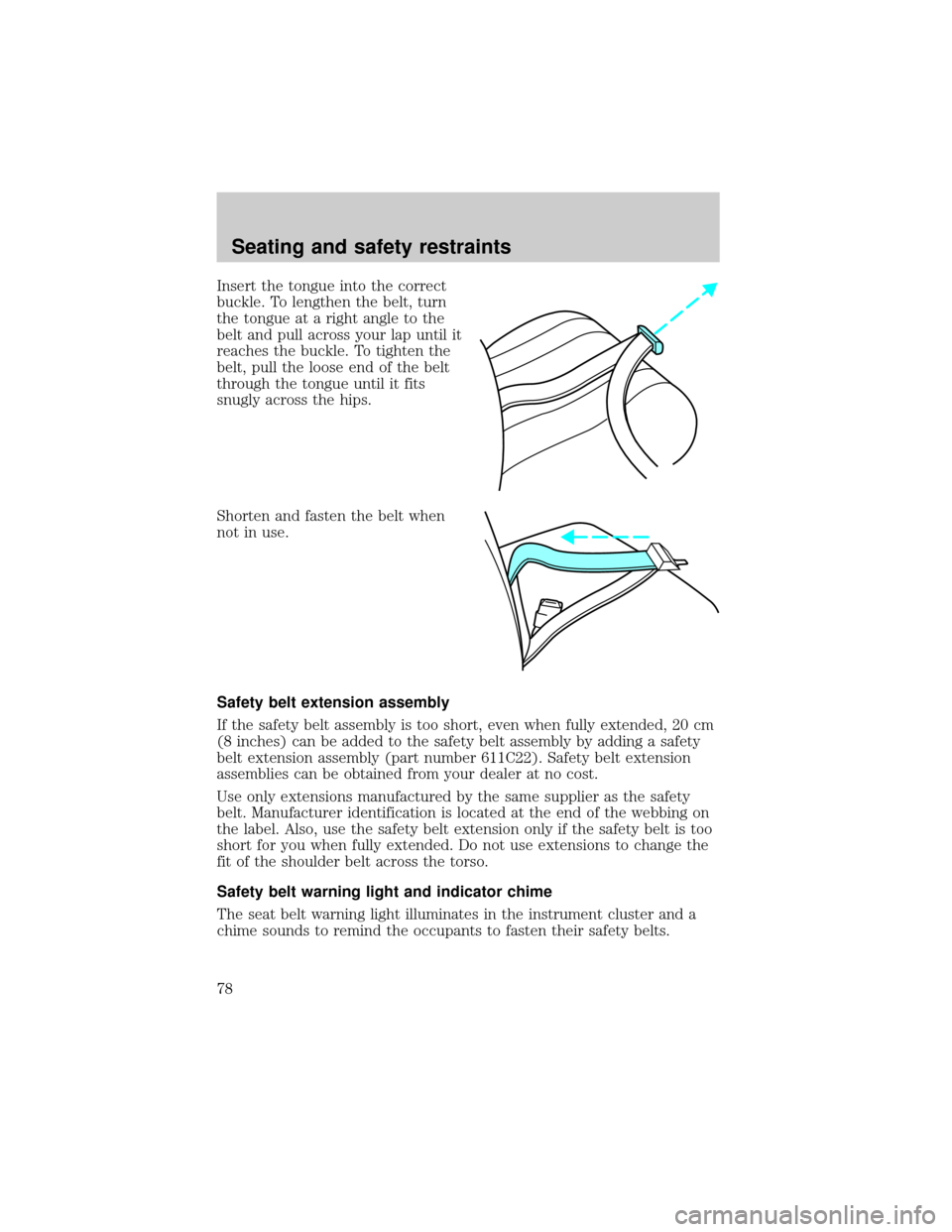
Insert the tongue into the correct
buckle. To lengthen the belt, turn
the tongue at a right angle to the
belt and pull across your lap until it
reaches the buckle. To tighten the
belt, pull the loose end of the belt
through the tongue until it fits
snugly across the hips.
Shorten and fasten the belt when
not in use.
Safety belt extension assembly
If the safety belt assembly is too short, even when fully extended, 20 cm
(8 inches) can be added to the safety belt assembly by adding a safety
belt extension assembly (part number 611C22). Safety belt extension
assemblies can be obtained from your dealer at no cost.
Use only extensions manufactured by the same supplier as the safety
belt. Manufacturer identification is located at the end of the webbing on
the label. Also, use the safety belt extension only if the safety belt is too
short for you when fully extended. Do not use extensions to change the
fit of the shoulder belt across the torso.
Safety belt warning light and indicator chime
The seat belt warning light illuminates in the instrument cluster and a
chime sounds to remind the occupants to fasten their safety belts.
Seating and safety restraints
78
Page 79 of 176
Conditions of operation
If... Then...
The driver's safety belt is not
buckled before the ignition
switch is turned to the ON
position...The safety belt warning light
illuminates for one to two minutes and
the warning chime sounds for four to
eight seconds.
The driver's safety belt is
buckled while the indicator
light is illuminated and the
warning chime is sounding...The safety belt warning light and
warning chime turn off.
The driver's safety belt is
buckled before the ignition
switch is turned to the ON
position...The safety belt warning light and
indicator chime remain off.
Safety belt maintenance
Check the safety belt systems periodically to make sure they work
properly and are not damaged. Check the safety belts to make sure there
are no nicks, wears or cuts. All safety belt assemblies, including
retractors, buckles, front seat belt buckle assemblies (slide bar)
(if equipped), shoulder belt height adjusters (if equipped), child safety
seat tether bracket assemblies (if equipped), and attaching hardware,
should be inspected after a collision. Ford recommends that all safety
belt assemblies used in vehicles involved in a collision be replaced.
However, if the collision was minor and a qualified technician finds that
the belts do not show damage and continue to operate properly, they do
not need to be replaced. Safety belt assemblies not in use during a
collision should also be inspected and replaced if either damage or
improper operation is noted.
Failure to replace the safety belt assembly under the above
conditions could result in severe personal injuries in the event of
a collision.
Refer toCleaning and maintaining the safety beltsin the
Maintenance and caresection.
Seating and safety restraints
79