1998 HONDA CIVIC COUPE engine
[x] Cancel search: enginePage 1 of 251
 to navigate through\
this reference.
For a printed owners manual, click on authorized manuals or")
1998 Civic Coupe Online Reference Owner's Manual
Use these links (and links throughout this manual) to navigate through\
this reference.
For a printed owner's manual, click on authorized manuals or go to www.h\
elminc.com.
Contents
Introduction ........................................................................\
........................ .........................................
i
A Few Words About Safety........................................................................\
.........................................ii
Driver and Passenger Safety ........................................................................\
......................................3
Proper use and care of your vehicle's seat belts, and Supplemental Restr\
aint System.
Instruments and Controls........................................................................\
.........................................49
Instrume nt panel indicator and gauge, and how to use dashboard and steering colu\
mn controls.
Comfort and Convenience Features ........................................................................\
...................... 85
How to operate the climate control system, the audio system, and other c\
onvenience features.
Before Driving........................................................................\
......................................................... 107
What gasoline to use, how to break-in your new vehicle, and how to load luggage and other cargo.
Driving ........................................................................\
..................................................................... 119
The proper way to start the engine, shift the transmission, and park, pl\
us towing a trailer.
Maintenance........................................................................\
.............................................................141
The Maintenance Schedule shows you when you need to take you r vehicle to the dealer.
Appearance Care........................................................................\
......................................................199
Tips on cleaning and protecting your vehicle. Things to look for if your\
vehicle ever needs body repairs.
Taking Care of the Unexpected........................................................................\
..............................205
This section covers several problems motorists sometimes experience, an d how to handle them.
Technical Information........................................................................\
.............................................229
ID numbers, dimensions, capacities, and technical information.
Warranty and Customer Relations (U.S. and Canada)................................................................243
A summary of the warranties covering your new Acura, and how to contact \
us.
Authorized Manuals (U.S. only)........................................................................\
..............................249
How to order manuals and other technical literature.
Index........................................................................\
............................................................................. I
A summary of information you need when you pull up to the fuel pump. Service Information Summary Owner's Identification
Page 18 of 251
Protecting Adults
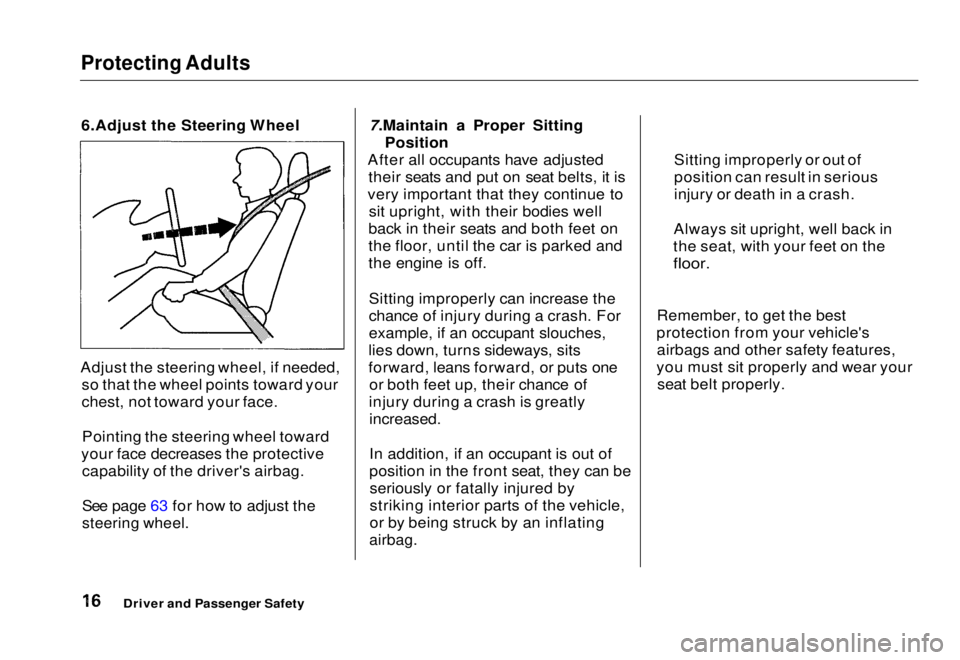
6.Adjust the Steering Wheel
Adjust the steering wheel, if needed, so that the wheel points toward your
chest, not toward your face.
Pointing the steering wheel toward
your face decreases the protective capability of the driver's airbag.
See page 63 for how to adjust the
steering wheel.
7.Maintain a Proper Sitting
Position
After all occupants have adjusted their seats and put on seat belts, it is
very important that they continue to sit upright, with their bodies well
back in their seats and both feet on
the floor, until the car is parked and
the engine is off.
Sitting improperly can increase the
chance of injury during a crash. For
example, if an occupant slouches,
lies down, turns sideways, sits
forward, leans forward, or puts one or both feet up, their chance of
injury during a crash is greatly
increased.
In addition, if an occupant is out of
position in the front seat, they can beseriously or fatally injured by
striking interior parts of the vehicle,
or by being struck by an inflating
airbag.
Remember, to get the best
protection from your vehicle's airbags and other safety features,
you must sit properly and wear your seat belt properly.
Driver and Passenger Safety Sitting improperly or out of
position can result in serious
injury or death in a crash.
Always sit upright, well back in
the seat, with your feet on the
floor.Main Menu Table of Contents s t
Page 47 of 251
Additional Information About Your SRS
How Your SRS Indicator Light
Works The purpose of the SRSindicator light is to alert
you to a potential problem with your Supplemental Restraint System.
When you turn the ignition ON (II), this indicator will light up briefly
then go out. This tells you that thesystem is working properly.
However, if the light comes on at any
other time, you should have yoursystem checked by your dealer. For
example:
If the SRS indicator light does not
come on after you turn the ignition
ON (II). If the light stays on after the
engine starts. If the light comes on or flashes on
and off while you drive.
If you see any of these indications,
your airbags may not deploy when you need them. See your Honda dealer as soon as possible. SRS Service
Your Supplemental Restraint System is virtually maintenance-free, and
there are no parts you can safelyservice. However, you must have
your vehicle serviced if:
Your airbags ever inflate. The
airbags and
the control unit must
be replaced. Do not try to remove or replace the airbags yourself.
This must be done by a Honda dealer or a knowledgeable body
shop.
The SRS indicator light alerts you
to a problem. Take your vehicle to
an authorized Honda dealer as soon as possible. If you ignore this
indication, the airbags might not
inflate when you need them.
Driver and Passenger Safety
SRS
Ignoring the SRS indicator light
can result in serious injury or death if the airbags do notinflate when needed.
Have your vehicle checked by a
dealer as soon as possible if
the SRS light alerts you to a potential problem.Main Menu Table of Contents s t
Page 49 of 251
Carbon Monoxide Hazard
Your vehicle's exhaust contains carbon monoxide gas. You should
have no problem with carbon
monoxide entering the vehicle in
normal driving if you maintain your
vehicle properly.
Have the exhaust system inspected
for leaks whenever:
The vehicle is raised for an oilchange.
You notice a change in the sound of the exhaust. The vehicle was in an accident
that may have damaged the under-
side.
High levels of carbon monoxide can
collect rapidly in enclosed areas,
such as a garage. Do not run the
engine with the garage door closed.
Even with the door open, run the
engine only long enough to move the
vehicle out of the garage. With the trunk lid open, air flow can
pull exhaust gas into your vehicle'sinterior and create a hazardous
condition. If you must drive with the
trunk lid open, open all the windows and set the heating and coolingsystem as shown below.
If you must sit in your parked vehicle,
even in an unconfined area, with the
engine running, adjust the heating and cooling system as follows:
1. Select the Fresh Air mode. 2. Select the mode.
3. Turn the fan on high speed.
4. Set the temperature control to a comfortable setting.
Driver and Passenger Safety
Carbon monoxide gas is toxic.
Breathing it can cause
unconsciousness and even kill
you.
Avoid any enclosed areas oractivities that expose you to
carbon monoxide.Main Menu Table of Contents s t
Page 55 of 251
Indicator Lights
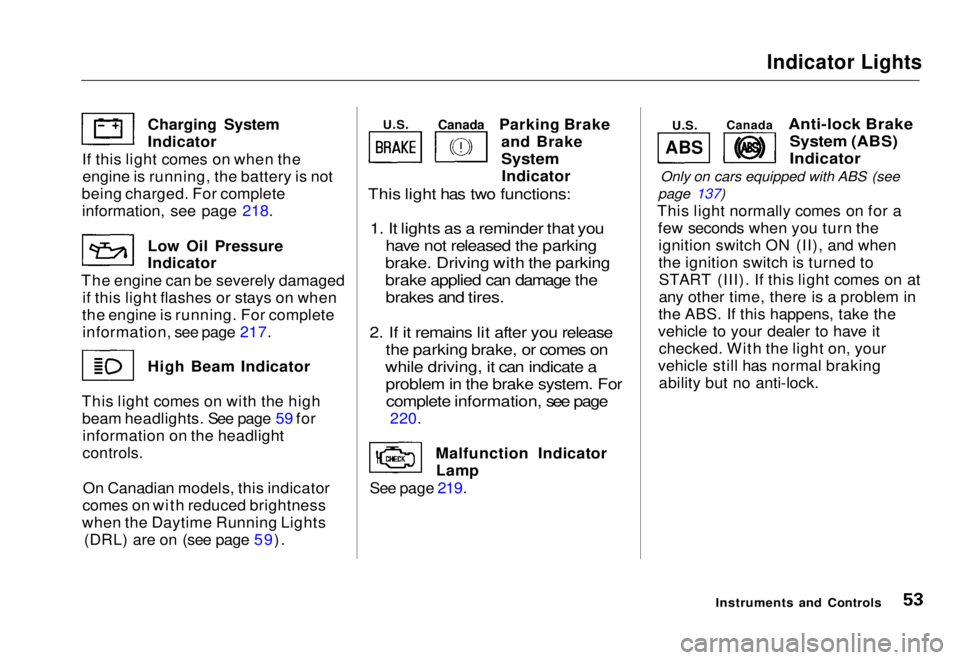
Parking Brake and Brake
System
Indicator
This light has two functions:
1. It lights as a reminder that you have not released the parking
brake. Driving with the parking
brake applied can damage the brakes and tires.
2. If it remains lit after you release the parking brake, or comes on
while driving, it can indicate a problem in the brake system. Forcomplete information, see page
220.
Malfunction Indicator Lamp
See page 219.
Anti-lock Brake
System (ABS)
Indicator
Only on cars equipped with ABS (see
page 137)
This light normally comes on for a few seconds when you turn theignition switch ON (II), and when
the ignition switch is turned toSTART (III). If this light comes on at
any other time, there is a problem in
the ABS. If this happens, take the
vehicle to your dealer to have it checked. With the light on, your
vehicle still has normal braking ability but no anti-lock.
Instruments and Controls
Charging System Indicator
If this light comes on when the engine is running, the battery is not
being charged. For complete
information
,
see page 218.
Low Oil
Pressure
Indicator
The engine can be severely damaged if this light flashes or stays on when
the engine is running. For complete information, see page 217. High Beam Indicator
This light comes on with the high beam headlights. See page 59 forinformation on the headlight
controls.
On Canadian models, this indicator
comes on with reduced brightness
when the Daytime Running Lights (DRL) are on (see page 59).
ABS
U.S.
Canada
U.S.
CanadaMain Menu Table of Contents s t
Page 57 of 251
Gauges
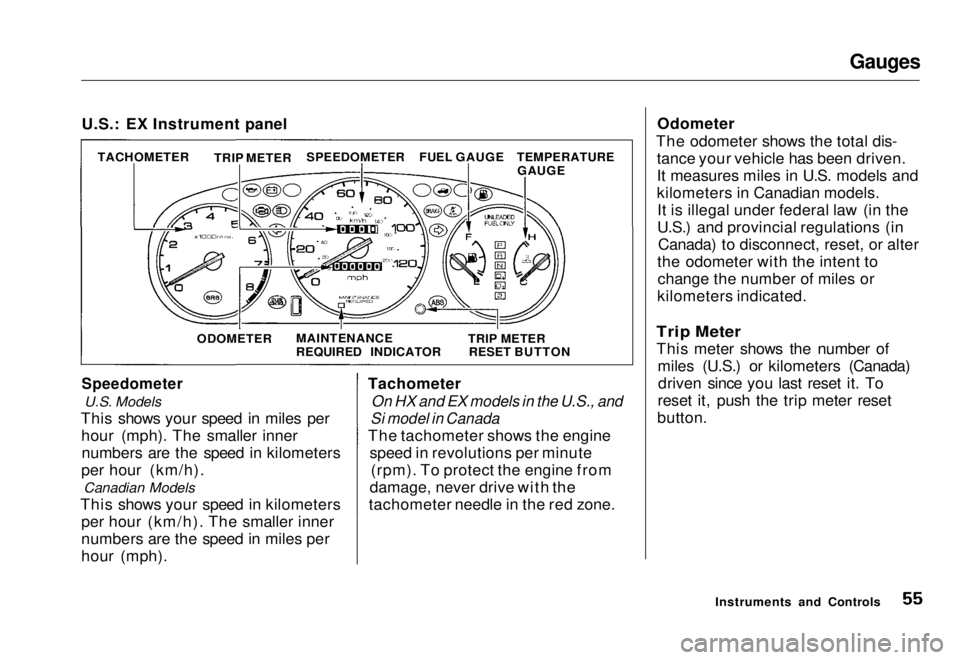
U.S.: EX Instrument panel
Speedometer
U.S. Models
This shows your speed in miles per hour (mph). The smaller innernumbers are the speed in kilometers
per hour (km/h). Canadian Models
This shows your speed in kilometers per hour (km/h). The smaller inner
numbers are the speed in miles per
hour (mph). Tachometer
On HX and EX models in the U.S., and
Si model in Canada
The tachometer shows the engine speed in revolutions per minute(rpm). To protect the engine from
damage, never drive with the
tachometer needle in the red zone. Odometer
The odometer shows the total dis- tance your vehicle has been driven.
It measures miles in U.S. models and
kilometers in Canadian models.It is illegal under federal law (in the
U.S.) and provincial regulations (in Canada) to disconnect, reset, or alter
the odometer with the intent to change the number of miles or
kilometers indicated.
Trip Meter
This meter shows the number of miles (U.S.) or kilometers (Canada)driven since you last reset it. To
reset it, push the trip meter reset
button.
Instruments and Controls
TACHOMETER
TRIP METER
SPEEDOMETER
FUEL GAUGE
ODOMETER MAINTENANCE
REQUIRED INDICATOR TRIP METER
RESET BUTTON TEMPERATURE
GAUGEMain Menu Table of Contents s t
Page 58 of 251
Gauges
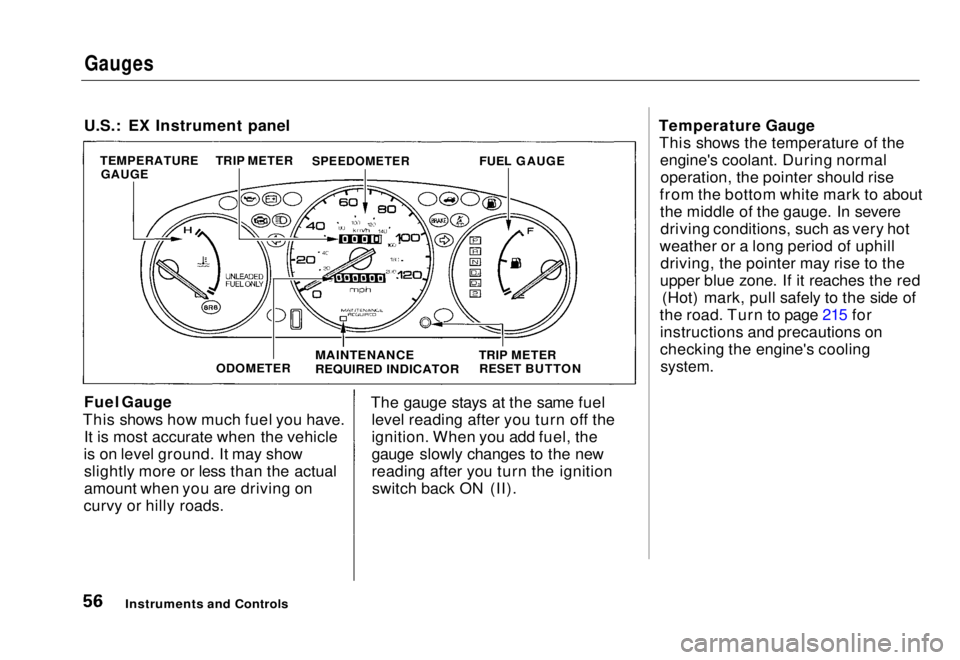
U.S.: EX Instrument panel
Fuel Gauge
This shows how much fuel you have. It is most accurate when the vehicle
is on level ground. It may show slightly more or less than the actual
amount when you are driving on
curvy or hilly roads. The gauge stays at the same fuel
level reading after you turn off the
ignition. When you add fuel, the
gauge slowly changes to the new
reading after you turn the ignitionswitch back ON (II). Temperature Gauge
This shows the temperature of the engine's coolant. During normaloperation, the pointer should rise
from the bottom white mark to about the middle of the gauge. In severedriving conditions, such as very hot
weather or a long period of uphill driving, the pointer may rise to the
upper blue zone. If it reaches the red (Hot) mark, pull safely to the side of
the road. Turn to page 215 for instructions and precautions on
checking the engine's cooling
system.
Instruments and Controls
TEMPERATURE
GAUGE TRIP METER
SPEEDOMETER
FUEL GAUGE
ODOMETER
MAINTENANCE
REQUIRED INDICATOR
TRIP METER
RESET BUTTONMain Menu Table of Contents s t
Page 70 of 251
Keys and Locks
LOCK (0) — You can insert or
remove the key only in this position.
To switch from ACCESSORY to LOCK, you must push the key in
slightly as you turn it. If your vehicle
has an automatic transmission, it
must also be in Park. The anti-theft
lock will lock the steering column
when you remove the key. If the front wheels are turned, the
anti-theft lock may sometimes make
it difficult to turn the key from
LOCK to ACCESSORY. Firmly turn
the steering wheel to the left or to
the right as you turn the key. ACCESSORY (I) — In this position,
you can operate the audio system and the accessory power socket.
ON (II) — This is the normal key
position when driving. All features
and accessories on the vehicle are
usable. Several of the lights on the
instrument panel come on as a test
when you turn the ignition switch
from ACCESSORY to ON (see page 51).
START (III) — Use this position
only to start the engine. The switch
returns to ON (II) when you let go of
the key.
You will hear a reminder beeper if
you leave the key in the ignition switch in the LOCK (0) or
ACCESSORY (I) position and open the driver's door. Remove the key to
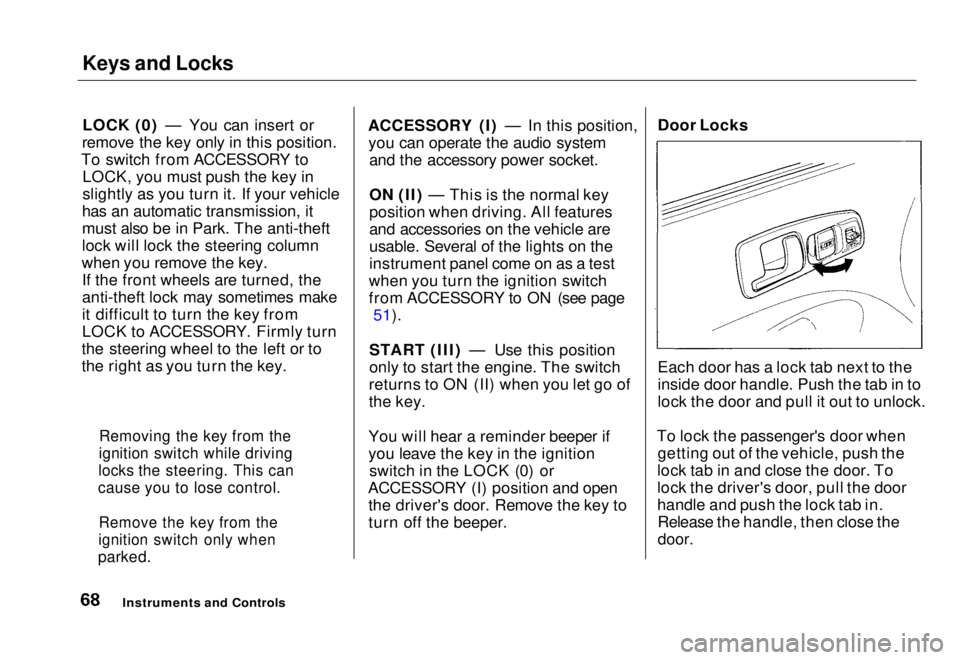
turn off the beeper. Door Locks
Each door has a lock tab next to the
inside door handle. Push the tab in to
lock the door and pull it out to unlock.
To lock the passenger's door when getting out of the vehicle, push the
lock tab in and close the door. To
lock the driver's door, pull the door
handle and push the lock tab in. Release the handle, then close the
door.
Instruments and Controls
Removing the key from the
ignition switch while driving
locks the steering. This can
cause you to lose control.
Remove the key from the
ignition switch only when
parked.Main Menu Table of Contents s t