Page 127 of 251
Automatic Transmission
Driving
CONTINUED
Park (P) — This position mechani-
cally locks the transmission. Use
Park whenever you are turning off or
starting the engine. To shift out of
Park, you must press on the brake
pedal and have your foot off the
accelerator pedal. Press the release
button on the side of the shift lever to move it.
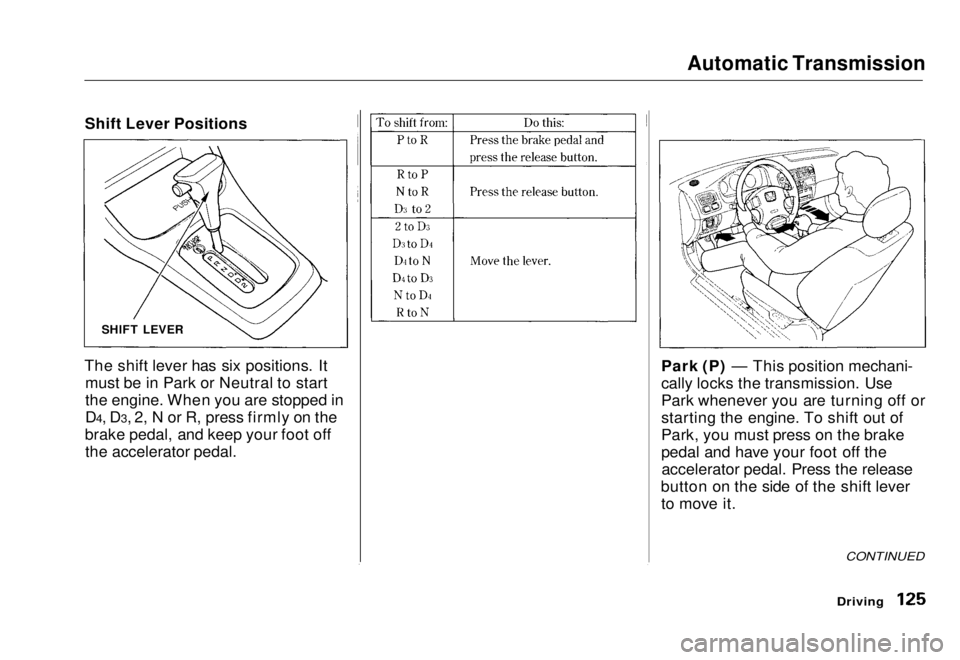
The shift lever has six positions. It
must be in Park or Neutral to start
the engine. When you are stopped in
D4, D3, 2, N or R, press firmly on the
brake pedal, and keep your foot off the accelerator pedal. SHIFT LEVER
Shift Lever PositionsMain Menu Table of Contents s t
Page 128 of 251
Automatic Transmission
If you have done all of the above andstill cannot move the lever out of
Park, see Shift Lock Release on page
128.
You must also press the release button to shift into Park. To avoidtransmission damage, come to acomplete stop before shifting into
Park. The shift lever must be in Park
before you can remove the key from
the ignition switch. Reverse (R) — To shift to Reverse
from Park, see the explanation under
Park. To shift to Reverse from
Neutral, come to a complete stop and
then shift. Press the release button before shifting into Reverse from
Neutral.
Neutral (N) — Use Neutral if you
need to restart a stalled engine, or ifit is necessary to stop briefly with
the engine idling. Shift to Park posi-
tion if you need to leave the vehicle
for any reason. Press on the brake pe- dal when you are moving the shift
lever from Neutral to another gear.
Drive (D4) — Use this position for
your normal driving. The transmis- sion automatically selects a suitable
gear for your speed and acceleration.
You may notice the transmission shifting up at higher speeds when
the engine is cold. This helps the
engine warm up faster. Drive (D3) —This position is similar
to D4, except only the first three
gears are selected. Use D3 to provide
engine brakin g
when going down a
steep hill. D3 can also keep the
transmission from cycling between
third and fourth gears in stop-and-go driving.
For faster acceleration when in D3 or
D4, you can get the transmission to
automatically downshift by pushing
the accelerator pedal to the floor.
The transmission will shift down one or two gears, depending on your
speed.
DrivingMain Menu Table of Contents s t
Page 129 of 251
Automatic Transmission
Second (2) — To shift to Second,
press the release button on the side of the shift lever. This position locks
the transmission in second gear. It does not downshift to first gear
when you come to a stop. Second gives you more power when climbing,and increased engine braking when
going down steep hills. Use second
gear when starting out on a slippery surface or in deep snow. It will help
reduce wheelspin. Maximum Speeds
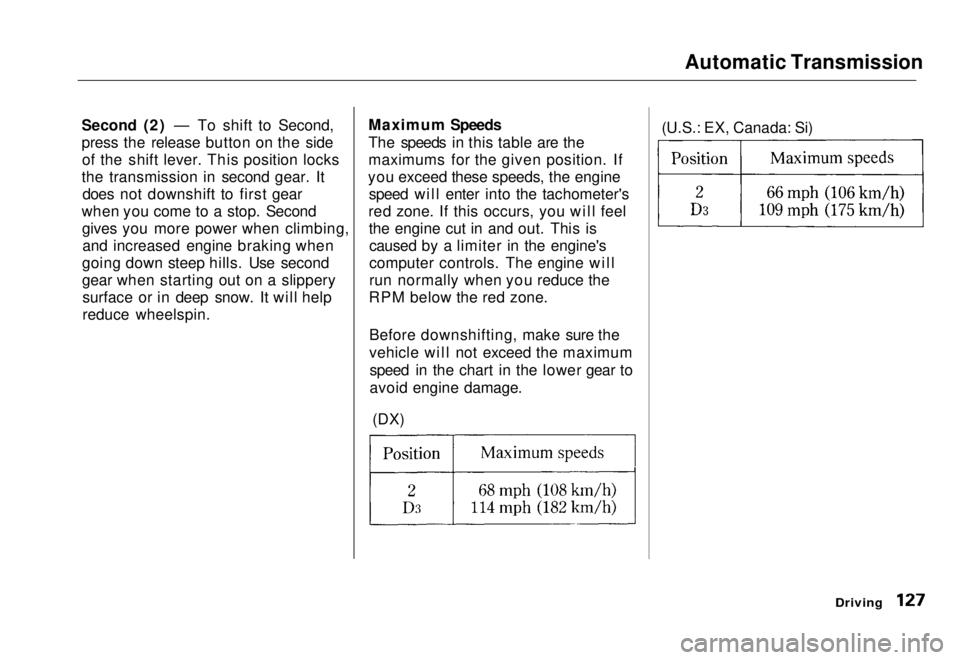
The speeds in this table are the
maximums for the given position. If
you exceed these speeds, the engine speed will enter into the tachometer's
red zone. If this occurs, you will feel the engine cut in and out. This iscaused by a limiter in the engine's
computer controls. The engine will
run normally when you reduce the
RPM below the red zone.
Before downshifting, make sure the
vehicle will not exceed the maximumspeed in the chart in the lower gear to
avoid engine damage.
(DX) (U.S.: EX, Canada: Si)
DrivingMain Menu Table of Contents s t
Page 130 of 251
Automatic Transmission
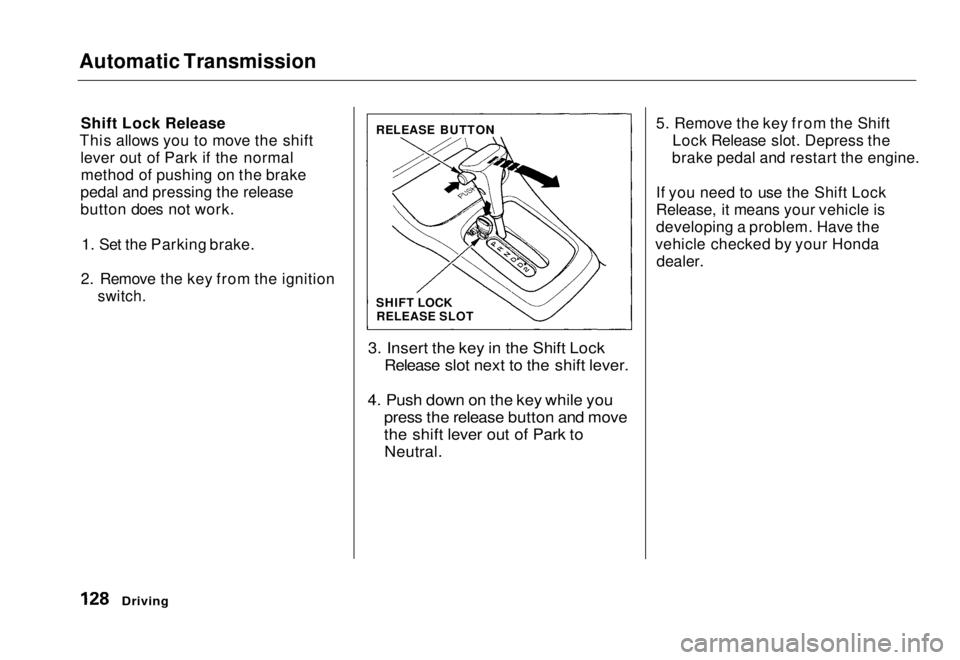
Shift Lock Release
This allows you to move the shift lever out of Park if the normalmethod of pushing on the brake
pedal and pressing the release
button does not work.
1. Set the Parking brake.
2. Remove the key from the ignition
switch.
3. Insert the key in the Shift LockRelease slot next to the shift lever.
4. Push down on the key while you press the release button and move
the shift lever out of Park to
Neutral.
5. Remove the key from the Shift
Lock Release slot. Depress the
brake pedal and restart the engine.
If you need to use the Shift Lock
Release, it means your vehicle is
developing a problem. Have the
vehicle checked by your Honda dealer.
Driving
SHIFT LOCK
RELEASE SLOT
RELEASE BUTTONMain Menu Table of Contents s t
Page 131 of 251
Automatic Transmission (CVT)
Continuously Variable
Transmission (CVT)
On HX model
Honda's Continuously Variable
automatic transmission's unique design provides a smooth, constant
flow of power. It is electronically controlled for more precise operation
and better fuel economy. Shift Lever Position Indicator
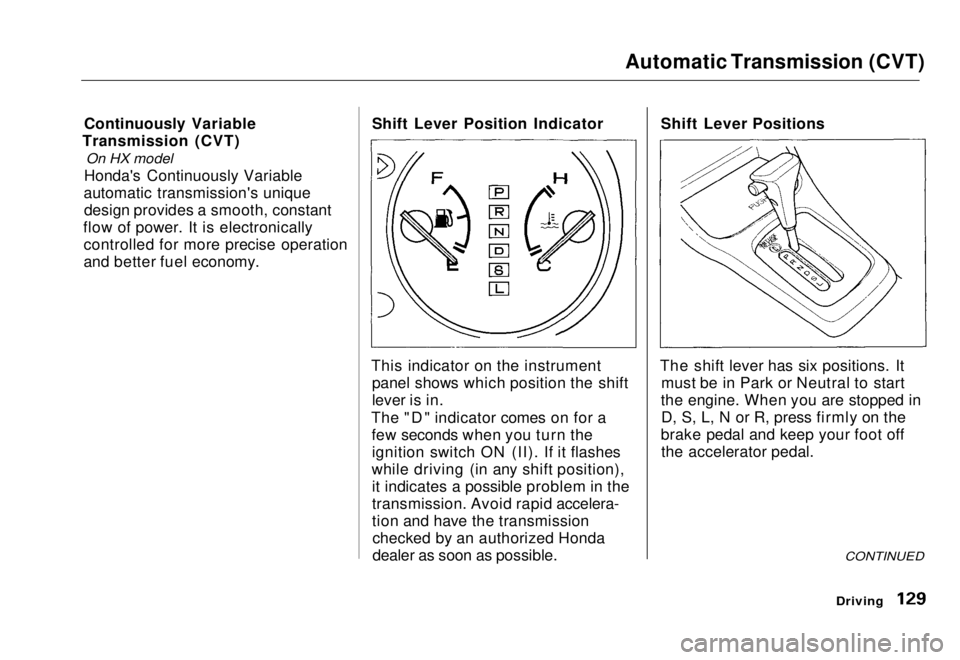
This indicator on the instrument panel shows which position the shift
lever is in.
The "D" indicator comes on for a few seconds when you turn theignition switch ON (II). If it flashes
while driving (in any shift position), it indicates a possible problem in the
transmission. Avoid rapid accelera-
tion and have the transmissionchecked by an authorized Honda
dealer as soon as possible. Shift Lever Positions
The shift lever has six positions. It must be in Park or Neutral to start
the engine. When you are stopped in D, S, L, N or R, press firmly on the
brake pedal and keep your foot off the accelerator pedal.
CONTINUED
DrivingMain Menu Table of Contents s t
Page 132 of 251
Automatic Transmission (CVT)
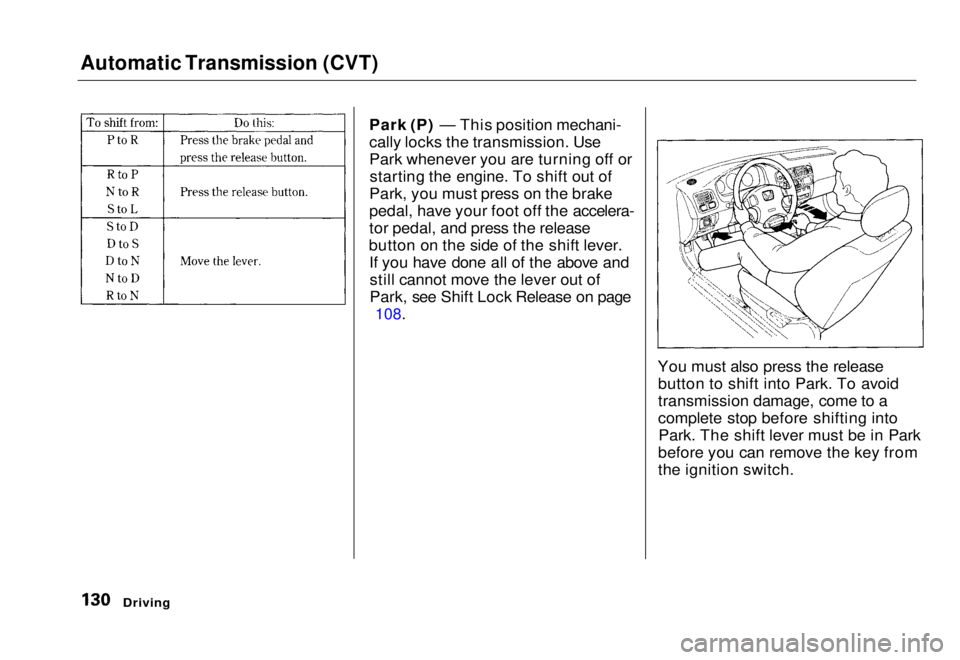
Park (P) — This position mechani-
cally locks the transmission. Use
Park whenever you are turning off orstarting the engine. To shift out of
Park, you must press on the brake
pedal, have your foot off the accelera-
tor pedal, and press the release
button on the side of the shift lever. If you have done all of the above andstill cannot move the lever out of
Park, see Shift Lock Release on page
108.
You must also press the releasebutton to shift into Park. To avoid
transmission damage, come to a
complete stop before shifting intoPark. The shift lever must be in Park
before you can remove the key from
the ignition switch.
DrivingMain Menu Table of Contents s t
Page 133 of 251
Automatic Transmission (CVT)
Reverse (R) — To shift from Re-
verse to Park, see the explanation under Park. To shift to Reverse fromNeutral, come to a complete stop
first. Press the release button before shifting into Reverse from Neutral.
Neutral (N) — Use Neutral if you need to restart a stalled engine, or if
it is necessary to stop briefly with
the engine idling. Always shift to Park position if you need to leave the
vehicle for any reason. Press on the brake pedal when you are moving
the shift lever from Neutral toanother position. Drive (D) — Use this position for
your normal driving. The transmis- sion automatically adjusts to keep
the engine at the best speed for driving conditions. To help the
engine warm up faster, the transmis-
sion will select ratios that allow the
engine to run at higher speeds when
it is cold.
Second (S) — Selecting Second
shifts the transmission into a lower
range of ratios for better accelera-
tion and increased engine braking. Use Second when you are goingdown a steep hill, or in stop-and-go
driving.
Low (L) — To shift to Low, press
the release button on the side of the shift lever. Use Low to get more
power when climbing, and for
maximum engine braking when
going down steep hills.
For faster acceleration when in D, S
or L, the transmission will
automatically "kick down" to a lower
range of ratios by pushing the accelerator pedal to the floor.
DrivingMain Menu Table of Contents s t
Page 134 of 251
Automatic Transmission (CVT)
Maximum Speeds
The CVT shifts automatically to maintain proper engine speed in anyshift position.
When the vehicle reaches the maximum speed in any shift position,
you may feel the engine cut in and out. This is caused by a limiter (112
mph, 180 km/h) in the engine's
computer controls. The engine will
run normally when you reduce thespeed below the maximum.
DrivingMain Menu Table of Contents s t