Page 72 of 251
Keys and Locks
Remote Transmitter
On EX model in the U.S.
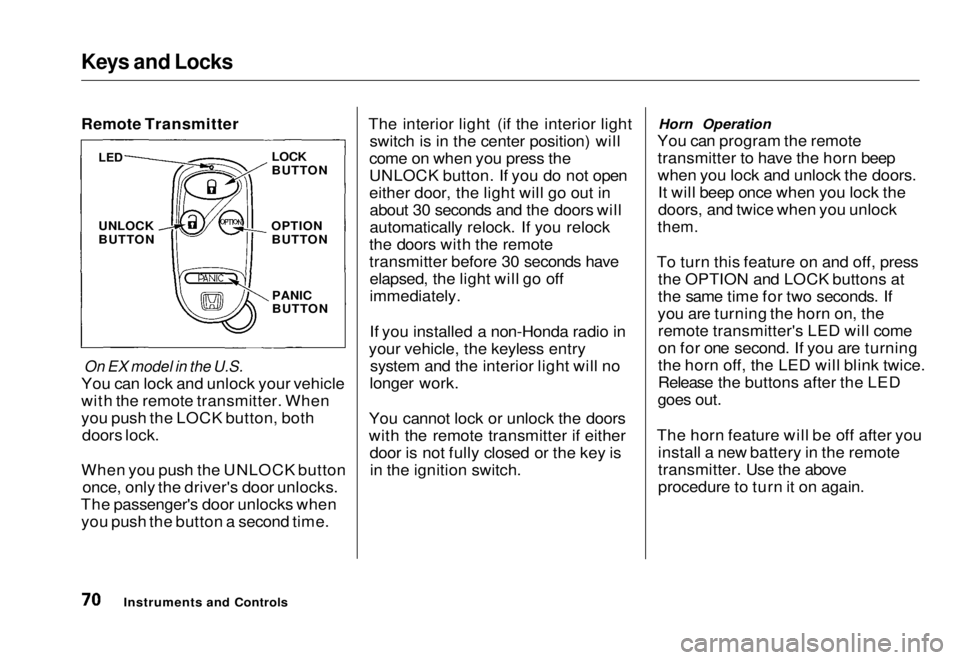
You can lock and unlock your vehicle
with the remote transmitter. When
you push the LOCK button, both doors lock.
When you push the UNLOCK button once, only the driver's door unlocks.
The passenger's door unlocks when you push the button a second time. The interior light (if the interior light
switch is in the center position) will
come on when you press the
UNLOCK button. If you do not open
either door, the light will go out in about 30 seconds and the doors will
automatically relock. If you relock
the doors with the remote
transmitter before 30 seconds have elapsed, the light will go off
immediately.
If you installed a non-Honda radio in
your vehicle, the keyless entry system and the interior light will no
longer work.
You cannot lock or unlock the doors
with the remote transmitter if either door is not fully closed or the key isin the ignition switch. Horn Operation
You can program the remote transmitter to have the horn beep
when you lock and unlock the doors.It will beep once when you lock the
doors, and twice when you unlock
them.
To turn this feature on and off, press the OPTION and LOCK buttons at
the same time for two seconds. If
you are turning the horn on, the remote transmitter's LED will come
on for one second. If you are turning
the horn off, the LED will blink twice.
Release the buttons after the LED
goes out.
The horn feature will be off after you install a new battery in the remote
transmitter. Use the above
procedure to turn it on again.
Instruments and Controls
LED
UNLOCK
BUTTON
LOCK
BUTTON
OPTION BUTTON
PANIC
BUTTONMain Menu Table of Contents s t
Page 73 of 251
Keys and Locks
Panic Mode
Panic mode allows you to remotely
sound your vehicle's horn to attract
attention. To activate this mode,
press and hold the PANIC button for
about one second. Your vehicle's
horn will beep for about 30 seconds.
To cancel PANIC mode before 30 seconds, press any button on the
remote transmitter. You can also
turn the ignition switch to
ACCESSORY (I) or ON (II).
Panic mode will not activate if the
ignition switch is in ACCESSORY (I)or ON (II).
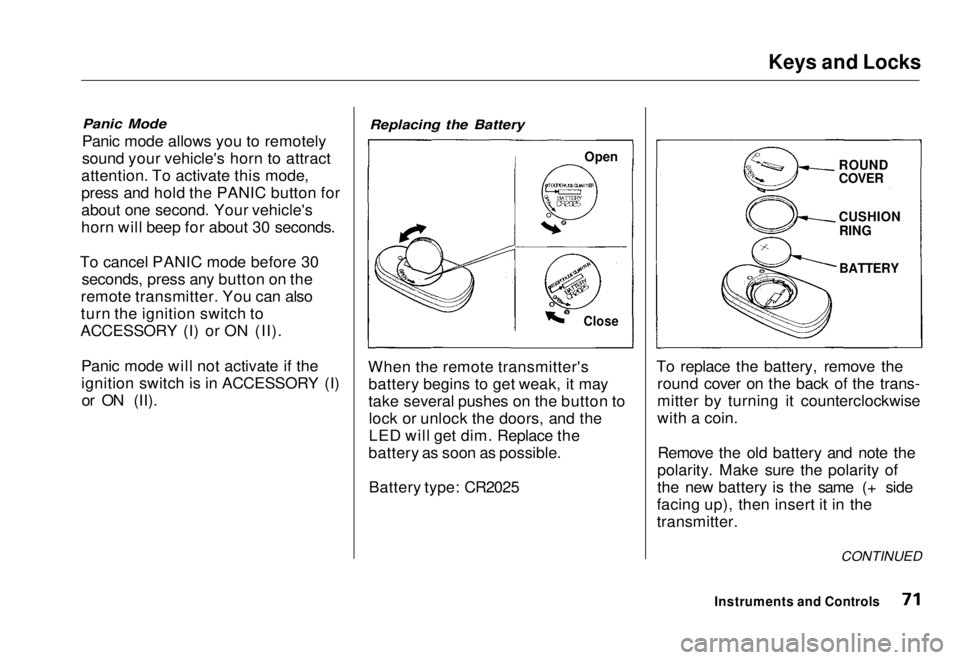
Replacing the Battery
When the remote transmitter's battery begins to get weak, it may
take several pushes on the button tolock or unlock the doors, and the
LED will get dim. Replace the
battery as soon as possible.
Battery type: CR2025 To replace the battery, remove the
round cover on the back of the trans-
mitter by turning it counterclockwise
with a coin.
Remove the old battery and note the
polarity. Make sure the polarity of
the new battery is the same (+ side
facing up), then insert it in the
transmitter.
Instruments and Controls
Open
Close
ROUND
COVER
CUSHION
RING
BATTERY
CONTINUEDMain Menu Table of Contents s t
Page 74 of 251
Keys and Locks
Reinstall the 0-ring. Align the
mark on the cover with the mark on the transmitter,
then set the cover in place and turn it
clockwise.
After the battery is changed, the transmitter must be synchronized
with the main unit. With the doors and trunk lid closed, press either theLOCK or UNLOCK button six times.
Test the transmitter by locking and unlocking the doors several times. Transmitter Care
Avoid severe shock to the trans- mitter, such as dropping or throwing
it. Also, protect it from extreme hotor cold temperatures.
Clean the transmitter case with a
soft cloth. Do not use strong
cleaners or solvents that could harm
the case. Immersing the transmitter in any liquid will harm the trans-
mitter and cause it to not function
properly.
Use the ring on the transmitter to
attach it to your main key ring. You
could damage the transmitter if you
try to use its ring as a key ring. If you lose a transmitter, you will
need to have the replacement
programmed to your vehicle's
system by your Honda dealer. Any
other transmitters you have will also
need to be reprogrammed.
As required by the FCC: This device complies with Part 15 of the
FCC rules. Operation is subject to the
following two conditions: (1) This device may not cause harmful interference, and (2) this device must accept any
interference received, including
interference that may cause undesired operation.
Changes or modifications not expressly
approved by the party responsible for
compliance could void the user's
authority to operate the equipment.
Instruments and ControlsMain Menu Table of Contents s t
Page 75 of 251
Keys and Locks
Trunk
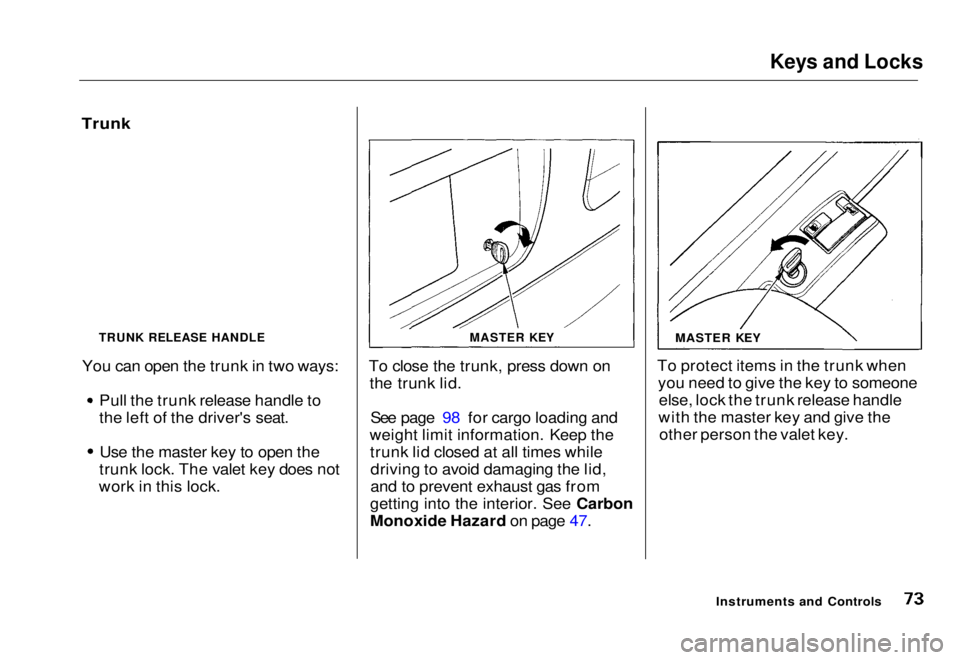
You can open the trunk in two ways: Pull the trunk release handle to
the left of the driver's seat.
Use the master key to open the
trunk lock. The valet key does not
work in this lock. To close the trunk, press down on
the trunk lid.
See page 98 for cargo loading and
weight limit information. Keep the trunk lid closed at all times whiledriving to avoid damaging the lid,
and to prevent exhaust gas from
gettin
g
into the interior. See Carbon
Monoxide Hazar d
on page 47.To protect items in the trunk when
you need to give the key to someoneelse, lock the trunk release handle
with the master key and give the other person the valet key.
Instruments and Controls
MASTER KEY
MASTER KEY
TRUNK RELEASE HANDLEMain Menu Table of Contents s t
Page 76 of 251
Seat Adjustments
Front Seat Adjustments
See pages 10 — 11 for important safety
information and warnings about how to
properly position seats and seat-backs.
Adjust the seat before you start
driving.
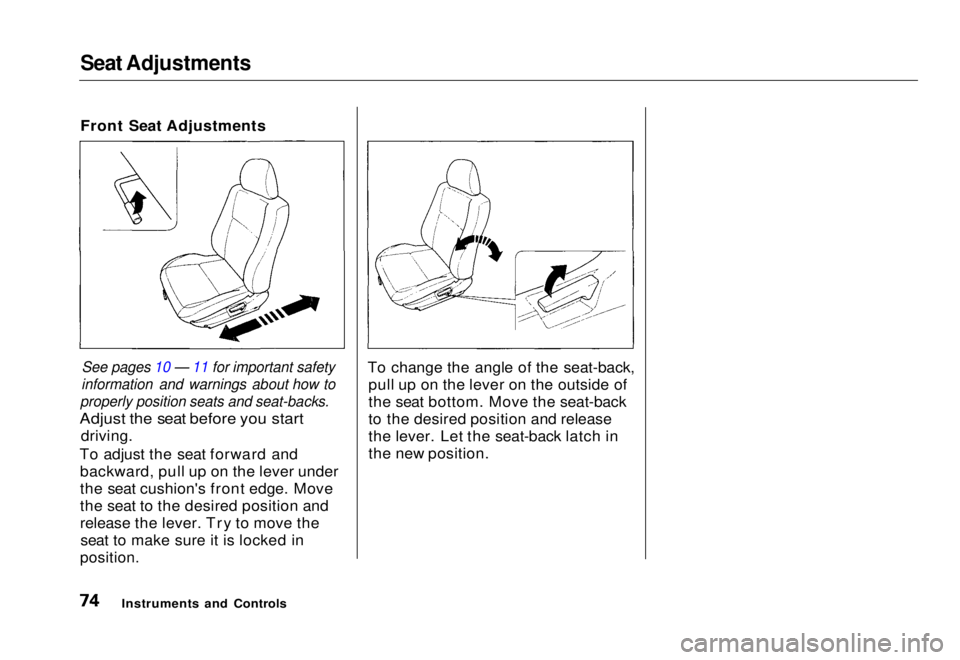
To adjust the seat forward and backward, pull up on the lever under
the seat cushion's front edge. Move
the seat to the desired position and
release the lever. Try to move theseat to make sure it is locked in
position.
To change the angle of the seat-back,
pull up on the lever on the outside of
the seat bottom. Move the seat-back
to the desired position and release
the lever. Let the seat-back latch in
the new position.
Instruments and ControlsMain Menu Table of Contents s t
Page 78 of 251
Seat Adjustments, Folding Rear Seat
The front head restraints adjust for height. You need both hands to
adjust the restraint. Do not attempt
to adjust it while driving. To raise it, pull upward. To lower the restraint,
push the release button sideways and push the restraint down.
To remove a head restraint for cleaning or repair, pull it up as far as
it will go. Push the release buttonand pull the restraint out of the seat-
back. Folding Rear Seat
The back of the rear seat folds down to give you direct access to the
trunk. Each side folds down sepa-
rately. With only half the seat folded,
you can still carry a passenger in the
back seat.
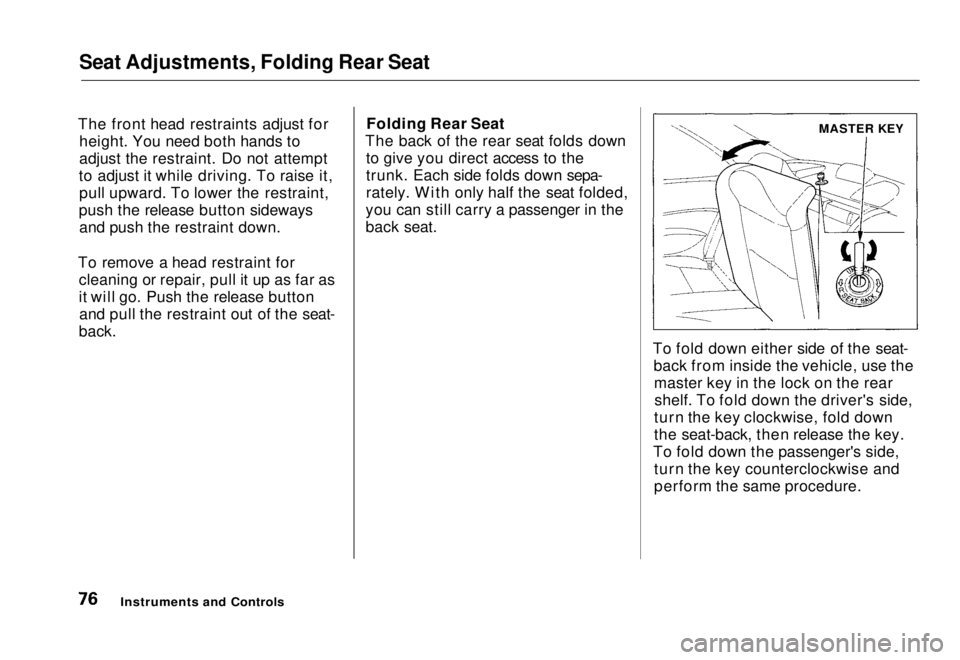
To fold down either side of the seat-back from inside the vehicle, use themaster key in the lock on the rearshelf. To fold down the driver's side,
turn the key clockwise, fold down
the seat-back, then release the key.
To fold down the passenger's side, turn the key counterclockwise and
perform the same procedure.
Instruments and Controls
MASTER KEYMain Menu Table of Contents s t
Page 79 of 251
Folding Rear Seat, Power Windows
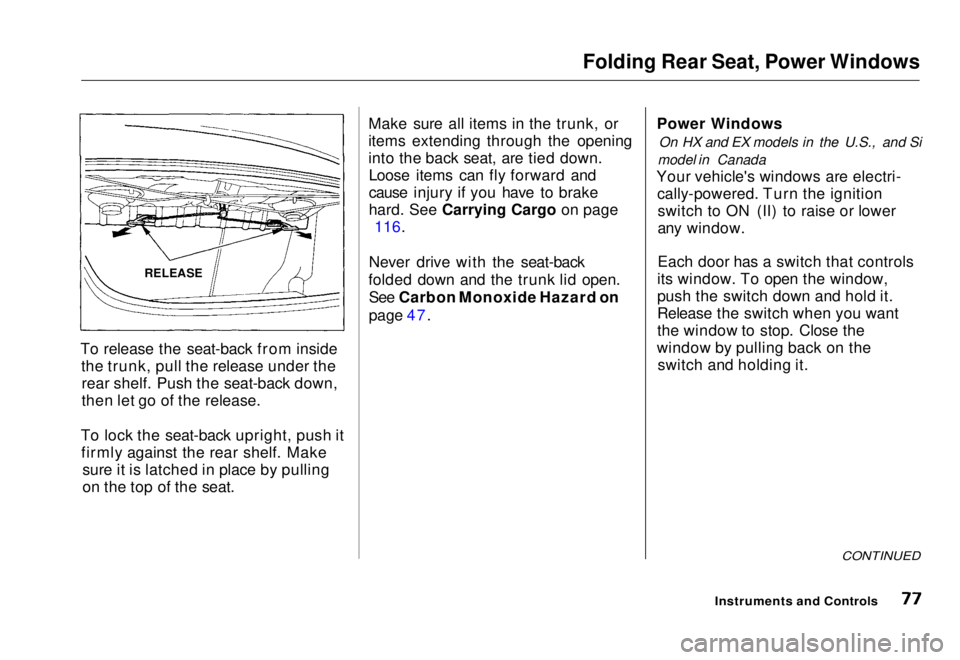
To release the seat-back from inside the trunk, pull the release under therear shelf. Push the seat-back down,
then let go of the release.
To lock the seat-back upright, push it firmly against the rear shelf. Make sure it is latched in place by pulling
on the top of the seat. Make sure all items in the trunk, or
items extending through the opening
into the back seat, are tied down.
Loose items can fly forward and
cause injury if you have to brake
hard
.
See Carrying Cargo on page
116.
Never drive with the seat-back
folded down and the trunk lid open. See Carbon Monoxide Hazard on
page 47. Power Windows
On HX and EX models in the U.S., and Si
model in Canada
Your vehicle's windows are electri- cally-powered. Turn the ignitionswitch to ON (II) to raise or lower
any window.
Each door has a switch that controls
its window. To open the window,
push the switch down and hold it.
Release the switch when you want
the window to stop. Close the
window by pulling back on the switch and holding it.
CONTINUED
Instruments and Controls
RELEASEMain Menu Table of Contents s t
Page 86 of 251
Interior Light
(U.S.: EX, Canada: Si)
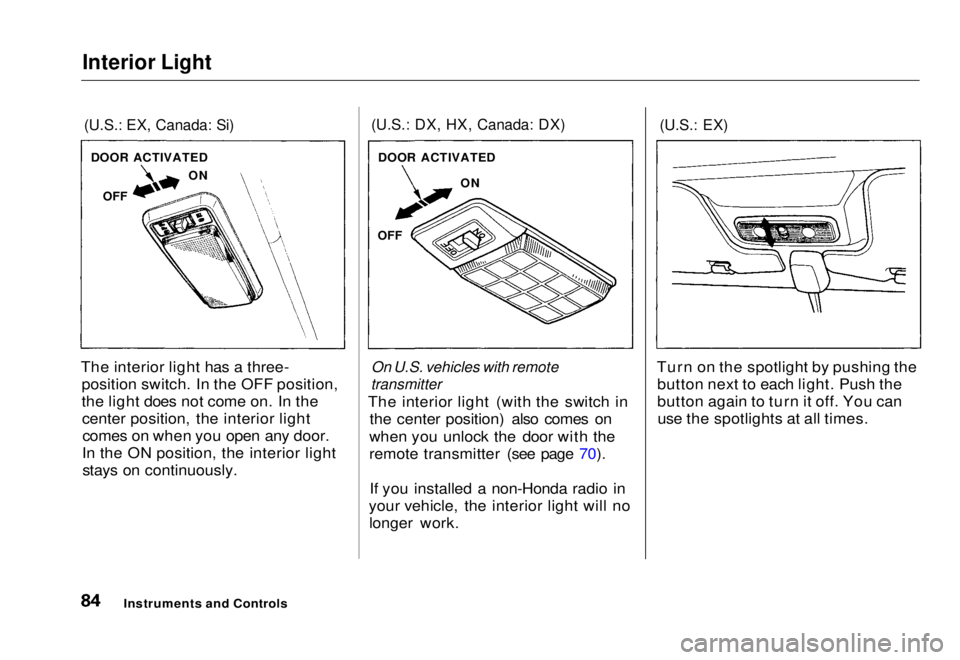
The interior light has a three- position switch. In the OFF position,
the light does not come on. In thecenter position, the interior lightcomes on when you open any door.
In the ON position, the interior light stays on continuously.
(U.S.: DX, HX, Canada: DX)
On U.S. vehicles with remote
transmitter
The interior light (with the switch in the center position) also comes on
when you unlock the door with the
remote transmitter (see page 70).
If you installed a non-Honda radio in
your vehicle, the interior light will no longer work.
(U.S.: EX)
Turn on the spotlight by pushing the button next to each light. Push the
button again to turn it off. You canuse the spotlights at all times.
Instruments and Controls
DOOR ACTIVATED
OFF ON
DOOR ACTIVATED
ON
OFFMain Menu Table of Contents s t