1998 GMC ENVOY instrument panel
[x] Cancel search: instrument panelPage 92 of 386

Turn and Lane Change Signals
The turn signal has two upward (for right) and two
downward (for left) positions. These positions allow
you to signal a turn or a lane change.
To signal a turn, move the lever all the way up
or down. When the turn
is finished, the lever
will return automatically.
I 1 I An arrow on the instrument
panel will flash
in the
direction of the turn or
lane change.
To signal a lane change, just raise or lower the lever
until the arrow starts to flash. Hold it there until you
complete your lane change. The lever will return by
itself when you release it.
The signal indicator will flash even if a turn signal bulb
is burned out. Check the front and rear turn signal lamps
regularly
to make sure they are working. If
a bulb is burned out, replace it to help avoid an
accident. If the
arrows don’t go on at all when you
signal a turn, check the fuse (see “Fuses and Circuit
Breakers”
in the Index) and for burned-out bulbs.
Turn Signal On Chime
If your turn signal is left on for more than 3/4 of a mile
(1.2 km), a chime will sound at each flash of the turn
signal.
To turn off the chime, move the turn signal lever
to the off position.
Headlamp High/Low Beam Changer
To change the headlamps from low beam to high or high
to low, pull the multifunction lever all the way toward
you. Then release
it.
When the high beams are
on, this indicator light on
the instrument panel will
also be on.
2-31
ProCarManuals.com
Page 97 of 386

Passing Another Vehicle While Using Cruise Control Exterior Lamps
Use the accelerator pedal to increase your speed. When
you take your foot off the pedal, your vehicle will slow
down to the cruise control speed you set earlier.
Using Cruise Control on Hills
How well your cruise control will work on hills depends
upon your speed, load and the steepness of the hills.
When going up steep hills, you may want
to step on the
accelerator pedal to maintain your speed. When going
downhill, you may have to brake or shift to a lower gear
to keep your speed down.
Of course, applying the brake
takes you out of cruise control. Many drivers find this to
be too much trouble and don’t use cruise control on
steep hills.
Ending Cruise Control
There are two ways to turn off the cruise control:
Step lightly on the brake pedal.
Move the cruise control switch to OFF.
Erasing Speed Memory
When you turn off the cruise control or the ignition,
your cruise control set speed memory is erased. Your
parking lamp and headlamp switch is on the
driver’s side
of your instrument panel.
Rotate the
knob to the right to the parking lamps symbol
to manually turn on:
Parking Lamps
Sidemarker Lamps
Taillamps
License Plate Lamps
Instrument Panel Lights
2-36
ProCarManuals.com
Page 98 of 386

Rotate the knob to the right to the master lamps symbol
to turn on all the lamps listed as well as
the headlamps.
Rotate the
knob all the way to the left to turn off your
lamps and put the system in automatic headlamp mode.
Automatic Headlamp System
When it is dark enough outside, your automatic
headlamp system will turn on your headlamps at the
normal brightness along with other lamps such as the
taillamps, sidemarker, parking lamps and the instrument
panel lights. The radio lights will also be dim.
Your vehicle is equipped with High Intensity Discharge
(€€ID) headlamps. Your headlamps come on at lower
intensity and gradually increase to full brightness.
Your vehicle is equipped with
a light sensor on the top
of the instrument panel under the radio speaker grille,
so
be sure it is not covered, which will cause the system to
be on whenever the ignition is on.
The system may also turn on your headlamps when
driving through a parking garage, heavy overcast
weather, a tunnel or fueling your vehicle in a low-light
area. This is normal.
There is a delay in the transition between the daytime
and nighttime operation of the Daytime Running Lamps
(DRL) and the automatic headlamp systems
so that driving under bridges or bright overhead street lights
does not affect the system. The DRL and automatic
headlamp system will only be affected when the light
sensor
sees a change in lighting lasting longer than
the delay.
To idle your vehicle with the automatic headlamp
system
off, set the parking brake while the ignition is
off. Then start your vehicle. The automatic headlamp
system will stay off until you release the parking brake.
As with any vehicle, you should turn on the regular
headlamp system when you need it.
Lamps On Reminder
A reminder chime will sound when your headlamps or
parking lamps
are manually turned on and your ignition
is in
OFF, LOCK or ACCESSORY. To disable the
chime, rotate the thumb wheel all the way down. In
the
automatic mode, the headlamps turn off once the
ignition key is in
OFF,
Daytime Running Lamps
Daytime Running Lamps (DRL) can make it easier for
others to see the front of your vehicle during the day.
DRL can be helpful in many different driving
conditions, but they can be especially helpful in the short periods after dawn and before sunset.
2-37
ProCarManuals.com
Page 99 of 386

The DRL system will make your high-beam headlamps
come
on at reduced brightness when:
Fog Lamps
the ignition is on,
the headlamp switch is in automatic headlamp
mode and
the parking brake is released.
When the DRL are on, only your high-beam headlamps
will be on. The taillamps, sidemarker and other lamps
won’t be on. The instrument panel won’t be lit up either.
When it begins to get dark, the high-beam headlamps
will automatically switch from DRL to the regular
low-beam headlamps.
When you turn
the headlamp switch off, the regular
low-beam headlamps will
go off, and your high-beam
headlamps will change to the reduced brightness
of DRL
provided it is not dark outside.
To idle your vehicle with
the DRL off, set the parking
brake. The DRL will stay off until
you release the
parking brake.
As with any vehicle, you should turn on the regular
headlamp system
when you need it. Use your fog lamps
for better vision in foggy or misty
conditions. Your low-beam headlamps or your parking
lamps must be on for your fog lamps to work.
The fog lamp switch is
on the instrument panel under
the lamps switch. Press
the switch to turn the fog lamps
on. Press the switch again to turn them
off. A light will
glow in
the switch when the fog lamps are on.
Remember,
fog lamps alone will not give off as much
light as your headlamps. Never use your fog lamps in
the dark without turning on your headlamps.
The
fog lamps will go off whenever your high-beam
headlamps come on. When the high beams
go off, the
fog lamps will come on again.
2-38
ProCarManuals.com
Page 100 of 386

Interior Lamps
Brightness Control
Rotate the thumbwheel next to the headlamp switch up
to make your instrument panel lights brighter. Turn the
switch all the way up to turn
on the interior lamps.
Front Reading Lamp?
Press the button near each lamp on the overhead console
to turn the reading lamps
on and off. The lamps can be
swiveled to point in the desired direction.
If you have the
mini console, press the lens on each
lamp
to turn it on or off.
Exit Lighting
With exit lighting, the interior lamps will come on when
you remove
the key from the ignition. These lights will
stay
on for a short period of time and then will go out.
Illuminated Entry
Your vehicle is equipped with an illuminated entry feature.
When the doors are opened, the dome lamps will come
on if the DOME OVERRIDE button is out. When all the
doors are closed, or the front door handles are lifted and
released, the lamps will stay
on for a short period of
time and will then go
out. If the dome lamp button is
pressed in, the lamps will
go out immediately.
Dome Lamps
The dome lamps will come on when you open the doors.
You can
also turn the dome lamps on by rotating the
thumbwheel, located next to the parking/headlamps
knob, all the way
LIP. In this position, the dome lamps
will remain on whether the doors are opened or closed.
2-39
ProCarManuals.com
Page 110 of 386

NOTICE:
Loading cargo that weighs more than 200 Ibs.
(91 kg) on the luggage carrier may damage your
vehicle. When you carry large things, never let
them hang over the rear or the sides of your
vehicle. When loading cargo on the roof panel, be
sure it rests on the slats and does not scratch or
damage the vehicle.
Put the cargo against the side rails and fasten it
securely to the luggage carrier. Put the main
weight as
far forward as you can and move the
rear crossrail forward as
far as possible to keep
the load from shifting.
Don’t exceed the maximum vehicle capacity when
loading your vehicle. For more information on vehicle
capacity and loading, see “Loading Your Vehicle“
in
the Index.
To prevent damage or loss of cargo as you’re driving,
check now and then to make sure the luggage carrier and
cargo are still securely fastened.
Ashtrays and Cigarette Lighter
The ashtray is located in the center floor console, in
front
of the shift lever. Flip the cover to expose
the ashtray.
NOTICE:
Don’t put papers and other things that burn into
your ashtray.
If you do, cigarettes or other
smoking materials could set them on fire
causing damage.
To remove the front ashtray, pull the bin upward.
The lighter is located
in the instrument panel below the
climate controls.
To use the lighter, press it in all the
way, and let
go. When it’s ready, it will pop back
by itself.
2-49
I
ProCarManuals.com
Page 113 of 386

Accessory Power Outlets
With the accessory power outlets, you can plug in
auxiliary electrical equipment. There are four accessory
power outlets located throughout the vehicle. Two are
near the lower center part
of the instrument panel, one is
located in
the lower rear of the center console and the
other is located in
the rear of the vehicle in the air
inflator compartment. Follow the proper installation
instructions that are included with any electrical
equipment you install.
These circuits are protected by
a fuse and have
maximum current levels.
NOTICE:
When using the accessory power outlets,
maximum electrical load must not exceed
20 amps. Always turn off any electrical
equipment when not in use. Leaving electrical
equipment on for extended periods will drain
your battery.
Sunroof (If Equipped)
Your vehicle may be equipped with a power sliding
sunroof. To open or close your sunroof, the ignition or
RAP needs to be on. See “Retained Accessory Power”
in the Index.
Press and release the rear side
of the button in the mini
console to open the sunroof. You can press the forward
side
of the button to close the sunroof. Once the sunroof
is closed, press the forward side of the button to open
the sunroof to the vent position.
The sunroof
is also equipped with a sunshade which you
can pull forward to block sun rays.
2-52
ProCarManuals.com
Page 119 of 386
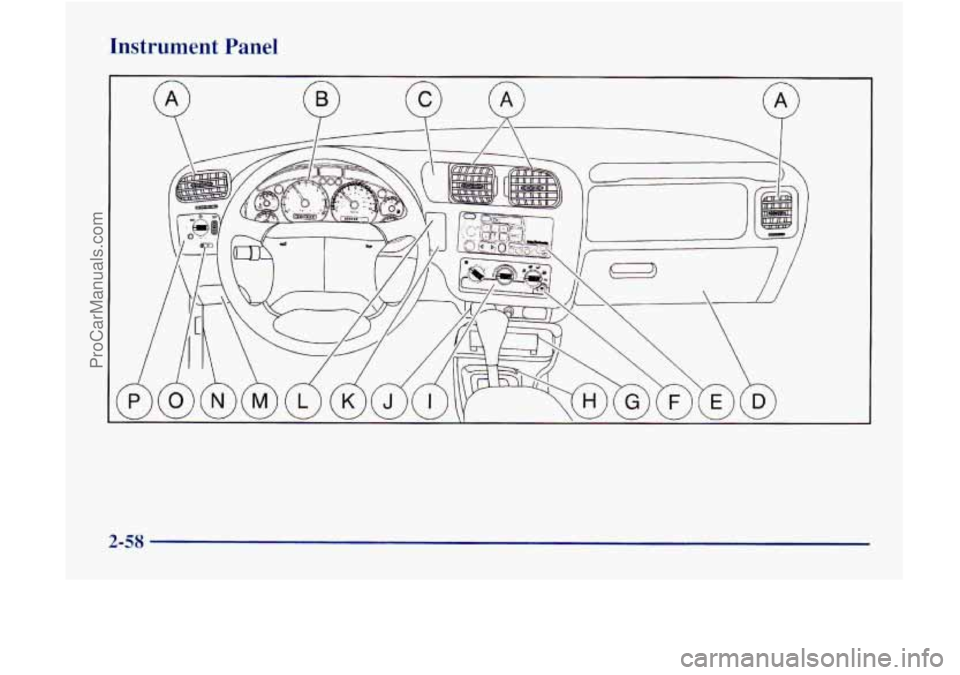
Instrument Panel
2-58
ProCarManuals.com