1998 CHEVROLET VENTURE buttons
[x] Cancel search: buttonsPage 129 of 474
5. Check the transmitter operation. If needed, follow
the instructions on resynchronizing your remote
transmitter.
Resynchronizing Your Remote Transmitter
Your remote keyless entry system uses a continually
changing code for increased security. Normally, the
receiver in your vehicle will keep track of this
changing code.
Loss of synchronization will occur if the transmitter
is activated more than
256 times while out of range
of the vehicle.
Loss of synchronization will occur after the battery
replacement if the transmitter is immediately activated
more than
16 times while out of range of the vehicle.
If your remote keyless entry transmitter has stopped
working,
you may need to resynchronize the transmitter
to the vehicle receiver. To do this, press the
LOCK and
UNLOCK buttons together and hold for at least seven
seconds or until the horn sounds if equipped with Content
Theft-Deterrent. Check the transmitter operation.
Switchbanks
There are two sets of switchbanks located in the front
of the vehicle. The switches will vary with the options that are
on your vehicle. It is useful to become familiar
with them since they are used frequently while
operating the vehicle.
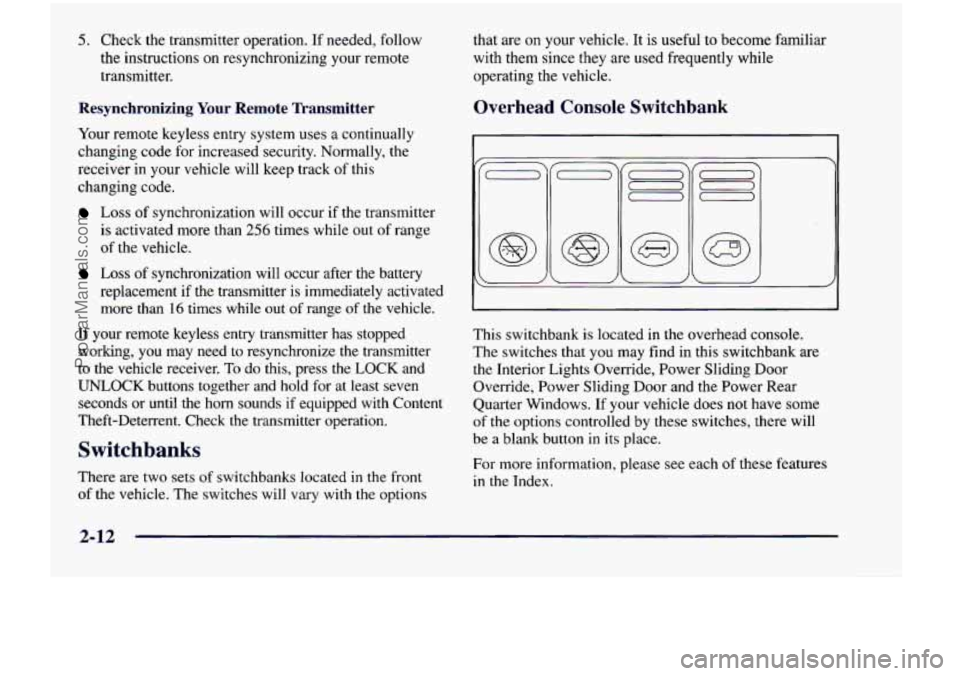
Overhead Console Switchbank
This switchbank is located in the overhead console.
The switches that
you may find in this switchbank are
the Interior Lights Override, Power Sliding Door
Override, Power Sliding Door and the Power Rear
Quarter Windows. If your vehicle does
not have some
of
the options controlled by these switches, there will
be a blank button in its place.
For more information, please see each
of these features
in the Index.
ProCarManuals.com
Page 136 of 474
Resetting the Power Sliding Door
The power sliding door may operate incorrectly or not
at all because of the following conditions:
A low voltage or dead battery,
Disconnecting the battery or
If the IGN 1, B/U LAMP, RADIO or PWR
SEAT/PSD fuse is removed or blown.
See “Fuse Panel” in the Index for more information
about your fuse panel.
If any of these conditions occur, the power sliding door
will need to be reset.
To do this, follow the directions
listed here. It will be easier if you read through them
once before beginning this procedure.
1. Check to be sure the power sliding door is unlocked
2. Turn the ignition switch to OFF.
and securely closed.
3. Enable the power sliding door override feature.
4. RI .ove the RADIO fuse from the underhood fuse
anu relay center. Leave
it out for 30 seconds.
5. Reinstall the fuse and wait 10 seconds.
6. Disable the power sliding door override feature.
7. Push either of the power door buttons to open the
8. Wait five seconds and close the door by pushing
9. Wait five seconds and repeat Steps 7 and 8.
If the door does not rest in the fully open position
after repeating Step
7, repeat Steps 7 and 8 again. If
the door still does not operate correctly, see your
dealer for service. power sliding door.
either power door button.
Sliding Door Security Lock
Your vehicle is equipped with a sliding door security
lock that helps prevent young children or other
passengers from opening the sliding door by using the
inside door handle. This lock is on both doors if your
vehicle has the dual sliding doors.
If
you have the optional power sliding door, you can
override the security lock by pressing either power
door switch when
the power sliding door override
feature
is disabled. See “Power Sliding Door” earlier
in the section.
The security lock lever
1s located on the inside of the
sliding door, on the front edge of the door. To access the
lever, open the sliding door. Use the security lock label
on the edge of the door as a guide.
ProCarManuals.com
Page 185 of 474
Reading Lamps
To turn either reading lamp on or off, press the
lamp lens.
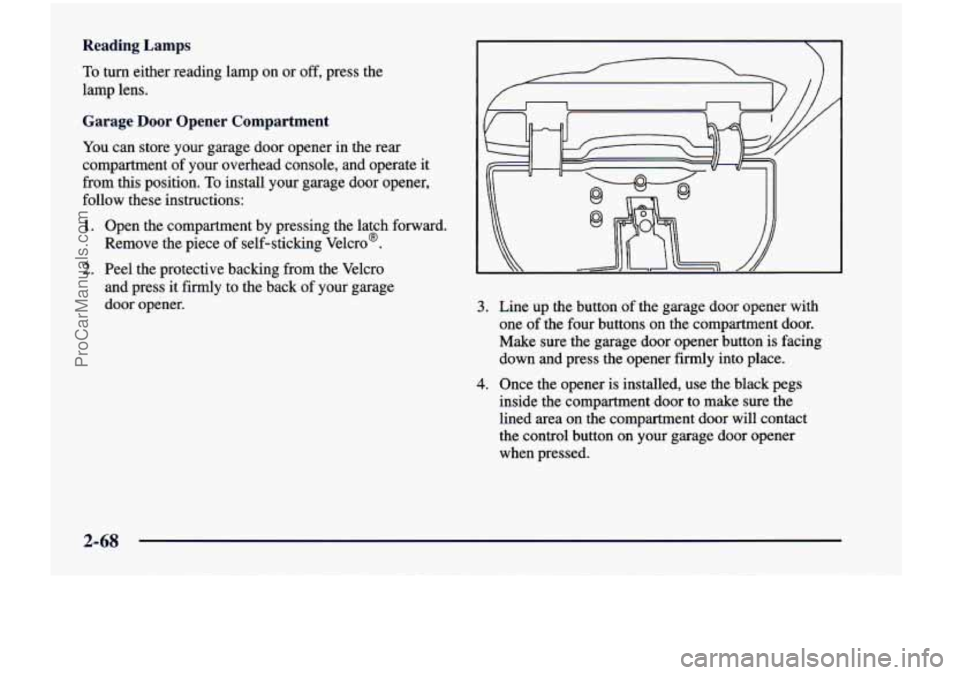
Garage Door Opener Compartment
You can store your garage door opener in the rear
compartment of your overhead console, and operate
it
from this position. To install your garage door opener,
follow these instructions:
1. Open the compartment by pressing the latch forward.
Remove the piece of self-sticking Velcro?
2. Peel the protective backing from the Velcro
and press it firmly to the back of your garage
door opener.
3. Line up the button of the garage door opener with
one of the four buttons
on the compartment door.
Make sure the garage door opener button is facing
down and press the opener firmly into place.
4. Once the opener is installed, use the black pegs
inside the compartment door to make sure the
lined area on the compartment door will contact
the control button on your garage door opener
when pressed.
2-68
ProCarManuals.com
Page 216 of 474
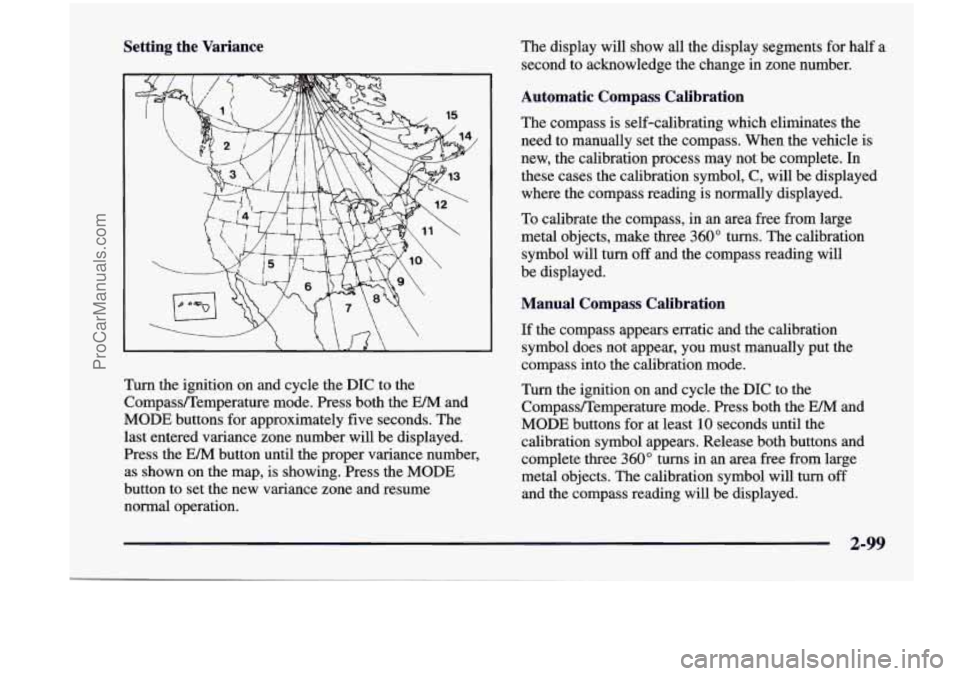
Setting the Variance The display will show all the display segments for half a
second to acknowledge the change in zone number.
Turn the ignition on and cycle the DIC to the
Compass/Temperature mode. Press both the
EM and
MODE buttons for approximately five seconds. The
last entered variance zone number will be displayed.
Press the EM button until the proper variance number,
as shown on the map, is showing. Press the MODE
button to set the new variance zone and resume
normal operation.
Automatic Compass Calibration
The compass is self-calibrating which eliminates the
need to manually set the compass. When the vehicle is
new, the calibration process may not be complete. In
these cases the calibration symbol, C, will be displayed
where the compass reading is normally displayed.
To calibrate the compass, in an area free from large
metal objects, make three 360" turns. The calibration
symbol will turn
off and the compass reading will
be displayed.
Manual Compass Calibration
If the compass appears erratic and the calibration
symbol does not appear, you must manually put the
compass into the calibration mode.
Turn the ignition on and cycle the DIC to the
Compass/Temperature mode. Press both the EM and
MODE buttons for at least
10 seconds until the
calibration symbol appears. Release both buttons and
complete three 360" turns
in an area free from large
metal objects. The calibration symbol will turn
off
and the compass reading will be displayed.
2-99
ProCarManuals.com
Page 217 of 474

Error Displays
An error of the vehicle’s speed sensor or fuel sender
In the absence of vehicle communications, a double
will
cause
-E- to be displayed.
dash
“--” is displayed.
Trip Computer
There are five trip computer displays which may be
stepped through by pushing the MODE button. The
information will appear in the following order:
Average Fuel Economy (AVG ECON): This shows
the average fuel economy since the last reset.
0 Instantaneous Fuel Economy (INST ECON): This
shows fuel economy for the most recent second
of driving.
Trip Range (RANGE): This shows the estimated
distance that can be traveled with the remaining fuel.
The fuel economy used to calculate range
is based on
the last few hours
of driving.
Trip Fuel Used (FUEL USED): This shows me
accumulated fuel used since the last reset.
Average Speed (AVG SPEED): This shows the
average speed since the last reset.
Resetting the Trip Computer
Press and hold the MODE and E/M buttons for at least
two seconds. The reset is acknowledged with the display
showing all segments on for a period
of half a second. A
reset can only be done in AVG ECON, FUEL USED
and AVG SPEED displays. Resetting affects all three
displays regardless of which display you are
in.
2-100
ProCarManuals.com
Page 222 of 474
w.
+# DEFOG: This setting directs air to the windshield
and through the floor ducts. This mode is particularly
useful during cold or inclement weather because of your
vehicle’s larger windshield area.
the windshield and side window vents.
DEFROST: This setting directs most of the air to
Mode Buttons
e RECIRC: Press this button (the light will glow)
to limit the amount
of fresh air entering your vehicle by
recirculating much of the air inside your vehicle. You
may use this setting to limit odors entering your vehicle.
Press the OUTSIDE AIR button (the light on the RECIRC button will go
off) to let outside air circulate
into the vehicle.
OUTSIDE AIR: Press this button (the light will
glow) to send outside air into your vehicle. Using this
setting while trying to defrost or defog the windows will
help clear the vents of moisture. Press the RECIRC
button (the light on the
OUTSIDE AIR button will go
off) to limit outside air entering the vehicle. When the
DEFOG
or DEFROST setting is selected, the system
will automatically go to OUTSIDE AIR mode.
Air Conditioning
On very hot days, your vehicle will cool down more
quickly and economically if you open the windows long
enough to let hot, inside air escape. For all settings,
adjust the temperature control knob and fan speed
as desired.
To get maximum cooling or a quick cool-down on very
hot days, press the A/C and RECIRC buttons (the lights
will glow) and turn the temperature knob to the left
(toward the blue area). Adjust the mode
knob to direct
the air to the desired location. This setting should not be
used for long periods
of time because the air may
become too cold and dry. Push the A/C button again (the
light will go off) to turn
off the air conditioning.
When the air conditioner compressor is on, you may sometimes notice slight changes
in your vehicle’s engine
performance and power. This is normal. The system
is
designed to help fuel economy while it maintains the
desired cooling level.
The air conditioner removes moisture from the air,
so
you may sometimes notice water dripping from under
your vehicle’s engine compartment when it is idling or
after it has been turned off. This is normal.
3-3
ProCarManuals.com
Page 229 of 474
AM-FM Stereo Finding a Station
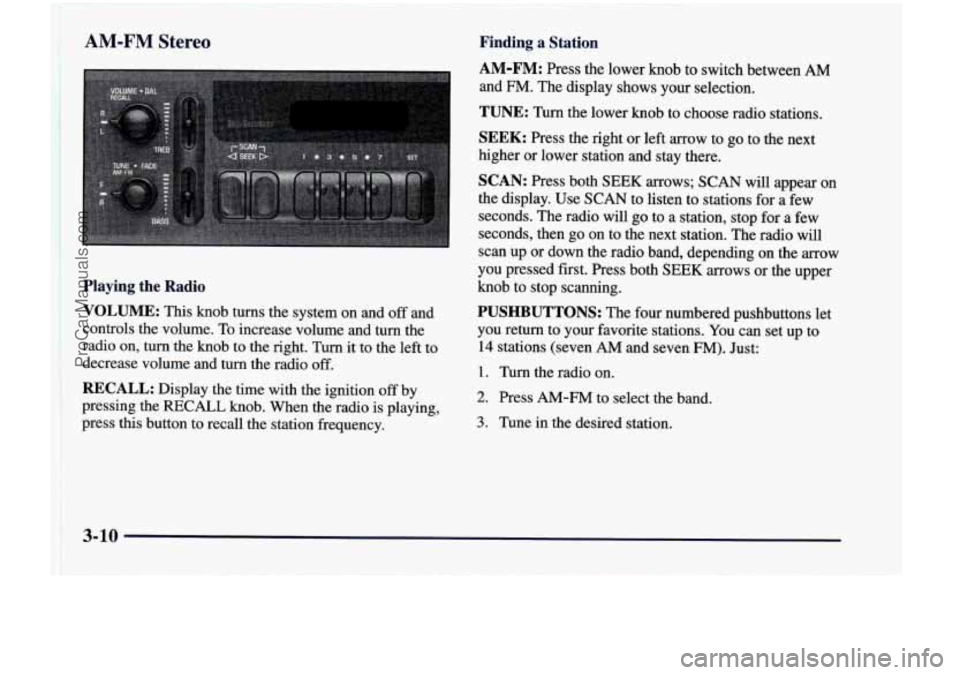
Playing the Radio
VOLUME:
This knob turns the system on and off and
controls the volume. To increase volume and turn the
radio on, turn the knob to the right. Turn it to the left to
decrease volume and turn the radio off.
RECALL: Display the time with the ignition off by
pressing the
RECALL knob. When the radio is playing, 2; 1 ,. press this button to recall the station frequency.
AM-FM: Press the lower knob to switch between AM
and FM. The display shows your selection.
TUNE: Turn the lower knob to choose radio stations.
SEEK: Press the right or left arrow to go to the next
higher or lower station and stay there.
SCAN: Press both SEEK arrows; SCAN will appear on
the display. Use SCAN to listen to stations for
a few
seconds. The radio will go to a station, stop for a few
seconds, then go on to the next station. The radio will
scan up or down the radio band, depending on the arrow
you pressed first. Press both
SEEK arrows or the upper
knob to stop scanning.
PUSHBUTTONS: The four numbered pushbuttons let
you return to your favorite stations. You can set up to
14 stations (seven AM and seven FM). Just:
1. Turn the radio on.
2. Press AM-FM to select the band.
3. Tune in the desired station.
3-10
ProCarManuals.com
Page 230 of 474
4. Press SET. (SET will appear on the display.)
5. Press and hold one of the four numbered buttons,
within five seconds. The sound will mute. When it
returns, release the button. Whenever you press that numbered button, the station you set will return.
6. Repeat the steps for each pushbutton.
In addition to the four stations already set, up to three
more stations may be preset on each band by pressing
two adjoining buttons at the same time. Just:
1. Tune in the desired station.
2. Press SET. (SET will appear on the display.)
3. Press any two adjoining pushbuttons at the same
time, within
five seconds. The sound will mute.
When it returns, release the buttons. Whenever
you press the same buttons, the station you set
will return.
4. Repeat the steps for each pair of pushbuttons.
Setting the Tone
BASS:
Slide the lever up or down to increase or
decrease bass.
TREB: Slide the lever up or down to increase or
decrease treble.
If a station is weak or noisy, you may
want to decrease the treble.
Adjusting the Speakers
BAL:
Turn the control behind the upper knob to move
the sound to the left or right speakers. The middle
position balances the sound between the speakers.
FADE: Turn the control behind the lower knob to move
the sound to the front or rear speakers. The middle
position balances the sound between
the speakers.
3-11
ProCarManuals.com