1998 CHEVROLET CORVETTE ignition
[x] Cancel search: ignitionPage 145 of 378
Downloaded from www.Manualslib.com manuals search engine ‘hip Odometers Elapsed Time
There are two trip odometers. Press the TRIP button and
TRIP A will be displayed. Press it again and TRIP
B
will be displayed. TRIP A could be used to track the
distance to a destination. TRIP B could be used to track
maintenance periods.
TRIP A 130.5 MI or
TRIP A 209.9 km
TRIP B 300.5 MI or
0 TRIP B 483.5 km
The trip odometers can be reset by pushing the RESET
button on the DIC. Both
of the trip odometers can be
used simultaneously.
Miles Since Last Ignition Feature
You can also display number of miles driven since you
last started the car if you press and hold the RESET
button for two seconds, then release. The miles (or
kilometers) since the last ignition cycle will be set into
the trip odometer. Press the TRIP button until ELAP. TIME is displayed,
such as
ELM. TIME 00: 00 : 00.
When the ignition is in the ON position, the DIC can be
used as a stopwatch. The display can show hours,
minutes, seconds and hundredths of a second. The
elapsed time indicator will record up to 99 hours,
59 minutes and 59 seconds, then
it will reset to zero and
continue counting. (Hundredths are shown up to
59 minutes, 59 seconds and 99 hundredths). The display
appears as ELAP. TIME
00: 00 : 00 in the elapsed
time function.
You can start or stop the elapsed time by pressing
RESET. To reset the elapsed time to zero, stop the timer
by pressing
RESET. Then press and hold RESET for
two seconds and release.
2-92
Page 146 of 378
Downloaded from www.Manualslib.com manuals search engine Average Speed
Press the
TRIP button until the average speed is
displayed, such as:
AVERAGE SPEED 62 MPH or
AVERAGE SPEED 100 km/h
Press reset in this mode to start calculating the average
speed. Press and hold RESET to clear.
Engine Oil Life
Press the TRIP button until the engine oil life is
displayed, such as
OIL LIFE REMAIN 89%.
This is an estimate of the engine oil’s remaining useful
life. It will show 99% when the system is reset after an oil change.
It will alert you to change your oil on a
schedule consistent with your driving conditions.
When the remaining oil life is low, the system will alert
you with the message CHANGE
OIL SOON.
When the oil life is down to zero, ‘you will receive the
message
CHANGE OIL NOW.
To reset the OIL LEE reminder after an oil change:
1. With the ignition on, press the TRIP button so the
OIL LIFE percentage is displayed.
2. Press RESET and hold for two seconds. The word
RESET
will appear, then OIL LIFE 99%.
Remember, you must reset the
OIL LIFE yourself after
each oil change. It will not reset itself. Also, be careful
not to reset the
OIL LIFE accidentally at any time other
than when the oil has just been changed. It can’t be reset
accurately until the next oil change.
The DIC does not replace the need to maintain your
vehicle as recommended in the Maintenance Schedule in
this manual. Also, the oil change reminder will not
detect dusty conditions or engine malfunctions that may
affect the oil.
If you drive in dusty areas, change your oil
after every
3,000 miles (5 000 km) or three months,
whichever occurs first, unless the DIC instructs you to
do
so sooner. Also, the oil change reminder does not
measure how much oil you have in your engine,
so be
sure to check your oil level often. See “Engine Oil” in
the Index.
2-93
Page 149 of 378
Downloaded from www.Manualslib.com manuals search engine Auto Lock
Press the OPTIONS button until AUTO LOCK appears
on the display, then use the RESET button to page
through the following choices:
AUTO LOCK ON
AUTO LOCK OFF
If you choose AUTO LOCK ON, both doors will
automatically lock when the vehicle exceeds
10 mph
(16 ktnh) in a manual transmission. In a vehicle with an
automatic transmission, both doors will automatically
lock when you move the shifter out of PARK (P).
Choose AUTO LOCK
OFF to turn this option off.
Auto Unlock
The AUTO UNLOCK will be available only if AUTO
LOCK is set to ON.
Press the OPTIONS button until AUTO UNLOCK
appears
on the display, then use the RESET button to
page through the following choices:
AUTO UNLOCK - DRIVER
0 AUTO UNLOCK - BOTH
0 AUTO UNLOCK OFF
If you choose AUTO UNLOCK- DRIVER, the driver’s
door will automatically unlock when you turn the
vehicle
off and pull the key out of the ignition.
Choose AUTO UNLOCK
- BOTH, and both doors will
automatically unlock when you turn the vehicle
off and
pull the key out of the ignition.
AUTO UNLOCK
OFF turns off this option.
Easy Entry
The easy entry feature will only be available if the
vehicle is equipped with the memory option.
Press the OPTIONS button until SEAT EASY ENTRY
appears on the display, then use the RESET button to
page through the following choices:
0 SEAT EASY ENTRY ON
SEAT EASY ENTRY OFF
If you choose SEAT EASY ENTRY ON, when you turn
the ignition off and remove the key, the seat will
automatically move back for an easy exit or an easy
entrance when returning to the vehicle.
SEAT EASY ENTRY
OFF turns off this option.
Page 151 of 378
Downloaded from www.Manualslib.com manuals search engine ABS ACTIVE (Anti-Lock Brake System Active) - :
When your anti-lock system is adjusting brake pressure
to help avoid a braking skid, the ABS ACTIVE message
will be displayed.
Slippery road conditions may exist if this message is
displayed,
so adjust your driving accordingly. The
message will stay on for a few seconds after the system
stops adjusting brake pressure.
SERVICE ABS (Anti-Lock Brake System) - : If the
SERVICE ABS message is displayed when you
are
driving, stop as soon as possible and turn the ignition
off. Then start the engine again to reset the system. If
the message stays on, or comes back on again while you
are driving, your vehicle is in need of service. If the
regular brake system warning light isn’t on, you still
have brakes, but don’t have anti-lock brakes. If the
regular brake system light is also on, you don’t have
anti-lock brakes and there is a problem with your
brakes.
See “Brake System Warning Light” earlier in
this section.
If the SERVICE ABS message is being displayed, your
traction control system and the optional active handling system will also be disabled. The driver information
center will scroll three messages SERVICE ABS,
SERVICE TRACTION SYS. and SERVICE ACTIVE
HNDLG and the instrument cluster car icon will be illuminated.
The driver can acknowledge these messages
by pressing the reset button three times. When the
service message is displayed the computer controlled
systems will not assist the driver and you should have
the system repaired as soon as possible. Adjust your
driving accordingly.
SERVICE COLUMN LOCK: The system that
controls the locking and unlocking of the steering
column may not work properly. Have the vehicle towed
to a dealer for service.
LOW OIL PRESSURE: You will hear four chimes and
the CHECK GAGES telltale will come on when this
message is displayed.
To acknowledge the warning,
press the RESET button. After you press the
RESET
button, a message will be displayed and you will hear a
chime every minute until the vehicle is serviced.
If you
do not press RESET, the message will remain on the
digital display until the vehicle is serviced.
Low oil pressure may be the result of a combination of
low oil level and abrupt changes in the vehicle’s
direction. When this warning
is displayed, you should
not operate the engine at high
RPM or make fast abrupt
moves. When convenient, you should check the oil
level. See “Engine Oil” in the Index.
Page 163 of 378
Downloaded from www.Manualslib.com manuals search engine Automatic Electronic Dual Climate Control System
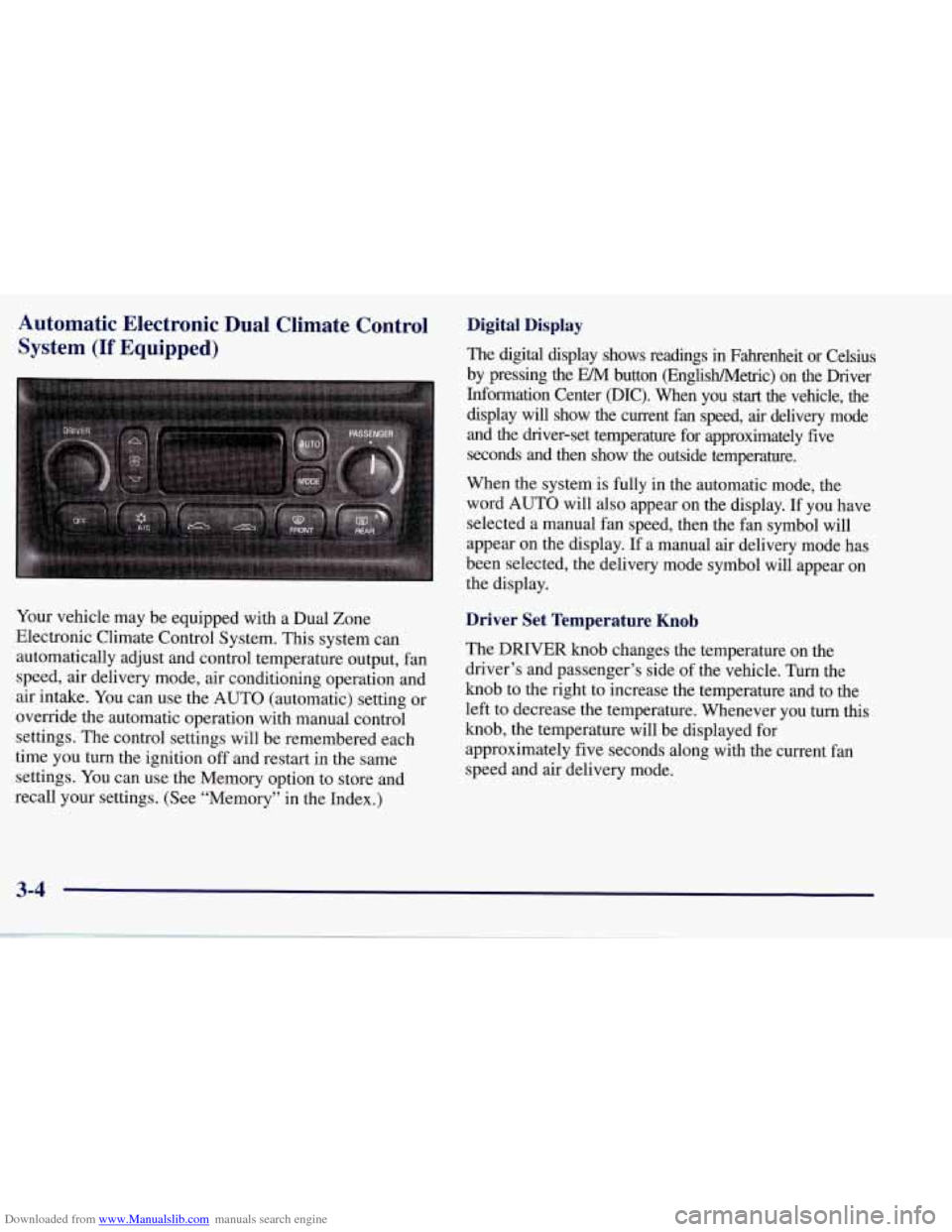
(If Equipped)
Your vehicle may be equipped with a Dual Zone
Electronic Climate Control System. This system can
automatically adjust and control temperature output, fan
speed, air delivery mode, air conditioning operation and
air intake. You can use the AUTO (automatic) setting or
override the automatic operation with manual control
settings. The control settings will be remembered each
time you turn the ignition
off and restart in the same
settings. You can use the Memory option to store and
recall your settings. (See “Memory” in the Index.)
Digital Display
The digital display shows readings in Fahrenheit or Celsius
by pressing the EM button (EnglisWMetric) on the Driver
Information Center @IC). When you
start the vehicle, the
display will show the current fan speed, air delivery mode
and the driver-set temperature for approximately five
seconds and then show the outside temperature.
When the system is fully in the automatic mode, the
word AUTO will also appear on the display. If you have
selected a manual fan speed, then the fan symbol will
appear on the display.
If a manual air delivery mode has
been selected, the delivery mode symbol will appear on
the display.
Driver Set Temperature Knob
The DRIVER knob changes the temperature on the
driver’s and passenger’s side of the vehicle. Turn the
knob to the right to increase the temperature and to the
left to decrease the temperature. Whenever you turn this
knob, the temperature will be displayed for
approximately five seconds along with the current fan
speed and air delivery mode.
3-4
Page 168 of 378
Downloaded from www.Manualslib.com manuals search engine Sensors
The Dual Zone Electronic Climate Control System
uses several sensors to control operation and
display information.
Solar Load Sensor
This sensor is located on the top right side of the
defroster grille. The defroster grille is on the top of the
instrument panel.
The sensor monitors the sun’s solar radiation and uses
this information as
part of the automatic climate control
system when operating in the
AUTO mode.
Be careful not to put anything over the sensor. It cannot
compensate for changes in the amount of heat the
vehicle is absorbing from the sun when covered.
Outside Air Temperature Sensor
This sensor is located in the air intake under the front
bumper of the vehicle. Information from this sensor
is used for the outside air temperature readings
shown on the digital display for the automatic climate
control system. If
the outside temperature goes up, the displayed
temperature will not change until:
The vehicle’s speed is above 20 mph (32 km/h) for
one and a half minutes.
0 The vehicle’s speed is above 45 mph (72 km/h) for
one minute.
These delays help prevent false readings. If the
temperature goes down, the outside temperature display
is updated immediately.
If your vehicle has been turned off for more than
three hours, the current outside temperature will be
shown when you start the vehicle. If it has been turned
off for less than three hours, the temperature will be
recalled from the previous vehicle operation.
Inside Temperature Sensor
This sensor is located just left of the ignition switch.
The automatic climate control system uses this sensor
to receive information
so if you block or cover it, the
system will not function properly.
3-9
Page 172 of 378
Downloaded from www.Manualslib.com manuals search engine Playing the Radio
PWR-VOL: Press this knob to turn the system on and
off. To increase volume, turn the knob to the right. Turn
it to the left to decrease volume. The knob is capable of
rotating continuously.
RECALL: Press this button to recall the station being
played. If you press the button when the ignition is
off,
the clock will show for a few seconds.
SCV: Your system has a feature called
Speed-Compensated-Volume (SCV). With SCV, your
audio system adjusts automatically to make up for road
and wind noise as you drive. Set the volume at the
desired level. Move the control ring behind the upper
knob to the right to adjust the SCV. Then, as you drive,
SCV automatically increases the volume, as necessary,
to overcome noise at any particular speed. The volume
level should always sound the same to you as you drive.
If you don’t want to use SCV, turn the control all the
way down. Each notch on the control ring allows for
more volume compensation at faster vehicle speeds.
Finding a Station
AM-FM: Press this button to switch between AM, FM1
and FM2. The display shows your selection.
TUNE: Press this knob lightly so it extends. Turn it to
choose radio stations. Push the
knob back into its stored
position when you’re not using it.
SEEK: Press the right or left arrow to go to the
next higher
or lower station. The sound will mute
while seeking.
SCAN: Press one of the SEEK arrows for two seconds,
and SCAN will appear in the display. Use SCAN to
listen to stations for a few seconds. The radio will go to
a station, stop for a few seconds, then
go on to the next
station. Press SEEK again to stop scanning. The sound
will mute while scanning.
PUSHBUTTONS: The six numbered pushbuttons let
you return to your favorite stations. You can set up to
18 stations (six AM, six FM1 and six FM2). Just:
1. Turn the radio on.
2. Press AM-FM to select the band.
3. Tune in the desired station.
4. Press AUTO TONE to select the equalization that
best suits the type of station selected.
3-13
Page 174 of 378
Downloaded from www.Manualslib.com manuals search engine FADE: Press this knob lightly so it extends. Turn the
knob to the right to adjust the sound to the front
speakers and to the left for the rear speakers. The middle
position balances the sound between the speakers.
Push these knobs back into their stored positions when
you’re not using them.
Playing a Cassette Tape
Your tape player is built to work best with tapes that are
30 to 45 minutes long on each side. Tapes longer than
that are
so thin they may not work well in this player. If
a tape is inserted when the ignition is on but the radio is
off, the tape
will begin playing. A tape symbol is shown
in the center of the graphic display whenever a tape is
inserted. When
a tape is active, the tape symbol will be
accompanied by a direction arrow.
While the tape is playing, use the VOL, AUTO TONE,
BAL, FADE, BASS and TREB controls just as you do
for the radio. Other controls may have different
functions when a tape is inserted. The display will show
the tape symbol and an arrow to show which side of the
tape is playing.
If you hear nothing or hear just a garbled sound, it may
not be in squarely. Press EJECT to remove the tape and
start over.
The player is able to detect a tight or broken tape, and
will eject the tape. The radio will go back to playing the
last station selected.
The player automatically senses the cassette for metal or
Cr02 and sets the pre-emphasis. Anytime a tape is
inserted, the top side is selected to play first.
PREV (1): Press this button or the left SEEK arrow to
go to the previous selection on the tape if the current
selection has been playing for less than eight seconds.
If
the PREV button is pressed and the current selection has
been playing for more than eight seconds, it will
go to
the beginning of the current selection. Your tape must
have at least three seconds of silence between each
selection for PREV or SEEK to work. The tape direction
arrow blinks during PREV or SEEK operation. The
sound will mute during PREV or SEEK operation. Press
this button or one of the SEEK arrows again to return to
normal play.
3-15