1998 BMW CONVERTIBLE ECO mode
[x] Cancel search: ECO modePage 64 of 179

63
At a glanceControls Car careRepairsTechnicalDataIndex
Records the total vehicle mileage
(registers distance in kilometers on
Canadian vehicles).Trip odometerRecords trip distances up to 999.9 miles
(kilometers).To reset to zeroPress button.
The displays appear from ignition key
position 1.
To display with ignition switched off:
Press the reset button (arrow).Never allow the engine to operate with
the needle in the red overspeed sector
of the gauge.
In this range the fuel supply is inter-
rupted to protect the engine, producing
the sensation of a loss of power.Indicates the current fuel consumption
in mpg (in liters per 100 km on Cana-
dian vehicles).
When the vehicle is stationary, the nee-
dle returns to zero (maximum reading
on Canadian models).
2040
120
140
km/h
240 220 200 180 160
140
120
100
80
60
40
20MPH
F360us320
360us030
360us031
Odometer Tachometer Energy control*
Page 69 of 179
68
You can
ddisplay the time and date
dpre-program an hourly reminder sig-
nal (memo) e.g., a reminder of the
news
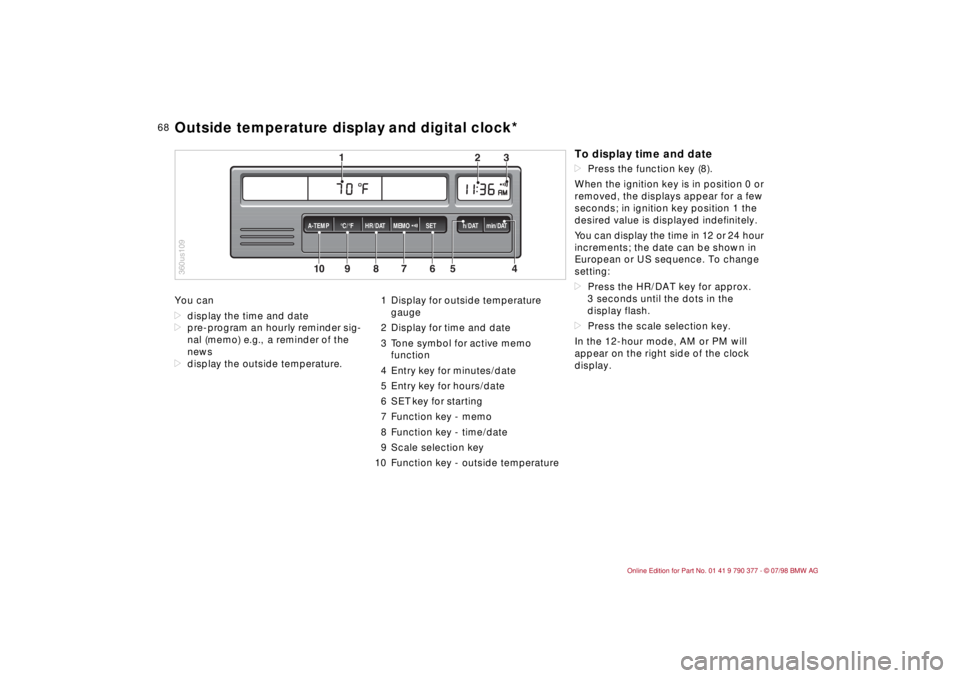
ddisplay the outside temperature.1 Display for outside temperature
gauge
2 Display for time and date
3 Tone symbol for active memo
function
4 Entry key for minutes/date
5 Entry key for hours/date
6 SET key for starting
7 Function key - memo
8 Function key - time/date
9 Scale selection key
10 Function key - outside temperature
10
MEMO
9
8
7
6
5
43
2
1
HR/DAT A-TEMP°C/°F SET h/DAT min/DAT
360us109Outside temperature display and digital clock*
To display time and datedPress the function key (8).
When the ignition key is in position 0 or
removed, the displays appear for a few
seconds; in ignition key position 1 the
desired value is displayed indefinitely.
You can display the time in 12 or 24 hour
increments; the date can be shown in
European or US sequence. To change
setting:
dPress the HR/DAT key for approx.
3 seconds until the dots in the
display flash.
dPress the scale selection key.
In the 12-hour mode, AM or PM will
appear on the right side of the clock
display.
Page 70 of 179

69
At a glanceControls Car careRepairsTechnicalDataIndex
Memo modePress the MEMO key to activate or
deactivate the signal. When MEMO is
active, a tone symbol appears in the
right display. The signal sounds every
hour at the pre-programmed time or
without programming 15 seconds
before each full hour.Outside temperatureData request: Press TEMP key.
If the outside temperature drops below
37.5 5F (+36), a warning signal sounds,
the temperature display automatically
appears and the unit of measure flashes
for 8 seconds.
The warning is repeated whenever the
temperature has increased to 43 5F
(+66) at least once before falling to
37.5 5F (+36) again.a
The temperature warning device
does nothing to alter the fact that sur-
face ice can still form at temperatures
above 37.5 5F (+36), e.g., on bridges
and on shade-covered road surfaces.c
EntriesAll numbers for the time and date are
entered with the entry keys according
to the following principle: The numbers
can be entered in any order. Each time
the key is pressed, or for each half sec-
ond the key is held down, the numerical
value increases by one.
Pressing the key longer starts the rapid-
advance function.
After a power failureThe dots in the display flash.
dPress the scale selection key as
required.
dEnter the time with the h/DAT and
min/DAT entry keys.
dPress SET. The clock starts.
dPress the HR/DAT key.
dEnter the date with the entry keys.
dPress SET.
dConfirm the year by pressing the SET
key or correct with the entry key and
complete the number entry by press-
ing the SET key.
360us321
Outside temperature display and digital clock*
Page 71 of 179
70
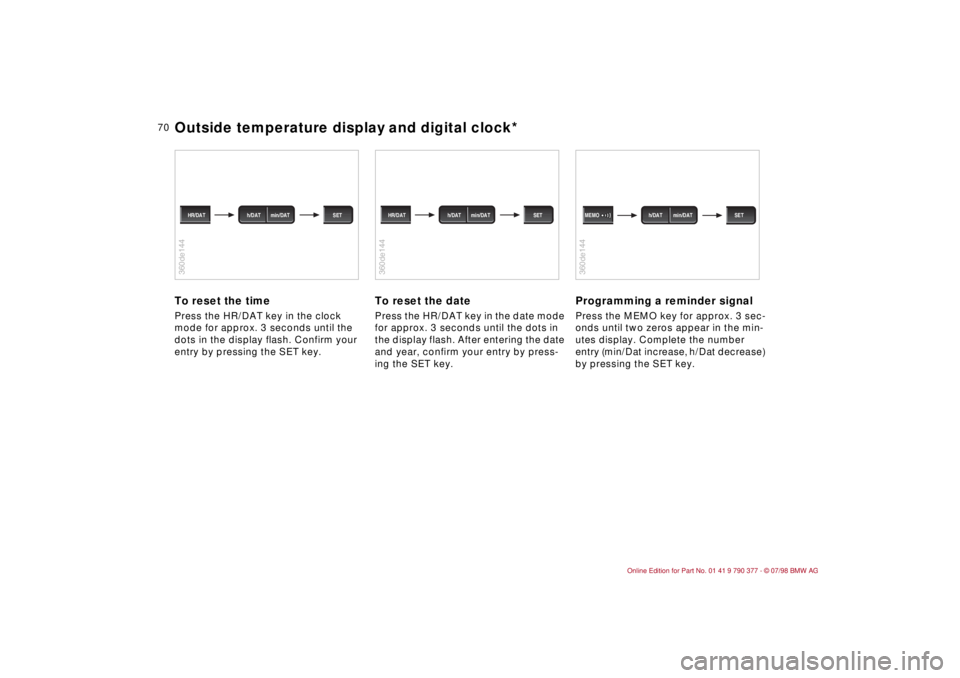
To reset the timePress the HR/DAT key in the clock
mode for approx. 3 seconds until the
dots in the display flash. Confirm your
entry by pressing the SET key.
To reset the datePress the HR/DAT key in the date mode
for approx. 3 seconds until the dots in
the display flash. After entering the date
and year, confirm your entry by press-
ing the SET key.
Programming a reminder signalPress the MEMO key for approx. 3 sec-
onds until two zeros appear in the min-
utes display. Complete the number
entry (min/Dat increase, h/Dat decrease)
by pressing the SET key.
360de144
h/DAT min/DAT HR/DAT SET
360de144
h/DAT min/DAT HR/DAT SET
360de144
h/DAT min/DAT MEMO SET
Outside temperature display and digital clock*
Page 75 of 179
74
The Check Control uses texts with mes-
sages and warnings to alert the driver
to defective systems. In addition, an
indicator lamp is provided in the instru-
ment cluster. For details and operating
instructions, refer to pages 71, 72.
The outside temperature can also be
displayed.
With the digital clock you can
ddisplay the time and date,
dpre-program an hourly reminder sig-
nal (memo) e.g., a reminder of the
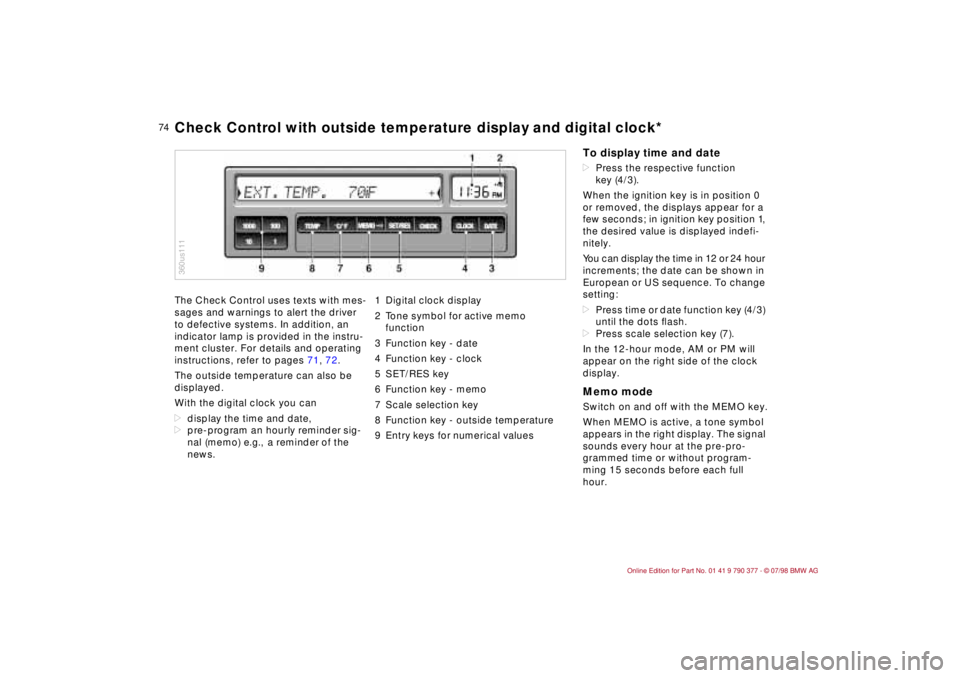
news.1 Digital clock display
2 Tone symbol for active memo
function
3 Function key - date
4 Function key - clock
5 SET/RES key
6 Function key - memo
7 Scale selection key
8 Function key - outside temperature
9 Entry keys for numerical values
360us111Check Control with outside temperature display and digital clock*
To display time and datedPress the respective function
key (4/3).
When the ignition key is in position 0
or removed, the displays appear for a
few seconds; in ignition key position 1,
the desired value is displayed indefi-
nitely.
You can display the time in 12 or 24 hour
increments; the date can be shown in
European or US sequence. To change
setting:
dPress time or date function key (4/3)
until the dots ßash.
dPress scale selection key (7).
In the 12-hour mode, AM or PM will
appear on the right side of the clock
display.Memo modeSwitch on and off with the MEMO key.
When MEMO is active, a tone symbol
appears in the right display. The signal
sounds every hour at the pre-pro-
grammed time or without program-
ming 15 seconds before each full
hour.
Page 78 of 179
77
At a glanceControls Car careRepairsTechnicalDataIndex
Allows you to select display data for
safe and economical driving.
If your car is equipped with the Check
Control option, texts with information
and warnings are used to alert the
driver to system malfunctions. In addi-
tion, an indicator lamp is provided in the
instrument cluster. For details and
operating instructions, refer to
pages 71 and 72.
With the digital clock you can
ddisplay the time and date,
dpre-program a reminder signal
(memo), e.g., to remind you of news
broadcasts.
Refer to page 74 for information and
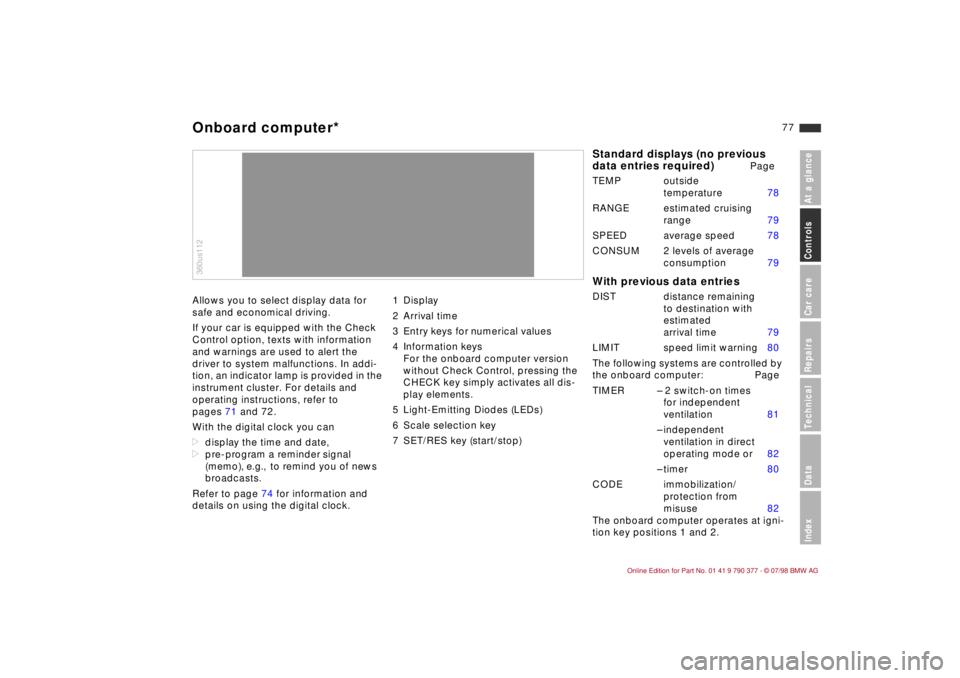
details on using the digital clock.1 Display
2 Arrival time
3 Entry keys for numerical values
4 Information keys
For the onboard computer version
without Check Control, pressing the
CHECK key simply activates all dis-
play elements.
5 Light-Emitting Diodes (LEDs)
6 Scale selection key
7 SET/RES key (start/stop)360us112Onboard computer*
Standard displays (no previous
data entries required)
Page
TEMP outside
temperature 78
RANGE estimated cruising
range 79
SPEED average speed 78
CONSUM 2 levels of average
consumption 79
With previous data entriesDIST distance remaining
to destination with
estimated
arrival time 79
LIMIT speed limit warning 80
The following systems are controlled by
the onboard computer: Page
TIMER Ð 2 switch-on times
for independent
ventilation 81
Ð independent
ventilation in direct
operating mode or 82
Ð timer 80
CODE immobilization/
protection from
misuse 82
The onboard computer operates at igni-
tion key positions 1 and 2.
Page 92 of 179

91
At a glanceControls Car careRepairsTechnicalDataIndex
To defrost windshield and door
windows
Air conditioner Circulated air mode/Automatic
recirculated air control (AUC)
*
Press the button repeatedly to run
through the following control sequence:
dIndicator lamps off: outside air flow
operational.
dLeft-hand indicator lamp on Ð AUC
mode: the system detects pollutants
in the outside air and responds by
deactivating the outside air flow as
required. The system then recircu-
lates the air currently within the vehi-
cle.
dRight-hand indicator lamp on: the
flow of outside air into the vehicle is
permanently blocked. The system
then recirculates the air currently
within the vehicle.a
If the windshields fog over in circu-
lated air mode, switch off the circulated
air mode/Automatic recirculated air
control and increase the air supply. if
necessary.c
Rear window defrosterBMW Convertible: Heated rear-window
blower.
The rear-window blower is always
switched off with the convertible top
down.
When the hardtop
* is in place, press
the rear-window heating button.
Temperature
This program is designed for
rapid removal of ice and con-
densation from the windshield and side
windows.
The air conditioner cools and
dehumidifies incoming air
before reheating it to the selected tem-
perature.
Depending on the weather, the wind-
shield may fog over briefly when the
engine is started.
Switching off the air conditioner at out-
side temperatures below approx. 41 5F
(56) will prevent the windows from
fogging up.
Frequently switching the air condi-
tioner on and off may also promote the
formation of condensation on the win-
dow surfaces.
b
Condensation forms in the air
conditioner system during operation,
which then exits under the vehicle. It is
not unusual for a small puddle to form
there.c
You can respond to unpleas-
ant odors in the outside air
by temporarily excluding the outside air.
The system then recirculates the air
currently within the vehicle.
A
The indicator lamp comes
on to confirm that the rear
defroster is operating.
The defroster switches off automatically
after approx. 15 minutes.
On both the driver's and the
passenger's side you can
adjust the specific temperature. The fig-
ures in the display provide a general
indication of interior temperature. We
recommend 70 5F (226) as a standard
setting for comfortable travel, both with
and without the air conditioner. When
you start the vehicle, the system
ensures that the selected temperature
is achieved as quickly as possible and
maintained at a constant level by the
control.
Automatic climate control
Page 112 of 179

111
At a glanceControlsCar careRepairsTechnicalDataIndex
Information for your safetyThe factory-approved radial tires have
been selected to provide optimum
safety and driving comfort on your vehi-
cle.
In a very real sense, both tire life and
your own safety are riding on correct
tire specifications and inflation pres-
sures.
Incorrect inflation pressures are a fre-
quent cause of tire damage. To a great
extent it also influences the ability of
your BMW to hold the road.a
Check the tire pressures Ð also in
the spare tire Ð at least every two weeks,
and before every extended trip.
Incorrect inflation pressures can also
lead to tire damage and accidents.c
Tire tread - tire damageInspect your tires frequently for tread
wear, signs of damage and for foreign
objects lodged in the tread. Check the
tread depth.
The tread depth should not be less than
0.12 in (3 mm). Otherwise there is an
increased risk of aquaplaning, even at
relatively moderate speeds and with
only small amounts of water on the
road.
We recommend that you always replace
the tires once the tread wears to 0.12 in
(3 mm). Once the tread has worn to
0.063 in (1.6 mm), tread depth indica-
tors appear.a
Never continue driving on a deflat-
ed (flat) tire. A flat tire greatly impairs
steering and braking response, and can
lead to complete loss of control over the
vehicle.
Avoid overloading the vehicle so that the
permitted load on the tires is not ex-
ceeded. This can cause overheating and
gradual internal damage. The ultimate
result can assume the form of a sudden
air loss.Unusual vibrations encountered during
normal vehicle operation can indicate
tire failure or some other vehicle defect,
as can variations in normal vehicle
response, such as a pronounced ten-
dency to pull to the left or right. Should
this occur, you should respond by
immediately reducing your speed and
carefully proceeding to the nearest
BMW Retailer or professional tire cen-
ter, or having the vehicle towed in to
have it and its tires inspected.
Tire damage (up to and including blow-
outs) can endanger the lives of both the
vehicle occupants and other road
users.c
Tire inflation pressures Tire tread