1997 TOYOTA LAND CRUISER turn signal
[x] Cancel search: turn signalPage 10 of 159

Indicator symbols on the instrument panel5
Anti-lock brake system warning light * 1
Brake system warning light * 1
Seat belt reminder light* 1
Low oil pressure warning light* 1
Malfunction indicator light* 1
SRS airbag warning light* 1
Automatic transmission fluid
temperature warning light*
1 Turn signal indicator lights
Headlight high beam indicator light
Over-drive indicator light
Open door warning light * 1
Unengaged Parkºwarning light * 1
PWRº mode indicator light
Automatic transmission second
start indicator light Center Differential lock indicatorlight
Front Differential lock indicator light
Rear Differential lock indicatorlight
Page 62 of 159

87
Push R
VM.º again to turn off the RM fea-
ture. RPT (Repeat)
The repeat feature automatically replays the current cassette. Push RPTº while the track is playing.
RPTº will appear on the display. When
the track ends, it will automatically be re-
wound and replayed. This process will be continued until you push the button again
to turn off the repeat feature.
There must be at least 3 seconds of blank
space between tracks in order for the re-
peat feature to work correctly. SCAN
You can either scan all the frequencies on a band or scan only the preset stations for
that band.
To scan the preset stations: Quickly push
and release SCANº. If you hear a beep,
you held the button too long, and the radiowill scan all the frequencies. The radio will tune in the next preset station up the
band, stay there for a few seconds, and
then move to the next preset station. To
select a station, push SCANº a second time. To scan all the frequencies: Push SCANº
until you hear a beep. The radio will find
the next station up the station band, stay there for a few seconds, and then scan
again. To select a station, push SCANº a
second time. Cassette Player
The cassette player scan feature is similar
to the radio scan feature and uses the same button.
Push SCANº. SCANº will appear on the
display. The player will fast forward to the
next cassette track,
play it for 12 seconds,
and then scan again. To select a track,
push SCANº a second time. If the player reaches the end of one side of a cassette
tape, it will continue scanning on the other
side. SKIP
The skip feature allows you to fast forward
past long stretches of blank tape. This is
especially useful at the end of cassettes. Push SKIPº. SKIPº will appear on the
display. The cassette player will keep
track of how much blank space it plays.
Any time it has played about 1- seconds of blank tape, it will automatically fast for-
ward to the next track and begin to play.
Push the button a second time to turn off the skip feature. ST (Stereo reception) display
Your radio automatically changes to ste- reo reception when a stereo broadcast is
received. STº appears on the display. If the signal becomes weak, the radio re-
duces the amount of channel separationto prevent the weak signal from creating
noise. If the signal becomes extremely weak, the radio switches from stereo to mono reception.
TAPE
Push TAPEº to switch from radio opera-
tion to cassette operation. If the audio
system is off,
you can turn on the cassette
player by pushing TAPEº. In both cases, a cassette must already be loaded in the
player.
Page 69 of 159

94Scan Radio
You can either scan all the frequencies on a band or scan only the preset stations for
that band.
To scan the preset stations: Quickly push
and release SCANº. If you hear a beep,
you held the button too long, and the radio will scan all the frequencies. The radio willtune in the next preset station up the
band, stay there for a few second, and
then move to the next preset station. To
select a station, push SCANº a second time.
To scan all the frequencies: Push SCANº
until you hear a beep. The radio will find
the next station up the station band, Stay there for a few seconds, and then scan
again. To select a station, push SCANº a
second time. Cassette player
The cassette player scan feature is similar
to the radio scan feature and uses the same button.
Push SCANº. SCANº will appear on the
display. The player will fast forward to the
next cassette track,
play it for 12 seconds,
and then scan again. To select a track,
push SCANº a second time. If the player reaches the end of one side of a cassette
tape, it will continue scanning on the other
side.
Compact disc player
The compact disc player scan feature is
similar to the radio scan feature.
Push SCANº. SCANº will appear on the
display. The compact disc player will play the next track for 10 seconds, then scan
again. To select a track, push SCANº a
second time. If the player r eaches the end
of the disc, it will continue scanning at
track 1. SKIP
The skip feature allows you to fast forward
past long stretches off blank tape. This is
especially useful at the end of cassettes. Push SKIPº. SKIPº will appear on the
display. The cassette player will keep
track of how much blank space it plays.
Any time it has played about 10 seconds
of blank tape, it will automatically fast for-
ward to the next track and begin to play.
Push the button a second time to turn off the skip feature. ST (Stereo reception) display
Your radio automatically changes to ste- reo reception when a stereo broadcast is
received. STº appears on the display. Ifthe signal becomes weak, the radio re-
duces the amount of channel separation to prevent the weak signal from creating
noise. If the signal becomes extremely weak, the radio switches from stereo to mono reception.
TAPE
Push T
APEº to switch from radio or com-
pact disc operation to cassette operation.
If the audio system is off, you can turn on
the cassette player by pushing TAPEº. In both cases, a cassette must already be
loaded in the player.
Page 77 of 159
102
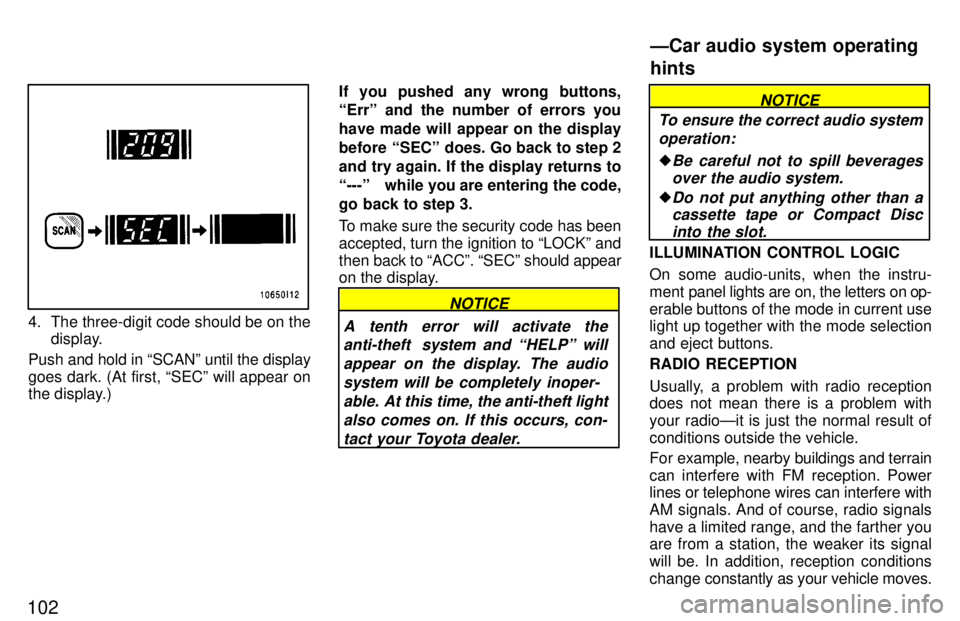
4. The three-digit code should be on thedisplay.
Push and hold in SCANº until the display
goes dark. (At first, SECº will appear on
the display.) If you pushed any wrong buttons, Errº and the number of errors you have made will appear on the display
before SECº does. Go back to step 2and try again. If the display returns to
---º while you are entering the code,
go back to step 3.
To make sure the security code has been accepted, turn the ignition to LOCKº andthen
back to ACCº. SECº should appear
on the display.
NOTICE
A tenth error will activate the anti-theft system and HELPº will
appear on the display. The audiosystem will be completely inoper- able. At this time, the anti-theft light
also comes on. If this occurs, con- tact your Toyota dealer.
NOTICE
To ensure the correct audio system operation:
Be careful not to spill beveragesover the audio system.
Do not put anything other than acassette tape or Compact Disc
into the slot.
ILLUMINATION CONTROL LOGIC
On some audio-units, when the instru-
ment panel lights are on, the letters on op-
erable buttons of the mode in current use
light up together with the mode selection and eject buttons. RADIO RECEPTION
Usually, a problem with radio reception
does not mean there is a problem with
your radioÐit is just the normal result of
conditions outside the vehicle.
For example, nearby buildings and terrain
can interfere with FM reception. Power
lines or telephone wires can interfere with
AM signals. And of course, radio signals
have a limited range, and the farther you are from a station, the weaker its signal
will be. In addition, reception conditions
change constantly as your vehicle moves.
ÐCar audio system operating hints
Page 111 of 159

136
TIRES
Ensure that your vehicle's tires are
properly inflated. See Chapter 7-2 forinstructions.
The trailer tires should be inflated to
the pressure recommended by the
trailer manufacturer in respect to the
total trailer weight.
TRAILER LIGHTS Trailer lights must comply with federal,
state/provincial and local regulations. See your local recreational vehicle
dealer or rental agency for the correct type of wiring and relays for your trail-
er. Check for correct operation of the
turn signals and stop lights each time
you hitch up. Direct splicing may dam-
age your vehicle's electrical system
and cause a malfunction of your lights.
BREAK-IN SCHEDULE Toyota recommends that you do not
tow a trailer with a new vehicle or a ve-
hicle with any new power train compo-
nent (engine, transmission, differen- tial, wheel bearing, etc.) for the first
800 km (500 miles) of driving. MAINTENANCE
If you tow a trailer, your vehicle will re-
quire more frequent maintenance due
to the additional load. For this informa-
tion, please refer to the scheduled
maintenance information in the Own-
er 's Manual Supplement/Maintenance Scheduleº.
Retighten all fixing bolts of the towing
ball and bracket after approximately
1000 km (600 miles) of trailer driving.
PRE-T OWING SAFETY CHECK Check that your vehicle remains level
when a loaded or unloaded trailer is
hitched. Do not drive if the vehicle has
an abnormal nose-up or nose-down
condition, and check for improper
tongue load, overload, worn suspen-
sion or other possible causes.
Make sure the trailer cargo is securely
loaded so that it cannot shift.
Check that your rear view mirrors con-
form to any applicable federal, state/
provincial or local regulation. If not,
install the rear view mirrors required
for towing purpose. TRAILER TOWING TIPS
When towing a trailer, your vehicle will
handle differently than when not tow-
ing.
The three main causes of vehicle-
trailer accidents are driver error, ex-
cessive speed and improper trailer
loading. Keep these in mind when tow-
ing: Before starting out, check operation of
the lights and all vehicle-trailer con-
nections. After driving a short dis-
tance, stop and recheck the lights and
connections. Before actually towing a
trailer, practice turning, stopping and
backing with a trailer in an area away
from traffic until you learn the feel.
Because stopping distance may be in-
creased, vehicle-to-vehicle distance
should be increased when towing a
trailer. For each 16 km/h (10 mph) ofspeed, allow at least one vehicle and
trailer length between you and the ve-
hicle ahead. Avoid sudden braking asyou may skid, resulting in jackknifing
and loss of control. This is especially
true on wet or slippery surfaces.
Page 114 of 159
139
Avoid continuous speeding up and
slowing down. Stop-and-go driving
wastes fuel.
Avoid unnecessary stopping andbraking. Maintain a steady pace. Try
to time the traffic signals so you only
need to stop as little as possible or take
advantage of through streets to avoid
traffic lights. Keep a proper distance
from other vehicles to avoid sudden braking. This will also reduce wear on your brakes.
Avoid heavy traffic or traffic jams
whenever possible.
Do not rest your foot on the brake pedal. This causes needless wear,
overheating and poor fuel economy.
Maintain a moderate speed onhighways. The faster you drive, the
greater the fuel consumption. By re-
ducing your speed, you will cut down
on fuel consumption.
Keep the front wheels in properalignment. Avoid hitting the curb and
slow down on rough roads. Improper
alignment not only causes faster tire
wear but also puts an extra load on the
engine, which, in turn, wastes fuel.
Keep the bottom of your vehicle
free from mud, etc. This not only
lessens weight but also helps prevent corrosion.
Keep your vehicle tuned-up and in
top shape. A dirty air cleaner, improp-
er valve clearance, dirty plugs, dirty oil
and grease, brakes not adjusted, etc.
all lower engine performance and con-
tribute to poor fuel economy. For lon-
ger life of all parts and lower operating
costs, keep all maintenance work on
schedule, and if you often drive under severe conditions, see that your ve-
hicle receives more frequent mainte-
nance (For scheduled maintenance in-
formation, please refer to the separate
Owner 's Manual Supplement/Main-
tenance Scheduleº).
CAUTION
Never turn off the engine to coast
down hills. Your power steering and
brake booster will not function with-
out the engine running. Also, the
emission control system operates
properly only when the engine is run-
ning.!
Page 134 of 159

165
Tire surface and wheel nuts Check the tires carefully
for cuts, damage
or excessive wear. See Chapter 7-2 for
additional information. When checking the tires, make sure no nuts are missing,
and check the nuts for looseness. T ighten
them if necessary.
Tire rotation
Rotate the tires every 12000 km (7500
miles). See Chapter 7-2 for additional in- formation.
Fluid leaks Check underneath for leaking fuel, oil, wa-
ter or other fluid after the vehicle has been
parked for a while. If you smell fuel fumes
or notice any leak, have the cause found
and corrected immediately. Doors and engine hood
Check that all doors including back door
operate smoothly and all latches lock se-
curely. M ake sure the engine hood secon-
dary latch secures the hood from opening
when the primary latch is released. INSIDE THE VEHICLE Items listed below should be checked
regularly, e.g. while performing peri-
odic services, cleaning the vehicle,etc. Lights Make sure the headlights, stop lights, tail lights, turn signal lights, and other lights are all working. Check headlight aim. Service reminder indicators and
warn-
ing buzzers Check that all service reminder indicators
and warning buzzers function properly. Steering wheel
Be alert for changes in steering condition, such as hard steering or strange noise. Seats Check that all seat controls such as seat
adjusters, seatback recliner, etc. operate
smoothly and that all latches lock securely
in any position. Check that the head re-
straints move up and down smoothly and
that the locks hold securely in any latched
position. For folding-down rear seat-
backs, swing-up rear seat cushions and
detachable temporary third seat, check
that the latches lock securely. Seat belts
Check that the seat belt system such as
buckles, retractors and anchors operate
properly
and smoothly. Make sure the belt
webbing is not cut, frayed, worn or dam-aged. Accelerator pedal Check the pedal for smooth operation and
uneven pedal effort or catching. Brake pedal Check the pedal for smooth operation and
that the pedal has the proper clearance. Check the brake booster function. Brakes
At a safe place, check that the brakes do not pull to one side when applied. Parking brake Check that the lever has the proper travel and that, on a safe incline, your vehicle is
held securely with only the parking brakeapplied.
Automatic transmission Parkº mech-
anism
Check the lock release button of the se-
lector lever for proper and smooth opera-
tion. On a safe incline, check that your ve-
hicle is held securely with the selector
Page 156 of 159

199
4. STOP 10A: Stop lights, multiport fuel
injection system/sequential multiport fuel injection system, cruise control
cancel device, automatic transmission
shift lock system
5. DEFOG 20 A: Rear window defogger
6. WIPER 20 A: Windshield wipers and
washer, rear window wiper and wash-er
7. GAUGE 10 A: Gauges and meters,
service reminder indicators and warn-
ing buzzers (except discharge and
open door warning lights), back-up lights
8. TURN 7.5 A: Turn signal lights 9. ECU-IG 15 A:
Cruise control system
10. ECU-B 10 A: SRS airbag system
11. REAR-HTR 20 A: Air conditioning
system
12. IGN 7.5 A: Multiport fuel injection sys-
tem/sequential multiport fuel injection
system, emission control system,
SRS airbag system
13. A.C 10 A: Air conditioning system
14. DIFF 30 A: Differential lock system
15. CHARGE 7.5 A: Charging system,
discharge warning light
16. EFI 15 A: Multiport fuel injection sys-
tem/sequential multiport fuel injection system
17. CDS-F AN 20 A: No circuit
18. HEAD (RH) 15 A: Right-hand head-
lights
19. HEAD (LH) 15 A: Left-hand head-
lights
20. HAZ-HORN 15 A: Emergency flash-
ers, horns 21. DOME 10 A:
Interior lights, personal
light, luggage compartment light, igni-
tion switch light, open door warning
light, clock, radio, cassette tape play-
er, power antenna, vanity lights
Fuses (type B)
22. FL HEATER 40 A: Air conditioning
system
23. FL POWER 30 A: Power windows,
power door lock system, electric moon
roof.
Fuses (type C)
24. AM 1 50 A: All components in CIGº,
WIPERº, GAUGEº, TURNº, ECU-
IGº, REAR-HTRº, INº, DIFFº and
FL POWERº circuits
25. ABS 60 A: Anti-lock brake system