1997 OLDSMOBILE CUTLASS light
[x] Cancel search: lightPage 71 of 353

ACC (Accessory) (B): This position unlocks the
transaxle. It
also lets you use things like the radio and
windshield wipers when the engine is not running.
To
use ACC, push in the key and turn it to the right. Use
this position if your vehicle must be pushed or towed,
but never
try to push-start your vehicle.
ON (C): This position unlocks the ignition and
transaxle.
This position is also where the key returns
after you start your engine and release the switch. The
switch stays in ON when the engine is running. But even
when the engine
is not running, you can use ON to
operate your electrical power accessories, and to display some instrument panel warning lights.
START (D): This position starts the engine. When the
engine starts, release the key. The ignition switch will
return to
ON for normal driving.
Starting Your Engine
Move your shift lever to PARK (P) or NEUTRAL (N).
Your engine won’t start in any other position
-- that’s a
safety feature. To restart when you’re already moving,
use NEUTRAL
(N) only.
NOTICE:
Don’t try to shift to PARK (P) if your Oldsmobile
is moving. If you do, you could damage the
transaxle. Shift to PARK
(P) only when your
vehicle is stopped.
Starting Your 3100 Engine
1. Without pushing the accelerator pedal, turn your
ignition key to
START. When the engine starts, let
go of the key. The idle speed will go down as your
engine gets warm.
NOTICE:
Holding your key in START for longer than
15 seconds at a time will cause your battery to
be drained much sooner. And the excessive heat
can damage your starter motor.
ProCarManuals.com
Page 78 of 353

Second-Gear Start
Your vehicle is equipped with a second-gear start
feature. Place the shift lever in SECOND
(2) gear to
provide more traction when you are starting on ice
or other slippery surfaces. The transaxle will be in
SECOND
(2) gear when the vehicle begins to move.
After starting in SECOND
(2) gear, place the shift lever
in THIRD
(3) or DRIVE (D).
This feature is only for improved traction only when
the road surface is slippery and
is not intended for
continuous use or when the vehicle is stuck in sand,
mud, ice, snow
or gravel.
Parking Brake
To set the parking brake,
hold the regular brake pedal
down with your right foot.
Push down the parking
brake pedal with your left
foot. If the ignition is on,
the brake system warning
light will come on. To
release the parking brake, hold the regular brake
pedal down with your right foot. Push down on the
parking brake pedal with your left foot.
If the parking
brake
is not released when you begin to drive, a chime
will sound warning you that the parking brake is still on.
NOTICE:
Driving with the parking brake on can cause
your rear brakes to overheat. You may have to
replace them, and you could
also damage other
parts
of your vehicle.
If you are towing a trailer and are parking on a hill, see
“Towing a Trailer” in the Index. That section shows
what to do first to keep the trailer from moving.
2-21
ProCarManuals.com
Page 86 of 353

To signal a lane change, just raise or lower the lever
until the arrow starts to flash. Hold it there until you
complete your lane change. The lever will return by
itself when you release it.
A warning chime signal will come on if you have left
your turn signal on for more than
3/4 mile (1 km).
As you signal a turn or a lane change, if the arrow
flashes rapidly, a signal bulb may be burned out and other drivers won’t see your turn signal.
If a bulb is burned out, replace it to help avoid an
accident. If the arrow doesn’t go on at all when you
signal a turn, check for burned-out bulbs and then check
the fuse (see “Fuses and Circuit Breakers” in the Index).
Headlamp High/Low Beam
To change the headlamps
from low beam to high
beam, push forward on the
turn signaUmultifunction
lever.
To change the
headlamps from high beam
to low beam, pull the turn
signal lever backward.
When the high bearns are
I I on, a light on the instrument
panel also will be on.
Flash to Pass
This feature lets you use your high-beam headlamps to
signal a driver
in front of you that you want to pass.
To use it, pull the turn signaYmultifunction lever toward
you until the high-beam headlamps come on, then
release the lever to turn them
off.
ProCarManuals.com
Page 91 of 353

Increasing Speed While Using Cruise Control
There are two ways to go to a higher speed.
Use the accelerator pedal to get to the higher speed.
Push the SETDECEL button, then release the button
and the accelerator pedal. You’ll now cruise at the
higher speed.
Press the RESUME/ACCEL button. Hold it there
until you get up to the speed you want, and then
.release the button.
To increase your speed in very
small amounts, press the RESUME/ACCEL button
for less than half a second and then release
it. Each
time you do this, your vehicle will go about
1 mph
(1.6 kmk) faster.
The accelerate feature
will only work after you turn on
the cruise control by pushing
the SETDECEL button.
Reducing Speed While Using Cruise Control
There are two ways to reduce your speed while using
cruise control:
0 Push the SETDECEL button until you reach the
lower speed you want, then release it.
To slow down in very small mounts, push the
SETDECEL button for less than half a second. Each
time you do this, you’ll go
1 mph (1.6 kmk) slower.
Passing Another Vehicle While Using Cruise Control
Use the accelerator pedal to increase your speed. When
you take your foot
off the pedal, your vehicle will slow
down to the cruise control speed you set earlier.
Using Cruise Control on Hills
How well your cruise control will work on hills depends
upon your speed, load and the steepness of the hills.
When going up steep hills, you may have to step on the
accelerator pedal to maintain your speed. When going
downhill, you may have to brake or shift to
a lower gear
to keep your speed down. Of course, applying the brake
takes you out of cruise control. Many drivers find this to
be too much trouble and don’t use cruise control
on
steep hills.
Ending Out of Cruise Control
There are two ways to turn off the cruise control:
Step lightly on the brake pedal;
0 Press the cruise control ON/OFF button.
Erasing the Cruise Speed Memory
When you turn off the cruise control or the ignition,
your cruise control set speed memory is erased.
2-34 ~~
ProCarManuals.com
Page 93 of 353

Daytime Running Lamps / Automatic
Light
Control
Daytime Running Lamps (DRL) can make it easier for
others to see the front of your vehicle during the day.
DRL can be helpful in many different driving
conditions, but they can be especially helpful in the
short periods after dawn and before sunset.
A light sensor below the defroster grille makes the
DRL and Automatic Light Control (ALC) work, so
be sure it isn’t covered. The DRL system will make
your low-beam headlamps come on at
a reduced
brightness when:
0 The ignition is on,
0 The headlamp switch is off,
0 The transaxle is not in PARK (P) and
0 The park brake is not set. When the
DRL are on, only your low-beam headlamps
will be on. The taillamps, sidemarker and other
lamps won’t be on. Your instrument panel won’t be
lit up either.
When it’s dark enough outside, the
ALC system will
turn your headlamps on to full brightness. The other
lamps that come on with your headlamps will also
come on.
When it’s bright enough outside, the ALC system will
turn off your regular lamps, and your low-beam
headlamps change to the reduced brightness of DRL.
To idle your vehicle with the DIU
off, set the park
brake while the ignition is off. Then start the vehicle.
The
DRL will stay off until you release the park brake.
As with any vehicle, you should turn
on the regular
headlamp system when you need it.
2-36
ProCarManuals.com
Page 95 of 353

Illuminated EntryLExit System
When you lift the outside handle of either front door, or
open either rear door, the lamps inside your vehicle will
go on. These lamps will fade out after about
40 seconds,
or when the ignition is turned on after all doors have
been closed.
If the ignition was recently turned off, the
lamps will fade out after four seconds. These lamps
will also go on when you press the LOCK or
UNLOCK
button on the optional Remote Lock Control transmitter.
If the ignition has been off for less than two minutes,
the lamps inside your vehicle will stay on for about
15 seconds after your key is removed from the
ignition to provide an illuminated exit.
Mirror Reading Lamps
Press the switch on the lower front portion of the mirror
to turn on the lamp. Press the other side
of the switch to
turn the lamp off.
Three-Position Dome Lamp
The switch on this lamp has three positions. The ON
position will turn on the light. The DOOR position will
turn on the light whenever a door is opened. The OFF
position will shut off the lamp completely, even when
a door is opened.
Trunk Lamp
The trunk lamp comes on when you open your trunk.
Battery Saver
Your Oldsmobile is equipped with a battery saver
feature designed to protect your vehicle’s battery.
When any interior lamp
(trunk, reading, footwell or
glove box) is left on when the~ignition is turned
off, the
battery saver system will automatically shut the lamp
off
after 20 minutes. This will avoid draining the battery.
To reactivate the interior lamps, either:
The ignition must be turned on,
The activated lamp switch must be turned off and
then on or
0 A front door must be opened.
The battery saver feature will also be activated when
any door
of your vehicle is left open.
ProCarManuals.com
Page 96 of 353

Mirrors
Inside Daymight Rearview Mirror
This mirror can be adjusted two ways. First, to adjust
the angle of the mirror, move the mirror to a position
that allows you see out the back window.
To adjust the
height of the mirror, adjust the
arm that connects the
mirror to the windshield.
To reduce glare from lights behind you, move the lever
toward you
to the night position.
Manual Remote Control Mirror
The outside rearview mirror should be adjusted so you
can just see the side
of your vehicle when you are sitting
in a comfortable driving position.
Adjust the driver’s side
outside mirror with the
control lever on the
driver’s door.
To adjust your passenger’s side mirror, sit in the driver’s
seat and have a passenger adjust the mirror for you.
2-39
ProCarManuals.com
Page 101 of 353
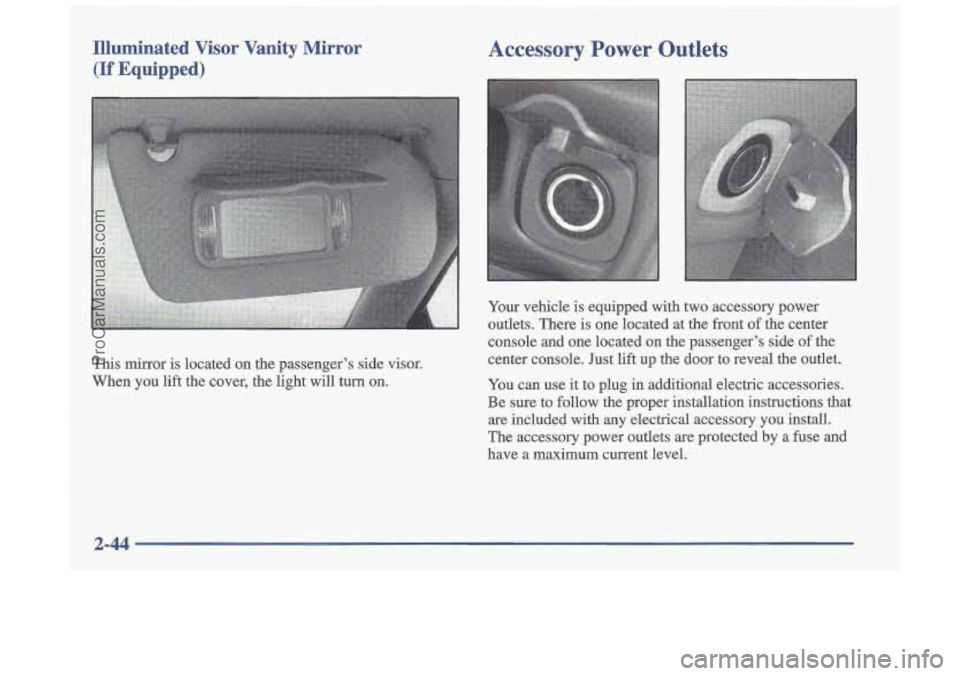
Illuminated Visor Vanity Mirror Accessory Power Outlets
(If Equipped)
This mirror is located on the passenger’s side visor.
When you lift the cover, the light will turn
on.
Your vehicle is equipped with two accessory power
outlets. There is one located at the front of the center
console and one located on the passenger’s side of the
center console. Just lift up the door to reveal the outlet.
You can use it to plug in additional electric accessories.
Be sure to follow the proper installation instructions that
are included with any electrical accessory you install.
The accessory power outlets
are protected by a fuse and
have a maximum current level.
2-44
ProCarManuals.com