1997 OLDSMOBILE BRAVADA lock
[x] Cancel search: lockPage 72 of 358

You can also use SECOND (2) for starting your vehicle
from a stop on slippery road surfaces.
FIRST (1): This position gives you even more power
(but lower fuel economy) than
SECOND (2). You can
use
it on very steep hills, or in deep snow or mud. If the
selector lever is
put in FIRST (1) while the vehicle is
moving forward, the transmission won’t shift into
FIRST
(1) until the vehicle is going slowly enough.
NOTICE:
If your rear wheels can’t rotate, don’t try to
drive. This might happen if you were stuck in
very deep sand
or mud or were up against a solid
object. You could damage your transmission.
Also, if you stop when going uphill, don’t hold
your vehicle there with only the accelerator
pedal. This
could overheat and damage the
transmission. Use your brakes or shift into
PARK (P) to hold your vehicle in position
on a hill.
Locking Rear Axle
Your rear axle can give you additional traction on snow,
mud, ice,
sand or gravel. It works like a standard axle
most of the time, but when one of the rear wheels has no
traction and the other does, the locking feature will
allow the wheel
with traction to move the vehicle.
All-Wheel Drive
Your engine’s driving power is sent to all four wheels
for extra traction. All-wheel drive is like four-wheel
drive, but there
is no lever or switch to engage or
disengage the front axle. It is
fully automatic and adjusts
itself as needed
for road conditions.
Parking Brake
To set the parking brake, hold the regular brake pedal
down with your right foot. Push down the parking brake
pedal
with your left foot. If the ignition is on, the brake
system warning light
will come on.
To release the parking brake, hold the regular brake
pedal
down.
2-18
ProCarManuals.com
Page 74 of 358

2. hlove the shift lever into PARK (P) position like this: Leaving Your Vehicle With the
Engine Running
It can be dangerous to leave your vehicle with the
engine running.
Your vehicle could move
suddenly if the shift lever
is not fully in PARK (P)
with the parking brake firmly set. And, if you
leave the vehicle with the engine running, it could
overheat and even catch fire.
You or others could
be injured. Don’t leave your vehicle with the
engine running unless you have to.
0 Hold in the button on the lever.
Push the lever all the way toward the front of
the vehicle.
3. TLIIII the ignition key to LOCK.
4. Remove the key and take it with YOLI. If you can
remove the key and
leave your vehicle, your vehicle
is in PARK (P).
If you have to leave your vehicle. with the engine
running,
be s111-e to firndy set your parking brake and
shifi into PARK (P) before you leave it. After you’ve
n~oved the shift lever into the PARK (P) position, hold
the reg~~lar brake pedal ckwn. Then, see if you can move
the shift lever away from PARK (P) without first pulling
it toward you. If you can, it means that the shift lever
wasn’t
FLIIIY locked into PARK (P).
2-20
ProCarManuals.com
Page 75 of 358

Torque Lock
If you are parking on a hill and you don’t shift your
transmission into PARK
(P) properly, the weight of the
vehicle may put too much force
on the parking pawl in
the transmission. You may find it difficult to pull the
shift lever out of PARK (P). This is called “torque lock.”
To prevent torque lock, set the parking brake and then
shift into PARK
(P) properly before you leave the
driver’s seat.
To find out how, see “Shifting Into
PARK (P)” in the Index.
When you are ready
to drive, move the shift lever out of
PARK (P) h
vehicle push yo~~rs
a little uphill to take some of the
pressure from
the parking pawl in the transmission, so
you can pull the shift lever out of PARK (P).
Shifting Out of PARK (P)
Your vehicle has a brake-transmission shift interlock.
You have to fully apply your regular brake before you
can shift from PARK
(P) when the ignition is in the
RUN position. See “Automatic Transmission Operation”
in the Index.
If you cannot shift out of PARK (P), ease pressure on
the shift lever -- push the shift lever all the way into
PARK
(P) as you maintain brake application. Then press
the shift lever button and move the shift lever into the
gear you want.
If you ever hold the brake pedal down but still can’t
shift
out of PARK (P), try this:
1. Turn the key to OFF.
2. Apply and hold the brake until the end of Step 4.
3. Shift to NEUTRAL(N).
4. Start the vehicle and then shift to the drive gear
you want.
5. Have the vehicle fixed as soon as you can.
* 2-21
ProCarManuals.com
Page 78 of 358
Windows
Power Windows
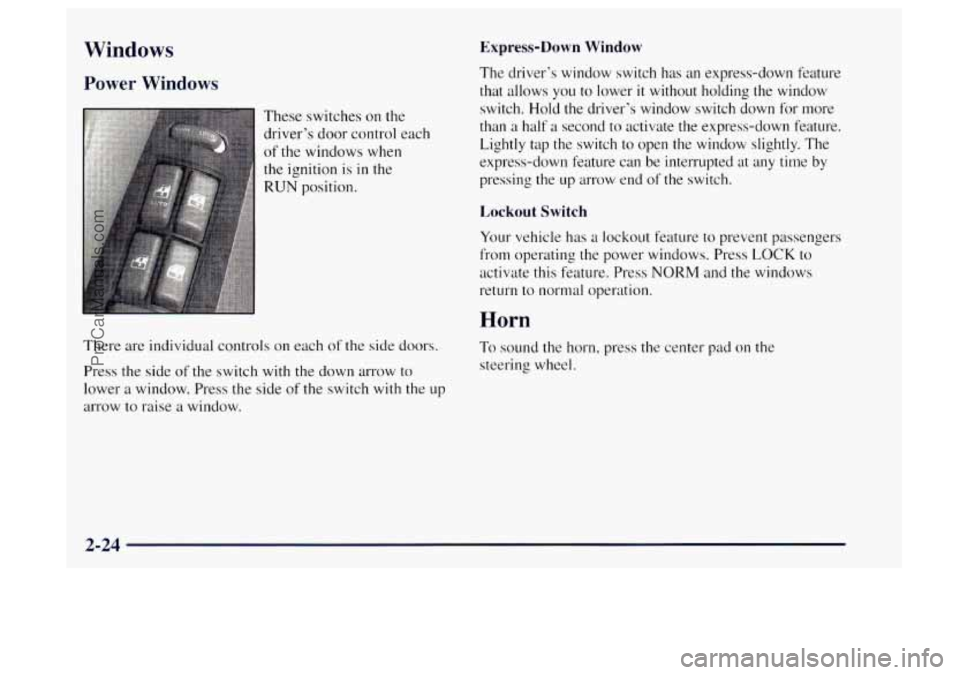
These switches on the
driver’s door control each
of the windows when
the ignition is in the
RUN position.
There are individual controls on each of the side doors.
Press the side of the switch with the down arrow to
lower a window. Press the side of the switch
with the up
arrow to raise a window.
Express-Down Window
The driver’s window switch has an express-down feature
that allows you to lower
it without holding the window
switch.
Hold the driver’s window switch down for more
than a half a second to activate the express-clown feature.
Lightly tap the switch to open the window slightly. The
express-down feature can be interrupted
at any time by
pressing the up arrow end of the switch.
Lockout Switch
Your vehicle has a lockout feature to prevent passengers
from operating the power windows. Press LOCK to
activate this feature. Press
NORM and the windows
return to normal operation.
Horn
To sound the horn, press the center pad on the
steering wheel.
2-24
ProCarManuals.com
Page 79 of 358

Tilt Wheel
You should adjust the
steering wheel before
you drive.
You can raise it to the highest level to give your legs
more room when you enter and exit the vehicle.
To tilt the wheel, hold the steering wheel and pull the
lever toward you. Move the steering wheel to a
comfortable level, then release the lever
to lock the
wheel in place.
Do not adjust the steering wheel while driving.
Turn SignaVMultifunction Lever
The lever on the left side of the steering column
includes your:
Turn Signal and Lane Change Indicator
Headlamp HighLow Beam Changer
Windshield Wipers
Windshield Washer
0 Cruise Control
2-25
ProCarManuals.com
Page 81 of 358

Windshield Wipers
You control the windshield wipers by turning the band
with the wiper symbol on it.
For a single wiping cycle, turn the band to MIST. Hold
it there until the wipers start, then let go. The wipers will
stop after one wipe.
If you want more wipes, hold the
band on MIST longer.
You can set the wiper speed for a long or short delay
between wipes. This can be very useful in light rain or
snow. Turn the band
to choose the delay time. The
closer to
LOW, the shorter the delay. For
steady wiping at low speed, turn the band away
from
you to the LOW position. For high-speed wiping,
turn the band further, to
HIGH. To stop the wipers,
move the band
to the OFF position.
Be sure to clear ice and snow from the wiper blades
before using
them. If they‘re frozen to the windshield,
carefully loosen or thaw them.
If your blades do become
worn
or damaged, get new blades or blade inserts.
Windshield Washer
At the top of the multifunction lever, there’s a paddle
marked with the windshield washer symbol and
PUSH.
To spray washer fluid on the windshield, press the
paddle. The wipers will clear the window and then
either stop or return to your preset speed.
In freezing weather, don’t use your washer until
the windshield
is warmed. Otherwise the washer
fluid can form ice on the windshield, blocking
your vision.
I I
I I.
ProCarManuals.com
Page 86 of 358

Press the bottom switch with the master lamps symbol on
it to turn on all the lamps listed as well as the headlamps.
Press the side of the switch marked
OFF to turn off
your lamps.
Lamps On Reminder
A reminder tone will sound when your headlamps or
parking lamps are turned on and your ignition is
in OFF,
LOCK or ACCESSORY. To turn the tone off, press the
OFF switch.
Daytime Running Lamps
Daytime Running Lamps (DRL) can make it easier for
others to see the front of your vehicle during the day.
DRL can be helpful in many different driving
conditions, but they can be especially helpful in the
short periods after dawn and before sunset.
The DRL system
will make your headlamps come on at
reduced brightness when:
the ignition is on,
the headlalnp switch is off and
0 the parking brake is released. When
the DRL are
on, only your headlamps will be on.
The taillamps, sidemarker and other lamps won’t be
on.
The instrument panel won’t be lit up either.
When
it begins to get dark, your DRL indicator light
is a reminder to turn your headlamp switch on. The
other lamps that come
on with your headlamps will also
come on.
When you
turn the headlamp switch off, the regular
lamps will go off. and your headlamps
will change to
the reduced brightness of DRL.
To idle your vehicle with the DRL off, set the parking
brake. The DRL
will stay off until you release the
parking brake.
As with any vehicle, you should turn on the regular
headlamp system when you need
it.
2-32
ProCarManuals.com
Page 96 of 358
Ashtrays and Cigarette Lighter
To use the lighter, press it in all the way, and let go.
When it’s ready, it will pop back by itself.
I NOTICE:
Don’t hold a cigarette lighter in with your hand
while it is heating.
If you do, it won’t be able to
back away from the heating element when it’s
ready. That can make it overload, damaging the
lighter and the heating element.
The front ashtray must be completely pulled out to the
open position before the ashtray cover opens and
smoking material can be deposited.
NOTICE:
Don’t put papers and other things that burn into
your ashtray.
If you do, cigarettes or other
smoking materials could set them on fire,
causing damage.
To remove the front ashtray,
lift the release tab as high
as possible, then remove the tray.
There are smaller ashtrays inside the rear doors. Press
PUSH to turn an ashtray around for use.
Sun Visors
To block out glare, you can swing down the top and
bottom
visors. You can also swing the bottom visor from
side to side. Your visors may have an extension that can
be pulled out for additional glare protection and a strap
for holding small items, such as maps.
2-42
ProCarManuals.com