1997 OLDSMOBILE BRAVADA ignition
[x] Cancel search: ignitionPage 70 of 358

It is dangerous to get out of your vehicle if the
shift lever is not fully in
PARK (P) with the
parking brake firmly set. Your vehicle can roll.
Don’t leave your vehicle when the engine
is
running unless you have to. If you have left the
engine running, the vehicle can move suddenly.
You or others could be injured.
To be sure your
vehicle won’t move, even when you’re on fairly
level ground, always set your parking brake and
move the shift lever to
PARK (P).
Your vehicle will be free to roll -- even if your
shift lever is in
PARK (P) -- if your transfer case
is in
NEUTRAL (N). So, be sure the transfer case
is in a drive gear
-- not in NEUTRAL (N). See
“Shifting Into
PARK (P)” in the Index. If you’re
pulling
a trailer, see “Towing a Trailer” in
the Index. Ensure the shift lever
is fully in
PARK (P) range before
starting the engine.
Your vehicle has a
brake-transmission shift interlock. You have to fully
apply your regular brakes before you can
shift from
PARK (P) when the ignition key is in the RUN position.
If you cannot shift
out of PARK (P), ease pressure on
the shift lever
-- press the button on the shift lever and
push the shift lever all the way into PARK (P) as you
maintain brake application. Then move the shift lever
into the gear you wish. See “Shifting Out of PARK (P)”
in the Index.
REVERSE (R): Use this gear to back up.
NOTICE:
Shifting to REVERSE (R) while your vehicle is
moving forward could damage your
transmission. Shift to
REVERSE (R) only after
your vehicle is stopped.
To rock your vehicle back and forth to get out of snow,
ice or sand without damaging your transmission, see
“Stuck: In
Sand, Mud, Ice or Snow” in the Index.
ProCarManuals.com
Page 72 of 358

You can also use SECOND (2) for starting your vehicle
from a stop on slippery road surfaces.
FIRST (1): This position gives you even more power
(but lower fuel economy) than
SECOND (2). You can
use
it on very steep hills, or in deep snow or mud. If the
selector lever is
put in FIRST (1) while the vehicle is
moving forward, the transmission won’t shift into
FIRST
(1) until the vehicle is going slowly enough.
NOTICE:
If your rear wheels can’t rotate, don’t try to
drive. This might happen if you were stuck in
very deep sand
or mud or were up against a solid
object. You could damage your transmission.
Also, if you stop when going uphill, don’t hold
your vehicle there with only the accelerator
pedal. This
could overheat and damage the
transmission. Use your brakes or shift into
PARK (P) to hold your vehicle in position
on a hill.
Locking Rear Axle
Your rear axle can give you additional traction on snow,
mud, ice,
sand or gravel. It works like a standard axle
most of the time, but when one of the rear wheels has no
traction and the other does, the locking feature will
allow the wheel
with traction to move the vehicle.
All-Wheel Drive
Your engine’s driving power is sent to all four wheels
for extra traction. All-wheel drive is like four-wheel
drive, but there
is no lever or switch to engage or
disengage the front axle. It is
fully automatic and adjusts
itself as needed
for road conditions.
Parking Brake
To set the parking brake, hold the regular brake pedal
down with your right foot. Push down the parking brake
pedal
with your left foot. If the ignition is on, the brake
system warning light
will come on.
To release the parking brake, hold the regular brake
pedal
down.
2-18
ProCarManuals.com
Page 74 of 358

2. hlove the shift lever into PARK (P) position like this: Leaving Your Vehicle With the
Engine Running
It can be dangerous to leave your vehicle with the
engine running.
Your vehicle could move
suddenly if the shift lever
is not fully in PARK (P)
with the parking brake firmly set. And, if you
leave the vehicle with the engine running, it could
overheat and even catch fire.
You or others could
be injured. Don’t leave your vehicle with the
engine running unless you have to.
0 Hold in the button on the lever.
Push the lever all the way toward the front of
the vehicle.
3. TLIIII the ignition key to LOCK.
4. Remove the key and take it with YOLI. If you can
remove the key and
leave your vehicle, your vehicle
is in PARK (P).
If you have to leave your vehicle. with the engine
running,
be s111-e to firndy set your parking brake and
shifi into PARK (P) before you leave it. After you’ve
n~oved the shift lever into the PARK (P) position, hold
the reg~~lar brake pedal ckwn. Then, see if you can move
the shift lever away from PARK (P) without first pulling
it toward you. If you can, it means that the shift lever
wasn’t
FLIIIY locked into PARK (P).
2-20
ProCarManuals.com
Page 75 of 358

Torque Lock
If you are parking on a hill and you don’t shift your
transmission into PARK
(P) properly, the weight of the
vehicle may put too much force
on the parking pawl in
the transmission. You may find it difficult to pull the
shift lever out of PARK (P). This is called “torque lock.”
To prevent torque lock, set the parking brake and then
shift into PARK
(P) properly before you leave the
driver’s seat.
To find out how, see “Shifting Into
PARK (P)” in the Index.
When you are ready
to drive, move the shift lever out of
PARK (P) h
vehicle push yo~~rs
a little uphill to take some of the
pressure from
the parking pawl in the transmission, so
you can pull the shift lever out of PARK (P).
Shifting Out of PARK (P)
Your vehicle has a brake-transmission shift interlock.
You have to fully apply your regular brake before you
can shift from PARK
(P) when the ignition is in the
RUN position. See “Automatic Transmission Operation”
in the Index.
If you cannot shift out of PARK (P), ease pressure on
the shift lever -- push the shift lever all the way into
PARK
(P) as you maintain brake application. Then press
the shift lever button and move the shift lever into the
gear you want.
If you ever hold the brake pedal down but still can’t
shift
out of PARK (P), try this:
1. Turn the key to OFF.
2. Apply and hold the brake until the end of Step 4.
3. Shift to NEUTRAL(N).
4. Start the vehicle and then shift to the drive gear
you want.
5. Have the vehicle fixed as soon as you can.
* 2-21
ProCarManuals.com
Page 78 of 358
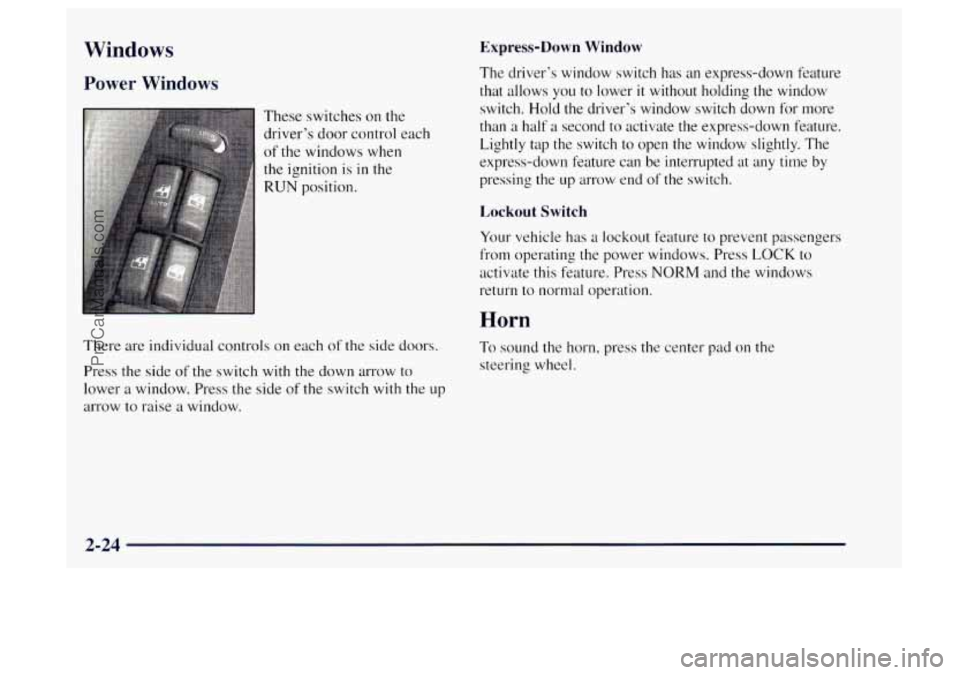
Windows
Power Windows
These switches on the
driver’s door control each
of the windows when
the ignition is in the
RUN position.
There are individual controls on each of the side doors.
Press the side of the switch with the down arrow to
lower a window. Press the side of the switch
with the up
arrow to raise a window.
Express-Down Window
The driver’s window switch has an express-down feature
that allows you to lower
it without holding the window
switch.
Hold the driver’s window switch down for more
than a half a second to activate the express-clown feature.
Lightly tap the switch to open the window slightly. The
express-down feature can be interrupted
at any time by
pressing the up arrow end of the switch.
Lockout Switch
Your vehicle has a lockout feature to prevent passengers
from operating the power windows. Press LOCK to
activate this feature. Press
NORM and the windows
return to normal operation.
Horn
To sound the horn, press the center pad on the
steering wheel.
2-24
ProCarManuals.com
Page 85 of 358
Using Cruise Control on Hills
How well your cruise control will work on hills depends
upon your speed,
load and the steepness of the hills.
When going up steep hills, you may want to step on the
accelerator pedal to maintain your speed. When going
downhill, you may have to brake
or shift to a lower gear
to keep your speed down.
Of course, applying the brake
takes
you out of cruise control. Many drivers find this to
be too much trouble and don’t use cruise control on
steep hills.
Ending Cruise Control
There are two ways to turn off the cruise control:
Step lightly on the brake pedal.
Move the cruise switch to OFF.
Erasing Speed Memory
When you turn off the cruise control or the ignition,
your cruise control set speed memory
is erased.
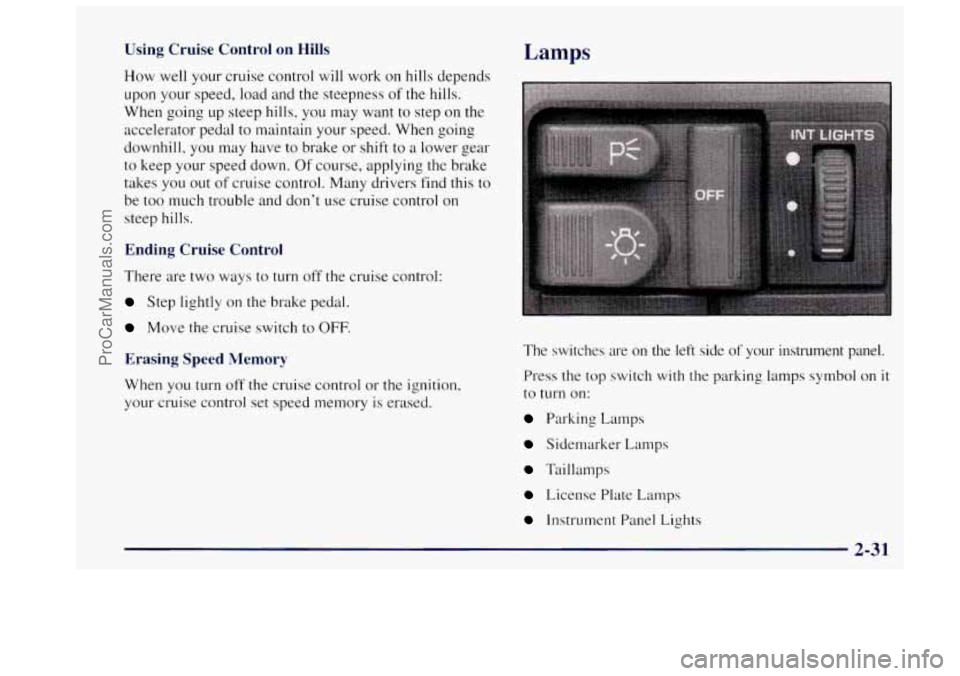
Lamps
The switches are on the left side of your instrument panel.
Press the top switch with the parking lamps symbol on
it
to turn on:
Parking Lamps
Sidernarker Lamps
Taillamps
License Plate Lamps
Instrument Panel Lights
2-3 1
ProCarManuals.com
Page 86 of 358

Press the bottom switch with the master lamps symbol on
it to turn on all the lamps listed as well as the headlamps.
Press the side of the switch marked
OFF to turn off
your lamps.
Lamps On Reminder
A reminder tone will sound when your headlamps or
parking lamps are turned on and your ignition is
in OFF,
LOCK or ACCESSORY. To turn the tone off, press the
OFF switch.
Daytime Running Lamps
Daytime Running Lamps (DRL) can make it easier for
others to see the front of your vehicle during the day.
DRL can be helpful in many different driving
conditions, but they can be especially helpful in the
short periods after dawn and before sunset.
The DRL system
will make your headlamps come on at
reduced brightness when:
the ignition is on,
the headlalnp switch is off and
0 the parking brake is released. When
the DRL are
on, only your headlamps will be on.
The taillamps, sidemarker and other lamps won’t be
on.
The instrument panel won’t be lit up either.
When
it begins to get dark, your DRL indicator light
is a reminder to turn your headlamp switch on. The
other lamps that come
on with your headlamps will also
come on.
When you
turn the headlamp switch off, the regular
lamps will go off. and your headlamps
will change to
the reduced brightness of DRL.
To idle your vehicle with the DRL off, set the parking
brake. The DRL
will stay off until you release the
parking brake.
As with any vehicle, you should turn on the regular
headlamp system when you need
it.
2-32
ProCarManuals.com
Page 91 of 358

Driver Information System
This system displays the outside air temperature, compass
direction and trip information in the overhead console.
The USNET (United States/metric) button allows you to
switch the display between the English and metric system.
The MODE button can be used to toggle between three
modes of operation:
OFF, COMPREMP and TRIP.
OFF: This turns the system off.
COMP/TEMP: The display provides the outside
temperature and one of eight compass readings to
indicate the direction the vehicle is facing.
Before you turn on the ignition and move the vehicle,
the temperature indicated will be the last outside
temperature recorded with the ignition on. If the outside
temperature is
37 "F (3 " C) or lower, the display will
toggle between the word ICE and the current
temperature every eight seconds. This is a warning to
the driver that road conditions may be icy, and that
appropriate precautions should be taken. The
compass is self-calibrating,
so it does not need to be
manually set. However,
if C (Calibration) is displayed, the
compass will need to
be calibrated. You may also place the
compass in a noncalibrated mode by pressing and holding
the MODE and USMET buttons simultaneously while
in
the COMPmEMP mode. After about 10 seconds, the
compass will display
C and you can release the buttons.
Drive the vehicle in a complete 360" circle three times at
a speed of less than
5 mph (8 km/h), and the compass will
function normally. Once the calibration is complete, the
display will return to
a compass reading.
2-37
ProCarManuals.com