1997 NISSAN ALTIMA lock
[x] Cancel search: lockPage 81 of 203
Clock Priority Mode
In this mode the clock is shown in the
display. If any radio or cassette tape func-
tions are activated, the radio (or cassette
tape) display illuminates for ten seconds
then returns to the clock mode.
NOTE:
After clock adjustment, the radio is in the
clock priority mode.
Radio/Cassette Tape Priority Mode
In this mode, the radio station illuminates in
the display during radio operation. During
cassette tape operation, TAPE illuminates
in the display.
Selecting the desired band
Push the band select button (FM/AM) to
change from AM to FM reception.
The stereo indicator glows during FM stereo
reception. When the stereo broadcast signal
is weak, the radio automatically changes
from stereo to monaural reception.
Tuning
WARNING
The radio should not be tuned while
driving in order that full attention may
be given to the driving operation.
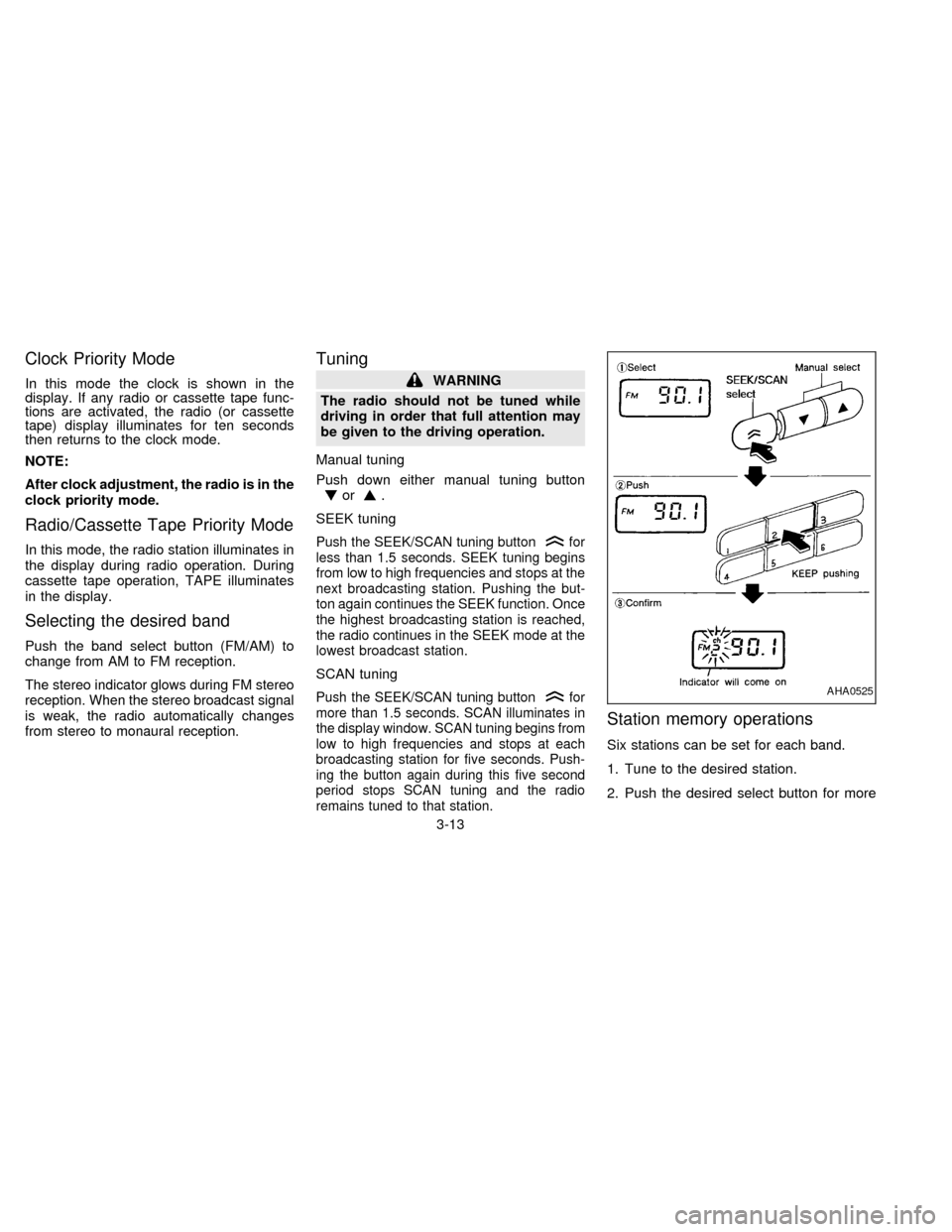
Manual tuning
Push down either manual tuning button
or.
SEEK tuning
Push the SEEK/SCAN tuning buttonfor
less than 1.5 seconds. SEEK tuning begins
from low to high frequencies and stops at the
next broadcasting station. Pushing the but-
ton again continues the SEEK function. Once
the highest broadcasting station is reached,
the radio continues in the SEEK mode at the
lowest broadcast station.
SCAN tuning
Push the SEEK/SCAN tuning buttonfor
more than 1.5 seconds. SCAN illuminates in
the display window. SCAN tuning begins from
low to high frequencies and stops at each
broadcasting station for five seconds. Push-
ing the button again during this five second
period stops SCAN tuning and the radio
remains tuned to that station.
Station memory operations
Six stations can be set for each band.
1. Tune to the desired station.
2. Push the desired select button for more
AHA0525
3-13
ZX
Page 84 of 203

Dolby NR (noise reduction)
Push theDOLBY NR button for
Dolby NR encoded tapes to reduce high
frequency tape noise. The indicator light
comes on.
Dolby NR is manufactured under license
from Dolby Laboratories Licensing Corpora-
tion. DOLBY NR and the double-D symbol
are trademarks of Dolby Laboratories Li-
censing Corporation.
If in the clock priority mode when the
button is pressed,and
TAPE illuminate in the display window for
about ten seconds. The clock mode then
returns to the display window.
Metal or chrome tape usage
The cassette player is automatically set to
high performance play when playing a metal
or chrome cassette tape.
Ejecting the cassette tape
Push the EJECT button. The cassette tape
automatically comes out.
3-16
ZX
Page 91 of 203
Manual antenna
The manual antenna cannot be shortened,
but can be removed. When you need to
remove the antenna, turn its base counter-
clockwise.
Microphone installed model
If equipped with a genuine cellular phone,
your NISSAN features a non-directional
microphone in the steering column cover,
so it is not necessary to look at or speak
directly into the microphone when calling.
To do so could detract from the driving
operation and cause an accident. See the
manual for car phone operation
Pre-wired and antenna for phone
installed model
Some models are pre-wired to accept the
genuine NISSAN cellular phone. In addition,
the same model has the phone antenna
built into the rear glass window
When installing a CB, ham radio or car
phone in your NISSAN, be sure to observe
the following cautions, otherwise the new
equipment may adversely affect the MFI
(Multiport Fuel Injection) system and other
electronic parts.
CAUTION
cKeep the antenna as far as possible
away from the Engine Control
Module.
cAlso keep the antenna wire more
than 8 inches (20 cm) away from the
MFI harness. Do not route the an-
tenna wire next to any harness.
cAdjust the antenna standing-wave
ratio as recommended by the
manufacturer.
cConnect the ground wire from the
CB radio chassis to the body.
cFor details, consult a NISSAN dealer.
CB RADIO OR CAR PHONE
3-23
ZX
Page 93 of 203

4Starting and driving
Precautions when starting and driving ...................4-2
Exhaust gas (carbon monoxide) ............................4-2
Three way catalyst .................................................4-2
Drinking alcohol/drugs and driving .........................4-3
Ignition switch .........................................................4-4
Manual transmission ..............................................4-4
Automatic transmission ..........................................4-4
Before starting the engine ......................................4-5
Driving with automatic transmission.......................4-6
Overdrive switch .....................................................4-8
Driving with manual transmission ..........................4-9Starting the engine ...............................................4-10
Parking brake operation .......................................4-11
Cruise control .......................................................4-12
Break-in schedule ................................................4-14
Increasing fuel economy ......................................4-14
Parking/parking on hills ........................................4-15
Power steering system .........................................4-16
Brake system........................................................4-16
Anti-lock brake system (ABS)
(if so equipped) ....................................................4-17
Cold weather driving ............................................4-18
ZX
Page 96 of 203
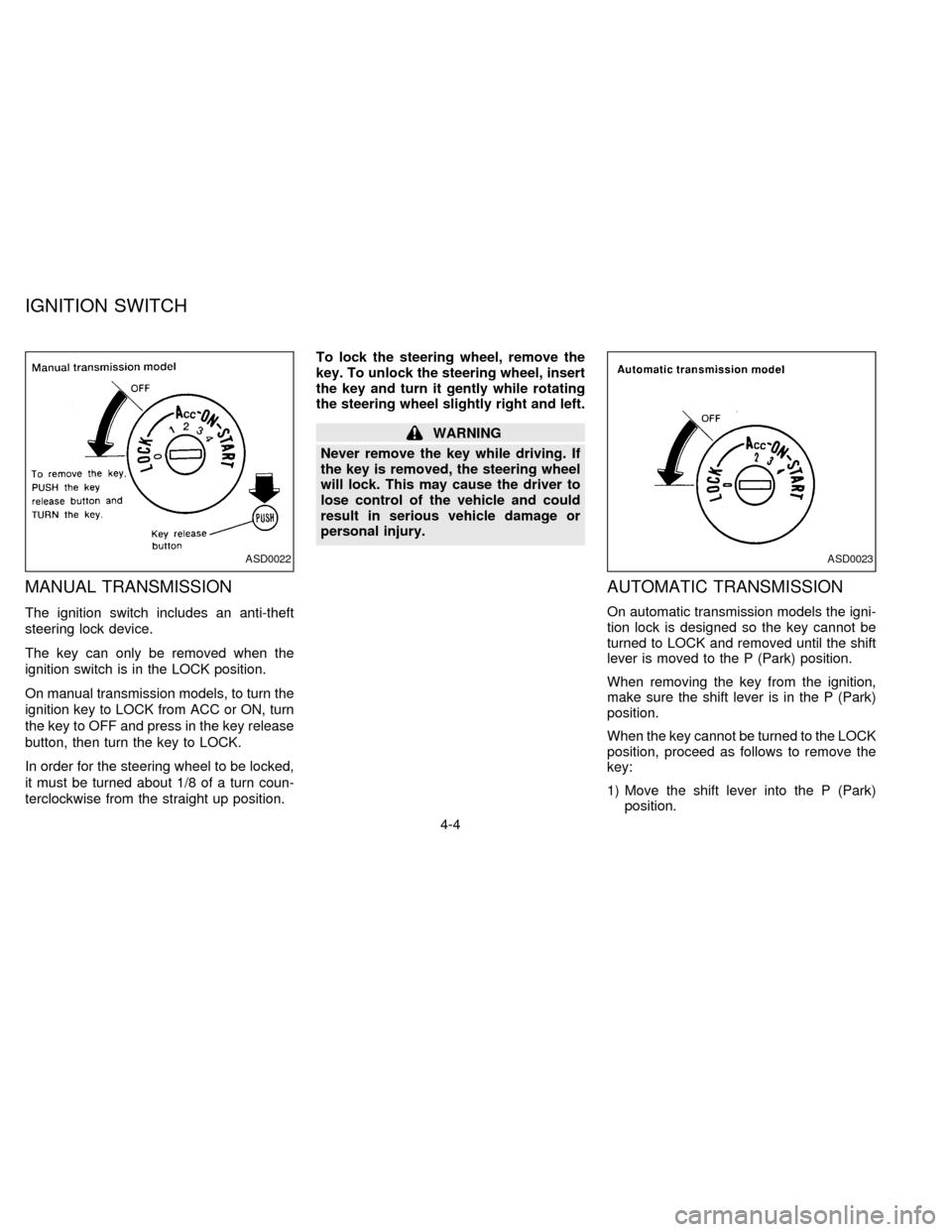
MANUAL TRANSMISSION
The ignition switch includes an anti-theft
steering lock device.
The key can only be removed when the
ignition switch is in the LOCK position.
On manual transmission models, to turn the
ignition key to LOCK from ACC or ON, turn
the key to OFF and press in the key release
button, then turn the key to LOCK.
In order for the steering wheel to be locked,
it must be turned about 1/8 of a turn coun-
terclockwise from the straight up position.To lock the steering wheel, remove the
key. To unlock the steering wheel, insert
the key and turn it gently while rotating
the steering wheel slightly right and left.
WARNING
Never remove the key while driving. If
the key is removed, the steering wheel
will lock. This may cause the driver to
lose control of the vehicle and could
result in serious vehicle damage or
personal injury.
AUTOMATIC TRANSMISSION
On automatic transmission models the igni-
tion lock is designed so the key cannot be
turned to LOCK and removed until the shift
lever is moved to the P (Park) position.
When removing the key from the ignition,
make sure the shift lever is in the P (Park)
position.
When the key cannot be turned to the LOCK
position, proceed as follows to remove the
key:
1) Move the shift lever into the P (Park)
position.
ASD0022ASD0023
IGNITION SWITCH
4-4
ZX
Page 97 of 203
2) Turn the ignition key slightly in the ON
direction.
3) Turn the key toward the LOCK position.
4) Remove the key.
If the key is removed from the ignition
switch, the shift lever cannot be moved from
P (Park).The shift lever can be moved if
the ignition switch is in the ACC posi-
tion. The shift lever can also be moved if
the ignition switch is in the ON position
and the foot brake pedal is depressed.
There is an OFF position in between LOCK
and ACC, although it does not show on the
key cylinder. When the ignition is in OFF the
steering wheel is not locked.
In order for the steering wheel to be locked, it
must be turned about 1/8 of a turn counter-
clockwise from the straight up position, and
the key must be removed from the ignition.
To lock the steering wheel, remove the
key. To unlock the steering wheel, insert
the key and turn it gently while rotating
the steering wheel slightly right and left.
WARNING
Never remove the key while driving. If
the key is removed, the steering wheel
will lock. This may cause the driver to
lose control of the vehicle and could
result in serious vehicle damage or
personal injury.
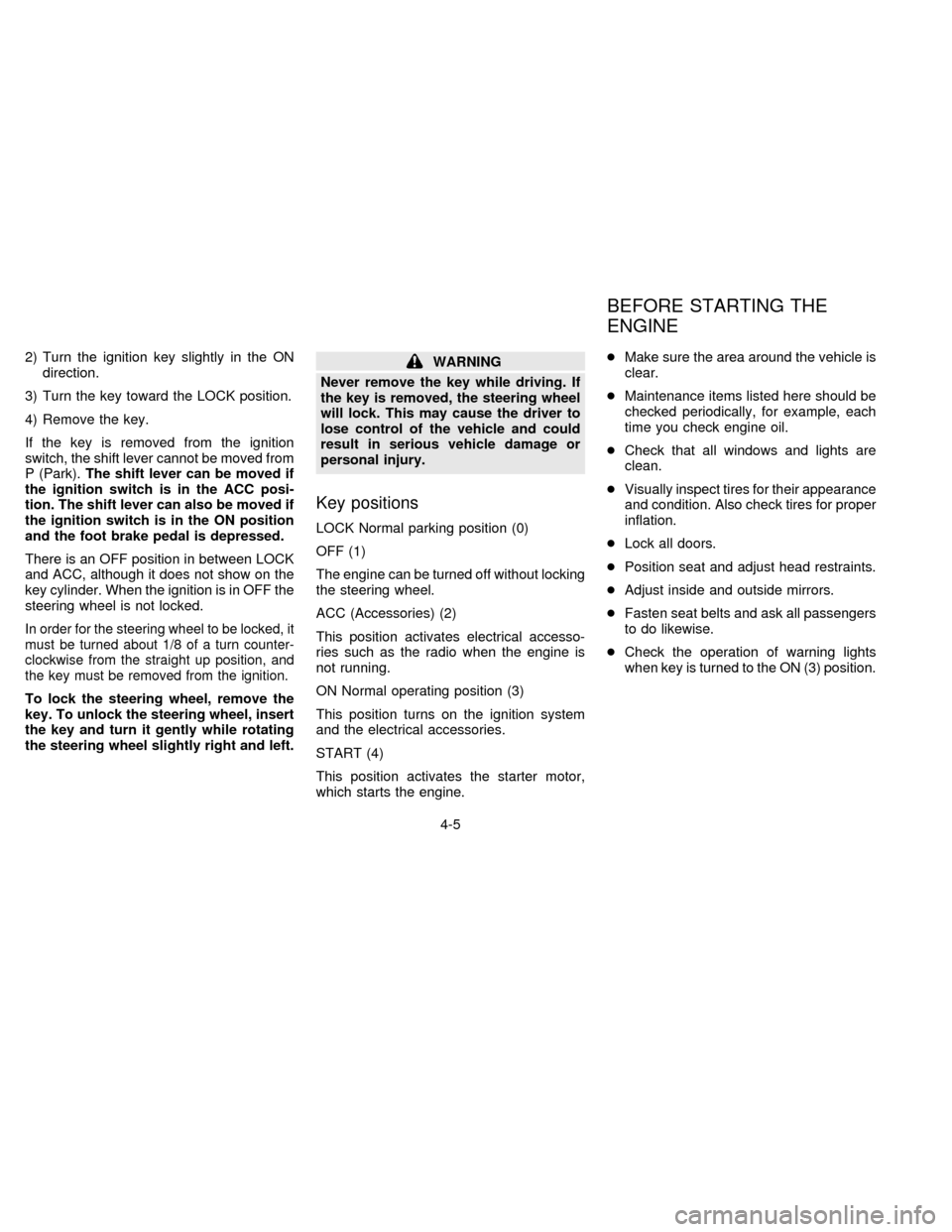
Key positions
LOCK Normal parking position (0)
OFF (1)
The engine can be turned off without locking
the steering wheel.
ACC (Accessories) (2)
This position activates electrical accesso-
ries such as the radio when the engine is
not running.
ON Normal operating position (3)
This position turns on the ignition system
and the electrical accessories.
START (4)
This position activates the starter motor,
which starts the engine.cMake sure the area around the vehicle is
clear.
cMaintenance items listed here should be
checked periodically, for example, each
time you check engine oil.
cCheck that all windows and lights are
clean.
cVisually inspect tires for their appearance
and condition. Also check tires for proper
inflation.
cLock all doors.
cPosition seat and adjust head restraints.
cAdjust inside and outside mirrors.
cFasten seat belts and ask all passengers
to do likewise.
cCheck the operation of warning lights
when key is turned to the ON (3) position.
BEFORE STARTING THE
ENGINE
4-5
ZX
Page 98 of 203
The automatic transmission in your vehicle
is electronically controlled by the A/T control
unit to produce maximum power and
smooth operation.
The recommended operating procedures for
this transmission are shown on the following
pages. Follow these procedures for maximum
vehicle performance and driving enjoyment.
Starting the vehicle
cAfter starting the engine, fully depress
the foot brake pedal before shifting the
shift lever to the D, R, 2 or 1 position. Be
sure the vehicle is fully stopped before
attempting to shift the shift lever.
cKeep the foot brake pedal depressed and
shift into a driving gear.
c
Release the foot brake, then gradually
start the vehicle in motion.
The automatic transmission is designed
so the foot brake pedal MUST be de-
pressed before shifting from P to any drive
position while the ignition switch is ON.
The shift lever cannot be moved out of P
and into any of the other gear positions if
the ignition key is turned to LOCK or if
the key is removed.When the battery charge is low, the shift
lever can be moved if the ignition switch
is in the ACC position.
WARNING
cDo not depress the accelerator pedal
while shifting from P or N to R, D, 2
or 1. Always depress the brake pedal
until shifting is completed. Failure to
do so could cause you to lose con-
trol and have an accident.
cCold engine idle speed is high, so
use caution when shifting into a for-
ward or reverse gear before the en-
gine has warmed up.
cNever shift to P or R while the ve-
hicle is moving. This could cause an
accident.
cOn slippery roads, do not downshift.
This may cause a loss of control.
CAUTION
When stopping the vehicle on an uphill
grade, do not hold the vehicle by de-
pressing the accelerator pedal. The foot
brake should be used for this purpose.
DRIVING WITH AUTOMATIC
TRANSMISSION
(if so equipped)
4-6
ZX
Page 99 of 203

Shifting with automatic transmission
Push the button to shift into P, R or from D
to 2. All other positions can be selected
without pushing the button.
P (Park):
Use this position when the vehicle is parked
or when starting the engine. Always be sure
the vehicle is at a complete stop. For maxi-
mum safety, depress the brake pedal, then
push in the selector lever button and move
the shift lever to the P position. Apply the
parking brake. When parking on a hill, apply
the parking brake first, then move the shift
lever into the P position.
Shifting from P (Park)
If the ignition switch is in the ON position
and the foot brake pedal is depressed, but
the shift lever still cannot be moved out of P
(Park), follow these instructions:
1. Shut the engine off and remove the key.
2. Apply the parking brake.
3. Reinsert the key and turn it clockwise to
the ACC position.
4. Depress the brake pedal, move the gear-
shift lever to N (Neutral) and start the
engine.These instructions for starting the vehicle in
N (Neutral) should only be used until service
can be obtained.
R (Reverse):
Use this position to back up. Always be sure
the vehicle is completely stopped. With the
brake pedal depressed, push in the selector
lever button and move the shift lever to the
R position.
N (Neutral):
Neither forward nor reverse gear is en-
gaged. The engine can be started in this
position. You may shift to N and restart a
stalled engine while the vehicle is moving.
D (Drive):
Use this position for all normal forward
driving.
2 (Second gear):
Use for hill climbing or engine braking on
downhill grades.
Do not shift into the 2 position at speeds
over 74 MPH (119 Km/h). Do not exceed 74
MPH (119 Km/h) in the 2 position.
ASD0510
4-7
ZX