71
3. Rotate the headlamp switch counterclockwise
from the OFF position.
4. The autolamp will automatically turn the lamps
on and off for you.
Do not put any articles on top of the photocell that
is located in the top left corner of the instrument
panel. This photocell controls the autolamp. If you
cover it, the photocell reacts as if it is nighttime,
and the lamps turn on.
To turn the autolamp off, rotate the headlamp
switch clockwise to the OFF position.You can set the autolamp so the headlamps stay on
for up to three minutes after you turn your vehicle
off.
q
The further you rotate the headlamp switch
counterclockwise, the longer the lamps will stay
on after you leave your vehicle. Similarly, if you
rotate the switch only slightly, the headlamps
stay on for only a short time after you turn
your vehicle off.
Turning On Interior LightsTo turn on the interior lights, push the headlamp
switch in.Instrument Panel IlluminationWith the light knob in the parking lamps or the
headlamps position, you can brighten or dim the
lights in the instrument panel with the rocker
switch.
File:05fncft.ex
Update:Mon Jun 17 13:49:49 1996
97
To set the childproof lock on each rear door, open
the rear door.
Find the lever at the black label with the word
LOCKED in white letters. Move the lever up.
To release the childproof lock, open the rear door
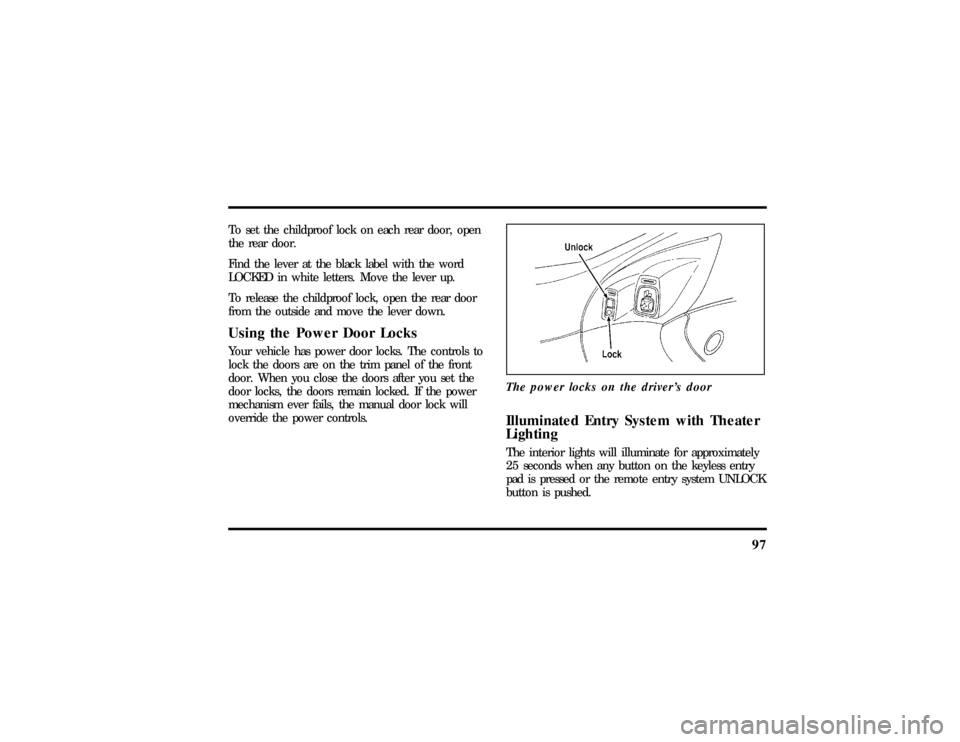
from the outside and move the lever down.Using the Power Door LocksYour vehicle has power door locks. The controls to
lock the doors are on the trim panel of the front
door. When you close the doors after you set the
door locks, the doors remain locked. If the power
mechanism ever fails, the manual door lock will
override the power controls.The power locks on the driver's door
Illuminated Entry System with Theater
LightingThe interior lights will illuminate for approximately
25 seconds when any button on the keyless entry
pad is pressed or the remote entry system UNLOCK
button is pushed.
File:05fncft.ex
Update:Mon Jun 17 13:49:49 1996