Page 166 of 305

163
For a warm engine:
q
Do not hold the key in the START position for
more thanfive (5) secondsat a time. If the
engine does not start within five (5) seconds on
the first try, turn the key to the OFF position.
Wait a few seconds after the starter stops, then
try again.
Whenever you start your vehicle, release the
key as soon as the engine starts. Excessive
cranking could damage the starter.
After you start the engine, let it idle for a few
seconds. Keep your foot on the brake pedal and
put the gearshift lever in gear. Release the
parking brake. Slowly release the brake pedal
and drive away in the normal manner.
NOTE:Your vehicle has an interlock that
prevents you from shifting out of P (Park)
unless your foot is on the brake pedal.If the engine does not start after two
attempts:
1. Turn the ignition key to the OFF position.
2. Press the accelerator all the way to the floor
and hold it.
3. Turn the ignition key to the START position.
4. Release the ignition key when the engine starts.
5. Release the accelerator gradually as the engine
speeds up.
If the engine still does not start, the fuel pump
shut-off switch may have been activated. For
directions on how to reset the switch seeFuel
Pump Shut-Off Switchin the index.
File:08fntot.ex
Update:Mon Jun 17 13:51:45 1996
Page 167 of 305
164
Acompute rsyste mcontrol sth e engine' sidle
WARNING
Extende didlin gat hig hengin espeeds
W ARNING
Do no tpark ,idle ,or driv eyou rvehicle
Page 169 of 305
166Have the exhaust and body ventilation systems
checked whenever:q
your vehicle is raised for service
q
the sound of the exhaust system changes
q
your vehicle has been damaged in a collision
Improve your ventilation by keeping all air inlet
vents clear of snow, leaves, and other debris.If the engine is idling while you are stopped in an
open area for long periods of time, open the
windows at least one inch (2.5 cm). Also, adjust
the heating or air conditioning system to bring in
outside air.
If you use the Electronic Automatic Climate
Control, set the fan speed selector dial to a medium
or high blower speed with the VENT or FLR & DEF
function buttons pressed.
File:08fntot.ex
Update:Mon Jun 17 13:51:45 1996
Page 173 of 305

170Traction Assist
TM
(If equipped)
Your vehicle may be equipped with the optional
Traction Assist
TM
system. This system helps prevent
wheel spin in order to improve tire traction and is
an especially useful feature when you drive in hilly
areas or on slippery, icy or snowy roads.
Traction Assist
TM
works automatically by rapidly
applying and releasing the brakes to prevent one or
both of the rear drive wheels from spinning during
acceleration.
During the Traction Assist
TM
function, which most
often occurs during low speed acceleration on
slippery surfaces, a noise may be heard coming from
the engine compartment. This is normal and may
last for a few seconds during the acceleration of the
vehicle.
In general, this system improves your vehicle's
stability and acceleration performance when road
conditions warrant. Traction Assist
TM
is fully
effective up to approximately 25 mph (40 km/h).At 25 mph (40 km/h) the function begins to taper
off until it no longer operates above 34 mph
(55 km/h).
If the Traction Assis;
TM
system is cycled excessively,
the system will shut down to prevent the rear
brakes from overheating. A cooling down period is
required to prevent damage to the brakes. This time
period varies and depends on brake usage during
the cooling down period. Anti-Lock braking is not
affected and will function normally during the cool
down period.
After the cool down period, the Traction Assist
TM
function is restored.%Rear Air Suspension SystemYour vehicle is equipped with an automatic load
leveling rear air suspension system. This system
maintains the rear vehicle height at a constant level
by automatically adding air or releasing air from the
rear air springs to offset changes in vehicle loads.
File:09fngft.ex
Update:Mon Jun 17 13:52:03 1996
Page 179 of 305

176Overdrive is the usual driving position for an
automatic overdrive transmission. It works the same
way Drive works, automatically upshifting or
downshifting as the vehicle speeds or slows.
However, Overdrive also shifts into a fourth gear Ð
an overdrive gear Ð when your vehicle cruises at
an appropriate consistent speed for any length of
time. This fourth gear will increase your fuel
economy when you travel at cruising speeds.When to use Drive (jÐ with
Transmission Control Switch activated)Overdrive may not be appropriate for certain
terrain. If the transmission shifts back and forth
between Third and Fourth gears while you are
driving on hilly roads or if your vehicle does not
have adequate power for climbing hills, depress the
TCS.
You can depress the TCS at any speed.
When to use 2 (Second)Use 2 (Second) for start-up on slippery roads or to
give you more engine braking to slow your vehicle
on downgrades.When to use 1 (Low)Use 1 (Low) when driving down steep grades. It
gives more engine braking to slow your vehicle than
2 (Second) on the downgrades. You can upshift
from 1 (Low) to 2 (Second) or from 1 (Low) to
Overdrive at any speed.P (Park)Always come to a complete stop before you shift
into P (Park). Make sure that the gearshift is
securely latched in P (Park). This locks the
transmission and prevents the rear wheels from
rotating.
File:09fngft.ex
Update:Mon Jun 17 13:52:03 1996
Page 183 of 305
181
Roadside EmergenciesThe flashers work whether your vehicle is running
or not. The flashers work for up to two hours
when the battery is fully charged and in good
condition without draining the battery excessively. If
the flashers run for longer than two hours or if the
battery is not fully charged, the battery can be
drained.
If the Engine Cranks but Does
Not Start or Does Not Start After
a CollisionFuel Pump Shut-off SwitchIf the engine cranks but does not start even after a
small collision, the fuel pump shut-off switch may
have been actuated. The shut-off switch is a device
intended to stop the fuel pump when your vehicle
has been involved in a substantial jolt.
Once the shut-off switch is actuated, you must reset
the switch by hand before you can start your
vehicle. The switch is on the left side of the trunk.
File:10fnert.ex
Update:Thu Jun 20 15:16:36 1996
Page 197 of 305
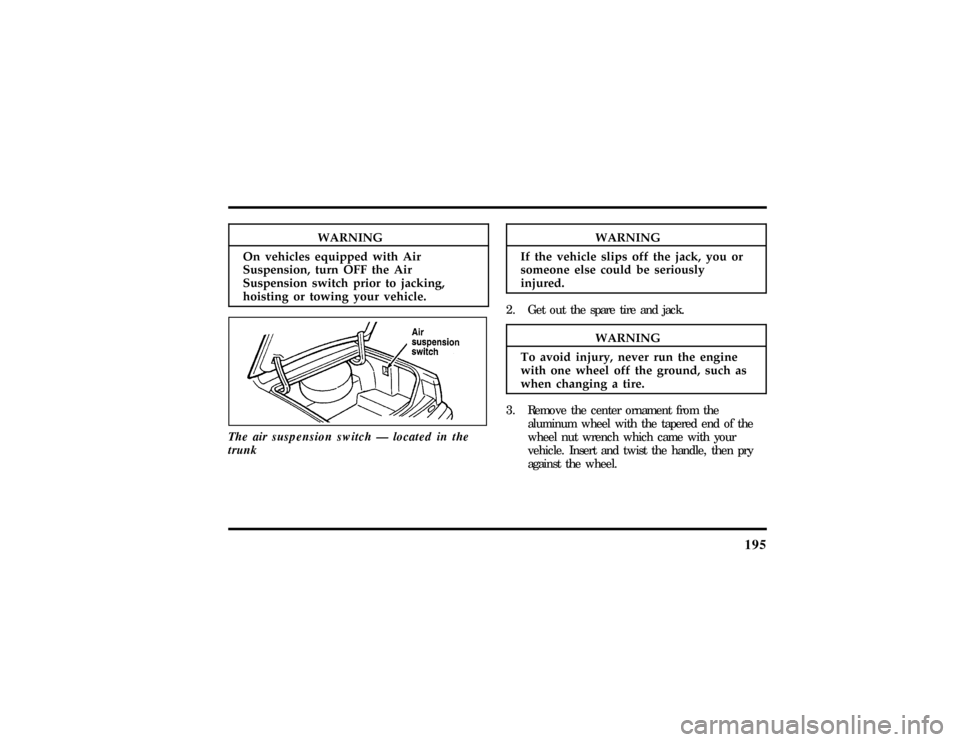
195
WARNING
On vehicle sequippe dwit hAir
WA RNING
If th evehicl eslip sof fth ejack ,yo uor
WARNING
To avoi dinjury ,neve rru n theengine
Page 207 of 305

205
If the acid touches someone's skin, eyes, or
clothing, immediately flush the area with water for
at least 15 minutes. If someone swallows the acid,
have him or her drink lots of milk or water first,
then Milk of Magnesia, a beaten egg, or vegetable
oil. Call a doctor immediately.
To avoid damaging your vehicle or your battery,
and to avoid injury to yourself, follow these
directions for preparing your vehicle to jump-start
and connecting the jumper cables in the order they
are given. If in doubt, call for road service.Preparing Your Vehicle1. Your vehicle has a 12-volt starting system, so
you need to use a 12-volt jumper system. You
will damage your starting motor, ignition
system, and other electrical parts if you connect
them to a 24-volt power supply (either two
12-volt batteries in series or a 24-volt generator
set).2. Do not disconnect the battery of the disabled
vehicle. You could damage the vehicle's
electrical system.
3. Park the booster vehicle close to the hood of
the disabled vehicle.Make sure the vehicles
do not touch each other.Set the parking
brake on both vehicles and stay clear of the
engine cooling fan and other moving parts.
4. Check all battery terminals and remove any
excessive corrosion before you attach the
jumper cables.
5. Turn on the heater fan in both vehicles. Press
the DEFROST button. Turn off all other
switches and gauges.
File:10fnert.ex
Update:Thu Jun 20 15:16:36 1996