Page 23 of 305
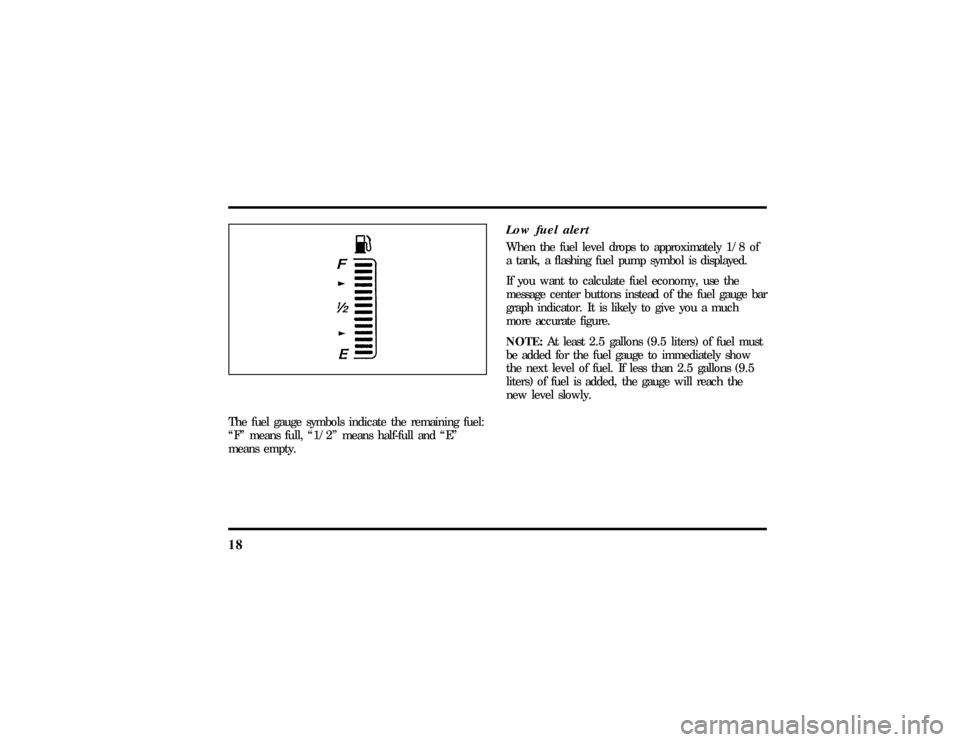
18The fuel gauge symbols indicate the remaining fuel:
ªFº means full, ª1/2º means half-full and ªEº
means empty.
Low fuel alertWhen the fuel level drops to approximately 1/8 of
a tank, a flashing fuel pump symbol is displayed.
If you want to calculate fuel economy, use the
message center buttons instead of the fuel gauge bar
graph indicator. It is likely to give you a much
more accurate figure.
NOTE:At least 2.5 gallons (9.5 liters) of fuel must
be added for the fuel gauge to immediately show
the next level of fuel. If less than 2.5 gallons (9.5
liters) of fuel is added, the gauge will reach the
new level slowly.
File:03fnist.ex
Update:Mon Jun 17 13:46:47 1996
Page 40 of 305

35
Luxury Audio SystemUsing the Controls on Your New RadioHow to turn the radio on and offPress the ªVOL/PUSH ONº knob to turn the radio
on. Press again to turn it off.How to adjust the volumeTurn the ªVOL/PUSH ONº knob clockwise to
increase the volume and counter-clockwise to
decrease the volume.
Volume may also be controlled by the Redundant
Control Switch located on your steering wheel (if
equipped). PressAon the ªVOLº button to
increase the volume andBon the ªVOLº button
to decrease the volume.NOTE:If the volume is set above a certain level
when the ignition is turned off, the volume level
will reset to a ªnominalº listening level when the
ignition switch is turned back on. However, if the
radio is turned off with the ªVOL/PUSH ONº knob,
the volume will not reset and will stay at the same
level when the radio is turned back on.
Selecting the AM or FM frequency bandPush the ªAMº or ªFM1/FM2º button to select the
desired frequency band. Pushing the ªFM1/FM2º
button more than once will alternate between FM1
and FM2. These functions are used with the
memory preset buttons described underHow to
tune radio stations.
You may also select AM, FM1 or FM2 by
depressing the ªBANDº button located on the
Redundant Control Switch on your steering wheel
(if equipped).
File:04fnast.ex
Update:Thu Jun 20 15:13:21 1996
Page 41 of 305

36How to tune radio stationsThere are four ways for you to tune in a particular
station. You can use the ªTUNEº, ªSEEKº, ªSCANº
or memory buttons.q
Using the ªTUNEº function
You can change the frequency up or down one
increment at a time by pressing and releasing either
the left
bor right
aside of the ªTUNEº or
ªTUNE DISCSº button. To change frequencies
quickly, press and hold down either the right or left
side of the button.
Manual tuning adjusts your radio to any allowable
broadcast frequency, whether or not a station is
present on that frequency. (SeeAll About Radio
Frequenciesin this section.)
q
Using the ªSEEKº function
Press the right
aside of the ªSEEKº button to
select the next listenable station up the frequency
band. Press the left
bside of the button to select
the next listenable station down the frequency
band. By holding the button down, listenable
stations can be passed over to reach the desired
station.
q
Using the ªSCANº function
Pressing the ªSCANº button will begin the scan
mode up the frequency band, stopping on each
listenable station for approximately five seconds.
To stop the scan mode on the presently sampled
station, press the ªSCANº button again.
q
Setting the station MEMORY PRESET buttons
Your radio is equipped with 6 station memory
buttons. These buttons can be used to select up
to 6 preset AM stations and 12 FM stations (6
in FM1 and 6 in FM2)
File:04fnast.ex
Update:Thu Jun 20 15:13:21 1996
Page 42 of 305

37
1. Select a band, then select a frequency.
2. Press one of the memory buttons and hold
until the sound returns and the lamp above the
memory button lights up. That memory button
is now set.
3. Follow the above steps for each memory preset
button.Using the Automatic Memory Store feature
(ªAUTOSETº)If the memory buttons have been set, either by
using the Auto Memory Load feature or if you have
set them manually, the system is prepared to let
you use a convenient feature calledAutomatic
Memory Store.
With Auto Memory Store, you can continually set
strong stations into your memory buttons without
losing your originally set stations. Your radio will
automatically set your memory buttons to the strong
local stations.Activate Auto Memory Store by pushing the
ªAUTOSETº button once. Your radio will set the
first six strong stations of the band you are in (AM,
FM1 or FM2) into the memory buttons. The display
will flash ªAUTOº and display the autoset icon ªAº
while the stations are being set in the memory
buttons.
NOTE: If there are less than six strong stations in
the frequency band, the remaining unfilled buttons
will store the last strong station detected on the
band. After all stations have been filled, the radio
will begin playing the station stored on memory
button 1.
To deactivate the Auto Memory Store mode and
return to the manually-set memory button stations,
simply push the ªAUTOSETº button. Display will
show ªAUTOº then ªOFFº. The next time Auto
Memory Store is activated on that band, the radio
will store the next set of six strong stations.
File:04fnast.ex
Update:Thu Jun 20 15:13:21 1996
Page 59 of 305
55
Controls and FeaturesThe Climate Control SystemElectronic Automatic Temperature
Control SystemThe Electronic Automatic Temperature Control
(EATC) module is located at the center of the
instrument panel and operates only when the key is
in the ON position.The EATC feature maintains the temperature you
select and automatically controls the airflow for
your comfort. It also allows you to override the
automatic operation with manual override buttons.
File:05fncft.ex
Update:Mon Jun 17 13:49:49 1996
Page 60 of 305
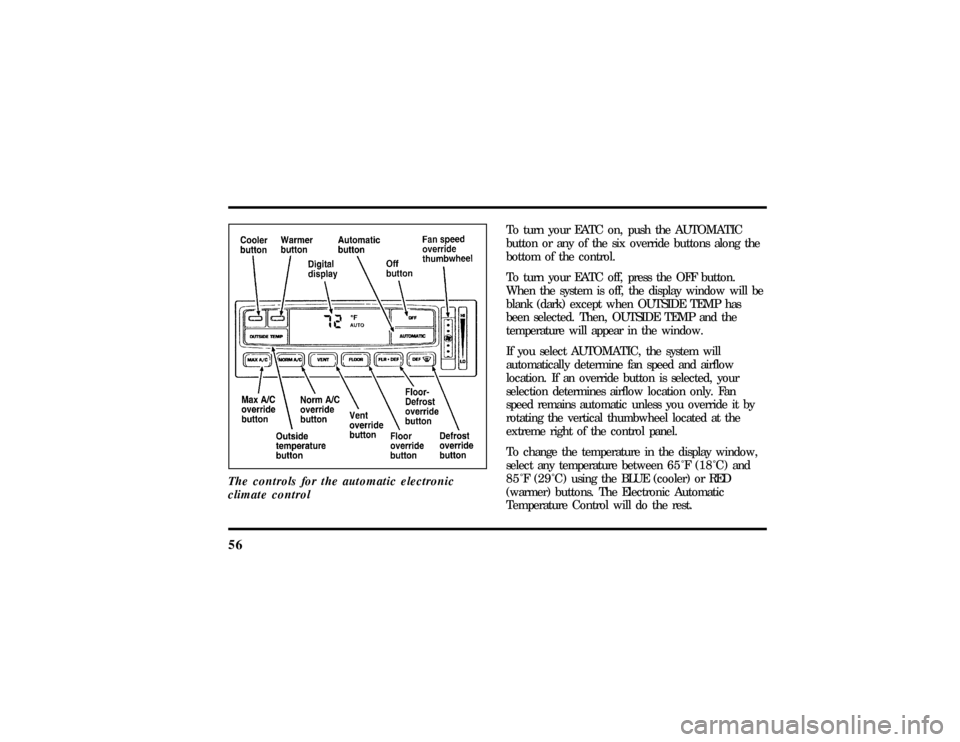
56The controls for the automatic electronic
climate control
To turn your EATC on, push the AUTOMATIC
button or any of the six override buttons along the
bottom of the control.
To turn your EATC off, press the OFF button.
When the system is off, the display window will be
blank (dark) except when OUTSIDE TEMP has
been selected. Then, OUTSIDE TEMP and the
temperature will appear in the window.
If you select AUTOMATIC, the system will
automatically determine fan speed and airflow
location. If an override button is selected, your
selection determines airflow location only. Fan
speed remains automatic unless you override it by
rotating the vertical thumbwheel located at the
extreme right of the control panel.
To change the temperature in the display window,
select any temperature between65ÊF(18ÊC) and
85ÊF(29ÊC)using the BLUE (cooler) or RED
(warmer) buttons. The Electronic Automatic
Temperature Control will do the rest.
File:05fncft.ex
Update:Mon Jun 17 13:49:49 1996
Page 62 of 305

58When in AUTOMATIC and weather conditions
require heat, air will be sent to the floor. But, a
feature is included in your EATC to prevent
blowing cold air to the floor if the engine coolant is
not warm enough to allow heating. For a short
time the fan will be at low speed and air directed
to the windshield. In 3-1/2 minutes or less, the fan
speed will start to increase and the airflow will
change to the floor area.
If unusual conditions exist (i.e., window fogging,
etc.), the six manual override buttons allow you to
select special air discharge locations. A thumbwheel
allows you to adjust the fan speed to suit your
needs.
Temperature selectionThe RED and BLUE buttons at the upper left of the
Control are for temperature selection. The RED
button will increase the set temperature and the
BLUE button will lower the set temperature.
Pressing a button and releasing it will change the
set temperature one degree. Holding either button
in will rapidly change the temperature setting in
one degree increments to either65ÊF(18ÊC)
(BLUE) or85ÊF(29ÊC)(RED).Then, the set
temperature will jump 5 Ê and stop at either60ÊF
(16ÊC)which is maximum cooling or90ÊF(32ÊC)
which is maximum heating.
The average temperature range used is between
68ÊF(20ÊC) and78ÊF(26ÊC).Changing the
temperature setting by several degrees outside this
range or overriding to60ÊF(16ÊC) or90ÊF(32ÊC)
will not speed up the heating or cooling process.
File:05fncft.ex
Update:Mon Jun 17 13:49:49 1996
Page 63 of 305
59
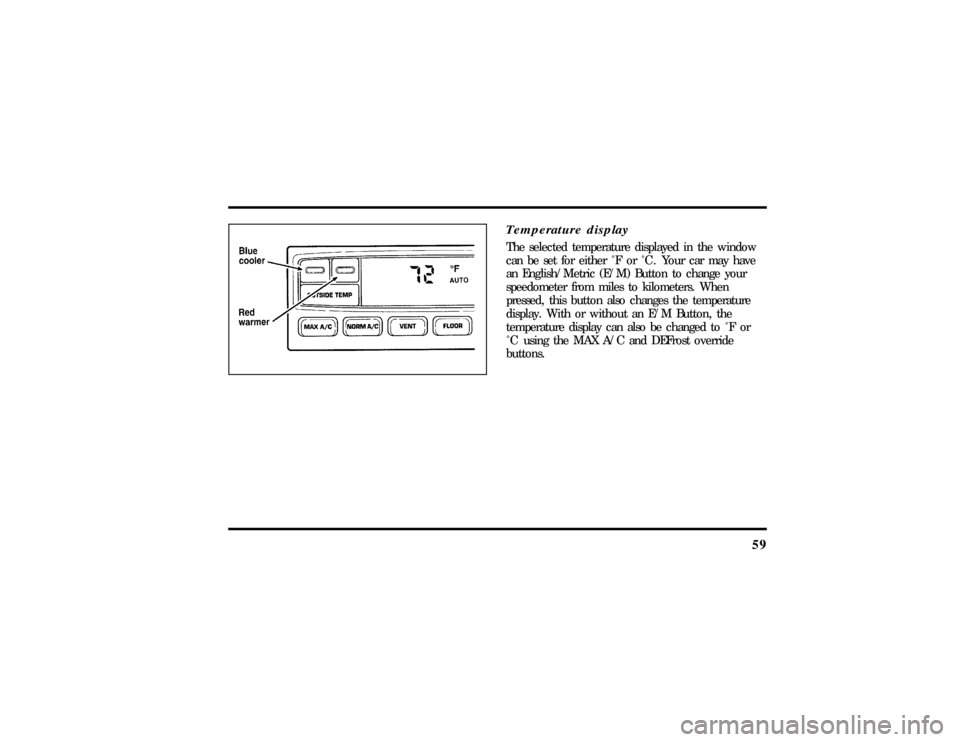
Temperature displayThe selected temperature displayed in the window
can be set for either Ê F or Ê C . Your car may have
an English/Metric (E/M) Button to change your
speedometer from miles to kilometers. When
pressed, this button also changes the temperature
display. With or without an E/M Button, the
temperature display can also be changed to Ê F or
Ê C using the MAX A/C and DEFrost override
buttons.
File:05fncft.ex
Update:Mon Jun 17 13:49:49 1996