Page 69 of 236
Locking the doors
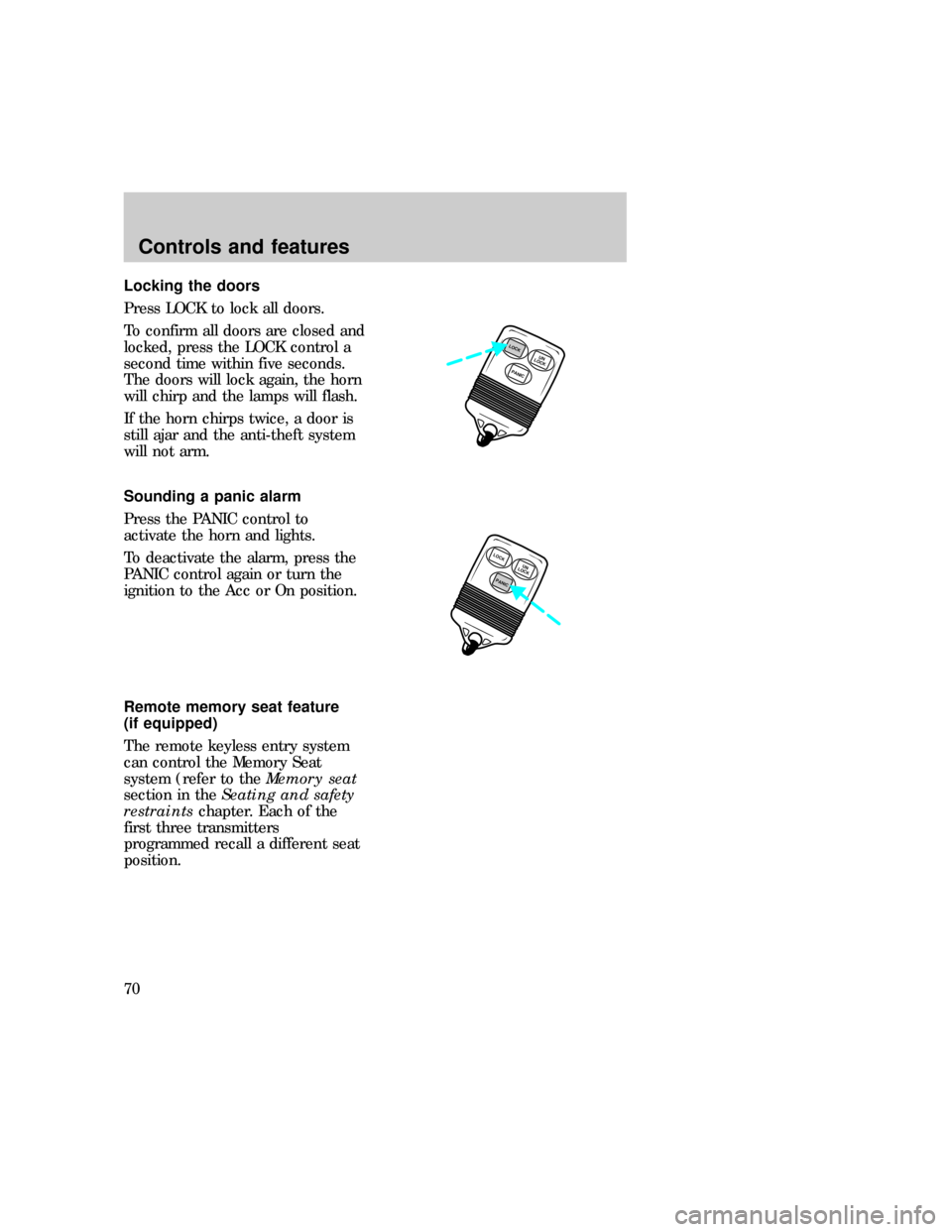
Press LOCK to lock all doors.
To confirm all doors are closed and
locked, press the LOCK control a
second time within five seconds.
The doors will lock again, the horn
will chirp and the lamps will flash.
If the horn chirps twice, a door is
still ajar and the anti-theft system
will not arm.
Sounding a panic alarm
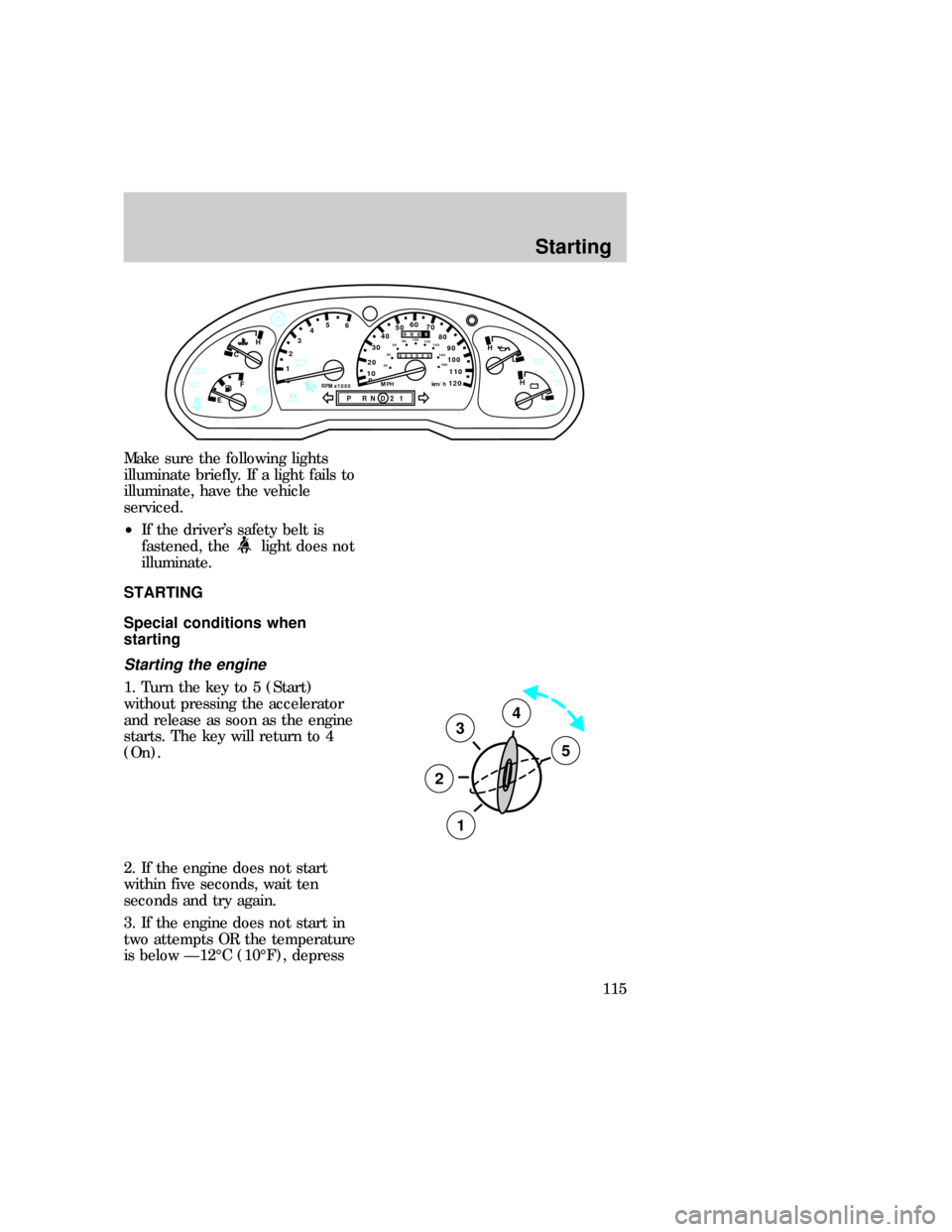
Press the PANIC control to
activate the horn and lights.
To deactivate the alarm, press the
PANIC control again or turn the
ignition to the Acc or On position.
Remote memory seat feature
(if equipped)
The remote keyless entry system
can control the Memory Seat
system (refer to theMemory seat
section in theSeating and safety
restraintschapter. Each of the
first three transmitters
programmed recall a different seat
position.
PANICUN
LOCKLOCK
LOCK
PANICUN
LOCK
uno_remote_panic
uno_remote_memory_seat
Controls and features
70
Page 73 of 236
KEYLESS ENTRY SYSTEM
(IF EQUIPPED)
You can lock or unlock the vehicle
doors without using a key by using
the drivers door keypad.
See alsoRemote entry system (if
equipped)in this chapter.
The computer code that operates
the keyless system is located on
your owners wallet card found in
the glove compartment.
When any button on the driver's
door keypad is pressed the system
will:
²turn on the interior lights for
approximately 25 seconds and
²light up the keypad controls for
five seconds.
Do not push the control keypad
with any hard object that could
damage the controls.
Locking the doors with the
keyless entry system
To lock all the doors, press 7/8 and
9/0 at the same time. It is not
necessary to first enter the keypad
code.
Unlocking the doors with the
keyless entry system
The driver door must be unlocked
before any other. If more than five
seconds pass between pressing
numbers, enter the code again.
123
45678
90
123
45678
90
com_keyless_locking.01
uno_keyless_unlocking
Controls and features
74
Page 114 of 236
Make sure the following lights
illuminate briefly. If a light fails to
illuminate, have the vehicle
serviced.
²If the driver's safety belt is
fastened, the
light does not
illuminate.
STARTING
Special conditions when
starting
Starting the engine
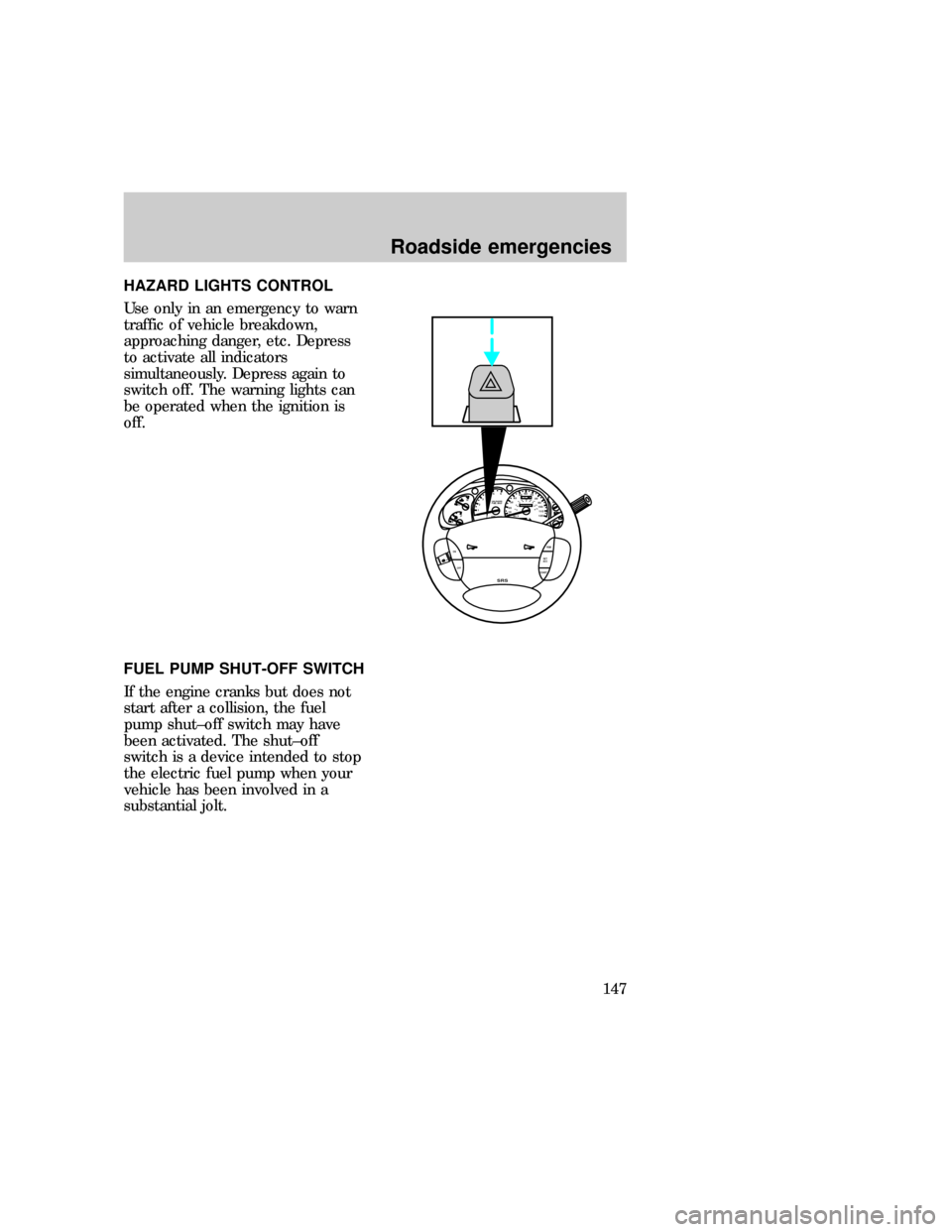
1. Turn the key to 5 (Start)
without pressing the accelerator
and release as soon as the engine
starts. The key will return to 4
(On).
2. If the engine does not start
within five seconds, wait ten
seconds and try again.
3. If the engine does not start in
two attempts OR the temperature
is below Ð12ÉC (10ÉF), depress
0ABS
- +
P RND21RPM x 1000
12345
6- +
H
H
L LH
C
F
E
!BRAKE
CHECK
GAGE
0
20
1030405060
70
80
90
110
120000000
oooo
10020406080100
120
140
160
180
MPH km/hDOOR
AJARCHECK
GAUGE
O/D
OFF4WD
LOW 4WD SPEED
CONT
3
2
1
5
4
uno_special_conditions_title
uno_starting_vehicle
Starting
115
Page 133 of 236

Allow more stopping distance and
drive slower than usual. Consider
using one of the lower gears.
Control trac system indicator
lights
4WD and 4WD LOW indicator
lights are located in the instrument
cluster. If either light flashes, see
your dealer or qualified service
technician.
The indicator lights will also
illuminate under the following
conditions:
²4WD AUTO modeÐ Neither
light will illuminate.
²4WD HIGH modeÐ Only the
4WD high light illuminates.
²4WD LOW modeÐ The 4WD
LOW light illuminates.
ALL WHEEL DRIVE (AWD)
SYSTEM (5.0L ENGINES ONLY)
Your vehicle is equipped with an
all wheel drive (AWD) transfer
case. Power is constantly supplied
to all four wheels through the
transfer case. The AWD system is
full time and has no external
controls.
Like all utility type vehicles, your
AWD vehicle has special design
and equipment features that make
it capable of performing in a
variety of off-road applications.
Specific design characteristics give
these vehicles higher centers of
gravity than ordinary passenger
cars.
4WD
4WD
LOW
uno_indicator_lights
uno_awd
Driving
134
Page 142 of 236
Trailer weight range
The range is between zero and the
maximum trailer weight rating
found in this chapter.
Using trailer brakes
Use electric brakes or manual,
automatic or surge type hydraulic
brakes that meet Federal and local
regulations. Install and adjust
brakes according to the
manufacturer's instructions.
Do not connect a trailer's
hydraulic brake system
directly to your vehicle's brake
system. Your vehicle may not
have enough braking power and
your chances of having a
collision greatly increase.
Using safety chains
Always connect the trailer's safety
chains to the vehicle. To connect
the chains, cross the chains under
the trailer tongue and attach to the
vehicle frame or hook retainers
(not the bumper). Make sure there
is enough slack to allow the vehicle
to turn corners.
Using trailer lamps
See your local trailer retailer or
rental agency for proper
instructions and equipment for
hooking up trailer lamps.
Do not hook the trailer lights
directly into the vehicle's wiring
system. If the trailer lamps are not
uno_brakes_trailer
uno_safety_chains
uno_lamps_trailer
Driving
143
Page 143 of 236

working properly, the warning
lights in the instrument cluster
may not work properly.
Using a hitch
Do not use hitches that:
²clamp onto the vehicle bumper
²attach to the axle.
Distribute the load so that only 10
to 15% of the total weight of the
trailer is on the tongue. tie down
the load so that it does not shift
and change the weight on the
hitch. Follow the towing
instructions of a reputable rental
agency.
Driving while towing a trailer
Do not drive faster than 70 km/h
(45 mph) while towing a 454 kg
(1000 lb) trailer. Do not drive
faster than 72 km/h (45 mph) with
any weight trailer while towing in
hilly terrain or on hot days.
Speed control (if equipped) may
not work properly while towing on
long, steep grades.
If driving with an automatic
transmission:
²use D or L rather than while
towing up or down steep hills
²anticipate stops and brake
gradually.
Towing behind another vehicle
Do not tow your vehicle behind
another vehicle, such as an RV,
unless front wheel dollies are used.
uno_hitch
uno_driving_towing
uno_towing_behind
Driving
144
Page 146 of 236
HAZARD LIGHTS CONTROL
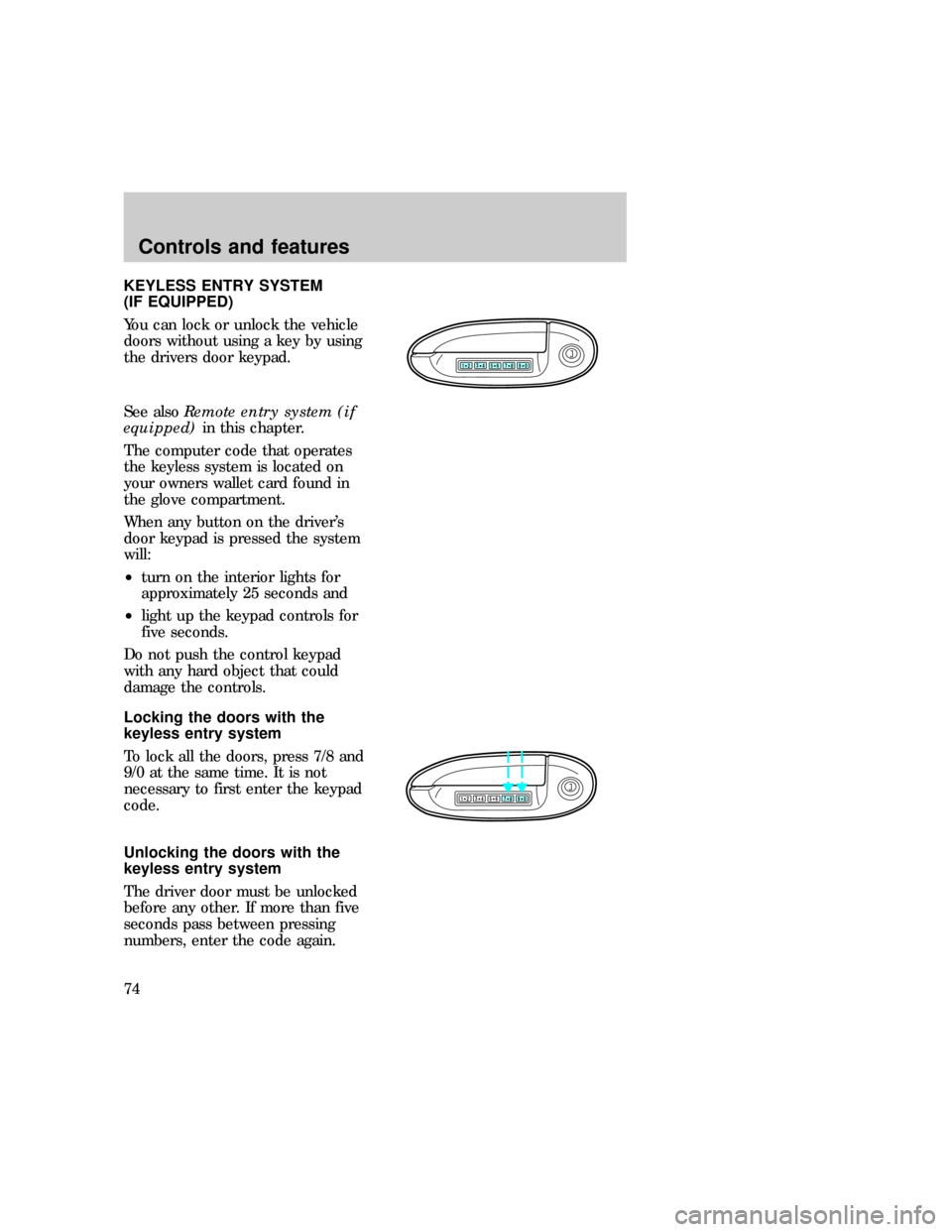
Use only in an emergency to warn
traffic of vehicle breakdown,
approaching danger, etc. Depress
to activate all indicators
simultaneously. Depress again to
switch off. The warning lights can
be operated when the ignition is
off.
FUEL PUMP SHUT-OFF SWITCH
If the engine cranks but does not
start after a collision, the fuel
pump shut±off switch may have
been activated. The shut±off
switch is a device intended to stop
the electric fuel pump when your
vehicle has been involved in a
substantial jolt.
0P RND21
UNLEADED
FUEL ONLY
RPM x 100012345
6H
C
F
E
RSM
SET
ACC
COAST OFF ON
SRS
- +H
H
L L020
1030405060
70
80
90
110
120000000oooo
km/h10020406080100
120
140
160
180
uno_hazard_switch uno_fuel_shut-off
Roadside emergencies
147
Page 208 of 236

the on-board diagnostic (OBD-II)
system. If your ªcheck
engine/service engine soonº light is
on, reference the applicable light
description in theWarning Lights
and Gaugessection of your
owners guide. Your vehicle may
not pass the I/M test with the
ªcheck engine/service engine soonº
light on.
If the vehicle's powertrain system
or its battery has just been
serviced, the OBD-II system is
reset to a ªnot ready for I/M testº
condition. To ready the OBD-II
system for I/M testing, a minimum
of 30 minutes of city and highway
driving is necessary as described
below:
²First, at least ten minutes of
driving on an expressway or
highway.
²Next, at least twenty minutes
driving in stop and go, city type
traffic with at least four idle
periods.
Allow the vehicle to sit for at least
8 hours without starting the
engine. Then, start the engine and
complete the above driving cycle.
The engine must warm up to it's
normal operating temperature.
Once started, do not turn off the
engine until the above driving
cycle is complete.
Maintenance and care
209