1997 CHEVROLET MALIBU lock
[x] Cancel search: lockPage 137 of 354
Downloaded from www.Manualslib.com manuals search engine AUTO TONE: This feature allows you to choose preset
bass and treble equalization settings designed for
classical, news, rock,
pop, country/western and jazz
stations. C/W will appear on the display when you first
press AUTO TONE. Each time
you press it, another
setting will appear on the display. Press it again after
JAZZ appears and the AUTO TONE display will go
blank. Tone control will return to the BASS and TREB
knobs. Also, if you use the BASS and TREB knobs,
control will return to them and the AUTO TONE
display will go blank.
Adjusting the Speakers
BAL:
Press this knob lightly so it extends. Turn
the knob clockwise for the right speakers and
counterclockwise for the left speakers. The middle
position balances the sound between the speakers.
FADE: Press this knob lightly so it extends. Turn the
knob clockwise to adjust the sound
to the front speakers
and counterclockwise for the rear speakers. The middle
position balances the sound between
the speakers.
Push these knobs back into their stored positions when
you’re not using them.
Playing a Compact Disc
Insert a disc partway into the slot, label side up. The
player will pull it in. The disc should begin playing. The
display will show CD and the CD symbol. If you want
to insert
a compact disc with the ignition off, first press
RECALL or EJECT.
If you’re driving on a very rough road or if it’s very hot,
the disc may not play and
ERR (error) may appear on
the display. Press RECALL to take ERR off the display.
When things get back to normal, the disc should play. If
the disc comes out, it could be that:
The disc is upside down.
It is dirty, scratched or wet.
It is very humid. (If so, wait about an hour and
try again.)
PREY (1): Press this button or the left SEEK arrow to
go to the previous track if the current selection has been
playing for less than eight seconds. If the PREV button
is pressed and the current selection has been playing for
more than eight seconds,
it will go to the beginning of
the current selection.
If you hold the button or press it
more
than once, the player will continue moving back
through the disc. The sound will mute while seeking.
3-16
Page 140 of 354
Downloaded from www.Manualslib.com manuals search engine PRO& Press this button on the remote cassette player
to go from one side of the tape to the other.
CDPLAY: After a cassette tape and a CD have been
inserted, press the CDRLAY button to switch between
the CD player and the cassette tape player. Both features
cannot be played at the same time.
EJECT: Press this button on the remote cassette player
to remove the tape. EJECT can be used with either the
ignition or radio
off. Also, you must press EJECT before
loading a cassette with the radio
off to allow loading. If
you leave a cassette tape in the player while listening to
the radio, it may become warm.
CLN: If this message appears on the display, the
cassette tape player needs to be cleaned. It will still
play tapes, but you should clean it as soon as possible to prevent damage to the tapes and player. See “Care
of
Your Cassette Tape Player” in the Index. After you clean
the player, press
and hold RECALL on the radio and the
EJECT button on the remote cassette for five seconds to
reset the
CLN indicator. The radio will display --- to
show the indicator was reset.
Theft-Deterrent Feature
THEFTLOCK” is designed to discourage theft of your
radio. It works by using a secret code to disable all radio
functions whenever battery power
is removed.
The THEFTLOCK feature for the radio may be used or
ignored. If ignored, the system plays normally and the
radio is not protected by the feature. If THEFTLOCK is
activated, your radio will not operate if stolen.
When THEFTLOCK is activated, the radio will display
LOC to indicate a locked condition anytime battery
power has been interrupted. If your battery loses power
for any reason, you must unlock the radio with the secret
code before it will operate.
3-19
Page 141 of 354
Downloaded from www.Manualslib.com manuals search engine Activating the Theft-Deterrent Feature
The instructions which follow, explain how to enter
your secret code to activate the
THEFTLOCK system.
It is recommended that you read through all nine steps
before starting the procedure.
NOTE:
If you allow more than 15 seconds to elapse
between any steps, the radio automatically reverts to
time and you must start the procedure over at Step
4.
1.
2.
3.
4.
Write down any three or four-digit number from
000 to 1999 and keep it in a safe place separate
from the vehicle.
Turn the ignition to
ACCESSORY or ON.
Turn the radio off.
Press the 1 and 4 buttons together. Hold them down
until
--- shows on the display. Next you will use the
secret code number which you have written down.
5. Press MN and 000 will appear on the display.
6. Press MN again to make the last two digits agree
7. Press HR to make the first one or two digits agree
8. Press AM-FM after you have confirmed that the
with your code.
with your code.
code matches the secret code you have written down.
The display will show REP
to let you know that you
need to repeat Steps
5 through 7 to confirm your
secret code.
9. Press AM-FM and this time the display will show
SEC to let you know that your radio is secure. The
indicator by the volume control will begin flashing
when the ignition is turned
off.
3-20
Page 142 of 354
Downloaded from www.Manualslib.com manuals search engine Unlocking the Theft-Deterrent Feature After a
Power Loss
Enter your secret code as follows; pause no more than
15 seconds between steps:
1. LOC appears when the ignition is on.
2. Press MN and 000 will appear on the display.
3. Press MN again to make the last two digits agree
4. Press HR to make the first one or two digits agree
with your
code.
with your code.
5. Press AM-FM after you have confirmed that the
code matches the secret code you have written down.
The display will show SEC, indicating the radio is
now operable and secure.
If you enter the wrong code eight times, INOP will
appear on the display. You will have to wait an hour
with the ignition on before you can
try again. When
you try again, you will only have three chances to
enter the correct code before INOP appears.
If
you lose or forget your code, contact your dealer.
Disabling the Theft-Deterrent Feature
Enter your secret code as follows; pause no more than
15 seconds between steps:
1. Turn the ignition to ACCESSORY or ON.
2. Turn the radio off.
3. Press the 1 and 4 buttons together. Hold them down
4. Press MN and 000 will appear on the display.
5. Press MN again to make the last two digits agree
6. Press HR to make the first one or two digits agree
7. Press AM-FM after you have confirmed that the
until SEC shows on the display.
with your code.
with your code. code matches the secret code you have written down.
The display will show
---, indicating that the radio is
no longer secured.
If the code entered is incorrect, SEC will appear on the
display. The radio will remain secured until the correct
code is entered.
When battery power is removed and later applied to a
secured radio, the radio won’t turn on and
LOC will
appear on the display.
To unlock a secured radio, see “Unlocking the
Theft-Deterrent Feature After a Power
Loss” earlier
in this section.
Page 148 of 354
Downloaded from www.Manualslib.com manuals search engine Section 4 Your Driving and the Road
Here you’ll find information about driving on different kinds of roads and in varying weather conditions. We’ve also
included many other useful tips on driving.
4-2 4-3
4-6 4-6
4-7
4-9
4-9
4-1 1 4-12
4-13 Defensive Driving
Driving Drunk
Having Control of Your Vehicle
Your Braking System Information
Anti-Lock Brake Information
Braking in Emergencies
Steering Tips
Off-Road Recovery Tips
Passing Other Vehicles
Losing Control of Your Vehicle 4-
14
4-16
4-2 1
4-22
4-22
4-24
4-26
4-28
4-30
4-32 Night Driving
Driving in Rain and on
Wet Roads
Tips Before Leaving on a Long Trip
Avoiding Highway Hypnosis
Driving on Hills and Mountains
Winter Driving
If You’re Caugh.t in a Blizzard
Recreational Vehicle Towing
Loading Your Vehicle
Helpful Hints for Towing a Trailer
Page 154 of 354
Downloaded from www.Manualslib.com manuals search engine Avoid needless heavy braking. Some people drive
in spurts -- heavy acceleration followed by heavy
braking
-- rather than keeping pace with traffic. This is a
mistake. Your brakes may not have time to cool between
hard stops. Your brakes will wear out much faster if you
do a lot of heavy braking. If you keep pace with the
traffic and allow realistic following distances, you will
eliminate a lot
of unnecessary braking. That means
better braking and longer brake life.
If your engine ever stops while you’re driving, brake
normally but don’t pump your brakes. If you do, the
pedal may get harder
to push down. If your engine
stops, you will still have some power brake assist. But
you will use
it when you brake. Once the power assist is
used up, it may take longer to stop and the brake pedal
will be harder to push.
Anti-Lock Brakes (ABS)
Your vehicle has anti-lock brakes (ABS). ABS is an
advanced electronic braking system that will help
prevent a braking
skid.
If there’s a problem with the
anti-lock brake system, this
warning light will stay on.
See “Anti-Lock Brake
System Warning Light” in
the Index.
4-7
Page 155 of 354
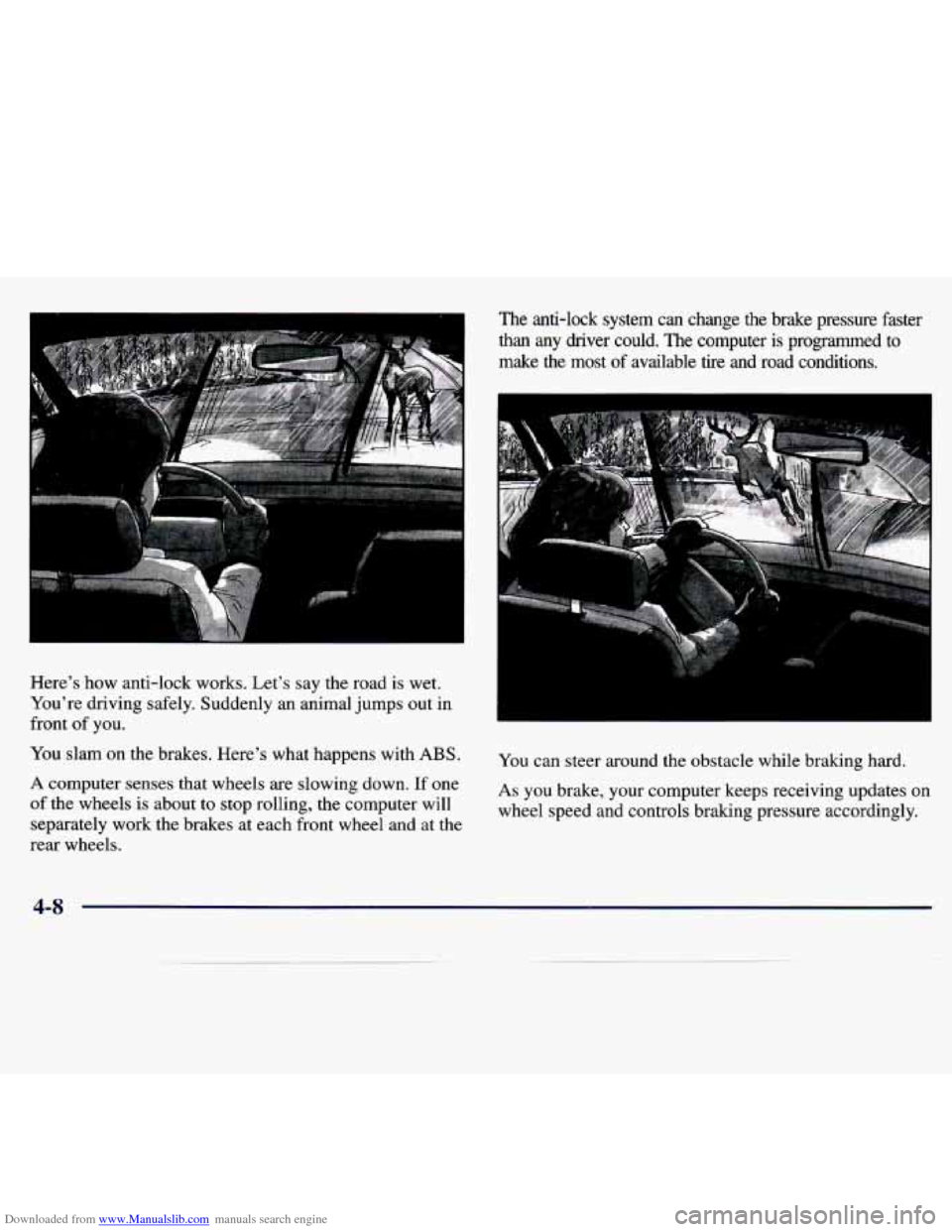
Downloaded from www.Manualslib.com manuals search engine Here’s how anti-lock works. Let’s say the road is wet.
You’re driving safely. Suddenly an animal jumps out in
front
of you.
You slam on the brakes. Here’s what happens with
ABS.
A computer senses that wheels are slowing down. If one
of the wheels
is about to stop rolling, the computer will
separately work the brakes at each front wheel and at the
rear wheels.
The anti-lock system can change the brake pressure faster
than any driver could. The computer is programmed to
make the most of available
tire and road conditions.
You can steer around the obstacle while braking hard.
As you brake, your computer keeps receiving updates on
wheel speed and controls braking pressure accordingly.
4-8
Page 156 of 354
Downloaded from www.Manualslib.com manuals search engine Remember: Anti-lock doesn’t change the time you need
to get your foot up to the brake pedal or always decrease
stopping distance. If you get too close to the vehicle in
front
of you, you won’t have time to apply your brakes
if that vehicle suddenly slows or stops. Always leave
enough room up ahead to stop, even though you have
anti-lock brakes.
Using Anti-Lock
Don’t pump the brakes. Just hold the brake pedal
down and let anti-lock work for you. You may feel the
system working, or you may notice some noise, but this
is normal.
Braking in Emergencies
With anti-lock, you can steer and brake at the same
time. In many emergencies, steering can help you more
than even the very best braking.
Steering
Power Steering
If you lose power steering assist because the engine
stops or the system
is not functioning, you can steer but
it will take much more effort.
Steering Tips
Driving on Curves
It’s important to take curves at a reasonable speed.
A lot of the “driver lost control’’ accidents mentioned on
the news happen on curves. Here’s why:
Experienced driver or beginner, each of
us is subject to
the same laws of physics when driving on curves. The
traction of the tires against the road surface makes it
possible for the vehicle to change its path when you turn
the front wheels. If there’s no traction, inertia will keep
the vehicle going in the same direction. If you’ve ever
tried to steer a vehicle
on wet ice, you’ll understand this.
The traction you can get
in a curve depends on the
condition
of your tires and the road surface, the angle at
which the curve is banked, and your speed. While you’re
in a curve, speed is the one factor you can control.
Suppose you’re steering through
a sharp curve. Then you
suddenly accelerate. Both control systems
-- steering and
acceleration
-- have to do their work where the tires meet
the road. Adding the sudden acceleration
can demand too
much of those places.
You can lose control.
4-9