1997 CHEVROLET EXPRESS ECO mode
[x] Cancel search: ECO modePage 144 of 386
Downloaded from www.Manualslib.com manuals search engine SCAN: Press and hold SEEK for two seconds until
SCAN appears on the display. SCAN allows you to
listen to stations for a few seconds. The receiver will
continue to scan and momentarily stop at each station
until you press the button again. The sound will mute
while scanning.
PUSHBUTTONS: The six numbered pushbuttons let
you return to your favorite stations. You can set up to
18 stations (six AM, six FMl and six FM2). Just:
I. Turn the radio on.
2. Press AM-FM to select the band.
3. Tune in the desired station.
4. Press AUTO TONE to select the setting you prefer.
5. Press and hold one of the six pushbuttons. The sound
will mute. When it returns, release
the button.
Whenever
you press that numbered button, the
station
you set will return and the tone you selected
will be automatically selected for that button.
6. Repeat the steps for each pushbutton.
P.SCAN: The preset scan button lets you scan through
your favorite stations stored
on your pushbuttons.
Select either the
AM, FMl or FM2 mode and then press P.SCAN. It will
scan through each station stored on
your pushbuttons and stop for a few seconds before
continuing
to scan through all of the pushbuttons.
Press P.SCAN again or one of the pushbuttons
to stop
scanning to listen to a specific stored station. P.SCAN
will light up
on the display while in this mode. If one of
the stations stored
on a pushbutton is too weak for the
location
you are in, the radio display will show the
channel number (PI-P6) for several seconds before
advancing to
the next preset station.
Setting the Tone
BASS:
Press lightly on this knob to release it from its
stored position. Turn the knob clockwise
to increase
bass and counterclockwise to decrease bass. When the
BASS control is rotated,
the AUTO TONE display will
go blank.
TREB: Press lightly on this knob to release it from its
stored position. Turn the knob clockwise to increase
treble and counterclockwise
to decrease treble. When
the TREB control is rotated,
the AUTO TONE display
will go blank. If a station
is weak or noisy, you may
want to decrease the treble.
Push these knobs back into their stored positions when
you’re not using them.
Page 145 of 386
Downloaded from www.Manualslib.com manuals search engine AUTO TONE: Press this button to select among the
six preset equalization settings and tailor the sound
to the music or voice being heard. Each time you
press the button, the selection will switch to one
of
the preset settings of CLASSIC, NEWS, ROCK, POP,
C/W (Country/Western) or JAZZ. To return to the
manual mode, press and release this button until the
AUTO TONE display goes blank. This will return the
tone adjustment to the BASS and
TREB controls. If a
BASS or TREB control is rotated, the AUTO TONE
display will
go blank.
Adjusting the Speakers
BAL: Press lightly on this knob to release it from its
stored position. Turn
the control clockwise to adjust
sound
to the right speakers and counterclockwise to
adjust sound to the left speakers. The middle position
balances the sound between
the speakers.
FADE: Press lightly on this knob to release it from its
stored position. Turn the control clockwise
to adjust the
sound
to the front speakers and counterclockwise for the
rear speakers. The middle position balances the sound
between the speakers.
Push these knobs back into their stored positions when
you’re
not using them.
Playing a Compact Disc
PWR:
Press this knob to turn the system on. (Please
note that
you can also turn the system on when
you insert a compact disc into the player with the
ignition on.)
Insert
a disc partway into the slot, label side up. The
player will pull
it in. Wait a few seconds and the disc
should play. CD and a CD symbol will also appear
on
the display. Anytime you are playing a CD, the letters
CD will be next
to the CD symbol.
If the disc comes back out and ERR appears on the
display,
it could be that:
0 You are driving on a very rough road. (The disc
should play when the road gets smoother.)
0 The disc is upside down.
0 It is dirty, scratched or wet.
0 It is very humid. (If so, wait about an hour and
try again.)
0 The disc player is very hot.
Press RECALL
to make ERR go off the display.
Page 146 of 386
Downloaded from www.Manualslib.com manuals search engine PREV (1): Press PREV or the SEEK left arrow to
search for the previous selection. If you hold this button
or press it more than once, the disc will advance further.
Sound is muted in this mode.
RDM (2): Press this button to play the tracks on the disc
in random order. While in the RDM mode, RANDOM
appears
on the display. Press RDM again to return to
normal play.
NEXT (3): Press NEXT or the SEEK right arrow to
search for
the next selection. If you hold this button or
press it more than once, the disc will advance further.
The next track number will appear on the display. Sound
is muted in this mode.
REV (4): Press and hold REV to return rapidly to a
favorite passage. You will hear the disc selection play at
high speed while
you press the REV button. This allows
you
to listen and find out when the disc is at the desired
selection. Release REV
to resume playing.
FWD (6): Press and hold this button to advance rapidly
within a track. You will hear the disc selection play at
high speed while
you press the FWD button. This allows
you to listen and find out when the disc is at the desired
selection. Release FWD
to resume playing.
RECALL: Press this button to see what track is playing.
Press
it again within five seconds to see how long the
CD has been playing that track. Elapsed time is
displayed in minutes and tenths of a second. The track
number will also appear when a new track begins
to
play. Press RECALL again to return to the time display.
AM-FM: While in the CD mode, press this button to
stop playing the CD and play the radio. The CD symbol
will still display but the word CD will be replaced with
either
AM, FMl or FM2. (If the radio is turned off, the
disc stays
in the player and will resume playing at the
point where
it stopped.)
CD AUX: To switch between the player and the radio
when a disc is playing, press
the AM-FM button. To
return to the player, press CD AUX. When a disc is
playing,
the letters CD and the CD symbol will appear
on the display. (If the radio is turned
off, the disc stays
in the player and will resume playing at the point where
it stopped.)
EJECT Press this button to eject the disc from the
player and play the radio. When the same
or a new disc
is inserted, the disc will start playing on track one. If a
compact disc is left sitting in the opening for more than
a few seconds, the player will pull
the CD back in. The
radio will continue playing. When the ignition is off,
press this button
to load a CD. If you leave a compact
disc in the player while listening
to the radio, it may
become warm.
Page 148 of 386
Downloaded from www.Manualslib.com manuals search engine NEXT (3): Press this button to advance to the next track
on the disc.
REV (4): Press and hold this button to quickly reverse
within a track.
As the CD reverses, elapsed time will
be displayed to help you find the correct passage.
FWD (6): Press and hold this button to quickly advance
within a track. As
the CD advances, elapsed time will be
displayed
to help you find the correct passage.
SEEK: Press the left arrow while playing a CD to go
back to the start of the current track. It will go back to
the current track if more than eight seconds have played.
Press the left arrow again
to go to previous tracks. Press
the right arrow to
go to the next higher track on the disc.
RANDOM: Press P.SCAN to enter the random play
mode. RANDOM will appear
on the display. While
in this mode, the tracks on the discs will be played
in
random order. If you press SEEK, PREV or NEXT
while in the random mode, the previous or next track
will be scanned randomly. Press P.SCAN again to
turn off RANDOM and return
to normal operation.
RECALL: Press this button to see what track is
currently playing. Press RECALL again within five
seconds to
see how long the track has been playing.
When
a new track starts to play, the track number will
also appear. Press RECALL a third time and the time
of day will be displayed.
TAPE AUX: With a disc loaded in the player and the
radio playing, press this button once to play the compact
disc.
To return to playing the radio, press AM-FM. If
both a cassette tape and CD are loaded, press TAPE
AUX to switch between the tape and compact disc.
EJECT Press this button on the remote player to eject a
compact disc. If you leave a compact disc in the player
while listening to the radio,
it may become warm.
Theft-Deterrent Feature
THEFTLOCK is designed to discourage theft of your
radio. It works by using a secret code to disable all radio
functions whenever battery power is removed.
The THEFTLOCK feature for the radio may be used or
ignored. If ignored, the system plays normally and the
radio is
not protected by the feature. If THEFTLOCK
is activated, your radio will not operate if stolen.
When THEFTLOCK is activated, the radio will display
LOC to indicate a locked condition anytime battery
power is removed. If your battery loses power for any
reason, you must unlock the radio with
the secret code
before it will operate.
Page 299 of 386
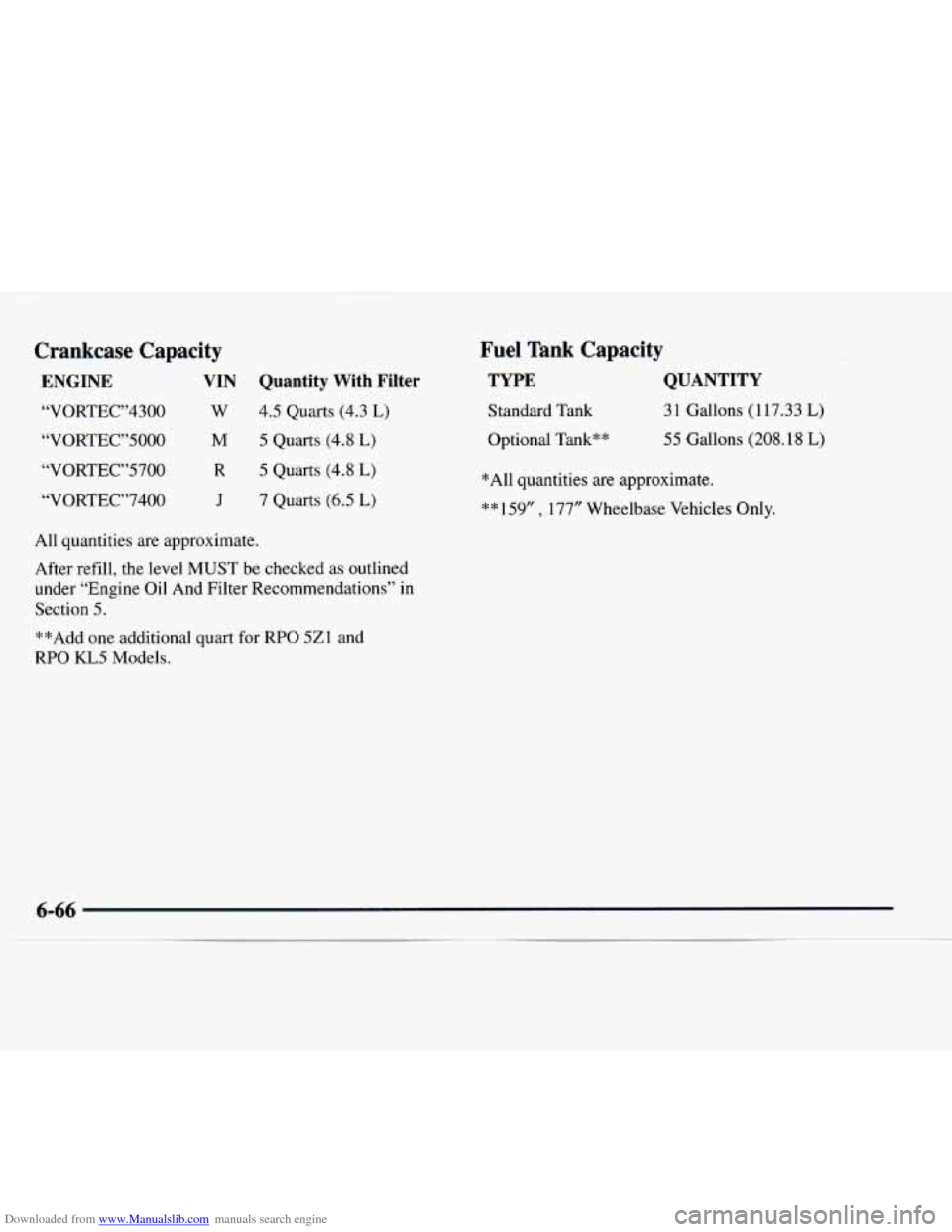
Downloaded from www.Manualslib.com manuals search engine Crankcase Capacity
ENGINE VIN Quantity With Filter
“VORTEC”4300 W 4.5 Quarts (4.3 L)
“VORTEC”5000 M 5 Quarts (4.8 L)
“VORTEC”5700 R 5 Quarts (4.8 L)
“VORTEC”7400 J 7 Quarts (6.5 L)
All quantities are approximate.
After refill, the level
MUST be checked as outlined
under “Engine Oil And Filter Recommendations”
in
Section 5.
**Add one additional quart for RPO 5Zl and
RPO KL5 Models.
Fuel Tank Capacity
TYPE QUANTITY
Standard Tank 31 Gallons (117.33 L)
Optional Tank** 55 Gallons (208.18 L)
*All quantities are approximate.
** 159” , 177” Wheelbase Vehicles Only.
Page 379 of 386

Downloaded from www.Manualslib.com manuals search engine Lights Air Bag Readiness
....................... 1.27. 2.5 1
Anti-Lock Brake System Warning ............ 2.53. 4.7
Brake System Warning
......................... 2-52
Daytime Running Lamps Indicator
............... 2-54
Interior
..................................... 2-40
Safety Belt Reminder
..................... 1 . I 1. 2.50
Service Engine Soon
.......................... 2-54
Loading Your Vehicle
........................... 4-27
Locks
......................................... 2-4
Door
........................................ 2-4
Ignition Transmission Lock Check
............... 7-47
PowerDoor
.................................. 2-5
Rear Door Security
............................. 2-5
Sliding Door Child Security
...................... 2-5
LossofControl
................................ 4-13
Lubricants and Fluids ............................ 7-5 1
Lubrication Service. Body ........................ 7-46
Maintenance. Normal Replacement
Parts ........... 6-67
Maintenance Record
............................ 7-53
Maintenance Schedule
............................ 7- 1
Long Tripmighway Definition ................... 7-6
Long Tripmighway Intervals
..................... 7-7
Owner Checks and Services
..................... 7-45
Periodic Maintenance Inspections
................ 7-49
Recommended Fluids and Lubricants
............. 7-5 1
Scheduled Maintenance Services .................. 7-4 Short
Trip/City Definition
....................... 7-5
Short Trip/City Intervals
........................ 7-5
Maintenance. Underbody
......................... 6-56
Maintenance When Trailer Towing
................. 4-37
Malfunction Indicator Lamp
...................... 2-54
ManualFrontSeat
............................... 1-2
Mirrors
....................................... 2-43
Convex Outside
.............................. 2-44
Inside Daymight Rearview
..................... 2-43
Power Remote Control
......................... 2-43
Visor Vanity
................................. 2-46
MMT
......................................... 6-4
Model Reference
................................. vi
Mountain Roads
................................ 4-22
Multifunction Lever
............................. 2-33
Neutral. Automatic Transmission ................. 2-21
New Vehicle Break-In ........................... 2-16
NightVision
................................... 4-15
Noise Control System
........................... 6-11
Odometer
.................................... 2-49
Odometer. Trip
................................. 2-49
Overheating Engine
............................. 5-12
Off-Road Recovery
............................. 4-11
Oil. Engine
.................................... 6-12
Owner Checks and Services
....................... 7-45
Owner Publications. Ordering
..................... 8-11