1997 CADILLAC SEVILLE ignition
[x] Cancel search: ignitionPage 80 of 370
Downloaded from www.Manualslib.com manuals search engine r
r
r
r
r
r
r
r
If the engine does not start and the “STARTING
DISABLED DUE TO THEFT SYSTEM, REMOVE
IGNITION
KEY” message is displayed in the Driver
Information Center, your key should be checked for
damage. Starting may be attempted with an undamaged
key immediately. See your Cadillac dealer or a
locksmith
fur key service.
If the “STARTING DISABLED DUE TO THEFT
SYSTEM,
REMOVE IGNITION KEY” and “WAIT
3 MINUTES” messages are displayed, the key should
be cleaned. After three minutes,
try again. A “START
CAR” message will appear
at this time. If the engine
still does not start, wait three minutes and try a duplicate
key. At this time, fuses should be checked (see “Fuses
and Circuit Breakers” in the Index). If the engine does
not start with the duplicate key, your vehicle needs
service. See your Cadillac dealer for service.
If the “THEFT SYSTEM PROBLEM’ message is
displayed during vehicle operation, your vehicle needs
servicing. Your vehicle will restart if you turn it
off,
however, your vehicle may be unprotected. See your
Cadillac dealer for service.
If an ignition key is lost or damaged, see your Cadillac
dealer or a locksmith to have a new key made.
e c6
NOTICE:
Your modern Cadillac doesn’t need an elaborate
“break-in.” But it
will perform better in the long
run if you follow these guidelines:
0 Don’t drive at any one speed -- fast or
slow -9 for the first 500 miles (805 km).
Don’t make full-throttle starts.
200 miles (322 km) or so. During this time
your new brake linings aren’t yet broken
in. Hard stops with new linings can mean
premature wear and earlier replacement.
Follow this breaking-in guideline every
time you get new brake linings.
0 Don’t tow a trailer during break-in. See
“Towing a Trailer” in the Index for more
information.
0 Avoid making hard stops for the first
Page 81 of 370
Downloaded from www.Manualslib.com manuals search engine NOTICE:
If your key seems stuck in LOCK and you can’t
turn it,
be sure you are using the correct key; if
so, is it all the way in? If it is, then turn the
steering wheel left and right while you turn thc
key hard. But turn the key only with
your hand.
Using
a tool to force it could break the key or the
ignition switch.
If none of this works, then your
vehicle needs service.
A
C
E
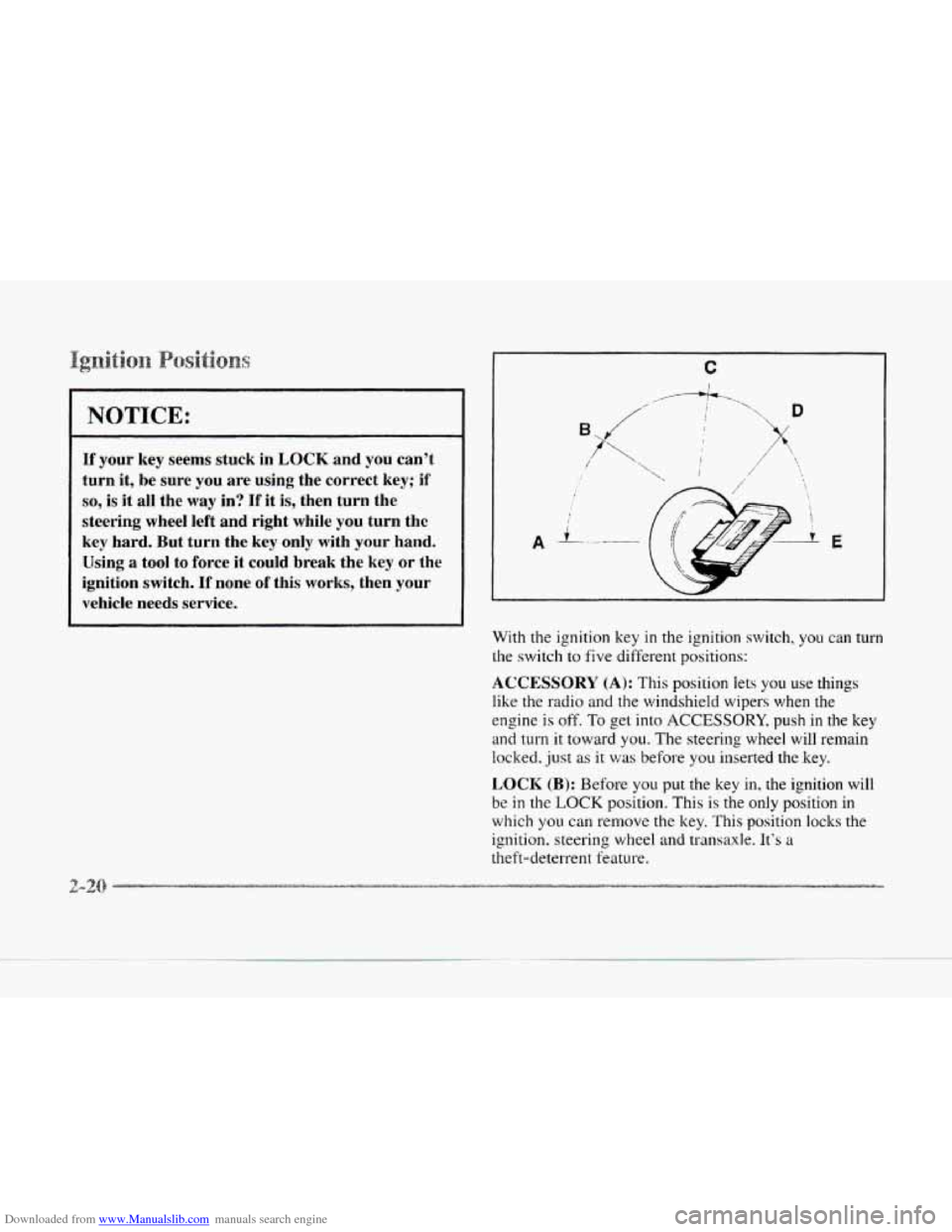
With the ignition key in the ignition switch, you can turn
the switch to five diHerent positions:
ACCESSORY (A): This position lets you use things
like the radio and the windshield wipers when the
engine
is off. To get into ACCESSORY, push in the key
and turn it toward
you. The steering wheel will remain
locked. just as
it was before you inserted the key.
LOCK (B): Before you put the key in, the ignition will
be
in the LOCK position. This is the only position in
which you can remove the key. This position locks the
ignition. steering wheel and transaxle. It’s
a
theft-deterrent feature.
Page 82 of 370
Downloaded from www.Manualslib.com manuals search engine c
OFF (C): This position lets you turn off the engine but
still turn the steering wheel. It doesn’t lock the steering
wheel like
LOCK. Use OFF if you must have your
vehicle
in motion while the engine is off (for example,
if your vehicle is being pushed).
RUN (D): This is the position for driving.
START (E): This starts the engine.
~~.~~:~~~~~~~~ A c.cesso3:y r%2wc3” ~~~~~~~
The following accessories on your Cadillac may be used
for
up to 10 minutes after the ignition key is turned from
RUN
to OFF:
Radio
0 Power Windows
Astroroof
rc-
Power to these accessories stops after 10 minutes or
if any door is opened. If you want power for another
10 minutes, turn the ignition key to RUN and then
back
to OFF.
Move your shift lever to PARK (P) or NEUTRAL (N).
Your engine won’t start in any other position -- that’s a
safety feature. To restart when you’re alreadv moving,
use NEUTRAL (N) only.
NOTICE:
Don’t try to shift to PARK (P) if your Cadillac is
moving. If you do, you could damage the
transaxle. Shift to PARK
(P) only when your
vehicle is stopped.
I. Without pushing the accelerator pedal, turn your
ignition
key to START. When the engine starts. let
go of the key. The idle speed will go down as your
engine gets warm.
Page 86 of 370
Downloaded from www.Manualslib.com manuals search engine c
CAUTION:
It is dangerous to get out of your vehicle if the
shift lever
is not fully in PARK (P) with the
parking brake firmly set. \’our vehicle can roll.
Don’t leave your vehicle when the engine is
running unless you have to. If
you have left the
engine running,
the vehicle can move suddenly.
I70u or others could be injured. To be sure your
vehicle won’t move, even when you’re
on fairly
level ground, always set your parking brake and
move the shift lever to
PARK (a).
See “Shifting Into PARK (P)” in the Index. If
you9re pulling
a trailer, see “Towing a Trailer”
in the Index. cnsure
the shift lever
is fully in PARK (P) range before
starting the engine. Your Cadillac has
a brake-transaxle
shift interlock.
You have to fully qph your regular
brakes
befory you can shift f’ron? PARK (P) when the
ignition key
is in the RLTN position. I!’you cannot shift
out of PARK (PI. ust‘ pr~~ssurc or] thc shift lever -- push
the shift lever
a11 thc \&+.a!. into PARI< (1’) and release the
shift lever button
on thc: floor shii t cxulhoic models as
you maintain bralit. application. Then IIIO\.C the shift
lever into the gear
~OLI \&:ish. ( p1-c.4~ tflc hi t‘t lever button
before
moving the shit’t le\^^- 011 I’loor shi t‘t console
models.) See ”Shifting Out of‘ PARK PI** in this section.
REVERSE (R): Use t,his pear to iwck 1113.
moving forward could damage your transaxle.
Shift to
REVERSE (R) only after your vehicle
Also use this gear to rock your vehicle back and forth to
get out of snow. ice or sand without damaging your
transaxle. See
“If You‘re Stuck in Sand. Mud, Ice or
Snow” in the Index for additional information.
2-2
Page 89 of 370
Downloaded from www.Manualslib.com manuals search engine c
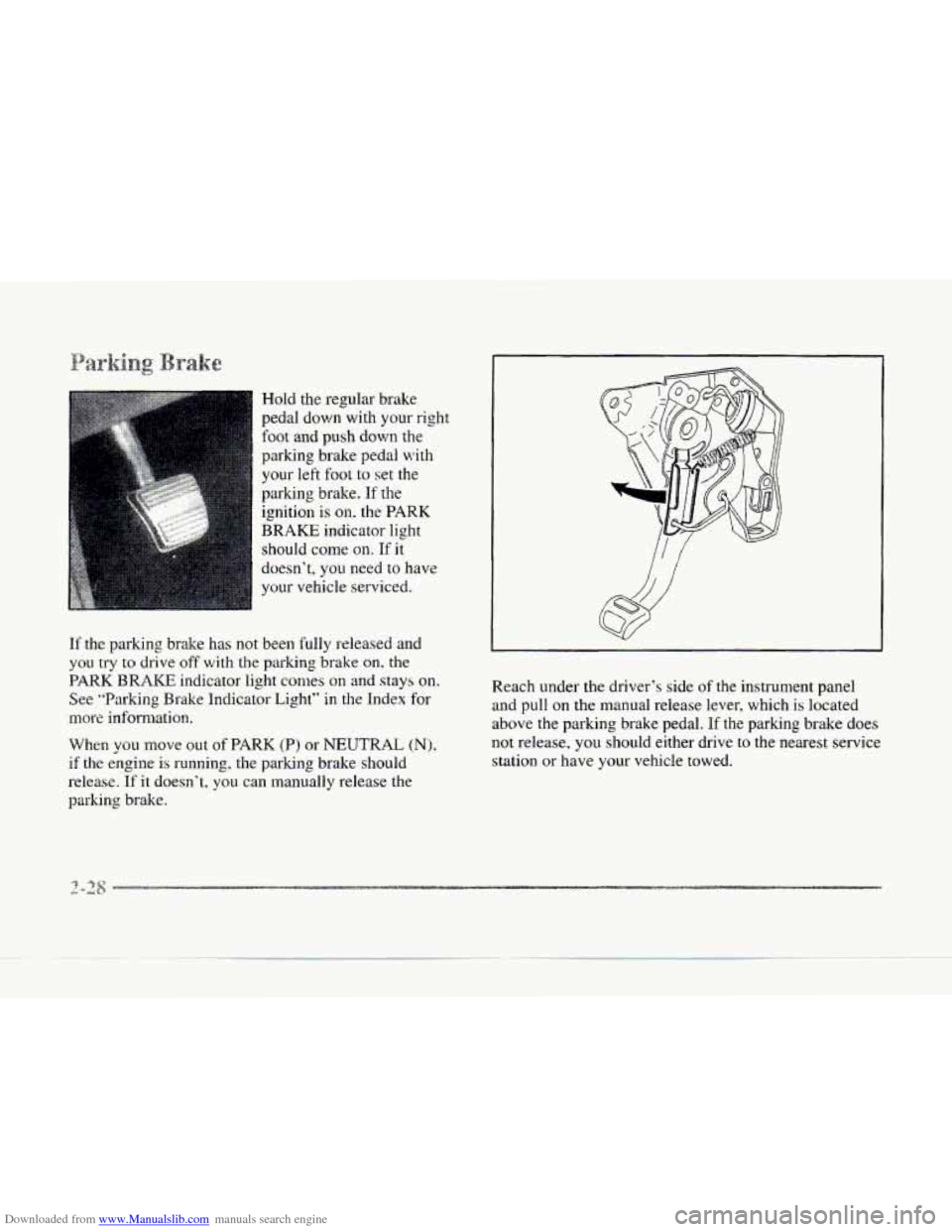
Hold the regular brake
pedal down with your right
foot and
push down the
parking brake pedal with
your
left foot to set the
parking brake. If the
ignition is
on. the PARK
BRAKE
indicator light
should come
on. If it
doesn’t, you need to have
your vehicle serviced.
If the parking brake has not been fully released and
you try to drive off with the parking brake on. the
PARK BRAKE indicator light comes on and stays on.
See ’bParking Brake Indicator Light” in the Index for
more information.
When
you move out of PARK (P) or NEUTRAL (N),
if the engine is running, the parking brake should
release.
If it doesn’t. you can manually release the
parking brake. Reach under
the driver’s side of the
instrument panel
and pull
on the manual release lever, which is located
above the parking brake pedal. If the parking brake does
not release,
you should either drive to the nearest service
station or have your vehicle towed.
Page 91 of 370
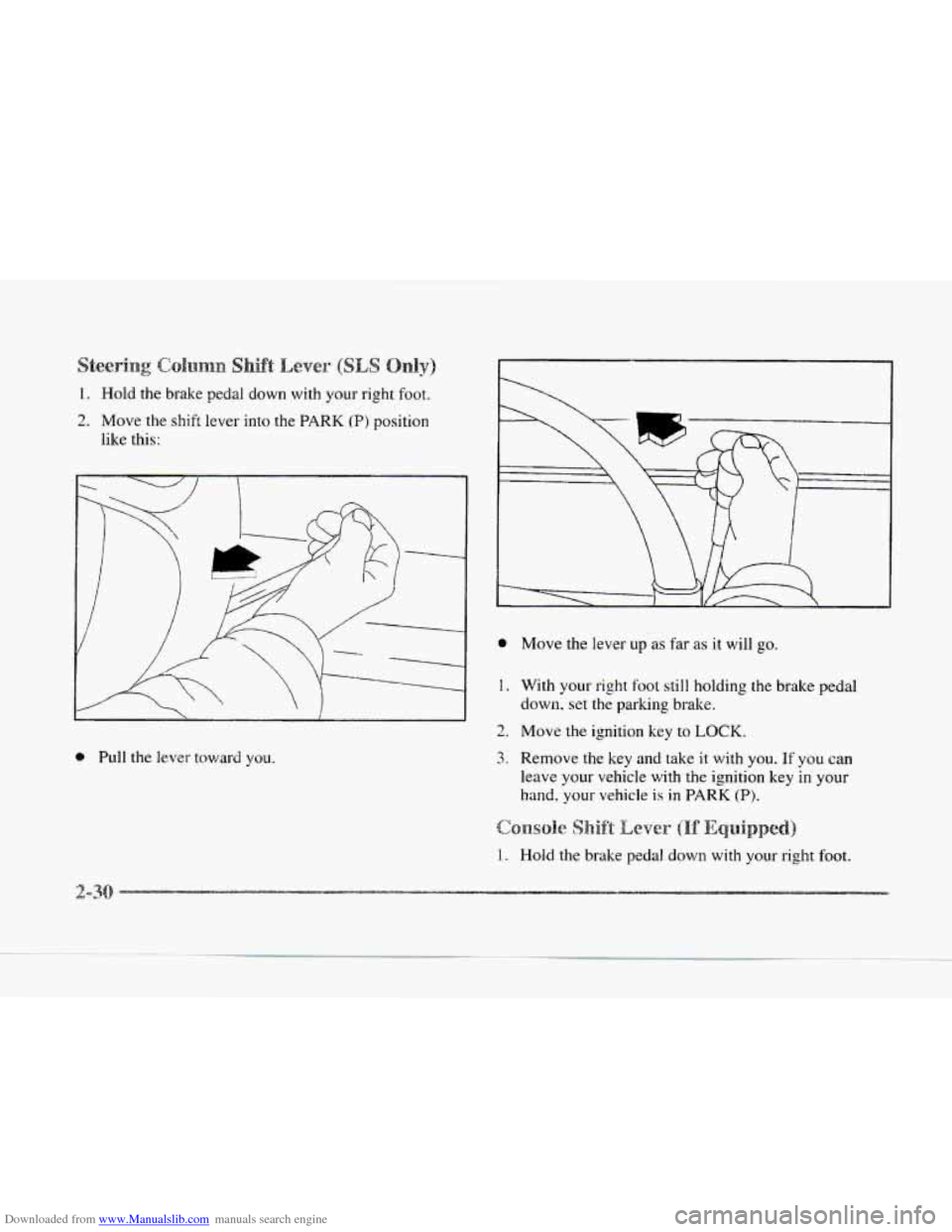
Downloaded from www.Manualslib.com manuals search engine 1. Hold the brake pedal down with your right hot.
2. Move the shift lever into the PARK (P) position
like this:
e Pull the lever tov~ard you.
0 Move the lever up as far as it will go.
1. With your right foot still holding the brake pedal
down,
set the parking bralte.
2. Move the ignition key to LOCK.
3. Remove the key and take it with you. If you can
leave your vehicle with the ignition key in
your
hand. your vehicle is in PARK (P).
1. Hold the brake pedal down with your right foot.
2-3
Page 92 of 370
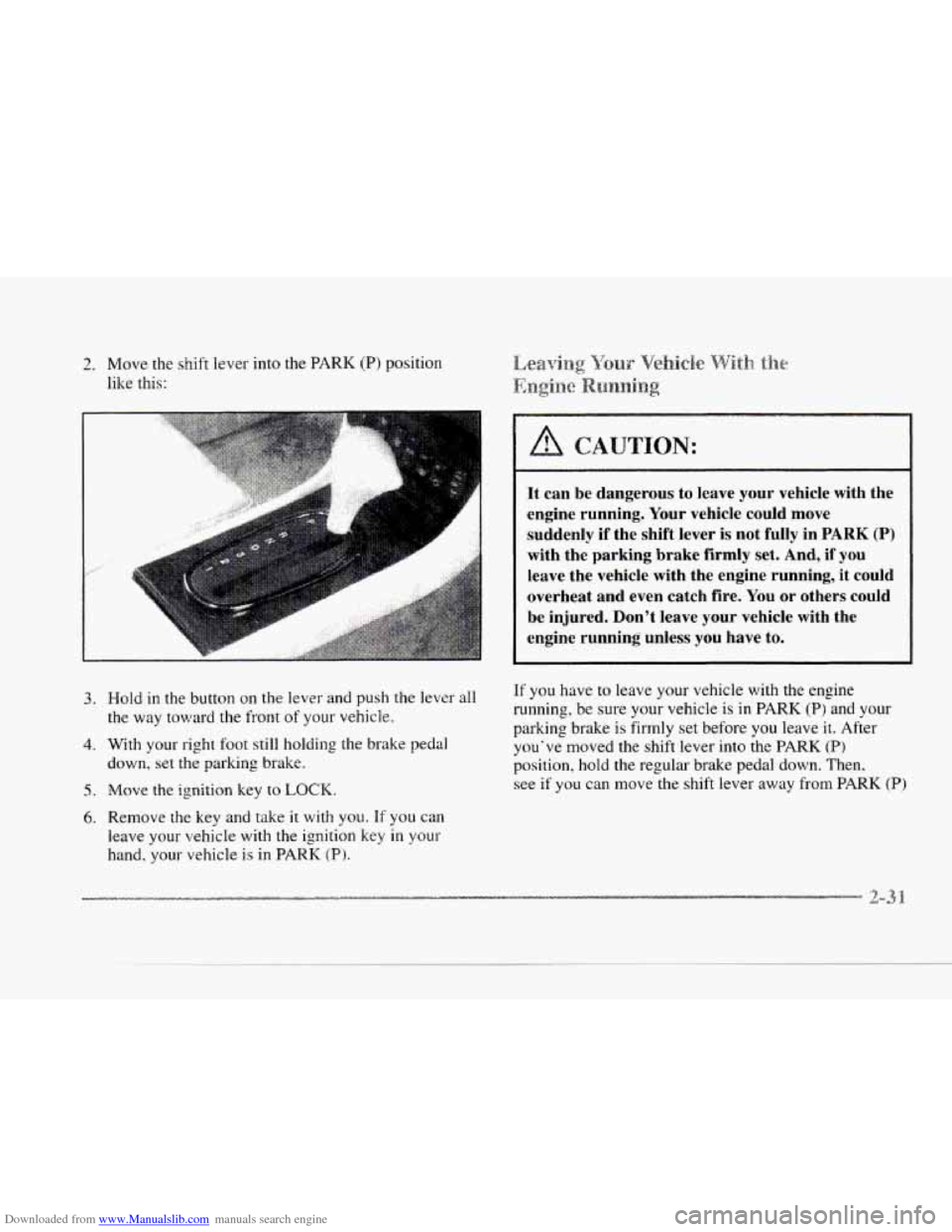
Downloaded from www.Manualslib.com manuals search engine 2. Move the shift lever into the PARK (P) position
like this:
c
I
3.
c
... . .. ... . ..: . ..
4.
5.
6.
It can be dangerous to leave your vehicle with the
engine running. Your vehicle could move
suddenly
if the shift lever is not fully in PARK (P)
with the parking brake firmly set. And, if you
leave the vehicle with the engine running, it could
overheat and even catch fire. You or others could
be injured. Don't leave your vehicle with the
engine running unless you have to.
Hold in the button on the lever and push the lever all
the way toward the front of your vehicle.
With your right foot still holding the brake pedal
down,
set the garlung brake.
Move,
the ignition key to LOCK.
Remove the key and take it with you. If you can
leave your vehicle with the ignition key in
your
hand, your vehicle is in PARK (P}.
If you have to leave your vehicle with the engine
running, be sure your vehicle is in PARK
(P) and your
parking brake is firmly set before you leave it. After
you've moved the shift lever into the
PARK (P)
position, hold the regular brake pedal down. Then.
see if
you can move the shift lever away from PARK (P)
Page 93 of 370
Downloaded from www.Manualslib.com manuals search engine without first pulling it toward you (or, if you have the
console shift lever, without
first pushing the button). If
you can, it means that the shift lever wasn't fully locked
into PARK (Pj.
If you are parking on a hill and you don't shift your
transaxle into PARK
(P) properly, the weight of the
vehicle may put too much force
on the parking pawl in
the transaxle. You may find it difficult to pull the shift
lever out
of PARK (P). This is called "torque lock." To
prevent torque lock, set the parking brake and then shift
into PARK (P) properly before you leave the driver's
seat. To find out
how, see "Shifting Into PARK (P)" in
the Index.
If torque
lock does occur, you may need to have another
vehicle push yours
a little uphill to take some of the
pressure from the parking
pawl in the transaxle, so you
can pull the shift lever out of PARI' (P). Your
Cadillac has
a Brake-Transaxle Shift Interlock
(BTSIj.
You have to fully apply your regular brakes
bqfim you can shift from PARK (P) when the ignition is
in the RUN position. See "Automatic Transaxle" in the
Index.
If you cannot shift out of PARK (P), ease pressure on
the shift lever -- push the shift lever all the way into
PARK (P, and also release the shift lever button on floor
shift models as you maintain brake application. Then
move the shift lever into the gear
you want. (Press the
shift lever button before moving the shift lever.)
If you
ever hold the brake pedal down but still can't shift out of
PARK (P). try this: .
1.
2.
3.
4.
5.
Turn the key to OFF. Open and close the driver's
door to turn
oft the RAP feature.
Apply
and hold the brake until the end of Step 4.
Shift to NEUTRAL (N).
Start the vehicle and then shift to the drive pear
you want.
Have the vehicle fixed as soon as you can.