1996 TOYOTA PASEO engine
[x] Cancel search: enginePage 66 of 165

63
The shift pattern is as shown above.
Press the clutch pedal down fully while
shifting, and then release it slowly. Do not
rest your foot on the pedal while driving, because it will cause clutch trouble. And do not use the clutch to hold the vehicle
when stopped on an uphill gradeÐuse the
parking brake. Recommended shifting speeds
The transmission is fully synchronized
and upshifting or downshifting is easy.
For the best compromise between fuel
economy and vehicle performance, you
should upshift or downshift at the follow-
ing speeds:
gear km/h (mph)
1 to 2 or 2 to 1 24 (15)
2 to 3 or 3 to 2 40 (25)
3 to 4 or 4 to 3 64 (40)
4 to 5 or 5 to 4 72 (45)
Downshift to the appropriate gear if accel-
eration is needed when you are cruising
below the above downshifting speeds.
Upshifting too soon or downshifting too late will cause lugging and, possibly, ping-
ing. Regularly revving the engine to maxi-
mum speed in each gear will cause exces-
sive engine wear and high fuel consumption. Maximum allowable speeds
To get on a highway or to pass slower traf- fic, maximum acceleration may be neces-
sary.
Make sure you observe the following
maximum allowable speeds in each gear:
gear km/h (mph)
1 42 (26)
2 80 (49)
3 117 (72)
4 160 (99)
NOTICE
Do not downshift if you are going faster than the maximum allowable
speed for the next lower gear.
Manual transmission
Page 68 of 165
65
The cruise control allows you to cruise
the vehicle at a desired speed over 40 km/h (25 mph) even with your foot offthe accelerator pedal.
Your cruising speed can be maintained up
or down grades within the limits of engine
performance, although a slight speed
change may occur when driving up or
down the grades. On steeper hills, a greater speed change will occur so it is
better to drive without the cruise control.
To help maintain maximum control
of the vehicle, do not use the
cruise control when driving in
heavy or varying traffic, or on slip-
pery (rainy, icy or snow-covered)
or winding roads.
Avoid vehicle speed increases
when driving downhill. If the ve-
hicle speed is too fast in relation to
the cruise control set speed, can-cel the cruise control then down-
shift the transmission to use en-
gine braking to slow down. CAUTION
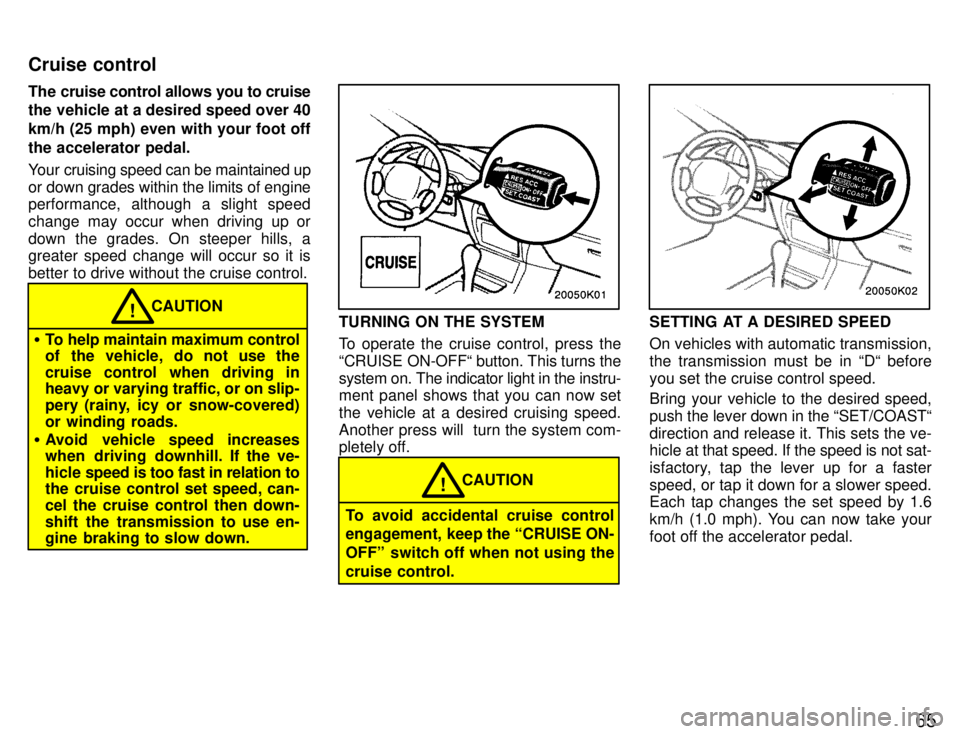
!TURNING ON THE SYSTEM
To operate the cruise control, press the
CRUISE ON-OFF button. This turns thesystem on. The indicator light in the instru-
ment panel shows that you can now set
the vehicle at a desired cruising speed.Another press will turn the system com-
pletely off.
To avoid accidental cruise control
engagement, keep the CRUISE ON-
OFFº switch off when not using thecruise control.
CAUTION
!
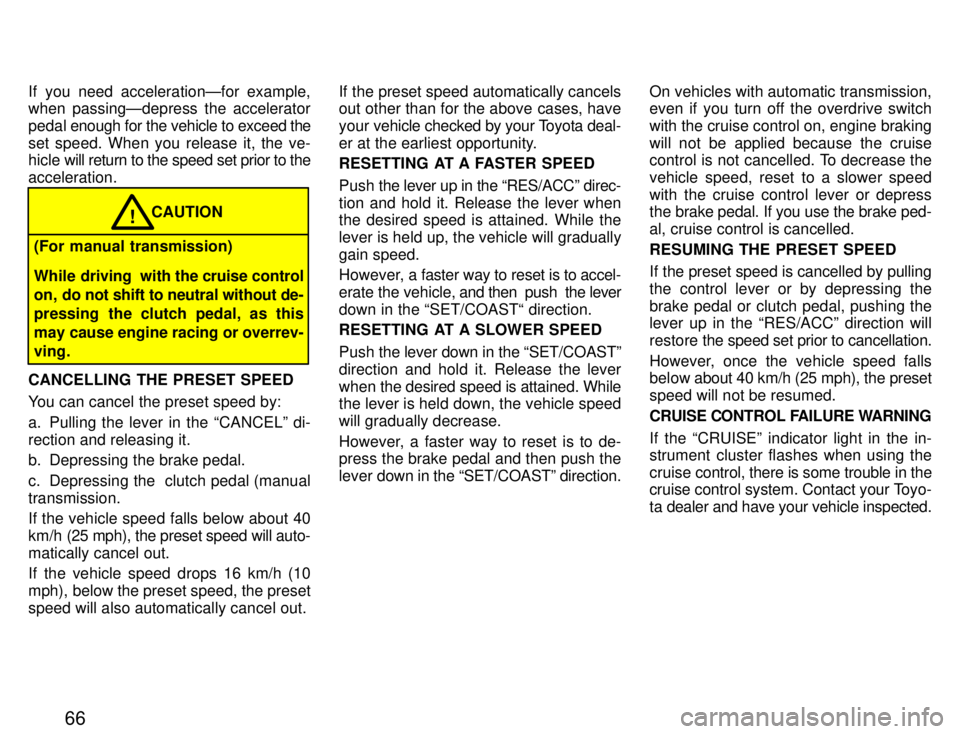
SETTING AT A DESIRED SPEED
On vehicles with automatic transmission,
the transmission must be in D beforeyou set the cruise control speed.
Bring your vehicle to the desired speed, push the lever down in the SET/COAST
direction and release it. This sets the ve-
hicle at
that speed. If the speed is not sat-
isfactory, tap the lever up for a faster
speed, or tap it down for a slower speed.
Each tap changes the set speed by 1.6
km/h (1.0 mph). You can now take your
foot off the accelerator pedal.
Cruise control
Page 69 of 165
66
If you need accelerationÐfor example,
when passingÐdepress the accelerator
pedal
enough for the vehicle to exceed the
set speed. When you release it, the ve-
hicle will return to the speed set prior to the
acceleration.
(For manual transmission)
While driving with the cruise control
on, do not shift to neutral without de-
pressing the clutch pedal, as this
may cause engine racing or overrev-ving. CAUTION
!
CANCELLING THE PRESET SPEED
You can cancel the preset speed by:
a. Pulling the lever in the CANCELº di- rection and releasing it.
b. Depressing the brake pedal.
c. Depressing the clutch pedal (manual transmission. If the vehicle speed falls below about 40
km/h (25 mph), the preset speed will auto-
matically cancel out.
If the vehicle speed drops 16 km/h (10
mph), below the preset speed, the preset
speed will also automatically cancel out. If the preset speed automatically cancels
out other than for the above cases, have your
vehicle checked by your Toyota deal-
er at the earliest opportunity.
RESETTING AT A FASTER SPEED Push the lever up in the RES/ACCº direc-
tion and hold it. Release the lever when
the desired speed is attained. While the
lever is held up, the vehicle will graduallygain speed.
However, a faster way to reset is to accel-
erate the vehicle, and then push the lever
down in the SET/COAST direction.
RESETTING AT A SLOWER SPEED Push the lever down in the SET/COASTº
direction and hold it. Release the lever
when the desired speed is attained. While
the lever is held down, the vehicle speedwill gradually decrease.
However, a faster way to reset is to de- press the brake pedal and then push the
lever down in the SET/COASTº direction. On vehicles with automatic transmission,
even if you turn off the overdrive switch with the cruise control on, engine braking
will not be applied because the cruise
control is not cancelled. To decrease the
vehicle speed, reset to a slower speed
with the cruise control lever or depress
the brake pedal. If you use the brake ped- al, cruise control is cancelled. RESUMING THE PRESET SPEED
If the preset speed is cancelled by pulling
the control lever or by depressing the
brake pedal or clutch pedal, pushing the
lever up in the RES/ACCº direction will
restore
the speed set prior to cancellation.
However, once the vehicle speed falls
below about 40 km/h (25 mph), the preset
speed will not be resumed.
CRUISE CONTROL FAILURE WARNING
If the CRUISEº indicator light in the in-
strument cluster flashes when using the cruise control, there is some trouble in the
cruise control system. Contact your Toyo-
ta dealer and have your vehicle inspected.
Page 86 of 165
Part 1Clock
Cigarette lighter and ashtray
83
OPERATION OF INSTRUMENTS AND CONTROLSÐ
Chapter 1-8 Other equipment
Clock
Cigarette lighter and ashtray
Glovebox
Cup holder
Floor mat
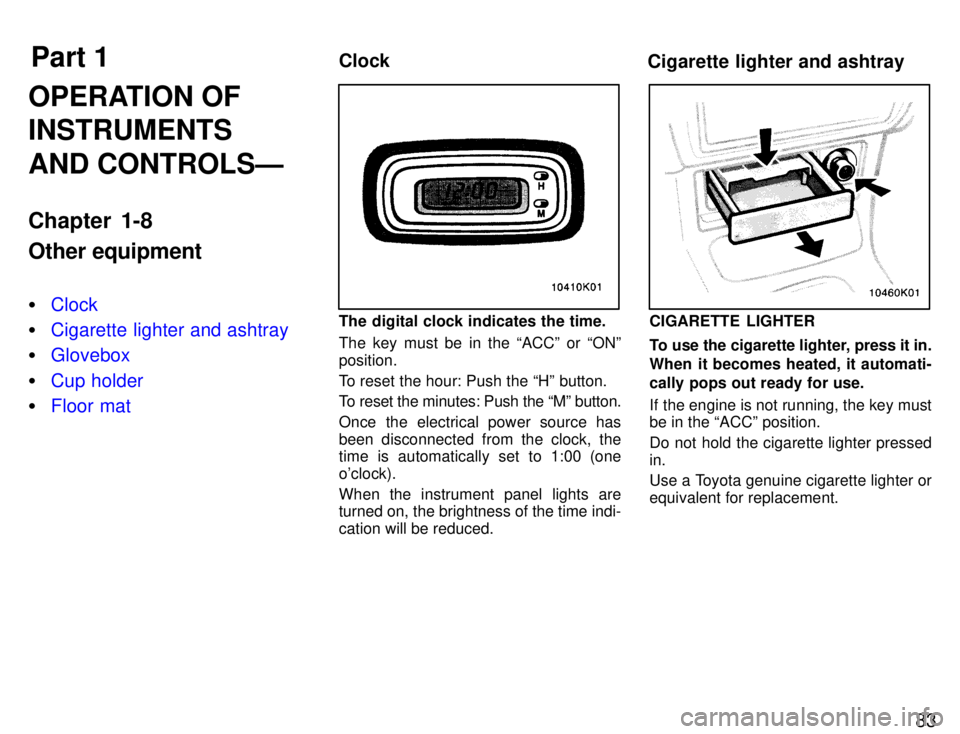
The digital clock indicates the time.
The key must be in the ACCº or ONº position.
To reset the hour: Push the Hº button.
To reset the minutes: Push the Mº button.
Once the electrical power source has
been disconnected from the clock, the
time is automatically set to 1:00 (one o'clock). When the instrument panel lights are turned on, the brightness of the time indi- cation will be reduced.CIGARETTE LIGHTER
To use the cigarette lighter, press it in.
When it becomes heated, it automati-
cally pops out ready for use.
If the engine is not running, the key must be in the ACCº position.
Do not hold the cigarette lighter pressed in.
Use a Toyota genuine cigarette lighter or equivalent for replacement.
Page 90 of 165
Part 2Break-in period Fuel
87
INFORMATION
BEFORE DRIVING
YOUR TOYOTA
Break-in period
Fuel
Operation in foreign countries
Three-way catalytic converter
Engine exhaust cautions
Facts about engine oil consumption
Twin ground electrode spark plugs
Brake system
Brake pad wear limit indicators
Luggage stowage precautions
Your Toyota's identification
Theft prevention labels
Types of tires
Drive gently and avoid high speeds.
Your vehicle does not need an elaborate
break-in. But following a few simple tips
for the first 1600 km (1000 miles) can add
to the future economy and long life of your vehicle:
Do not drive over 88 km/h (55 mph).
Run the engine at moderate speed be- tween 2000 and 4000 rpm.
Avoid full-throttle starts.
Try to avoid hard stops during the first
300 km (200 miles).
Do not drive slowly with the manual
transmission in a high gear.
Do not drive for a long time at any
single speed, either fast or slow. FUEL TYPE
Your new vehicle must use only un-
leaded gasoline.
To help prevent gas station mixups, your
Toyota has a new smaller fuel tank open- ing.
The special nozzle on pumps with un-
leaded fuel will fit it, but the larger stan-
dard nozzle on pumps with leaded gas will
not.
Do not use leaded gasoline. Use of
leaded gasoline will cause the
three-way catalytic converter to lose its effectiveness and theemission control system to function
improperly. Also, this can increase maintenance costs.
NOTICE
OCTANE NUMBER
Select Research Octane Number 91
(Octane Rating 87) or higher.
Use of unleaded fuel with an octane num- ber or rating lower than stated above will
cause persistent heavy knocking. If se-
vere, this will lead to engine damage.
Page 91 of 165

88If your engine knocks...
If you detect heavy knocking even when
using the recommended fuel, or if you
hear steady knocking while holding a
steady sp
eed on level roads, consult your
Toyota dealer.
However, now and then, you may notice
light knocking for a short time while accel-
erating or driving up hills. This is no cause
for concern.
GASOLINES CONTAINING DETER-
GENT ADDITIVES
Toyota recommends use of gasolines
that contain detergent additives to
avoid build-up of engine deposits.
For further details, ask your Toyota dealer
or a local gasoline retailer.
GASOLINES CONTAINING MTBE
Gasolines that contain MTBE (Methyl
Tertiary-Butyl Ether) are available in
the market. If you use a gasoline mixed
with MTBE, make certain that it does
not contain more than 15% of MTBE.
If the use of gasolines containing MTBE causes poor driveability and/or poor fuel
economy, you should discontinue the use
of fuels containing MTBE. GASOLINES CONTAINING ALCOHOL
If you use gasohol in your Toyota, be sure that it is unleaded, has an octane
rating no lower than 87 and does not
contain more than 10% ethanol.
Gasohol is a
mixture of gasoline and etha-
nol.
Toyota does not recommend the use of
gasolines containing methanol. If you use
gasoline containing methanol, use only
gasoline meeting the requirements above
and also containing less than 5% metha-
nol with cosolvents and corrosion inhibi-
tors for methanol.
Do not use gasohol other than
stated above. It will cause fuel sys-
tem damage or vehicle perfor- mance problems.
If driveability problems are en-
countered (poor hot starting, va-porizing, engine knock, etc.), dis-continue the use.
Take care not to spill gasohol dur-
ing refueling. Gasohol may causepaint damage.
NOTICE
FUEL TANK CAPACITY
45 L (11.9 gal., 9.9 Imp. gal.)
Page 92 of 165
89
If you plan to drive your Toyota in
another country... First,
comply with the vehicle registration
laws. Second, confirm the availability of the
correct fuel (unleaded and minimum oc- tane number).
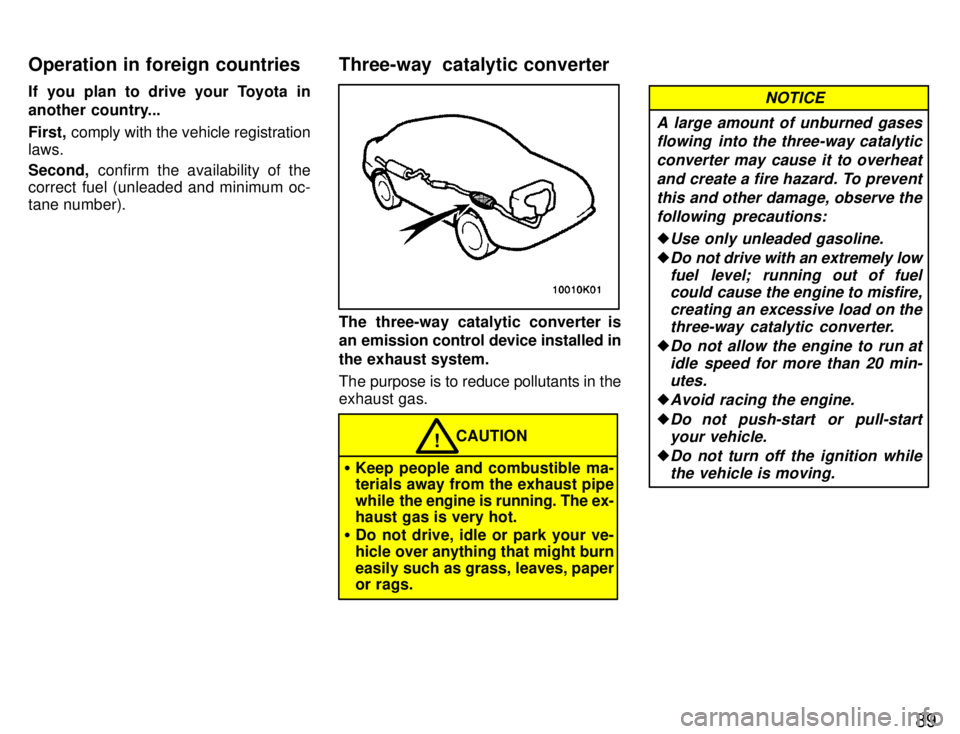
The three-way catalytic converter is
an emission control device installed in
the exhaust system.
The purpose is to reduce pollutants in the exhaust gas.
CAUTION!
Keep people and combustible ma- terials away from the exhaust pipe
while the engine is running. The ex-
haust gas is very hot.
Do not drive, idle or park your ve-
hicle over anything that might burn
easily such as grass, leaves, paper
or rags.
A large amount of unburned gases
flowing into the three-way catalytic
converter may cause it to overheatand create a fire hazard. To prevent this and other damage, observe thefollowing precautions:
Use only unleaded gasoline.
Do not drive with an extremely lowfuel level; running out of fuelcould cause the engine to misfire,
creating an excessive load on the
three-way catalytic converter.
Do not allow the engine to run atidle speed for more than 20 min-utes.
Avoid racing the engine.
Do not push-start or pull-start
your vehicle.
Do not turn off the ignition whilethe vehicle is moving.
NOTICE
Three-way catalytic converter
Operation in foreign countries
Page 93 of 165
90
Keep your engine in good running
order. Malfunctions in the engine
electrical system, electronic igni-tion system/distributor ignitionsystem or fuel systems could
cause an extremely high three-way catalytic converter tempera-ture.
If the engine becomes difficult to
start or stalls frequently, take yourvehicle in for a check-up as soon
as possible. Remember, your To- yota dealer knows your vehicleand its three-way catalytic con-
verter system best.
To ensure that the three-way cata-lytic converter and the entire emis-
sion control system operate prop- erly, your vehicle must receive theperiodic inspections required by
the Toyota Maintenance Schedule.
For scheduled maintenance infor-mation, refer to the separate Own-
er's Manual Supplement/Mainte-
nance Scheduleº.
CAUTION!
Avoid inhaling the engine exhaust.
It contains carbon monoxide,
which is a colorless and odorless
gas. It can cause unconsciousness
or even death.
Make sure the exhaust system has
no holes or loose connections. The system should be checked
from time to time. If you hit some-
thing, or notice a change in the
sound of the exhaust, have the
system checked immediately.
Do not run the engine in a garage
or enclosed area except for the
time needed to drive the vehicle in
or out. The exhaust gases cannot
escape, making this a particularly
dangerous situation.
Do not remain for a long time in a
parked vehicle with the engine run-
ning. If it is unavoidable, however,
do so only in an unconfined area
and adjust the heating or cooling
system to force outside air into the
vehicle. Keep the trunk lid closed while
driving. An open or unsealed trunk lid, may cause exhaust gases to be
drawn into the vehicle. If you must
drive with the trunk lid open to ac-
commodate a large object, close
the windows, open all the instru-
ment panel vents and have the
heating or cooling system deliver
fresh air into the vehicle by turning
the fan to high speed with the air in-
take control set at the outside airposition.
To allow proper operation of your
vehicle's ventilation system, keep
the inlet grilles in front of the wind-
shield clear of snow, leaves, or oth-
er obstructions.
If you smell exhaust fumes in the
vehicle, drive with the windows
open and the trunk lid cl osed. Have
the cause immediately located and corrected.
Engine exhaust cautions